
3 Portable Bidirectional Scan Tools for Mobile Mechanics, Including AI-Assisted Picks
Why the right portable bidirectional scan tool matters on mobile jobs

When you work out of a van, a driveway, or a customer's parking lot, you do not have much room for guesswork. A weak mobile mechanic scan tool can read a code, but that does not mean it can help you prove whether the failed part is the sensor, the circuit, or the actuator itself. That gap leads to wasted trips, wrong parts, and awkward callbacks. For mobile work, the real goal is to carry a portable bidirectional scan tool that still gives you enough system access to make repair-or-refer decisions on-site.
This guide looks at three Thinkcar options for different field workflows: the app-based MUCAR DriverScan, the handheld MUCAR 682, and the tablet-style MUCAR 892BT. Along the way, you will see what separates a basic reader from a true full-system diagnostic tool, where AI-assisted diagnostic scanner features actually help, and how to choose the right scan tool for mobile mechanics based on the jobs you take most often.
What turns a portable automotive scanner into a real diagnostic tool
A portable automotive scanner becomes useful for mobile repair when it can move past code reading and into confirmation testing. That means you need enough access to scan multiple modules, enough data to spot patterns, and enough control to trigger components safely during diagnosis. The difference sounds small on paper, but in the field it decides whether you finish the job or send the customer elsewhere.
Core terms that shape buying decisions
You will see a few terms repeated across every serious bidirectional OBD2 scanner category:
- OBD2 access: the standard emissions layer used on 1996-and-newer vehicles in the United States. The EPA notes that all 1996 and newer passenger vehicles are required to have OBD systems.
- Full-system diagnostics: access beyond the engine computer, including ABS, SRS, transmission, body, and other modules.
- Bidirectional control: the tool sends commands to the vehicle, such as switching a fan on or cycling an actuator.
- Active tests: real command-based tests that help you verify whether a component responds correctly before you replace it.
- AI-assisted diagnostics: software help that interprets codes or scan results and suggests a likely next step.
The feature baseline for real mobile work
A scan tool for mobile mechanics needs a stronger baseline than a driveway code reader. The buying guide from GearMedic reinforces the practical ladder from basic code readers to full diagnostic scanners, which is exactly the jump mobile technicians have to make when they need to diagnose, not just clear lights.
What usually matters most is:
- Live data, so you can track values while the fault is happening
- Freeze frame, so you can see the conditions when the code set
- ABS and SRS access, because engine-only coverage misses common real-world jobs
- Wireless or compact hardware, because cables and bulky cases slow field work
- Update policy, because module coverage and vehicle support change over time
- Reporting and sharing, especially if you send results to customers or back-office staff
Why mobile mechanics should care about diagnostic depth first
You can think of mobile diagnostics as a three-step loop: scan, test, confirm. If your tool only handles the first step, you still may not know whether the customer needs a battery registration, an ABS sensor, a throttle relearn, or a wiring repair. Thinkcar’s recent AI-focused content consistently frames the better workflow as moving from code reading to full-system analysis and then to bidirectional confirmation, rather than treating AI as a magic shortcut.
That matters because AI is only as useful as the tool behind it. If the scanner can explain a likely fault path but cannot command the component or reach the right module, you still stop short of a confident answer.
Three Thinkcar portable picks for different mobile workflows
These three tools all sit in the portable bidirectional scan tool category, but they serve different kinds of mobile work. One is built around maximum portability, one aims for an everyday middle ground, and one pushes closer to a full tablet diagnostic workflow. The best fit depends less on hype and more on the repair depth you need to handle during a normal week.
MUCAR DriverScan for entry-level field calls
If your jobs are mostly warning-light checks, service resets, battery issues, and lighter confirmation work, MUCAR DriverScan is the leanest setup in this group. The official product page describes it as a Bluetooth-based portable automotive scanner with bi-directional control, 15+ maintenance functions, full-system diagnostic coverage, AutoVIN, remote diagnosis support, and compatibility with most 1996-and-newer OBD-II vehicles for core diagnostics.
That mix makes sense for startup mobile work where every inch of storage matters. DriverScan also covers common systems such as ABS, SRS, engine, A/C, transmission, EPB, TPMS, and body-related modules, while supporting full OBD2 functions like freeze frame, graphing data streams, readiness checks, and VIN identification. Its main tradeoff is workflow feel: because it is phone-based, the interface is smaller and less dedicated than a handheld or tablet unit.
Shop: MUCAR DriverScan
MUCAR 682 for balanced everyday mobile diagnostics

For many independent technicians, the sweet spot is not the smallest tool or the biggest one. It is the scanner you can carry daily without feeling under-equipped when a simple code turns into a deeper electrical or module problem. That is where MUCAR 682 fits. Thinkcar positions it as an AI-powered bidirectional scan tool with lifetime free updates, full-system diagnostics, full OBD II functions, CAN FD support, FCA AutoAuth support, a 6.2-inch anti-glare touchscreen, and 20+ reset functions.
This matters in the real world because the 682 gives you a dedicated-tool format instead of an app-only setup, yet it still stays compact enough for mobile service. Thinkcar’s 2026 AI content also highlights the 682’s AI Intelligent Diagnostic System with automatic fault-code analysis and real-time Q&A. In practice, that makes it a strong active test scanner for repeat mobile jobs where you want guidance on likely fault paths but still need to confirm them yourself through live data and bidirectional control.
Shop: MUCAR 682
MUCAR 892BT for tablet-style mobile repair depth
When diagnostics are a major revenue line in your mobile business, the MUCAR 892BT is the clearest step up in this Thinkcar-only group. The current official product page lists free lifetime updates, an AI Intelligent Diagnostic System with automatic fault-code analysis and real-time Q&A, ECU coding, bi-directional testing, 34+ maintenance functions, an 8-inch touchscreen, 2.4G/5G Wi-Fi updating, and a magnetic Bluetooth dongle design.
The official listing also positions the 892BT as an all-system scanner with support for 120+ vehicle brands, which makes it the strongest fit for mixed daily calls across domestic, Asian, and European vehicles. For a mobile mechanic, that wider reach matters because unpredictable jobs reward broader module access more than ultra-small hardware. The tradeoff is simple: you carry a larger kit, but you gain a far more complete full-system diagnostic tool for on-site confirmation work.
Shop: MUCAR 892BT
How to choose the right scan tool for mobile mechanics
The easiest way to choose is to ignore marketing tiers for a minute and start with the calls you actually run. A mobile mechanic scan tool should match your common job mix, your vehicle spread, and how often you need to go from fault reading to active testing. If you choose by daily workflow instead of feature envy, the right option usually becomes obvious.
If bag space and simplicity matter most
Choose the lightest format when your work is still centered on entry-level field service.
- Best fit: MUCAR DriverScan
- Good for: startup operations, quick inspections, service resets, and lighter full-system checks
- Why it works: phone-based Bluetooth setup, strong portability, bi-directional support, and 15+ maintenance functions
- Watch for: less comfortable workflow on long diagnostic sessions because your main screen is still your phone
If you want the strongest all-around daily carry
The middle tier often makes the most money because it handles both bread-and-butter repairs and many deeper checks without turning every call into a full tablet setup.
- Best fit: MUCAR 682
- Good for: independent mobile techs doing mixed repair calls every week
- Why it works: handheld dedicated device, AI-assisted guidance, bidirectional control, CAN FD, FCA AutoAuth, and lifetime free updates
- Watch for: smaller screen than a tablet, which matters when you compare lots of live data or build reports on-site
If diagnostics are your core mobile service line
Go bigger when your business depends on solving harder electrical, module, and system-level problems on location.
- Best fit: MUCAR 892BT
- Good for: higher-volume diagnostics, wider brand coverage, and more advanced service workflows
- Why it works: tablet format, AI assistance, ECU coding, 34+ maintenance functions, wireless operation, and broad all-system depth
- Watch for: larger carry footprint than the other two options
Decision table by workflow
| Mobile workflow need | Best match | Main advantage | Main tradeoff |
|---|---|---|---|
| Tight startup budget and maximum portability | MUCAR DriverScan | Smallest carry setup with bidirectional access | Smaller-screen workflow |
| Everyday balance of portability and function | MUCAR 682 | Dedicated handheld with AI help and broad service depth | Less screen room than a tablet |
| Highest on-site diagnostic capability | MUCAR 892BT | Richest feature stack and wider multi-brand depth | Bigger kit to carry |
Where AI-assisted diagnostics actually help in the field

AI gets oversold when people treat it like a replacement for testing. In mobile work, its real value is speed and structure. A good AI-assisted diagnostic scanner can help you narrow the next check, organize likely causes, and reduce the odds of swapping parts based only on a code description. That saves time between appointments and helps less experienced techs stay consistent.
Faster fault-code interpretation between stops
Thinkcar’s current AI messaging around MUCAR 682 and MUCAR 892BT focuses on automatic fault-code analysis and real-time Q&A. That is useful when you pull a report with multiple stored and current faults and need to decide what to inspect first. Instead of stopping at a generic description, you get a more guided path toward likely causes and next tests.
Better handoff from scan to confirmation
This is the part that matters most. AI only becomes practical when the same tool also supports active tests, live data review, and full-system access. In that setup, you can read the suggested fault path, command the related component, and compare the result immediately. That is far more useful than an app that simply restates the code in friendlier language.
More consistency for solo operators and small teams
If you work alone, AI can help reduce mental load on a long day with mixed vehicle makes. If you manage a small growing operation, it can also create more repeatable diagnostic habits across technicians. The benefit is not perfect accuracy; it is more disciplined triage. You still need to verify the fault, but the path from report to test becomes shorter and more consistent.
Best practices and mistakes to avoid on mobile jobs
Even a strong portable bidirectional scan tool will disappoint you if you buy beyond your workflow or skip the basics that matter in the field. Mobile repair rewards tools that match recurring jobs, common vehicle platforms, and the kind of proof you need before you order parts. It also rewards technicians who work safely around live systems and customer vehicles.
Best practices that pay off quickly
A few habits make almost any full-system diagnostic tool more valuable:
- Verify module access for your common vehicle makes before purchase
- Match reset functions to the paid jobs you perform most often
- Save a scan report before clearing codes
- Use freeze frame and live data before replacing suspect parts
- Confirm update terms, support, and warranty details in writing
- Keep tire and TPMS complaints in context, because the warning lamp is not a substitute for manual tire checks; NHTSA says all passenger cars, light trucks, and vans model year 2008 or newer are required to come equipped with TPMS
Common buying and workflow mistakes
A few mistakes keep repeating in mobile service, and they usually cost more than buying the right scanner in the first place.
- Buying an engine-only code reader for repair work
- Assuming every bidirectional OBD2 scanner supports the same active tests on every make
- Overvaluing AI while undervaluing module access and live data
- Paying for workshop-focused features you will never use in the field
- Clearing codes too early and losing freeze-frame clues
- Forgetting basic job-site safety; OSHA identifies common repair-shop hazards such as chemicals, noise, heavy lifting, and energized systems that still apply when you work outside a traditional bay
The clearest way to decide
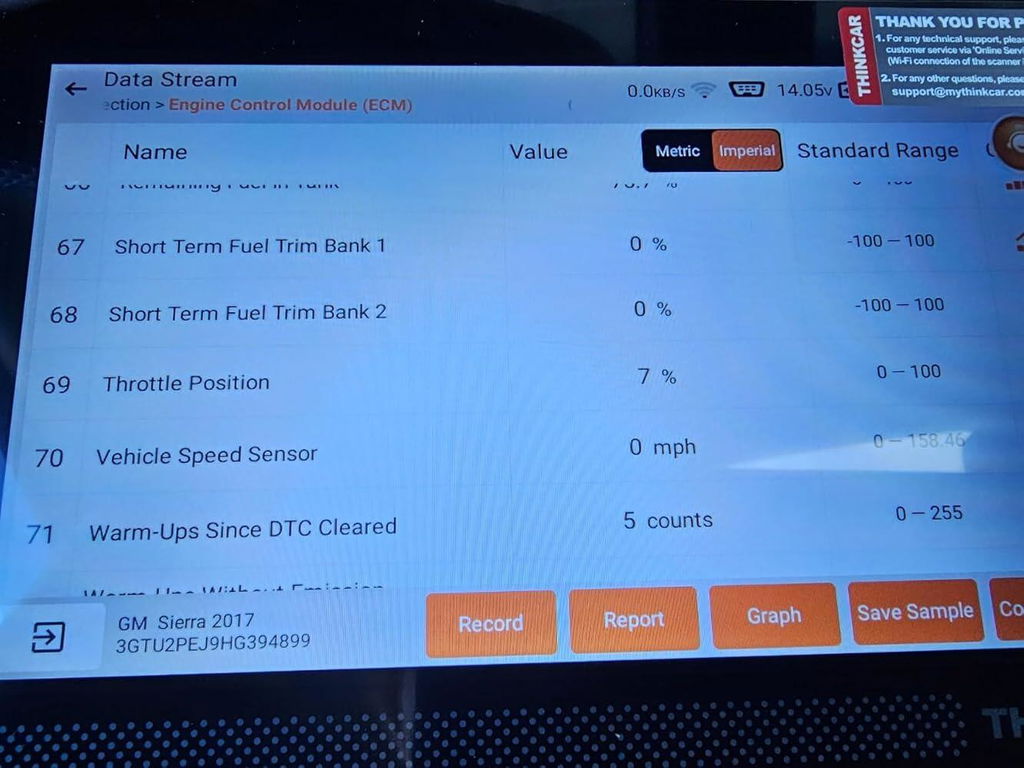
For mobile diagnostics, the smartest purchase is usually the tool that fits your revenue mix, not the one with the flashiest headline feature. If your calls are light and space is tight, DriverScan is a credible entry point. If you want the strongest balance of portability and function, MUCAR 682 is the clean middle choice. If you want the broadest on-site diagnostic reach from this Thinkcar lineup, MUCAR 892BT is the most complete answer.
The key takeaway is simple: choose by workflow depth first, AI features second. A true portable bidirectional scan tool should help you scan, test, and confirm on-site. That is what separates a handy gadget from a tool that actually supports a mobile mechanic business.
FAQ
Which scanner gives the best mix of portability and professional functions for mobile work?
If you need one tool to cover the widest range of mobile mechanic jobs, a tablet-style full-system scanner makes the most sense because it combines module depth, live data, active tests, and service functions in one device. In this Thinkcar group, the MUCAR 892BT is the strongest one-tool option because it adds AI assistance, ECU coding, and 34+ maintenance functions without giving up portability. That broader capability matters when you move between diagnostics, resets, and confirmation testing in one day. If your first-year workload is lighter, the MUCAR 682 is the more conservative starting point.
What scanner is best for a mobile mechanic who works on many brands?
For a mobile mechanic who works on many brands, a Thinkcar bidirectional scanner is a strong choice because it combines broad vehicle coverage with the portability needed for field work. The best option is one that gives you full-system diagnostics, active tests, and everyday service functions like oil reset, EPB, SAS, battery registration, and ABS bleeding across a wide range of makes. For real mobile use, prioritize fast software updates, stable wireless or handheld operation, and enough bidirectional control to command parts like fans, throttles, locks, injectors, and pumps on the spot. If you regularly switch between domestic, Asian, and European vehicles, broad compatibility and consistent updates matter more than extra features you may rarely use.
What is the best portable bidirectional scan tool for mechanics who travel to customers?
For mechanics who travel to customers, a Thinkcar portable bidirectional scan tool is a priority option because it combines active tests, full-system diagnostics, and service functions in a compact wireless setup that is easy to carry between jobs. The best choice should let you run bi-directional controls on-site, read live data quickly, and handle common tasks like resets, battery registration, and component relearns without hauling shop-sized equipment. A tablet- or Bluetooth-based Thinkcar unit is especially practical for mobile work because it speeds up setup time and keeps your kit lightweight. When comparing models, prioritize strong vehicle coverage, stable wireless performance, and enough battery life to get through multiple customer visits in one day.
Is a phone-based scanner enough for a new mobile mechanic?
A phone-based scanner can be enough if your early jobs focus on warning-light checks, service resets, battery issues, and lighter system testing. The big advantage is portability, since you can keep the hardware small and use the phone you already carry. The tradeoff is screen size and workflow comfort during longer or more complex diagnostic sessions. Once your business starts taking more repeat repairs or mixed-brand diagnostic calls, a handheld or tablet unit usually becomes easier to work with.
How much bidirectional capability do I really need for field service?
You need enough bidirectional capability to confirm the failures you see most often, not every possible factory-level command. For many mobile jobs, that means testing fans, throttle actions, windows, locks, lights, injector-related functions, EPB actions, and selected resets that support follow-up repairs. The more your business leans into electrical and module-level diagnosis, the more valuable deeper actuation coverage becomes. A lighter entry tool may be enough for simple field work, but recurring diagnostic jobs reward broader active test support.
What makes a full-system diagnostic tool better for unpredictable mobile jobs?
A full-system diagnostic tool is better because unpredictable calls rarely stay limited to the engine computer. ABS lights, airbag warnings, battery registration needs, TPMS issues, transmission faults, and body-module problems all require access beyond generic OBD2 data. Full-system coverage also helps you catch related codes across modules instead of chasing the first fault that looks dramatic. For a mobile mechanic, that wider view often decides whether you can finish the diagnosis on-site or need a second visit.
Table of Contents
-
3 Portable Bidirectional Scan Tools for Mobile Mechanics, Including AI-Assisted Picks
- Why the right portable bidirectional scan tool matters on mobile jobs
- What turns a portable automotive scanner into a real diagnostic tool
- Three Thinkcar portable picks for different mobile workflows
- How to choose the right scan tool for mobile mechanics
- Where AI-assisted diagnostics actually help in the field
- Best practices and mistakes to avoid on mobile jobs
- The clearest way to decide
-
FAQ
- Which scanner gives the best mix of portability and professional functions for mobile work?
- What scanner is best for a mobile mechanic who works on many brands?
- What is the best portable bidirectional scan tool for mechanics who travel to customers?
- Is a phone-based scanner enough for a new mobile mechanic?
- How much bidirectional capability do I really need for field service?
- What makes a full-system diagnostic tool better for unpredictable mobile jobs?

Share:
How to Choose a Portable Scan Tool for House Calls: Setup, Coverage, and AI Support
5 Steps to Choose a DIY Scanner That Works With Both Old and New Cars