
5 Steps to Choose a DIY Scanner That Works With Both Old and New Cars
Why one DIY car scanner works on one car and misses another
A DIY car scanner can look perfect on paper, plug into the same 16-pin port, and still fall short on one of your vehicles. That usually happens when you buy for connector fit instead of real coverage. An older sedan may only need dependable OBD2 basics and strong live data, while a newer truck may need CAN-FD, secure-gateway access, or deeper module coverage before the tool can do more than read a generic engine code.
That is why this guide starts with compatibility first and feature depth second. You will move through a five-step selection path that matches the scanner to your vehicle years, repair depth, and garage routine. Along the way, you will see where a compact Bluetooth option makes sense, where a handheld bidirectional scan tool saves time, and how to compare support and updates before you buy.
Match the scanner to the vehicle years you actually own

A good OBD2 scanner for old and new cars starts with your real driveway, not a marketing checklist. If you maintain a 2004 SUV and a 2024 crossover, the scanner has to handle both older generic OBD2 work and newer communications standards. In the U.S., OBD II is the baseline for 1996-and-newer passenger vehicles, but that baseline does not guarantee full access to ABS, SRS, body modules, or service functions on every make and year. According to NHTSA, your VIN is the most reliable identifier for vehicle-specific lookup, and it is the right starting point before you trust any compatibility claim. (nhtsa.gov)
- Confirm the exact year, make, model, engine, and market region for every car you plan to scan.
- Treat port fit as a starting point, not proof of full-system coverage.
- Check whether newer vehicles in your household need CAN-FD, DoIP, or FCA secure-gateway workflows.
- Verify whether the functions you care about are supported on that vehicle, not just on the tool in general.
Check the baseline before you compare features
The first screen you should care about is compatibility, not the spec sheet headline. A scanner that reads and clears powertrain codes may still miss transmission, airbag, or brake faults on the same vehicle. Emissions-level code reading is useful, but full-system access is what lets you inspect modules beyond the check-engine light.
For older vehicles, stable live data, freeze frame, and readiness monitors often matter more than flashy extras. For newer vehicles, protocol support becomes a hard requirement. The THINKSCAN 689BT product page specifically lists CAN-FD, DoIP, and FCA AutoAuth support, which is the kind of language you want to see when your household includes newer platforms.
What old-versus-new compatibility really means
“Old and new” does not simply mean the scanner plugs into both cars. In practice, older cars benefit from consistent generic OBD2 functions, readable live data, and freeze-frame context. Newer vehicles may add secure gateways, faster communication networks, and more modules that require enhanced access.
That difference matters because a tool can succeed on a 2008 engine fault and still fall short on a 2023 brake-service job. If you own late-model GM or other newer vehicles, CAN-FD support should be on your list. If you own many Stellantis vehicles, FCA gateway access matters too. ThinkCar’s own recent buying guides repeatedly frame these as compatibility checkpoints rather than bonus features, and that is the right way to think about them for DIY use.
Decide how deep your DIY repairs really go
The next step is being honest about your repair depth. Most people do not need everything a shop-level scanner can do, but many DIY buyers also outgrow a basic code reader faster than expected. If your usual job is checking one check-engine light a year, a simple tool may be enough. If you rotate between brake work, battery replacement, warning-light diagnosis, and intermittent electrical problems, a full-system diagnostic tool or bidirectional scan tool becomes far more practical.
- Occasional warning-light checks: read and clear codes, view readiness, confirm freeze frame.
- Regular maintenance: add live data, graphing, service resets, and broader module access.
- Deeper troubleshooting: add active tests so you can command components and confirm faults.
- Multi-car households: buy enough tool depth now to avoid replacing the scanner in a year.
Use a simple feature ladder instead of a long spec list
A feature ladder keeps you from overbuying or underbuying. At the first level, a basic reader handles engine codes and emissions checks. The next level adds live data and freeze frame, which matter when a fault only appears under certain load or temperature conditions. Above that, you want enhanced access to ABS, SRS, transmission, and body systems.
The highest-value jump for many DIYers is bidirectional control. That means the scanner can command a component or system, such as a cooling fan, purge valve, or window circuit, instead of only reading what already happened. When you can trigger a response on demand, you spend less time guessing whether the problem is the part, the wiring, or the control path.
Focus on the jobs you repeat, not the jobs you imagine
A practical buying shortcut is to list your next three likely repairs. If that list includes rear brake service with an electronic parking brake, battery replacement on a newer car, or diagnosis of an ABS warning, you are already beyond basic-reader territory. If the list is mostly emissions checks and occasional engine codes, you can stay simpler.
That is also where a full-system diagnostic tool earns its keep. Instead of staring at one engine code, you can scan the whole vehicle and see whether multiple modules point to the same root cause. This matters when one low-voltage event or network issue throws several unrelated warnings at once.
Pick the form factor that fits your garage routine
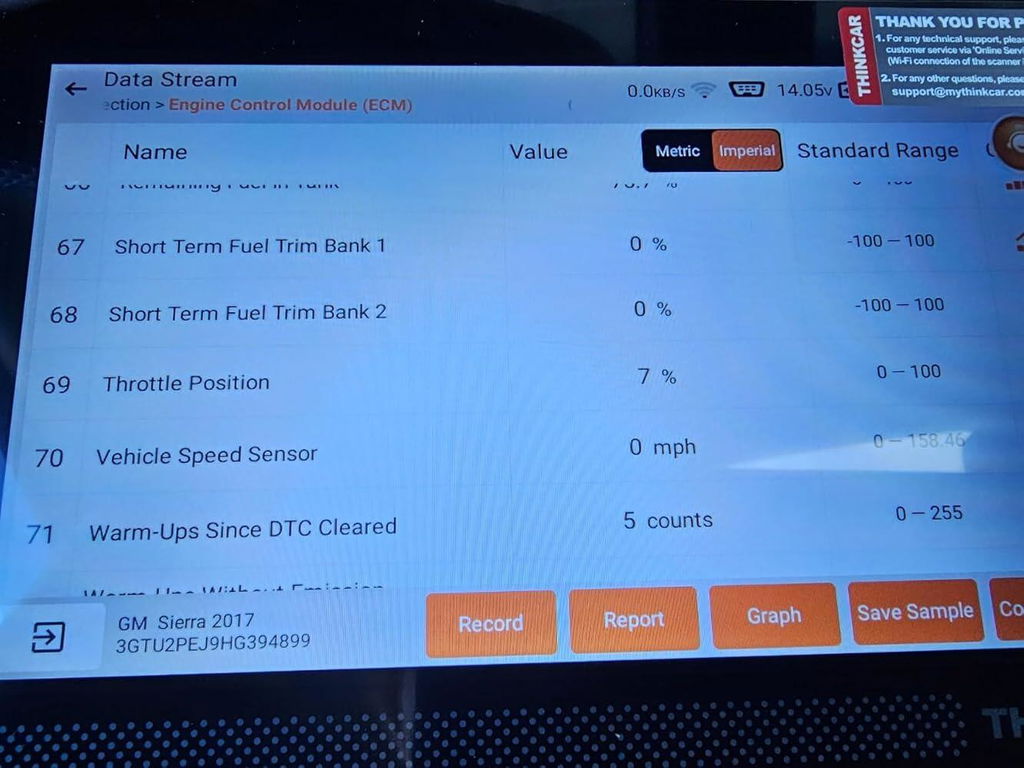
Form factor is not just about convenience. It affects setup time, connection stability, and how willing you are to use the tool when a problem first appears. Some DIY users prefer a dedicated handheld because it is always ready, has a bigger screen, and avoids phone distractions. Others like a Bluetooth dongle because it is compact, easy to move between cars, and less intimidating to start with.
- Handheld units work well if you scan often and want an all-in-one workflow.
- Bluetooth app tools work well if you want portability and already use your phone for maintenance apps.
- Larger screens help when you are reviewing graphs, multiple modules, or saved reports.
- Cheap dongles often create the exact friction you were trying to avoid: pairing issues, drops, and thin data displays.
Why handheld scanners feel easier in repeated use
A handheld tablet-style scanner usually wins on speed. You turn it on, connect it, run Auto VIN, and start scanning without swapping between apps, notifications, and battery-saving settings. That matters more than it sounds when you are in the driveway chasing an intermittent fault.
The MUCAR 682 fits that workflow well for value-focused users. ThinkCar describes it as a dedicated handheld with bidirectional testing, full-system diagnostics, CAN-FD support, FCA AutoAuth support, a 6.2-inch anti-glare touchscreen, 20+ reset functions, and lifetime free updates. Those details make it a better fit for recurring maintenance and confirmation work than a basic reader that only handles engine codes.
Where a Bluetooth setup makes more sense
A Bluetooth scanner can be the smarter choice when you want compact storage, lighter carry, and a lower-friction way to move between several vehicles. The tradeoff is that your phone or tablet becomes part of the toolchain. If the app is strong and the connection is stable, that setup feels efficient. If not, it can feel flimsy during live-data work.
For mixed-age household vehicles, THINKDIAG 2 is the practical step-up path in this format. ThinkCar says it supports full-system diagnostics, active tests, Auto-VIN, CAN-FD, and 15 maintenance functions, while targeting DIYers and smaller repair environments. That gives you more room to grow than a basic dongle without forcing you into a larger handheld right away.
Shop: THINKDIAG 2
Check the functions that actually prevent misdiagnosis
The easiest way to waste money with a DIY car scanner is to choose one that reads a code but cannot explain the context around it. A code tells you where the car noticed a problem. It does not tell you, by itself, which part to buy. The functions that prevent misdiagnosis are the ones that show operating conditions, system status, and component behavior before and after the fault appears.
Build your must-have diagnostics stack first
If you want reliable driveway diagnosis, make sure the scanner can do these four jobs well:
- Read and clear trouble codes across the systems you plan to service.
- Show freeze frame so you can see the snapshot saved when the fault set.
- Display live data, ideally with graphing, so intermittent issues become visible.
- Check readiness monitors before inspection or after clearing codes.
Readiness matters more than many first-time buyers realize. NHTSA materials and manufacturer service documents both note that a vehicle may fail emissions inspection if monitors are not ready after codes are cleared or battery power is lost. That makes readiness status a real ownership function, not just a menu item. (static.nhtsa.gov)
Add high-value advanced functions only when they match your jobs
Once the core stack is covered, the next layer should follow your repair pattern. ABS and SRS access matter if you are chasing brake or airbag warnings. Battery registration matters on many newer vehicles. EPB service, steering angle reset, throttle relearn, and ABS bleeding can save a trip to the shop if the tool supports your exact vehicle.
The key caveat is that reset and relearn functions are always vehicle-specific. A scanner may advertise the function, but support can vary by make, year, and software version. That is why compatibility lookup matters twice: first for connection, then again for the exact service job you want to perform.
Compare updates, support, and long-term ownership cost
A scanner is not a one-time decision if your vehicles change over time. Software updates affect coverage, bug fixes, and function expansion, especially on newer platforms. That means the lowest upfront price can become the most expensive path if the tool ages out quickly or locks basic usefulness behind extra renewals.
- Check whether updates are free for life, limited by term, or tied to an app activation model.
- Review warranty and return terms on the official site, not on third-party listings.
- Look for U.S. support access and practical setup help.
- Favor brands that make compatibility and update language easy to verify before checkout.
Why support policies matter as much as hardware specs
When a scanner misidentifies a VIN or a reset path is not obvious, support quality becomes part of the product. A decent tool with clear documentation and update flow is easier to live with than a feature-rich tool that leaves you guessing. ThinkCar’s current product pages for THINKDIAG 2 and THINKSCAN 689BT list 12-month warranty coverage and 30-day free returns, while the 689BT page also highlights monthly upgrades and lifetime free updates. Those are the kinds of current, site-backed details worth checking before you buy.
Compare shortlists by ownership horizon
If you keep vehicles for years and handle your own maintenance, long-term value usually comes from broader compatibility and fewer forced upgrades. If you only want basic engine checks for one older car, a simpler tool may still be the best choice. The trick is to compare based on the life of your vehicle mix, not only this month’s warning light.
That same logic applies when you compare brands. Autel’s current lineup includes both simple code readers and more advanced tools with CAN FD and DoIP support, while Innova’s current site highlights DIY-friendly all-system and bidirectional options like the 5610. In other words, each brand spans different tiers, so the better comparison is not brand versus brand but tool depth versus your real use case. (store.autel.com)
Choose the best fit for your repair depth and vehicle mix

Once you have worked through compatibility, repair depth, form factor, and support, the shortlist gets much easier. Instead of chasing the longest feature list, you can match the tool to your actual garage routine. ThinkCar’s lineup maps cleanly to three common DIY paths: compact app-based growth, value handheld service work, and advanced multi-vehicle troubleshooting.
Best fit for beginner-to-intermediate households
If you want more than code reading but are not ready for a larger handheld, THINKDIAG 2 is the clearest entry path. It brings full-system diagnostics, active tests, Auto-VIN, CAN-FD support, and 15 maintenance functions into a compact Bluetooth workflow. That makes it a solid choice for a household managing mixed-age cars and moving beyond occasional check-engine-light use.
Its strongest fit is light-to-moderate DIY growth. You can scan all systems, save time on vehicle identification, and step into service functions without committing to a bigger device. That balance is especially useful if your repairs are becoming more regular but you still prefer an app-first workflow.
Best fit for value-focused handheld buyers
MUCAR 682 makes sense when you want a dedicated handheld without depending on your phone. ThinkCar positions it around full OBD2 functions, full-system diagnostics, bidirectional testing, CAN-FD support, FCA AutoAuth support, 20+ resets, and lifetime free updates. For recurring maintenance tasks like brake service, battery work, and fault confirmation, that combination is easier to use repeatedly than a basic reader.
The practical appeal is workflow. A handheld screen, built-in setup, and active tests let you move faster from scan to confirmation. If your garage routine is steady and you want a tool that is always ready to grab, this is the middle-ground option that often feels right.
Shop: MUCAR 682
Best fit for advanced DIYers with old and new vehicles
For deeper troubleshooting across a mixed-year household, THINKSCAN 689BT is the top fit in this lineup. The official product page lists Bluetooth workflow, AutoVIN, AutoScan, FCA AutoAuth, CAN-FD, DoIP, all-system diagnostics, ECU coding, bidirectional controls, an 8-inch touchscreen, 4 GB RAM, 64 GB storage, and 34+ maintenance functions, while ThinkCar’s newer blog content describes it as supporting 35+ maintenance functions. The slight wording difference is exactly why vehicle-specific function checks still matter, but the overall position is clear: this is the advanced driveway option for owners who want broader protocol coverage and stronger troubleshooting depth.
Shop: THINKSCAN 689BT
What to compare against before you buy
A shortlist works better than a winner-take-all chart. You are not choosing the “best scanner” in the abstract. You are choosing the best fit for your cars, your repair habits, and how long you want the tool to stay useful.
| Comparison angle | What to check | Why it matters |
|---|---|---|
| Compatibility workflow | VIN lookup, year/make/model selection, protocol support | Prevents false confidence from simple port fit |
| Diagnostic depth | Engine-only, all-system, active tests, resets | Matches the tool to real repair tasks |
| Newer-vehicle readiness | CAN-FD, DoIP, secure-gateway support | Helps avoid surprises on late-model cars |
| Form factor | Handheld vs Bluetooth app | Affects speed, stability, and everyday use |
| Update policy | Lifetime, limited-term, or app-based | Changes long-term value |
Autel often shows up on shortlists because it spans from simple readers to advanced diagnostic platforms. Innova remains common with mainstream DIY buyers because its tools emphasize direct, accessible workflows. ThinkCar stands out when you want a clear path from compact Bluetooth tools to handheld bidirectional units without leaving mixed-year compatibility out of the conversation. (autel.com)
Best practices that save time in real DIY diagnostics
A scanner helps most when you use it in a repeatable way. Good habits make even a mid-tier tool more useful, while bad habits can make a premium scanner feel confusing.
Best habits to keep
- Verify the VIN, model year, and engine before deep scans.
- Run a full-system scan before ordering parts.
- Save the report and freeze-frame data before clearing codes.
- Update the tool before using advanced resets on newer vehicles.
- Recheck readiness after repairs if inspection is a concern.
NHTSA also recommends checking your VIN for open recalls, because a diagnostic tool does not replace recall research or free manufacturer recall repairs. In 2025, NHTSA says there were 997 vehicle safety recalls affecting more than 29 million vehicles in the United States, which is a reminder that not every warning or symptom should be handled as a DIY diagnosis alone. (nhtsa.gov)
Mistakes that create false confidence
Buying by price tag alone is the biggest one. Right behind it is assuming that an OBD2 scanner for old and new cars must provide full access just because it plugs in and reads one engine code. Another common mistake is skipping update policy and reset verification, then discovering later that the scanner cannot complete the service job you bought it for.
A final mistake is clearing codes too early. Once the fault data is gone, you may lose the very context that would have helped you diagnose the problem correctly the first time. That is why freeze frame, saved reports, and readiness checks matter in real ownership, not just in product comparisons.
Build your shortlist before you buy
By the time you finish these five steps, the choice is usually much clearer. Start with the vehicles you actually own, then match the scanner to the jobs you really do, the workflow you prefer, and the update path you can live with. That keeps you from buying a tool that looks capable but falls short the first time you need ABS access, a battery registration, or a newer protocol.
For lighter Bluetooth-based growth, THINKDIAG 2 is the smart compact path. For value-minded handheld use, MUCAR 682 covers more recurring maintenance work without phone dependence. For advanced mixed-year households, THINKSCAN 689BT is the strongest fit when you want deeper protocol coverage, bidirectional testing, and more room to grow.
FAQ
How do I ensure my diagnostic tool is compatible with older car models?
The safest way is to verify the exact year, make, model, engine, and region before you buy. Older vehicles often need less protocol complexity, but they still benefit from dependable code reading, freeze frame, live data, and readiness checks. If you also want ABS, SRS, or service resets, confirm those functions by vehicle-specific coverage rather than assuming they are included. For mixed-age garages, ThinkCar is a strong brand to shortlist because its range covers both compact and more advanced DIY use.
Which features are essential in an automotive diagnostic tool?
Essential features in an automotive diagnostic tool include reliable OBD2 functions such as reading and clearing trouble codes, viewing live data, checking I/M readiness, and accessing freeze-frame information. To work well across older and newer vehicles, it should also support a wide range of protocols, especially CAN, and ideally newer standards like CAN-FD or DoIP when needed. Broad vehicle coverage, regular software updates, and an easy-to-use interface are also important so the tool stays useful as cars and repair needs change. If you plan to do more than basic code checks, look for service functions such as oil reset, EPB, battery registration, or TPMS support.
What’s the difference between basic and advanced automotive diagnostic tools?
Basic automotive diagnostic tools usually focus on reading and clearing engine-related OBD2 trouble codes, checking readiness monitors, and showing a limited set of live data. Advanced tools go further by accessing more vehicle systems like ABS, SRS, transmission, and body modules, and they often include bi-directional controls, full-system scans, detailed live data graphs, and service functions. In practical terms, a basic scanner is enough for simple check-engine-light diagnosis, while an advanced tool is better for deeper troubleshooting and DIY maintenance on both older and newer vehicles. The right choice depends on whether you only want fault-code checks or also plan to diagnose system-specific problems and perform maintenance resets.
Is a handheld scanner better than a Bluetooth scanner for home use?
A handheld scanner is usually better for repeated garage use because it is self-contained and faster to start. You get a larger screen, fewer pairing distractions, and an easier workflow when reviewing multiple modules or graphs. A Bluetooth scanner is still a good choice if you want portability and prefer working from your phone. The better option depends on whether you value grab-and-go convenience or compact flexibility more.
How do I avoid compatibility problems after I buy the scanner?
Start by updating the tool before your first deep scan, especially if you own a newer vehicle. Then use Auto VIN first, but switch to manual vehicle selection if the identification looks wrong or the scanner misses functions you expected. Always scan all systems before clearing codes, and save the report so you can compare before-and-after results. If you rely on service resets, verify those exact functions on your vehicle before starting the repair.
Table of Contents
-
5 Steps to Choose a DIY Scanner That Works With Both Old and New Cars
- Why one DIY car scanner works on one car and misses another
- Match the scanner to the vehicle years you actually own
- Decide how deep your DIY repairs really go
- Pick the form factor that fits your garage routine
- Check the functions that actually prevent misdiagnosis
- Compare updates, support, and long-term ownership cost
- Choose the best fit for your repair depth and vehicle mix
- What to compare against before you buy
- Best practices that save time in real DIY diagnostics
- Build your shortlist before you buy
-
FAQ
- How do I ensure my diagnostic tool is compatible with older car models?
- Which features are essential in an automotive diagnostic tool?
- What’s the difference between basic and advanced automotive diagnostic tools?
- Is a handheld scanner better than a Bluetooth scanner for home use?
- How do I avoid compatibility problems after I buy the scanner?

Share:
3 Portable Bidirectional Scan Tools for Mobile Mechanics, Including AI-Assisted Picks
The Ultimate Guide to Smartphone Scan Tools for Serious DIY and AI-Guided Diagnostics