
Understanding Wireless OBD2 Scanners
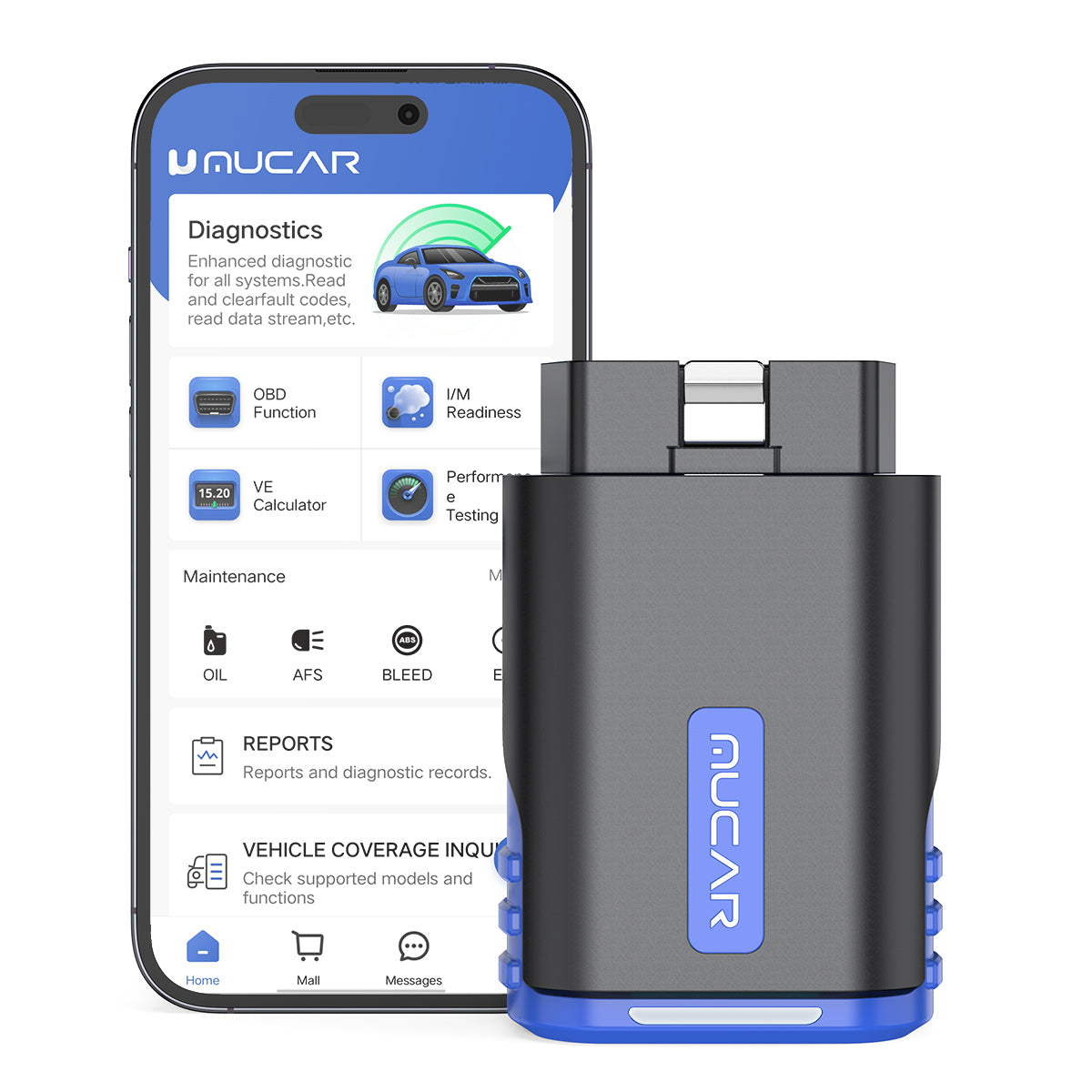
A warning light rarely tells you what is actually wrong. It only tells you where the confusion starts. That is why a wireless OBD2 scanner matters: it shortens the distance between a symptom, a real scan result, and a useful next step. When the tool also creates fast, readable reports, you spend less time guessing and more time deciding whether the issue is safe to drive, simple to fix, or worth escalating.
Just as important, modern diagnostics are no longer a solo workflow. A good Bluetooth OBD2 scanner can capture trouble codes, freeze-frame data, readiness status, and system results, then share them with a mechanic, teammate, or remote expert. In the sections below, you will see how wireless scanning works, which feature tiers matter, how remote vehicle diagnostics fits into real repair workflows, and how to compare ThinkCar, Foxwell, Innova, BlueDriver, and XTOOL without buying the wrong level of tool.
What Is a Wireless OBD2 Scanner and How Does It Work?
A wireless scanner is really two things working together: a small hardware interface that plugs into the vehicle’s OBD-II port, and an app-based workflow on your phone or tablet. The scanner reads data from the car, while the app turns that data into codes, graphs, health summaries, and reports you can actually use. For most U.S. vehicles, OBD-II support is expected on 1996-and-newer models, which is why many DIY users start there when checking compatibility. According to the EPA, OBD-II technology is standard on 1996 and newer cars and light trucks for monitoring vehicle operation.
Core terms every buyer should know
Before you compare tools, it helps to separate a few terms that often get blurred together:
- Code reader: reads and clears basic trouble codes, usually focused on emissions-related faults.
- Live data: shows sensor values in real time, such as coolant temperature, RPM, fuel trims, or O2 sensor readings.
- Freeze frame: a saved snapshot of conditions when a fault code was triggered.
- Full-system diagnostic tool: reaches more than the engine module, including ABS, SRS, transmission, body, and comfort systems.
- Bidirectional OBD2 scanner: sends commands to components for active tests, such as cycling a fan or locking doors.
- Car health report sharing: exporting or sending scan results so someone else can review them clearly.
A practical DIY car diagnostics workflow usually starts with codes, then moves to live data, then to confirmation testing if the fault is not obvious.
Why protocol support matters
Two scanners can look almost identical and still behave very differently on the same car. The reason is protocol support. Older OBD-II vehicles may rely on ISO 9141-2 or KWP2000, while many later vehicles use CAN-based communication. ThinkCar’s own compatibility guide notes that modern tools may also need support for newer layers such as CAN-FD or DoIP on some late-model vehicles.
That matters because a wireless OBD2 scanner is only useful when it can actually communicate with the vehicle network you own. ThinkCar lists MUCAR DriverScan as compatible for OBD-II diagnostics on most cars built in 1996 or later and names protocols including ISO 14230-4 KWP, ISO 15765-4 CAN, ISO 9141-2, and SAE J1850 VPW/PWM.
The main scanner categories to compare
Most buyers can sort the market into four groups:
- Basic Bluetooth dongles for reading and clearing engine codes.
- Advanced app-based scanners with better live data and some service functions.
- Full-system wireless scanners that reach more modules and produce richer reports.
- Bidirectional models that run active tests and more advanced maintenance routines.
ThinkCar positions MUCAR DriverScan in the deeper end of the app-based category. Its product page says it offers OE-level full-system diagnostics across systems such as ABS, SRS, engine, A/C, transmission, TPMS, body system, battery, cruise control, and instrument clusters. It also lists active tests for items like radiator fans, windows, mirrors, lights, horns, and door locks.
How to Use Fast Reports and Remote Sharing in Real Life
The real value of fast diagnostic reports is not just speed on your phone screen. It is clarity during handoff. A good report lets you stop saying, “The car feels weird,” and start saying, “Here are the stored codes, freeze-frame conditions, readiness status, and module results.” That shift cuts wasted time, especially when you are working with a remote mechanic, a family member, or a small shop that needs to make decisions quickly.
Scan, review, and send results quickly
A clean workflow usually looks like this:
- Plug the scanner into the OBD-II port.
- Pair the tool with the app.
- Run an initial health scan.
- Review trouble codes and system summaries.
- Save or export the report before clearing anything.
- Send the report with the vehicle year, make, model, engine, and symptom notes.
ThinkCar’s MUCAR DriverScan page explicitly lists AutoVIN, printed car health reports, and remote diagnosis support as core features. It also provides app setup steps that include downloading the MUCAR DriverScan app, registering the tool, downloading software, and reading the VIN to begin diagnosis.
When your report is structured well, the next person in the chain can focus on interpretation instead of reconstructing the problem from screenshots.
In this kind of workflow, a tool like MUCAR DriverScan is useful because it combines app portability with full-system access, health report output, and active testing in one compact format.
How remote vehicle diagnostics fits the workflow
Remote help can be as simple as sharing a report by app, email, or message. It can also be more advanced. FlexiHub’s remote vehicle diagnostics guide describes a setup where the vehicle-side diagnostic hardware is connected locally while a technician accesses the device remotely over the internet from another location. FlexiHub says the remote expert can then conduct standard diagnostic procedures as if the device were connected directly, provided the setup includes compatible hardware, internet access, and vehicle diagnostic software. (flexihub.com)
That broader model is useful for:
- A driver who wants a mechanic to review findings before booking a repair.
- A junior technician who needs help from a senior diagnostician.
- A small shop that supports multiple locations without flying experts onsite.
- A mobile technician who needs quick second-level advice.
FlexiHub also says remote diagnostics can reduce repair time and repeat visits by giving local technicians access to remote expertise in real time. (flexihub.com)
What this means for everyday users
You do not need a complex remote lab to benefit from car health report sharing. In many cases, the fastest workflow is still:
- run the scan,
- save the report,
- label the symptom,
- send the full result,
- wait for an informed next step.
That is why fast diagnostic reports matter more than flashy app graphics. If the receiving person cannot understand the report in 30 seconds, the workflow slows down.
Which Features Matter Most Before You Buy?
A scanner can look impressive in a product grid and still be wrong for your garage. The best buying process starts with your workflow, not the marketing tier. If you only check an occasional engine light, you do not need every advanced feature. If you maintain multiple vehicles, troubleshoot intermittent faults, or collaborate remotely, feature depth becomes much more important.
Speed, coverage, and app experience
Start with the first five minutes of ownership. A good Bluetooth OBD2 scanner should connect reliably, identify the vehicle quickly, and present results in a report that another person can understand without extra translation.
Key things to check:
- Pairing reliability: unstable Bluetooth wastes more time than slow diagnostics.
- AutoVIN: useful when you scan multiple vehicles and want faster setup.
- Report readability: clear fault summaries beat cluttered dashboards.
- Vehicle coverage: confirm your actual make, model, and year before buying.
- System depth: engine-only access is very different from full-system scanning.
- Update cadence: newer vehicles may need newer protocol and software support.
MUCAR DriverScan lists AutoVIN, printed car health reports, remote diagnosis support, and full OBD2 functions including freeze-frame viewing, graph data stream support, O2 sensor test, EVAP system test, onboard monitor test, DTC lookup, and I/M readiness status test.
When bidirectional and maintenance functions matter
A bidirectional OBD2 scanner is worth paying for when you need to command parts, not just observe them. ThinkCar’s product page says DriverScan can run active tests such as turning on the radiator fan, modulating the throttle, opening and closing windows, operating mirrors, switching lights, sounding the horn, and testing door locks.
That becomes useful when you want to:
- verify whether a component responds before replacing it,
- confirm a repair after installation,
- narrow down wiring versus part failure,
- support deeper remote troubleshooting,
- maintain several vehicles instead of one occasional commuter.
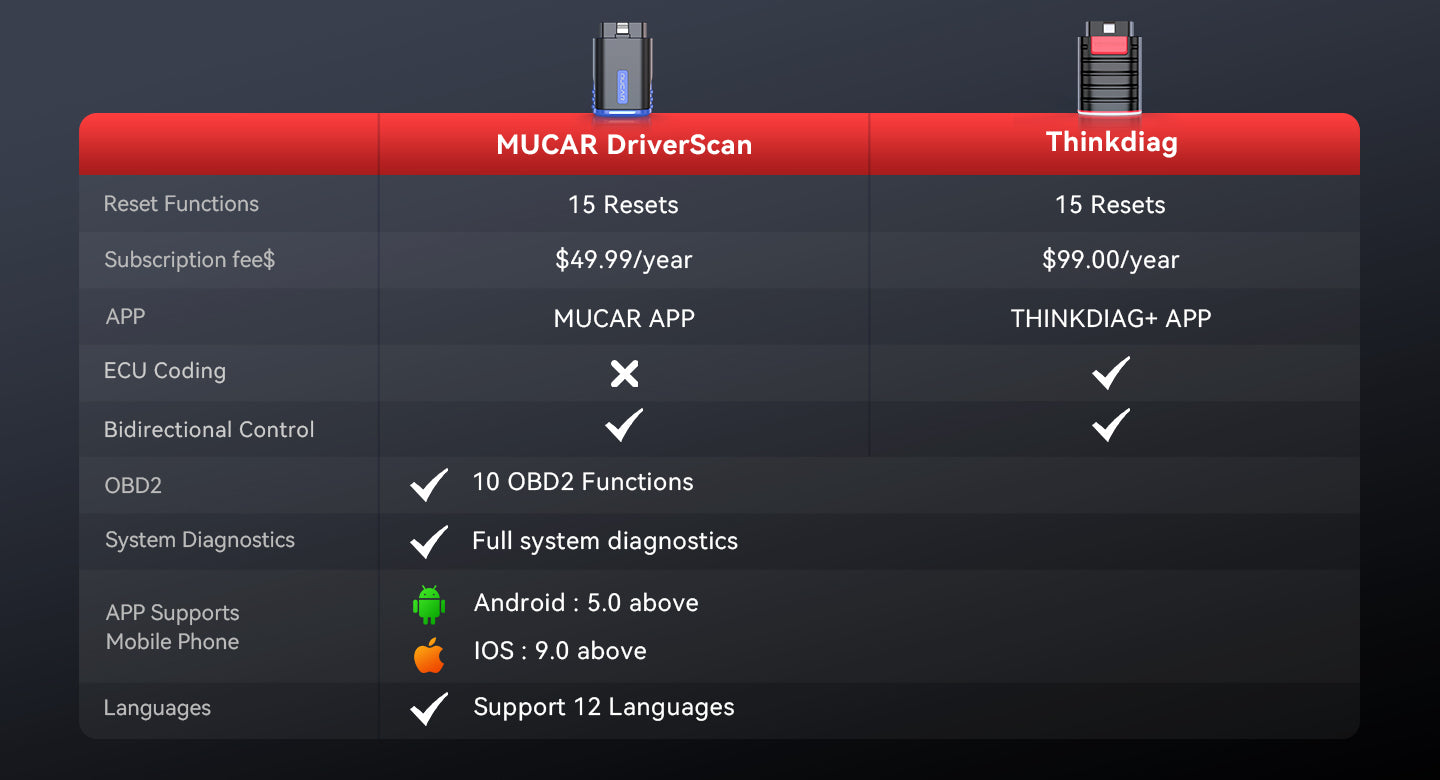
ThinkCar also lists 15-plus maintenance functions for DriverScan, including oil reset, steering angle calibration, electronic parking brake reset, battery registration, ABS bleeding, throttle reset, DPF regeneration, TPMS reset, injector matching, air suspension reset, gearbox reset, AFS reset, and EGR reset.
A quick comparison mindset for ThinkCar vs competitors
If you are comparing ThinkCar with Foxwell, Innova, BlueDriver, and XTOOL, avoid reducing the decision to brand familiarity alone. Use these questions instead:
| Factor | Why it matters | Best fit |
|---|---|---|
| Report quality | Faster review and easier remote handoff | DIY users and mobile techs |
| Full-system depth | Needed for ABS, SRS, body, and network faults | Multi-vehicle owners and small shops |
| Bidirectional tests | Confirms component response | Troubleshooting recurring faults |
| Maintenance functions | Reduces trips for routine service resets | Hands-on DIY owners |
| App usability | Better speed from scan to action | Everyone |
| Compatibility coverage | Prevents tool mismatch across years | Mixed old/new vehicle households |
BlueDriver is often chosen for simple phone-based workflows, while Foxwell and Innova are common in entry to mid-tier consumer diagnostics, and XTOOL often appears in more advanced feature comparisons. The right choice depends less on reputation and more on whether you need basic codes, a full-system diagnostic tool, or a more advanced remote workflow. This is an inference based on category positioning and the feature tiers described in the reference materials.
Expert Tips for Better Wireless Diagnostics
A faster scanner does not automatically produce better answers. Good results come from a repeatable process. That matters even more when you plan to share findings with someone else, because missing one small detail can turn a useful report into noise.
Do's for cleaner results
Use this checklist every time you scan:
- Scan all available systems before clearing anything.
- Save the full report first, including timestamps.
- Record the vehicle year, engine, mileage, and exact symptom.
- Keep freeze-frame data when a fault is intermittent.
- Review readiness monitors after repairs.
- Use live data to confirm whether the code matches actual behavior.
Readiness is especially important after code clearing or battery disconnect. EPA materials on OBD inspections note that readiness status affects whether a vehicle is ready for testing, which is why clearing codes too early can create confusion during follow-up diagnosis or inspection prep. (nepis.epa.gov)
Common pitfalls to avoid
Some mistakes show up again and again:
- Clearing codes before saving the original scan.
- Looking only at engine codes on a networked fault.
- Sending partial screenshots instead of the full report.
- Forgetting to include model year, engine, or symptom notes.
- Assuming all wireless tools have equal module depth.
- Buying on low price alone and discovering key limits later.
ThinkCar’s own compatibility content warns that mismatch is a major problem, especially when a scanner handles older vehicles but struggles with newer ones that need newer protocol support.
A note on safe workflow habits
Diagnostics itself is lower risk than mechanical disassembly, but under-hood testing still requires basic caution. If you move from scanning to active testing around a running engine, keep hands, sleeves, and tools away from moving belts and fans. OSHA also maintains workplace eye and face protection standards, which is a good reminder to use proper eye protection during any live mechanical inspection near batteries, fluids, or rotating parts.
Best Practices and Pitfalls
Choosing a wireless OBD2 scanner gets easier when you reduce the decision to workflow fit.
Best Practices
- Choose report clarity over flashy app design.
- Confirm actual vehicle coverage before purchase.
- Prefer a Bluetooth OBD2 scanner with stable pairing and AutoVIN if you scan more than one vehicle.
- Buy bidirectional capability only if you will use active tests, maintenance resets, or deeper validation.
- Save reports before code clearing so remote help stays useful.
- Treat remote vehicle diagnostics as a process: data, context, and objective all need to be clear.
Common Pitfalls to Avoid
- Do not assume every compact dongle is a full-system diagnostic tool.
- Do not confuse stored history codes with the root cause of today’s problem.
- Do not rely on verbal descriptions when car health report sharing is possible.
- Do not overlook app usability; poor report design slows real troubleshooting.
- Do not compare ThinkCar, Foxwell, Innova, BlueDriver, and XTOOL by price alone.
- Do not forget that newer vehicles may require more protocol and software support than older ones.
Conclusion
Wireless scanners are popular for a reason: they make diagnostics faster, more portable, and easier to share. The real upgrade is not just cable-free convenience. It is the ability to move from symptom to structured evidence quickly, then hand that evidence to the right person without losing detail.
If your goal is simple DIY car diagnostics, a basic app-based scanner may be enough. If you want stronger fast diagnostic reports, broader module access, maintenance functions, and better support for remote collaboration, a deeper tool such as MUCAR DriverScan makes more sense. Choose based on report quality, system depth, and sharing needs first. The right wireless OBD2 scanner is the one that helps you make a better decision in less time.
Official Site: ThinkCar
FAQ
What makes a wireless OBD2 scanner different from a wired scanner?
A wireless OBD2 scanner sends vehicle data to your phone, tablet, or computer instead of using a built-in wired screen. That usually means faster setup, easier app updates, and better portability in a home garage or mobile service workflow. In practice, the tradeoff is that app quality and Bluetooth stability matter more than they do on a self-contained wired unit. If you value report sharing and convenience, wireless often feels more flexible.
Are wireless OBD2 scanners accurate enough for serious diagnostics?
Yes, a wireless scanner can be accurate enough for serious work if the software depth and vehicle coverage are strong. The connection method does not decide accuracy by itself; protocol support, module access, and app interpretation matter more. A basic dongle may only handle engine codes, while a stronger full-system tool can read ABS, SRS, transmission, and body systems with much better context. For deeper troubleshooting, live data and active tests matter as much as code reading.
How do remote diagnostic report sharing features help?
Remote sharing helps by replacing vague descriptions with real scan output that someone else can review. A good report should include codes, freeze-frame data, readiness status, and clear system summaries, plus vehicle details like year, engine, and mileage. That can reduce repeat visits, shorten message back-and-forth, and help a remote mechanic decide whether the next step is testing, maintenance, or repair. In a small shop, this also improves communication between junior and senior technicians.
When should I choose a bidirectional wireless scanner?
Choose a bidirectional model when you need to command components during testing instead of only reading data. That is useful for jobs such as cycling a radiator fan, testing door locks, checking window control, confirming throttle response, or validating a repair after installation. It becomes more valuable when you work on multiple vehicles, chase intermittent faults, or want a tool that supports remote-assisted troubleshooting. If you only read occasional check-engine lights, you may not need that upgrade yet.
Do wireless OBD2 scanners work on old and new vehicles?
Many do, but compatibility depends on model year, protocol support, and how deep you need the diagnostics to go. For most U.S. users, 1996-and-newer vehicles are the main starting point for OBD-II compatibility, while advanced features can still vary by make and system. Older OBD-II vehicles may rely on legacy protocols, and newer vehicles may need support for newer communication layers or gateway access. That is why checking your exact make, model, engine, and year is more useful than trusting broad marketing claims.
How should I compare scanner brands without overbuying?
Compare scanner brands by workflow fit, not by hype or box claims. Start with five checkpoints: vehicle coverage, report quality, app usability, maintenance functions, and whether you truly need bidirectional testing. If your goal is basic code reading, a simpler tool may be enough; if you want full-system access and cleaner collaboration, step up deliberately. The best purchase is usually the lowest tier that still handles your actual diagnostic routine well.
Table of Contents
- Understanding Wireless OBD2 Scanners
- What Is a Wireless OBD2 Scanner and How Does It Work?
- How to Use Fast Reports and Remote Sharing in Real Life
- Which Features Matter Most Before You Buy?
- Expert Tips for Better Wireless Diagnostics
- Best Practices and Pitfalls
- Conclusion
-
FAQ
- What makes a wireless OBD2 scanner different from a wired scanner?
- Are wireless OBD2 scanners accurate enough for serious diagnostics?
- How do remote diagnostic report sharing features help?
- When should I choose a bidirectional wireless scanner?
- Do wireless OBD2 scanners work on old and new vehicles?
- How should I compare scanner brands without overbuying?

Share:
2026 Useful Guide To Choosing Scan Tool Without Ongoing Subscription Costs
Full-System vs Basic OBD2 Readers: What to Upgrade For