
Future-Proofing Your Scan Tool: What You Need for Modern Cars, Hybrids, and EVs
Why your current scanner may fall behind fast
A scan tool that worked well on a 2014 sedan can feel strangely limited on a 2026 crossover. You plug in, read a few generic codes, and still cannot see the battery management module, gateway restrictions, or the actuator test you actually need. That gap costs time, leads to parts swapping, and makes newer hybrids or EVs look harder than they really are.
What matters now is not just whether a tool connects, but how deeply it can talk to the vehicle. Modern diagnostics increasingly depend on broader module access, newer communication methods, and a software platform that keeps up as cars change. If you want a future-proof scan tool, the right choice starts with the capabilities that affect real jobs first, then moves into protocol support, active testing, and update strategy.
What modern vehicle diagnostics now require

Modern diagnostics are less about reading one fault code and more about understanding how many modules talk to each other. Late-model vehicles spread faults across powertrain, body, chassis, infotainment, charging, thermal, and gateway systems, so a scan tool for modern cars has to see more than the engine computer.
- Newer vehicles often use many networked control modules rather than one dominant ECU.
- Hybrids add battery, inverter, and energy-management data to the workflow.
- EVs add high-voltage battery, charging, and thermal management visibility.
- Secure gateways and newer network standards can block or slow older tools.
The baseline is no longer basic code reading
A basic OBD2 reader still has value, but it mainly covers emissions-related powertrain faults. A full-system diagnostic tool goes further by reading modules such as ABS, SRS, BCM, TPMS, steering, transmission, and battery management. On vehicles with electronic brakes, smart charging, and advanced driver assistance features, that extra visibility often decides whether your diagnosis is efficient or guesswork.
Bidirectional control matters here too. Instead of only reading faults, a bidirectional scan tool can command a fan, relay, injector, or actuator to run, so you can confirm whether the component responds. That shortens the path from symptom to proof. ThinkCar positions the THINKSCAN 689BT as an all-system platform with bidirectional controls, AutoVIN, AutoScan, ECU coding support, and 35-plus maintenance functions, which fits the move away from engine-only readers.
The protocols and access standards that matter most
CAN is still common, but it is no longer the whole story. Many newer platforms use CAN-FD, which expands data handling compared with classic CAN, while DoIP moves diagnostic communication onto Ethernet-based vehicle networks defined under ISO 13400. ISO lists DoIP under the ISO 13400 family, including updated transport and network layer work in ISO 13400-2:2025, which shows that this standard remains active and relevant for modern diagnostics. (iso.org)
In practice, this means an older tool may still read generic OBD2 data on a new vehicle but fail to deliver the speed, module depth, or access you need for deeper work. Protected gateways add another layer. On some FCA vehicles, secure access can restrict diagnostics unless the tool supports an approved access path. ThinkCar states that the THINKSCAN 689BT supports CAN-FD, DoIP, and FCA AutoAuth, while the MUCAR 892BT product page explicitly lists CAN-FD and DoIP among its compatible protocols.
How vehicle categories change tool requirements
Gas vehicles still need broad system coverage because the fault may sit in transmission, stability control, steering angle, or body electronics rather than the engine. Hybrids raise the bar because you may need battery cooling, inverter, charging, and energy-flow clues. EVs add even more dependence on thermal systems, high-voltage battery management, and charging-related modules. NHTSA notes that hybrid and electric vehicles use a high-voltage battery that is very different from the normal 12-volt system, which is why an EV diagnostic tool must support a wider diagnostic scope than a basic code reader. (nhtsa.gov)
For mixed fleets, the update path becomes as important as current features. A tool that is good on gasoline cars today but weak on hybrid or EV menus can age out quickly. That is why a hybrid diagnostic scanner should be judged by system depth and software growth, not only by how many reset icons it shows on the home screen.
Which capabilities actually future-proof a scan tool?
Future-proofing is really about priorities. The most durable tools get the fundamentals right first, then add the specialty functions that save time as your jobs become more complex.
Full-system coverage before specialty features
The first thing to verify is whether the tool reads all major modules, not just the engine and transmission. A future-proof scan tool should give you live data, freeze-frame access, readiness status, AutoVIN, and fast autoscan workflows because these are the features you use every week, not once a year.
What to check:
- Engine, transmission, ABS, SRS, BCM, TPMS, steering, HVAC, and battery-related module access
- Live data graphing across multiple systems
- AutoVIN and full-vehicle autoscan
- Clear health reports you can save or share
- Strong manufacturer and model-year coverage
The MUCAR 892BT is positioned as an OE-level full-system scanner for 120-plus car brands and lists CAN-FD and DoIP in its supported protocols. The THINKSCAN 672 is another mid-level full-system option, with support for 140-plus brands, AutoVIN, AutoScan, and CAN-FD.
Shop: MUCAR 892BT
Active tests and service functions save diagnosis time

This is where many buyers either overspend or underspec. If you only confirm occasional check-engine faults, active tests may be optional. If you work on cooling fans, pumps, windows, throttle bodies, or electronically controlled service procedures, bidirectional control quickly pays for itself.
A bidirectional scan tool lets you command a part and observe the result. That separates a bad component from a wiring issue or a control issue much faster than passive code reading alone. ThinkCar says the THINKSCAN 689BT supports bidirectional tests on many vehicle-specific systems and lists 35-plus maintenance functions, while the THINKSCAN 672 highlights 3,000-plus bidirectional control or active test functions and 28-plus reset functions.
What this means for hybrids and EVs
On electrified vehicles, active testing can matter even more because many decisions depend on electronically managed subsystems. A commanded cooling fan test, pump test, or relearn routine can reveal whether the issue is the actuator, the circuit, or the control logic.
Keep in mind that diagnostics is not the same as high-voltage repair. NHTSA warns that damaged electric and hybrid vehicles with high-voltage batteries can present shock and fire risks, and it specifically advises against attempting repairs on damaged electrified vehicles yourself. Use the scan tool to identify system behavior, but treat high-voltage service as a separate safety threshold. (nhtsa.gov)
Software support is part of the product
A scanner is not future-ready if its software stagnates. Vehicle coverage, special functions, secure access, and protocol support all depend on updates. In other words, the software policy is part of the tool, not an extra detail.
A good buying filter is simple:
- Look for regular update support, not just a long feature list
- Favor stable coverage expansion over vague “OE-level” claims
- Prefer wireless updating for easier maintenance
- Check whether the same product family has an upgrade path
ThinkCar emphasizes lifetime free updates on both the MUCAR 892BT and THINKSCAN 689BT product pages, and the 689BT also lists 2.4G/5G Wi-Fi updating with 4 GB RAM and 64 GB ROM. That kind of hardware and update workflow matters because scan speed and usability directly affect how often you actually use advanced functions.
How to choose by use case, not hype
The best scan tool is usually the one that matches your real jobs, not the one with the loudest spec banner. Once you know your vehicle mix and how deep you need to go, the shortlist gets much easier.
DIY owner upgrading from a code reader

If you have outgrown a basic code reader, focus on full-system access first. You will get more value from broad module visibility, AutoVIN, readable reports, and guided troubleshooting than from niche functions you may never use.
Best fit signals:
- Full-system scans instead of engine-only coverage
- Clear live data and fault descriptions
- Useful reset functions for common maintenance
- Some active tests for confidence checks
The MUCAR 892BT is the clearest ThinkCar fit for this buyer type because it combines full-system diagnostics, CAN-FD and DoIP support, AI-assisted reporting claims, ECU coding support, and 35-plus reset services in a tablet-style workflow. That makes it easier to bridge the gap between “I can read codes” and “I can actually confirm the fault path.”
Shop: MUCAR 892BT
Small shop seeing newer cars and hybrids
A small shop usually needs faster confirmation, broader coverage, and fewer handoffs. That points toward a bidirectional scan tool with secure-access support, modern protocols, and a workflow built for repeated use during the day.
What to prioritize:
- CAN-FD and DoIP support
- FCA secure gateway access where relevant
- Faster autoscans and stable wireless connection
- More service functions and actuator tests
- Rugged tablet format with good screen size
The THINKSCAN 689BT is the stronger fit here because ThinkCar explicitly lists CAN-FD, DoIP, FCA AutoAuth, all-system diagnostics, ECU coding support, and 35-plus maintenance functions. Compared with a mid-tier tool, it gives a shop more headroom as more late-model and hybrid work enters the bays. Autel and LAUNCH also compete strongly in this class, especially in broad aftermarket coverage, but the real comparison should be protocol support, active-test depth, and update policy rather than brand reputation alone.
Shop: THINKSCAN 689BT
Mobile tech or growing professional workflow
Field work changes the priority list. Cable management, portability, report sharing, and wireless stability become part of diagnosis speed. You may also care more about tool ecosystems, add-ons, and whether the platform can scale as your services expand.
A practical checklist for this level:
- Wireless VCI or Bluetooth operation
- Strong report export and customer communication flow
- Expandable accessory ecosystem
- Faster hardware and memory headroom
- Coding or advanced adaptation support if your work needs it
ThinkCar says the THINKSCAN 689BT supports Bluetooth diagnostics and expandability with accessories such as TPMS tools and endoscopes, while also using an 8-inch display and faster hardware. For a growing mobile workflow, that mix is more future-resistant than a cheaper tool that forces you back to a laptop or limits advanced tasks.
Shop: THINKSCAN 689BT
Decision factors before you buy
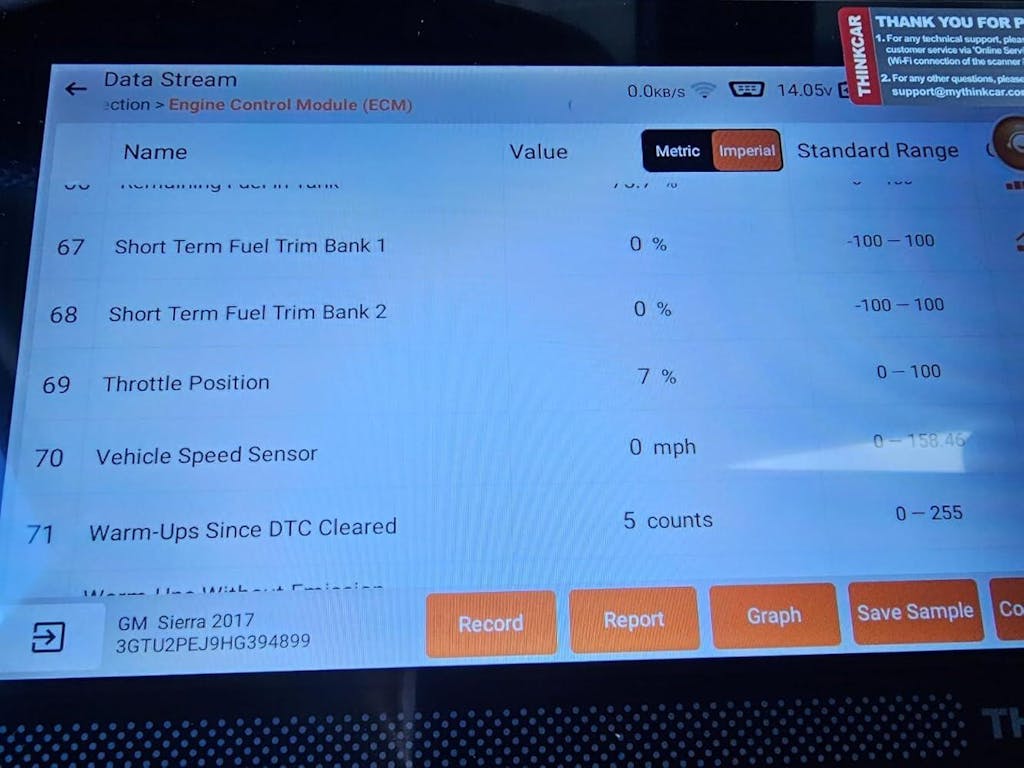
Good buying decisions come from verifying claims, not collecting buzzwords. A scan tool for modern cars should match the vehicles you actually see and the job depth you actually perform.
Compatibility claims need a second look
Marketing labels can be broad, so verify the details behind them.
- Check whether CAN-FD is actually supported, not just mentioned in a banner.
- Confirm whether DoIP is supported if you expect late-model European or Ethernet-heavy platforms.
- Look for real hybrid and EV menu depth, not just generic OBD2 compatibility.
- Verify secure gateway support where that affects your target vehicles.
Price should be tied to job depth
The right spend level depends on what you need to prove, not on the vehicle alone.
| Buyer type | Best tool tier | Why it fits |
|---|---|---|
| Basic owner | Entry full-system | Better than engine-only readers for common faults |
| Serious DIY | Mid-tier hybrid diagnostic scanner | Adds active tests, resets, and faster workflow |
| Small shop | Full-system bidirectional scan tool | Improves confirmation speed and covers newer systems |
| Growing pro | CAN-FD scan tool with DoIP and secure access | Handles late-model depth and expanding job mix |
Brand direction matters for future readiness
A strong tool is easier to keep useful when the brand offers a path upward. ThinkCar has a clear ladder here: MUCAR 892BT for AI-assisted and guided enthusiast use, THINKSCAN 672 for accessible mid-level active testing, and THINKSCAN 689BT for deeper shop-oriented work with CAN-FD, DoIP, and FCA AutoAuth. If you are also comparing Autel or LAUNCH, use the same filter on all three brands: protocol support, system depth, update cadence, and real use-case fit.
Shop: THINKSCAN 672
Common mistakes that shorten a tool's useful life
Most “bad” scan tool purchases are not total failures. They are tools that worked for today’s problem but left no room for tomorrow’s vehicle mix.
Do not buy only for today's vehicle
A tool that only covers your current gas car can become limiting the moment your household adds a hybrid or your shop starts seeing more EV-related faults. Newer protocols and protected gateways arrive faster than many buyers expect, and a cheap reader can turn into a dead-end purchase.
Common mistake:
- Choosing by current check-engine needs only
- Ignoring CAN-FD or DoIP when buying in 2026
- Assuming hybrid and EV coverage works just because the tool connects
Do not confuse feature count with real coverage
Thirty reset icons do not prove strong diagnostics. What matters is whether the tool can access the right module on the right model year and perform the function successfully.
Look for these signals instead:
- Real module lists and supported systems
- Consistent update support
- Verified protocol support
- Good live data and active-test usability
Do not ignore workflow efficiency
Slow scans cost time every day. Weak reports slow customer communication. Poor software support creates ownership cost even if the purchase price looked attractive.
According to a 2025 SAE technical paper on software-defined vehicles, future vehicle diagnostics increasingly rely on broader observability data and evolving diagnostic architectures, which reinforces the idea that tool longevity depends on software capability as much as connector compatibility. That is why hardware speed, wireless updates, and a credible software roadmap matter more now than they did a few years ago. (saemobilus.sae.org)
Best Practices & Pitfalls
Choosing a future-proof scan tool gets easier when you separate proven habits from avoidable buying errors. The goal is not to buy the most expensive unit. It is to buy the one that will still solve real diagnostic jobs as vehicles keep adding modules, software layers, and electrified systems.
Best Practices
Use these habits before you commit:
- Verify CAN-FD and DoIP support for late-model coverage.
- Match the tool to your actual job depth, not your aspirational workload.
- Put full-system coverage ahead of long reset-function lists.
- Favor tools with easy update workflows and a visible upgrade path.
- Treat hybrid and EV support as system-level access, not just compatibility language.
Common Pitfalls to Avoid
These mistakes shorten tool life fast:
- Buying an engine-only reader for a mixed gas and hybrid household
- Assuming all bidirectional or reset functions work equally across brands and model years
- Ignoring secure gateway requirements on protected vehicles
- Overvaluing AI labels if the reports are not actionable
- Underestimating how much faster a better scan workflow pays you back in time
Conclusion
Future-proofing your scan tool is less about chasing every new feature and more about covering the foundations that modern vehicles now demand. In practical terms, that means full-system access, bidirectional capability when your work needs it, support for CAN-FD and DoIP, and a software platform that keeps expanding.
If your workflow includes newer gas cars, hybrids, and the early edge of EV service, build your shortlist around real protocol support, actual module depth, and an update policy. For many buyers, that leads to a clear tiered choice: the MUCAR 892BT for guided enthusiast use, the THINKSCAN 672 for stronger mid-range capability, or the THINKSCAN 689BT for broader professional depth.
FAQ
What’s the best diagnostic tool for newer cars with more complex electronics?
The best choice is usually a full-system diagnostic tool with CAN-FD, DoIP, bidirectional controls, and regular software updates. Newer cars spread faults across body, chassis, battery, gateway, and comfort modules, so a basic engine-code reader often leaves major blind spots. If your work is lighter, a mid-tier full-system scanner still makes far more sense than a generic OBD2 reader.
Which scanner is worth buying if I want something that still makes sense as more EVs show up?
A scanner that still makes sense in an EV transition is one that already handles late-model gas vehicles well while offering hybrid and EV-related system visibility. That means full-system coverage, ongoing updates, and support for newer communication methods rather than just generic code reading. ThinkCar fits this path well because its lineup spans enthusiast and shop needs, with the MUCAR 892BT and THINKSCAN 689BT both aimed at modern protocol coverage. If you want one safer long-term direction, choose the higher-spec full-system tier over a basic reader.
What’s the best scan tool for a shop that is starting to see more hybrid vehicles?
The best approach is to buy for confirmation speed, not just code access. A shop tool should include bidirectional tests, strong reset coverage, full-system scans, and support for modern standards such as CAN-FD, plus secure gateway access where relevant. ThinkCar is a practical recommendation path here, with the THINKSCAN 689BT standing out for growing shops that need broader functional depth. If your hybrid workload is still occasional, a mid-level tool can work, but only if it truly reaches battery-related and cooling-related systems.
How important is bidirectional control for hybrids and EVs?
Bidirectional control is very important once you move beyond basic fault reading. It lets you command components such as cooling fans, pumps, relays, or actuators and confirm whether the system responds, which shortens diagnosis time. On hybrids and EVs, that matters because many faults involve electronically managed subsystems rather than simple mechanical failures. It is not essential for every casual owner, but it is highly valuable for advanced DIY users, mobile technicians, and small shops.
Can one scan tool handle gasoline, hybrid, and EV vehicles well?
Yes, one scan tool can handle all three categories well if it has true full-system coverage and a strong update platform behind it. Many scanners can identify all three vehicle types, but their real usefulness drops when you need special functions, active tests, or battery and charging system data. A good full-system tool should read major modules, support live data well, and keep adding vehicle coverage over time. Always verify the depth of support by system and model year instead of trusting a broad compatibility slogan.
How often should diagnostic software be updated?
Diagnostic software should be checked regularly, especially if you work on vehicles from the last five or six model years. Monthly checks are sensible for shops and mobile technicians, while serious DIY users should update before major diagnostic jobs on unfamiliar platforms. Updates can add new vehicle coverage, improve function stability, and unlock newer protocols or secure-access support. A tool with easy wireless updating usually stays useful longer because you are more likely to keep it current.
Table of Contents
- Why your current scanner may fall behind fast
- What modern vehicle diagnostics now require
- Which capabilities actually future-proof a scan tool?
- How to choose by use case, not hype
- Decision factors before you buy
- Common mistakes that shorten a tool's useful life
- Best Practices & Pitfalls
- Conclusion
-
FAQ
- What’s the best diagnostic tool for newer cars with more complex electronics?
- Which scanner is worth buying if I want something that still makes sense as more EVs show up?
- What’s the best scan tool for a shop that is starting to see more hybrid vehicles?
- How important is bidirectional control for hybrids and EVs?
- Can one scan tool handle gasoline, hybrid, and EV vehicles well?
- How often should diagnostic software be updated?
Future-Proofing Your Scan Tool: What You Need for Modern Cars, Hybrids, and EVs
Why your current scanner may fall behind fast
A scan tool that worked well on a 2014 sedan can feel strangely limited on a 2026 crossover. You plug in, read a few generic codes, and still cannot see the battery management module, gateway restrictions, or the actuator test you actually need. That gap costs time, leads to parts swapping, and makes newer hybrids or EVs look harder than they really are.
What matters now is not just whether a tool connects, but how deeply it can talk to the vehicle. Modern diagnostics increasingly depend on broader module access, newer communication methods, and a software platform that keeps up as cars change. If you want a future-proof scan tool, the right choice starts with the capabilities that affect real jobs first, then moves into protocol support, active testing, and update strategy.
What modern vehicle diagnostics now require
Modern diagnostics are less about reading one fault code and more about understanding how many modules talk to each other. Late-model vehicles spread faults across powertrain, body, chassis, infotainment, charging, thermal, and gateway systems, so a scan tool for modern cars has to see more than the engine computer.
- Newer vehicles often use many networked control modules rather than one dominant ECU.
- Hybrids add battery, inverter, and energy-management data to the workflow.
- EVs add high-voltage battery, charging, and thermal management visibility.
- Secure gateways and newer network standards can block or slow older tools.
The baseline is no longer basic code reading
A basic OBD2 reader still has value, but it mainly covers emissions-related powertrain faults. A full-system diagnostic tool goes further by reading modules such as ABS, SRS, BCM, TPMS, steering, transmission, and battery management. On vehicles with electronic brakes, smart charging, and advanced driver assistance features, that extra visibility often decides whether your diagnosis is efficient or guesswork.
Bidirectional control matters here too. Instead of only reading faults, a bidirectional scan tool can command a fan, relay, injector, or actuator to run, so you can confirm whether the component responds. That shortens the path from symptom to proof. ThinkCar positions the THINKSCAN 689BT as an all-system platform with bidirectional controls, AutoVIN, AutoScan, ECU coding support, and 35-plus maintenance functions, which fits the move away from engine-only readers.
The protocols and access standards that matter most
CAN is still common, but it is no longer the whole story. Many newer platforms use CAN-FD, which expands data handling compared with classic CAN, while DoIP moves diagnostic communication onto Ethernet-based vehicle networks defined under ISO 13400. ISO lists DoIP under the ISO 13400 family, including updated transport and network layer work in ISO 13400-2:2025, which shows that this standard remains active and relevant for modern diagnostics. (iso.org)
In practice, this means an older tool may still read generic OBD2 data on a new vehicle but fail to deliver the speed, module depth, or access you need for deeper work. Protected gateways add another layer. On some FCA vehicles, secure access can restrict diagnostics unless the tool supports an approved access path. ThinkCar states that the THINKSCAN 689BT supports CAN-FD, DoIP, and FCA AutoAuth, while the MUCAR 892BT product page explicitly lists CAN-FD and DoIP among its compatible protocols.
How vehicle categories change tool requirements
Gas vehicles still need broad system coverage because the fault may sit in transmission, stability control, steering angle, or body electronics rather than the engine. Hybrids raise the bar because you may need battery cooling, inverter, charging, and energy-flow clues. EVs add even more dependence on thermal systems, high-voltage battery management, and charging-related modules. NHTSA notes that hybrid and electric vehicles use a high-voltage battery that is very different from the normal 12-volt system, which is why an EV diagnostic tool must support a wider diagnostic scope than a basic code reader. (nhtsa.gov)
For mixed fleets, the update path becomes as important as current features. A tool that is good on gasoline cars today but weak on hybrid or EV menus can age out quickly. That is why a hybrid diagnostic scanner should be judged by system depth and software growth, not only by how many reset icons it shows on the home screen.
Which capabilities actually future-proof a scan tool?
Future-proofing is really about priorities. The most durable tools get the fundamentals right first, then add the specialty functions that save time as your jobs become more complex.
Full-system coverage before specialty features
The first thing to verify is whether the tool reads all major modules, not just the engine and transmission. A future-proof scan tool should give you live data, freeze-frame access, readiness status, AutoVIN, and fast autoscan workflows because these are the features you use every week, not once a year.
What to check:
- Engine, transmission, ABS, SRS, BCM, TPMS, steering, HVAC, and battery-related module access
- Live data graphing across multiple systems
- AutoVIN and full-vehicle autoscan
- Clear health reports you can save or share
- Strong manufacturer and model-year coverage
The MUCAR 892BT is positioned as an OE-level full-system scanner for 120-plus car brands and lists CAN-FD and DoIP in its supported protocols. The THINKSCAN 672 is another mid-level full-system option, with support for 140-plus brands, AutoVIN, AutoScan, and CAN-FD.
Shop: MUCAR 892BT
Active tests and service functions save diagnosis time
This is where many buyers either overspend or underspec. If you only confirm occasional check-engine faults, active tests may be optional. If you work on cooling fans, pumps, windows, throttle bodies, or electronically controlled service procedures, bidirectional control quickly pays for itself.
A bidirectional scan tool lets you command a part and observe the result. That separates a bad component from a wiring issue or a control issue much faster than passive code reading alone. ThinkCar says the THINKSCAN 689BT supports bidirectional tests on many vehicle-specific systems and lists 35-plus maintenance functions, while the THINKSCAN 672 highlights 3,000-plus bidirectional control or active test functions and 28-plus reset functions.
What this means for hybrids and EVs
On electrified vehicles, active testing can matter even more because many decisions depend on electronically managed subsystems. A commanded cooling fan test, pump test, or relearn routine can reveal whether the issue is the actuator, the circuit, or the control logic.
Keep in mind that diagnostics is not the same as high-voltage repair. NHTSA warns that damaged electric and hybrid vehicles with high-voltage batteries can present shock and fire risks, and it specifically advises against attempting repairs on damaged electrified vehicles yourself. Use the scan tool to identify system behavior, but treat high-voltage service as a separate safety threshold. (nhtsa.gov)
Software support is part of the product
A scanner is not future-ready if its software stagnates. Vehicle coverage, special functions, secure access, and protocol support all depend on updates. In other words, the software policy is part of the tool, not an extra detail.
A good buying filter is simple:
- Look for regular update support, not just a long feature list
- Favor stable coverage expansion over vague “OE-level” claims
- Prefer wireless updating for easier maintenance
- Check whether the same product family has an upgrade path
ThinkCar emphasizes lifetime free updates on both the MUCAR 892BT and THINKSCAN 689BT product pages, and the 689BT also lists 2.4G/5G Wi-Fi updating with 4 GB RAM and 64 GB ROM. That kind of hardware and update workflow matters because scan speed and usability directly affect how often you actually use advanced functions.
How to choose by use case, not hype
The best scan tool is usually the one that matches your real jobs, not the one with the loudest spec banner. Once you know your vehicle mix and how deep you need to go, the shortlist gets much easier.
DIY owner upgrading from a code reader
If you have outgrown a basic code reader, focus on full-system access first. You will get more value from broad module visibility, AutoVIN, readable reports, and guided troubleshooting than from niche functions you may never use.
Best fit signals:
- Full-system scans instead of engine-only coverage
- Clear live data and fault descriptions
- Useful reset functions for common maintenance
- Some active tests for confidence checks
The MUCAR 892BT is the clearest ThinkCar fit for this buyer type because it combines full-system diagnostics, CAN-FD and DoIP support, AI-assisted reporting claims, ECU coding support, and 35-plus reset services in a tablet-style workflow. That makes it easier to bridge the gap between “I can read codes” and “I can actually confirm the fault path.”
Shop: MUCAR 892BT
Small shop seeing newer cars and hybrids
A small shop usually needs faster confirmation, broader coverage, and fewer handoffs. That points toward a bidirectional scan tool with secure-access support, modern protocols, and a workflow built for repeated use during the day.
What to prioritize:
- CAN-FD and DoIP support
- FCA secure gateway access where relevant
- Faster autoscans and stable wireless connection
- More service functions and actuator tests
- Rugged tablet format with good screen size
The THINKSCAN 689BT is the stronger fit here because ThinkCar explicitly lists CAN-FD, DoIP, FCA AutoAuth, all-system diagnostics, ECU coding support, and 35-plus maintenance functions. Compared with a mid-tier tool, it gives a shop more headroom as more late-model and hybrid work enters the bays. Autel and LAUNCH also compete strongly in this class, especially in broad aftermarket coverage, but the real comparison should be protocol support, active-test depth, and update policy rather than brand reputation alone.
Shop: THINKSCAN 689BT
Mobile tech or growing professional workflow
Field work changes the priority list. Cable management, portability, report sharing, and wireless stability become part of diagnosis speed. You may also care more about tool ecosystems, add-ons, and whether the platform can scale as your services expand.
A practical checklist for this level:
- Wireless VCI or Bluetooth operation
- Strong report export and customer communication flow
- Expandable accessory ecosystem
- Faster hardware and memory headroom
- Coding or advanced adaptation support if your work needs it
ThinkCar says the THINKSCAN 689BT supports Bluetooth diagnostics and expandability with accessories such as TPMS tools and endoscopes, while also using an 8-inch display and faster hardware. For a growing mobile workflow, that mix is more future-resistant than a cheaper tool that forces you back to a laptop or limits advanced tasks.
Shop: THINKSCAN 689BT
Decision factors before you buy
Good buying decisions come from verifying claims, not collecting buzzwords. A scan tool for modern cars should match the vehicles you actually see and the job depth you actually perform.
Compatibility claims need a second look
Marketing labels can be broad, so verify the details behind them.
- Check whether CAN-FD is actually supported, not just mentioned in a banner.
- Confirm whether DoIP is supported if you expect late-model European or Ethernet-heavy platforms.
- Look for real hybrid and EV menu depth, not just generic OBD2 compatibility.
- Verify secure gateway support where that affects your target vehicles.
Price should be tied to job depth
The right spend level depends on what you need to prove, not on the vehicle alone.
| Buyer type | Best tool tier | Why it fits |
|---|---|---|
| Basic owner | Entry full-system | Better than engine-only readers for common faults |
| Serious DIY | Mid-tier hybrid diagnostic scanner | Adds active tests, resets, and faster workflow |
| Small shop | Full-system bidirectional scan tool | Improves confirmation speed and covers newer systems |
| Growing pro | CAN-FD scan tool with DoIP and secure access | Handles late-model depth and expanding job mix |
Brand direction matters for future readiness
A strong tool is easier to keep useful when the brand offers a path upward. ThinkCar has a clear ladder here: MUCAR 892BT for AI-assisted and guided enthusiast use, THINKSCAN 672 for accessible mid-level active testing, and THINKSCAN 689BT for deeper shop-oriented work with CAN-FD, DoIP, and FCA AutoAuth. If you are also comparing Autel or LAUNCH, use the same filter on all three brands: protocol support, system depth, update cadence, and real use-case fit.
Shop: THINKSCAN 672
Common mistakes that shorten a tool's useful life
Most “bad” scan tool purchases are not total failures. They are tools that worked for today’s problem but left no room for tomorrow’s vehicle mix.
Do not buy only for today's vehicle
A tool that only covers your current gas car can become limiting the moment your household adds a hybrid or your shop starts seeing more EV-related faults. Newer protocols and protected gateways arrive faster than many buyers expect, and a cheap reader can turn into a dead-end purchase.
Common mistake:
- Choosing by current check-engine needs only
- Ignoring CAN-FD or DoIP when buying in 2026
- Assuming hybrid and EV coverage works just because the tool connects
Do not confuse feature count with real coverage
Thirty reset icons do not prove strong diagnostics. What matters is whether the tool can access the right module on the right model year and perform the function successfully.
Look for these signals instead:
- Real module lists and supported systems
- Consistent update support
- Verified protocol support
- Good live data and active-test usability
Do not ignore workflow efficiency
Slow scans cost time every day. Weak reports slow customer communication. Poor software support creates ownership cost even if the purchase price looked attractive.
According to a 2025 SAE technical paper on software-defined vehicles, future vehicle diagnostics increasingly rely on broader observability data and evolving diagnostic architectures, which reinforces the idea that tool longevity depends on software capability as much as connector compatibility. That is why hardware speed, wireless updates, and a credible software roadmap matter more now than they did a few years ago. (saemobilus.sae.org)
Best Practices & Pitfalls
Choosing a future-proof scan tool gets easier when you separate proven habits from avoidable buying errors. The goal is not to buy the most expensive unit. It is to buy the one that will still solve real diagnostic jobs as vehicles keep adding modules, software layers, and electrified systems.
Best Practices
Use these habits before you commit:
- Verify CAN-FD and DoIP support for late-model coverage.
- Match the tool to your actual job depth, not your aspirational workload.
- Put full-system coverage ahead of long reset-function lists.
- Favor tools with easy update workflows and a visible upgrade path.
- Treat hybrid and EV support as system-level access, not just compatibility language.
Common Pitfalls to Avoid
These mistakes shorten tool life fast:
- Buying an engine-only reader for a mixed gas and hybrid household
- Assuming all bidirectional or reset functions work equally across brands and model years
- Ignoring secure gateway requirements on protected vehicles
- Overvaluing AI labels if the reports are not actionable
- Underestimating how much faster a better scan workflow pays you back in time
Conclusion
Future-proofing your scan tool is less about chasing every new feature and more about covering the foundations that modern vehicles now demand. In practical terms, that means full-system access, bidirectional capability when your work needs it, support for CAN-FD and DoIP, and a software platform that keeps expanding.
If your workflow includes newer gas cars, hybrids, and the early edge of EV service, build your shortlist around real protocol support, actual module depth, and an update policy. For many buyers, that leads to a clear tiered choice: the MUCAR 892BT for guided enthusiast use, the THINKSCAN 672 for stronger mid-range capability, or the THINKSCAN 689BT for broader professional depth.
FAQ
What’s the best diagnostic tool for newer cars with more complex electronics?
The best choice is usually a full-system diagnostic tool with CAN-FD, DoIP, bidirectional controls, and regular software updates. Newer cars spread faults across body, chassis, battery, gateway, and comfort modules, so a basic engine-code reader often leaves major blind spots. If your work is lighter, a mid-tier full-system scanner still makes far more sense than a generic OBD2 reader.
Which scanner is worth buying if I want something that still makes sense as more EVs show up?
A scanner that still makes sense in an EV transition is one that already handles late-model gas vehicles well while offering hybrid and EV-related system visibility. That means full-system coverage, ongoing updates, and support for newer communication methods rather than just generic code reading. ThinkCar fits this path well because its lineup spans enthusiast and shop needs, with the MUCAR 892BT and THINKSCAN 689BT both aimed at modern protocol coverage. If you want one safer long-term direction, choose the higher-spec full-system tier over a basic reader.
What’s the best scan tool for a shop that is starting to see more hybrid vehicles?
The best approach is to buy for confirmation speed, not just code access. A shop tool should include bidirectional tests, strong reset coverage, full-system scans, and support for modern standards such as CAN-FD, plus secure gateway access where relevant. ThinkCar is a practical recommendation path here, with the THINKSCAN 689BT standing out for growing shops that need broader functional depth. If your hybrid workload is still occasional, a mid-level tool can work, but only if it truly reaches battery-related and cooling-related systems.
How important is bidirectional control for hybrids and EVs?
Bidirectional control is very important once you move beyond basic fault reading. It lets you command components such as cooling fans, pumps, relays, or actuators and confirm whether the system responds, which shortens diagnosis time. On hybrids and EVs, that matters because many faults involve electronically managed subsystems rather than simple mechanical failures. It is not essential for every casual owner, but it is highly valuable for advanced DIY users, mobile technicians, and small shops.
Can one scan tool handle gasoline, hybrid, and EV vehicles well?
Yes, one scan tool can handle all three categories well if it has true full-system coverage and a strong update platform behind it. Many scanners can identify all three vehicle types, but their real usefulness drops when you need special functions, active tests, or battery and charging system data. A good full-system tool should read major modules, support live data well, and keep adding vehicle coverage over time. Always verify the depth of support by system and model year instead of trusting a broad compatibility slogan.
How often should diagnostic software be updated?
Diagnostic software should be checked regularly, especially if you work on vehicles from the last five or six model years. Monthly checks are sensible for shops and mobile technicians, while serious DIY users should update before major diagnostic jobs on unfamiliar platforms. Updates can add new vehicle coverage, improve function stability, and unlock newer protocols or secure-access support. A tool with easy wireless updating usually stays useful longer because you are more likely to keep it current.
Table of Contents
- Why your current scanner may fall behind fast
- What modern vehicle diagnostics now require
- Which capabilities actually future-proof a scan tool?
- How to choose by use case, not hype
- Decision factors before you buy
- Common mistakes that shorten a tool's useful life
- Best Practices & Pitfalls
- Conclusion
-
FAQ
- What’s the best diagnostic tool for newer cars with more complex electronics?
- Which scanner is worth buying if I want something that still makes sense as more EVs show up?
- What’s the best scan tool for a shop that is starting to see more hybrid vehicles?
- How important is bidirectional control for hybrids and EVs?
- Can one scan tool handle gasoline, hybrid, and EV vehicles well?
- How often should diagnostic software be updated?

Share:
AI Diagnostic Tools That Actually Cut Repair Time: 4 Scanners Worth a Look in 2026
5 Steps to Get the Most Value for Money with Car Diagnostic Scanners