
Introduction
A check-engine light can turn a simple Saturday fix into an expensive guessing game. You read one code, swap the first part that sounds related, and the light comes back three days later. That is where the right OBD2 scanner for DIY troubleshooting starts to matter. A good tool should help you narrow the fault, save the data that caused it, and confirm the repair before you spend more money.
What matters most is not hype or a long feature list. It is whether the scanner fits the jobs you actually do: basic code checks, deeper full-system work, or active testing on stubborn electrical faults. This guide breaks down those levels, shows where a Bluetooth OBD2 scanner makes sense, and explains when you should step up to a bidirectional scan tool or full-system diagnostic tool.
What should an OBD2 scanner actually do for a DIYer?
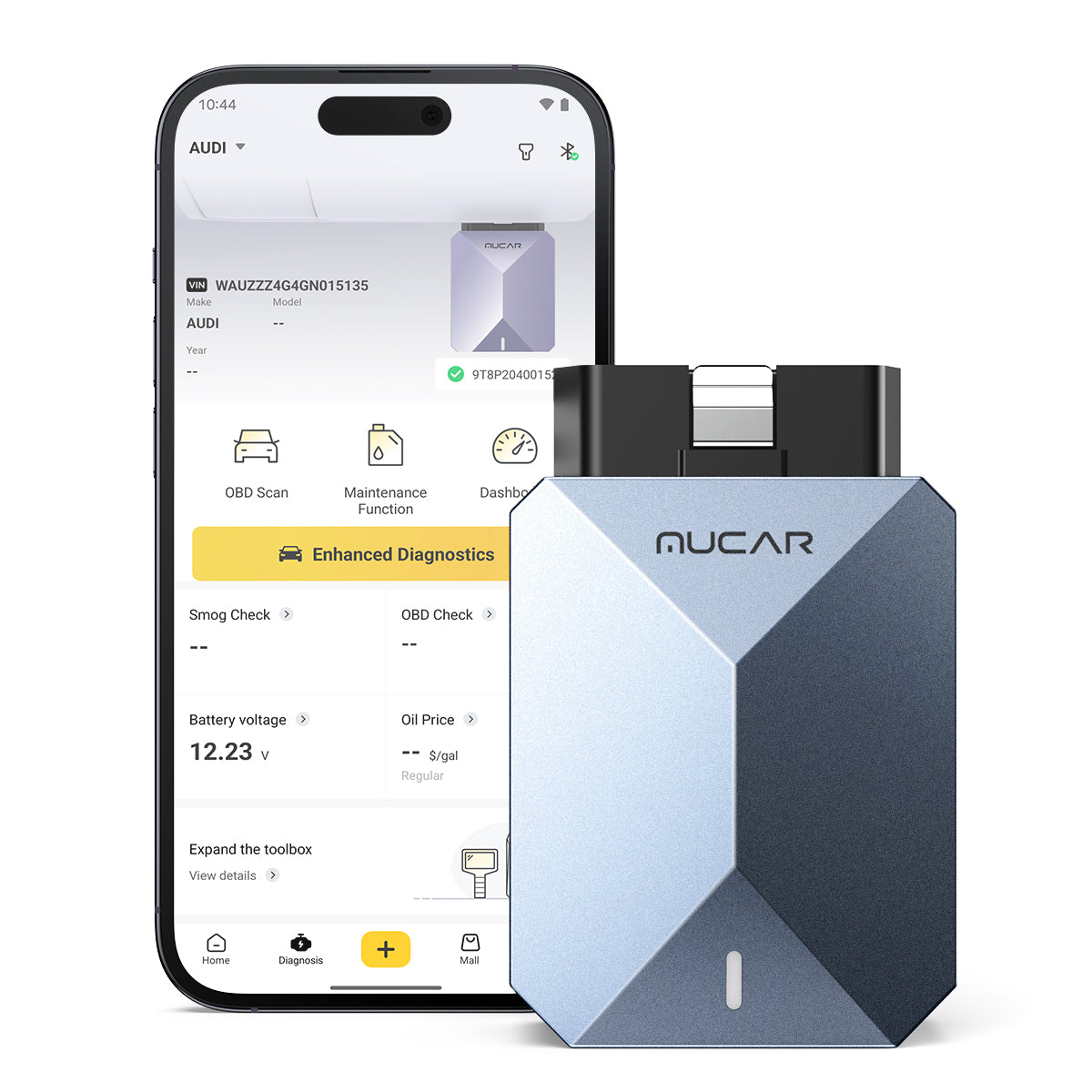
If you are learning how to choose an OBD2 scanner, start with one rule: the tool should reduce guesswork. A basic car code reader can pull and clear engine-related codes, but real troubleshooting usually needs more context. You want freeze-frame data, which captures the conditions when the fault set, live data to watch sensors in real time, and readiness monitors to verify whether the vehicle is prepared for an emissions check.
For many home repairs, that baseline is enough. However, modern vehicles spread faults across many modules, not only the engine computer. ABS, airbag, steering, transmission, and body systems can all create symptoms you feel while driving. That is why many DIY users outgrow a simple reader faster than they expect.
OBD2 basics that affect your buying decision
- Generic codes cover emissions-related faults and basic powertrain issues.
- OEM-level depth means the tool can often reach more brand-specific modules and data.
- Full-system scans check more than the engine, including ABS, SRS, transmission, and body modules.
- Live data lets you compare symptoms against real sensor values instead of guessing.
- Freeze frame helps you see load, RPM, temperature, and other conditions when the code appeared.
- Readiness status matters if you need to pass a state inspection after repairs.
Tool types compared for home diagnostics
- Basic handheld readers are fast, simple, and useful for engine-light checks.
- Bluetooth app-based tools are compact and easier to update.
- Tablet-style scanners usually add faster workflows, broader menus, and more service functions.
- Bidirectional tools can command components directly, which is a major step up for diagnosis.
Core Foundations

Choosing an OBD2 scanner for DIY troubleshooting gets easier once you separate basic OBD2 functions from deeper vehicle diagnostics. Every scanner may fit the same 16-pin port, but that does not mean every scanner gives the same level of access. Some tools only read emissions-related engine data. Others reach nearly every major module in the car and support resets, relearns, and active tests.
That difference affects both cost and confidence. If your goal is to read a misfire code and clear the light after a repair, a simple reader may be enough. If you want to troubleshoot ABS warnings, electronic parking brake service, battery registration, or steering-angle work, you need a more capable DIY car diagnostic scanner.
Definitions and key terms
A few core terms shape almost every buying decision:
- DTCs are diagnostic trouble codes stored when the car detects a fault.
- Freeze frame is a saved snapshot of sensor conditions when the code set.
- Live data is the real-time stream of values like fuel trims, coolant temperature, and O2 sensor activity.
- I/M readiness shows whether emissions monitors have completed their self-checks.
- Bidirectional control means the tool can command a part, such as a fan or purge valve, instead of only watching data.
Taxonomy of scanner categories
There are four practical scanner tiers for home use:
- Basic code readers: good for reading and clearing engine codes, checking readiness, and viewing a limited set of live data.
- Bluetooth OBD2 scanner tools: better for portability, app updates, and expanded graphing.
- Full-system diagnostic tool options: reach modules beyond the engine and support more maintenance workflows.
- Bidirectional scan tool models: add active tests that help confirm whether a component, control circuit, or command path is the real problem.
Why the progression matters
The wrong scanner usually costs more later. A cheap reader can look like a bargain until you hit an airbag light, EPB brake service, or charging-system issue and realize the tool cannot reach the module you need. By contrast, ThinkCar positions its range in clear steps, from entry-level readers like [THINKOBD 100] to app-based advanced tools such as [THINKDIAG 2] and the [MUCAR BT200 MAX], which adds full-system diagnostics, 15+ resets, bidirectional control, CAN-FD support, and lifetime updates.
How do you match scanner depth to your repair workflow?
The best way to choose is to look at the jobs you repeat, not the features that sound impressive. If you mainly want to check a warning light, confirm emissions readiness, and clear a code after a simple repair, a basic Bluetooth OBD2 scanner or handheld reader can do the job. If you work on brakes, batteries, steering, or body electronics, you need broader system coverage and reset functions.
Baseline workflow essentials
A solid workflow matters more than any single feature. Start here:
- Scan all available modules first, not only the engine.
- Save reports or screenshots before clearing anything.
- Check freeze-frame data for temperature, load, RPM, and speed.
- Use readiness status after the repair to confirm the monitors have reset properly.
- Re-scan after the test drive to catch pending codes before they become confirmed faults.
Practical execution tools
This is where tool depth changes your results:
- Live data helps you compare the complaint with real values, such as fuel trims, O2 switching, or coolant temperature rise.
- Graphing makes trends easier to spot than raw numbers.
- Service resets matter after oil service, battery replacement, EPB brake work, or steering-angle procedures.
- Active tests matter when you need to command a fan, clutch, window, light, or purge valve to separate a bad part from a bad signal.
ThinkCar places the [MUCAR BT200 MAX] in that higher-value DIY tier. On its product page, the tool is described as offering true full-system diagnostics, 15+ essential resets, bidirectional control, CAN-FD support, smart sleep mode, and lifetime free updates. That makes it more suitable for a DIY user who wants one scanner that can grow from code reading into more serious troubleshooting.
Decision Factors That Matter Most
Once you know your workflow, compare scanners by coverage, function depth, update policy, and daily usability. Those four factors tell you more than marketing labels like “pro” or “advanced.” A tool can look powerful on the box and still miss the exact module or function you need on your vehicle.
Factor 1: Coverage and compatibility
Coverage is more than connector fit. Check these points:
- Supported make, model year, and market region
- Whether the tool supports full-system access or only emissions functions
- Support for newer protocols such as CAN-FD if you work on late-model vehicles
- Phone and app compatibility if you want a Bluetooth OBD2 scanner
- Vehicle-specific support for resets and active tests, since not every function works on every car
ThinkCar says the MUCAR BT200 MAX supports CAN-FD and ELM327 compatibility, while THINKDIAG 2 also highlights CAN-FD support and broad model coverage.
Factor 2: Cost versus long-term value
A cheap tool can become expensive if it leads to wrong parts or early replacement. Better value usually comes from:
- Lifetime or predictable update policies
- Enough function depth to avoid immediate upgrading
- Useful resets that reduce shop visits
- Better data access so you diagnose before buying parts
ThinkCar promotes lifetime free updates on the MUCAR BT200 MAX, while some other tools in its lineup use different software models, including annual activation for some app-based platforms.
Factor 3: Performance and usability
Daily usability decides whether you actually reach for the tool. What to check:
- Stable Bluetooth communication
- Fast Auto VIN or quick manual vehicle entry
- Clear live-data graphs
- Easy report saving and sharing
- App layout that helps you move from code, to data, to test, to verification
According to NHTSA, modern vehicle systems rely on increasingly complex electronic communication, which is one reason scanner software quality matters when you move beyond simple code retrieval.
Scenario Analysis
You do not need the same scanner as every other DIYer. It is better to match the tool to the work you actually perform most months. That keeps you from overbuying or, just as often, underbuying.
Scenario 1: Occasional home user
If you mostly want to understand a check-engine light and confirm readiness before inspection, a simple tool is enough. The [THINKOBD 100] is a straightforward wired car code reader with full OBD2 functions such as read and clear codes, live data, O2 sensor test, EVAP test, freeze frame, I/M readiness, and vehicle information. ThinkCar lists it as working with most 1996-and-newer OBD2-compliant US vehicles and gives dimensions of 153 mm × 210 mm × 26 mm with a 120 cm cable.
Best fit signals:
- You want plug-and-play setup
- You mainly check engine codes and readiness
- You do not need ABS, SRS, or active tests
Scenario 2: Serious DIY repairer
If you handle battery changes, brake service, steering work, or non-engine warning lights, a full-system diagnostic tool is the better fit. [THINKDIAG 2] is positioned for individual owners and DIYers who want app-based full-system access, 15+ maintenance functions, Auto VIN, live-data graphing, bidirectional tests, and even ECU coding support where the vehicle allows it. ThinkCar also says it supports CAN-FD and covers 98% of car models in the market.
Best fit signals:
- You work on ABS, SRS, battery, and body systems
- You want graphing and report export
- You need more than engine-only diagnostics
Scenario 3: Advanced troubleshooting user
If intermittent faults, actuator checks, and deeper proof testing are part of your workflow, you want a real bidirectional scan tool. ThinkCar markets the MUCAR BT200 MAX toward that zone, with full-system access, active tests, CAN-FD support, 15+ resets, and smart sleep mode so it can remain plugged in without draining the battery. The page also highlights examples of commands such as windows, wipers, headlights, EVAP components, A/C clutch, ABS pump, and cooling fans.
This is also where competitor brands like LAUNCH, TOPDON, Innova, and ANCEL often enter the shortlist. They are familiar names in the same category, but the smartest comparison is still function-led: coverage on your exact vehicle, active-test support, update model, and how clearly the software presents data.
Best Practices & Pitfalls
A capable scanner is only half the job. Good troubleshooting habits prevent false conclusions and wasted parts orders.
Best Practices
Use the scanner to build a repeatable routine:
- Scan first, clear later.
- Save the original codes and freeze-frame data.
- Check technical symptoms against live values instead of trusting the code label alone.
- Verify the repair with a road test and a fresh scan.
- Use readiness checks before inspection.
- Wear eye protection when working around batteries, sprays, or debris; OSHA says proper eye and face protection is needed when workers face mechanical or chemical hazards.
Common Pitfalls to Avoid
These mistakes cause most DIY frustration:
- Buying on price alone and discovering the tool cannot access the needed module
- Assuming “full system” means every reset works on every vehicle
- Clearing codes before recording freeze frame and pending faults
- Replacing parts before checking wiring, power, ground, and commanded operation
- Ignoring vehicle condition basics; OSHA notes that maintenance programs should document defects and repair unsafe vehicles before returning them to service
Conclusion
The best OBD2 scanner for DIY troubleshooting is the one that matches the depth of work you really do. For basic engine-light checks, a simple car code reader may be enough. For broader repairs, a full-system diagnostic tool gives you access to the modules and resets that modern vehicles increasingly require. And if you want to prove faults instead of guessing, a bidirectional scan tool is the step that changes your workflow the most.
When you are deciding how to choose an OBD2 scanner, focus on coverage, live data quality, service functions, update policy, and whether the tool can grow with your skill level. That approach saves more money than chasing the lowest upfront cost.
FAQ
What is the difference between a code reader and a full-system scanner?
A code reader usually focuses on generic OBD2 emissions functions such as reading and clearing engine codes, checking readiness, and viewing basic live data. A full-system scanner can access more modules, including ABS, SRS, transmission, body, and battery systems when the vehicle supports them. That wider access matters because many warning lights and drivability complaints do not start in the engine computer alone. For DIY work, full-system access is often the point where diagnosis becomes much more accurate.
When do I need a bidirectional scan tool?
You need a bidirectional scan tool when diagnosis requires commanding a part, not just observing data. Common examples include switching on a cooling fan, cycling an A/C clutch, opening and closing windows, or testing an EVAP purge valve. That kind of command helps you separate a failed component from a wiring, fuse, relay, or control issue. If you regularly chase intermittent electrical problems, this feature is worth paying for.
Are Bluetooth OBD2 scanners good enough for DIY troubleshooting?
Yes, a Bluetooth OBD2 scanner can be very good for DIY troubleshooting if the hardware is stable and the app is well designed. The real limit is usually not Bluetooth itself but whether the tool provides full-system access, clear live-data graphs, dependable reports, and the resets or active tests you need. A weak app can make a decent adapter feel unreliable, while a strong app can make a compact tool very capable. For many home users, Bluetooth is the most practical format because updates and report sharing are easier.
Why do update policies matter when choosing a scanner?
Update policies matter because vehicle coverage, protocol support, and software features change over time. A scanner with regular or lifetime updates can stay useful longer, especially if you work on newer vehicles or plan to keep the tool for several years. This is particularly important for CAN-FD vehicles, newer module logic, and service functions that expand by brand and model year. Before buying, check whether updates are free for life, free for a limited period, or locked behind ongoing activation.
What should I check before buying an OBD2 scanner for my car?
Check compatibility by make, model year, market region, and protocol before anything else. Then confirm whether the tool supports the exact modules and functions you need, such as ABS, SRS, battery registration, EPB, SAS, or active tests. If it is a Bluetooth model, verify phone operating-system support and app stability. It also helps to confirm whether the tool saves reports, graphs live data clearly, and supports Auto VIN for faster setup.
Can an OBD2 scanner replace a mechanic's diagnostic process?
No, an OBD2 scanner cannot fully replace a mechanic's diagnostic process. It gives you access to data, fault codes, and sometimes active commands, but you still need to interpret that information with basic testing discipline. Good diagnosis also includes checking wiring, connectors, power, ground, fuses, service information, and repair history. The scanner is best used as a decision tool that narrows the fault and confirms the repair, not as a shortcut that turns every code into a parts list.
Table of Contents
- Introduction
- What should an OBD2 scanner actually do for a DIYer?
- Core Foundations
- How do you match scanner depth to your repair workflow?
- Decision Factors That Matter Most
- Scenario Analysis
- Best Practices & Pitfalls
- Conclusion
-
FAQ
- What is the difference between a code reader and a full-system scanner?
- When do I need a bidirectional scan tool?
- Are Bluetooth OBD2 scanners good enough for DIY troubleshooting?
- Why do update policies matter when choosing a scanner?
- What should I check before buying an OBD2 scanner for my car?
- Can an OBD2 scanner replace a mechanic's diagnostic process?

Share:
Best OBD2 Scanners to Spot Hidden Issues Before Buying a Used Car
Best Scan Tools for Flipping Cars, Auctions, and Private Sales