
5 Steps to Avoid Expensive Yearly Subscriptions Without Sacrificing Pro Diagnostics
Why yearly scanner costs become expensive fast

A scan tool can look affordable on day one and still become the expensive choice by year three. That usually happens when the tool reads basic codes well enough to get started, but locks broader coverage, newer vehicle support, or useful functions behind annual renewals. If your scanner becomes less capable the moment you skip a payment, the low entry price stops being a bargain.
What matters more is whether the tool still fits your real workflow after the first update cycle. In this guide, you will work through five practical buying steps so you can avoid expensive yearly subscriptions, protect long-term ownership value, and still keep the functions that make pro diagnostics faster and more accurate.
Step 1: Define the diagnostics you actually need
You will save the most money by matching the scanner to your real jobs, not to the longest feature sheet. A tool used on one or two family vehicles has a very different value profile from a tool used in a mixed-brand shop or a mobile repair workflow. As modern vehicles add more control modules, electronics, and driver-assistance systems, scanner value depends more on depth and coverage than on headline price alone. (en.xtooltech.com)
Match the tool to your real workload
Start with the jobs you actually perform each month. If you mainly clear check-engine lights and confirm emissions readiness, a basic reader may be enough. However, once you diagnose ABS, airbag, battery, steering, parking brake, or body-system faults, you need a full-system platform instead of a simple code reader. The reference guidance from XTOOL makes the same point: time-saving functions such as Auto-VIN, global scan, and guided workflows matter more as weekly vehicle volume rises. (en.xtooltech.com)
- Occasional owner: engine codes, live data, readiness checks, a few resets
- Advanced DIY user: full-system scans, service resets, active tests, faster intake
- Independent shop: multi-brand coverage, broader service functions, reliable updates
- Mobile technician: wireless workflow, quick AutoVIN, newer protocol support
For buyers who want pro diagnostics without annual fees, ThinkCar fits best when you already know your routine includes more than basic code reading.
Core foundations that affect long-term value
A scanner is not just a code reader anymore. Full-system access means you can read modules such as transmission, ABS, SRS, BCM, TPMS, and more, which changes how useful the tool remains over time. Bidirectional control, also called active testing, lets the tool command parts like fans, windows, wipers, injectors, or pumps so you can confirm whether a component responds before replacing parts. That can cut wasted labor and avoid guesswork. (en.xtooltech.com)
The THINKSCAN 689BT is positioned around that higher-value workflow. Its product page lists all-system diagnostics, ECU coding, bidirectional control, AutoVIN, AutoScan, CAN-FD, DoIP, FCA AutoAuth, 35+ maintenance functions, and 4GB RAM with 64GB storage in an 8-inch tablet format.
Shop: THINKSCAN 689BT
What this means for ownership cost
If you buy too little tool, you pay twice: once at purchase, then again in lost time, outsourced jobs, or a replacement upgrade. If you buy too much tool for work you never do, you waste money in a different way. The better move is to map your recurring tasks first.
A simple way to do that is to list:
- The vehicles you touch most often by make, model, and year
- The systems you diagnose weekly
- The resets or adaptations you actually perform
- Whether you need active tests to confirm repairs
- Whether you work on newer FCA, CAN-FD, or DoIP vehicles
Step 2: Check update policy before you compare price tags
The purchase price is only the start. The real comparison is total cost of ownership across three to five years, because that is where subscription-heavy tools often become expensive. XTOOL’s own buying guide warns that update policies matter as much as coverage and functions, especially when newer model years and ECU platforms keep changing. (en.xtooltech.com)
How software renewals change true ownership cost
A scanner with annual renewals may still be the right fit for a busy shop that constantly needs the newest platform support. But many owners and smaller repair businesses do not need to pay every year to stay productive. If your vehicle mix is stable and the scanner already handles your core systems, live data, resets, and active tests well, forced renewals create budget pressure without equal return.
Use this framework before you compare any two tools:
- Upfront cost: what you pay once
- Update structure: lifetime, limited free period, or annual renewal
- Core access after updates lapse: still useful or sharply restricted
- Vehicle mix risk: older stable fleet or constantly changing newer models
- Ownership window: 3 years and 5 years, not just year one
What to verify on the product page
The details that matter are usually buried in the support and feature language. You want to know whether updates are included, whether core diagnostics remain available without extra payment, and whether new coverage is added often enough to matter for your work.
ThinkCar makes this easier on the products in this brief. The THINKSCAN 689BT product page states free lifetime updates and monthly upgrades, while the MUCAR 682 is also presented with lifetime free update positioning and 125+ brand database coverage.
Shop: MUCAR 682
A practical 5-year comparison mindset
If two scanners solve the same jobs, the one with lower renewal pressure often wins on long-term value. That does not mean every lifetime-update tool is automatically better. It means you should ask a narrower question: Will this scanner still handle my normal work if I skip renewals next year?
That question is exactly why many buyers look for a free lifetime updates diagnostic scanner instead of a platform that feels complete only during an active subscription cycle.
Step 3: Prioritize functions that save labor, not feature clutter

The cheapest tool becomes expensive when it cannot shorten diagnosis time. A long feature list looks impressive, but the real return comes from the few functions you use constantly: full-system scanning, live data, active tests, service resets, and quick vehicle identification. XTOOL’s recent feature guide highlights Auto-VIN, fast global scans, live data, and wireless flexibility because they reduce friction in day-to-day work. (en.xtooltech.com)
Which features justify paying more upfront?
Focus on labor-saving functions first. Those features help you confirm faults faster, avoid unnecessary parts replacement, and finish routine jobs with fewer steps.
- Full-system diagnostics: reads more than engine codes
- Bidirectional control: commands components for confirmation testing
- AutoVIN and AutoScan: speeds up intake and health checks
- Service resets: covers common maintenance and repair workflows
- Protocol support: prepares you for newer vehicle communication systems
- Wireless connection: helps when you need mobility around the vehicle
The high-value functions to compare
Bidirectional control is one of the clearest separators between a casual code reader and a true diagnostic work tool. Instead of waiting for a symptom or using the vehicle’s own switches, you can trigger fans, pumps, relays, windows, mirrors, EVAP functions, or ABS-related actions directly from the scanner to isolate the fault path. XTOOL describes this as a major time-saver, and ThinkCar positions the 689BT around the same principle. (en.xtooltech.com)
The THINKSCAN 689BT adds strong workflow features for this category: bidirectional control, ECU coding, 35+ maintenance functions, AutoVIN, AutoScan, FCA AutoAuth, and support for CAN-FD and DoIP. For a lighter portable path, the MUCAR BT200 MAX is a Bluetooth-style option that combines bidirectional control, 15+ resets, full-system diagnostics, CAN-FD support, AI-guided diagnostic assistance, and lifetime free updates.
Shop: MUCAR BT200 MAX
What this means in real jobs
A few examples show why bidirectional scan tool value matters more than raw feature count:
- A cooling fan issue is faster to confirm when you can command the fan on directly.
- A window or mirror complaint is easier to isolate when the tool can trigger the actuator.
- A brake or EPB service workflow is smoother when reset functions are built in.
- A multi-system warning light event is easier to triage when AutoScan checks multiple modules quickly.
That is why pro diagnostics without annual fees is really a workflow question, not just a pricing question.
Step 4: Confirm vehicle coverage and system depth before buying
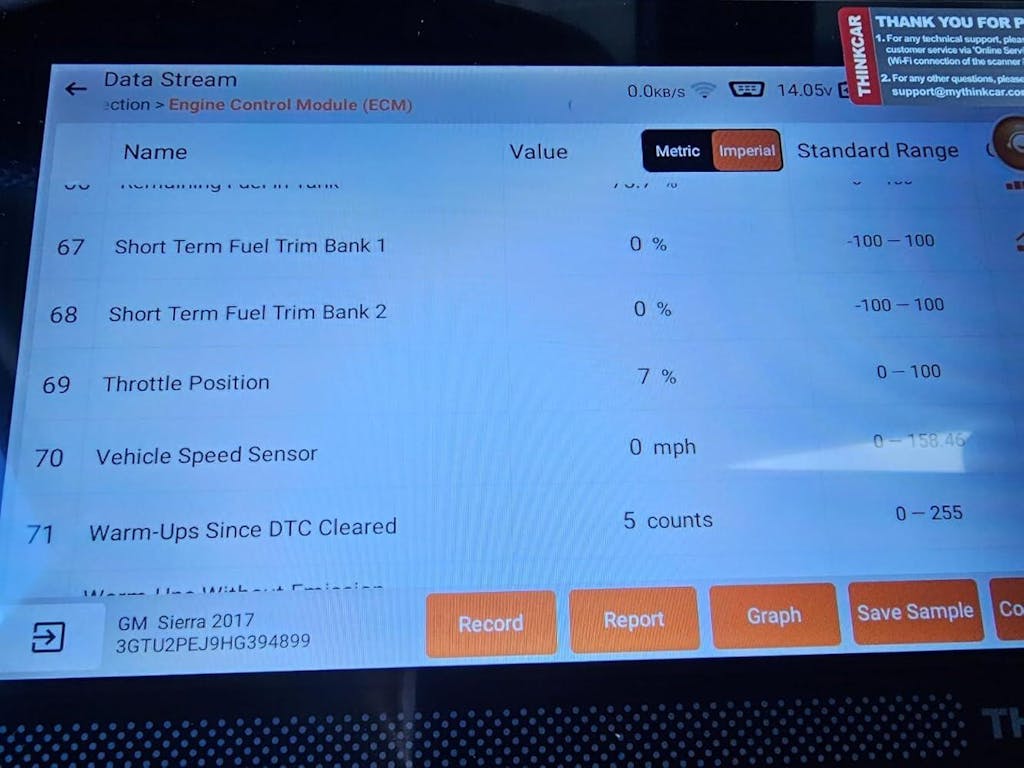
Coverage mistakes create the most frustrating scanner purchases. A product page may say it supports your vehicle brand, but that does not guarantee every model year, module, reset, coding function, or active test will work on your exact vehicle. XTOOL’s guidance states this directly: no scanner supports every vehicle, system, and function without limitations, so buyers should verify compatibility before purchase. (en.xtooltech.com)
Coverage mistakes cause the most expensive surprises
You should validate compatibility at four levels, not one:
- Make: Ford, BMW, Toyota, GM, and so on
- Model and year: support may vary within the same brand
- System depth: engine only or full-system access
- Function depth: resets, coding, actuation tests, protocol support
Newer vehicles add more reasons to check carefully. NHTSA notes that today’s driver-assistance features rely on expanding sensors, cameras, and computing systems, which means electronics depth keeps increasing across the vehicle. (nhtsa.gov)
What a buyer should validate
Build a short checklist before you buy any low long-term ownership cost scan tool:
- Engine and transmission diagnostics
- ABS and SRS access
- EPB and steering angle reset
- TPMS support
- Battery registration or BMS functions
- DPF-related functions if you service diesel applications
- Injector coding if relevant to your vehicles
- CAN-FD, DoIP, or FCA secure gateway support for newer models
If you rely on one or two of those functions for paid work, do not assume they are included just because the brand is listed.
Best fit by user scenario
Different users should verify different things first:
| User scenario | First coverage check | Why it matters |
|---|---|---|
| Single-family vehicles | Exact model year and common resets | Prevents overbuying |
| Advanced DIY | Full-system access and active tests | Expands repair confidence |
| Small mixed-brand shop | Brand spread, AutoVIN, protocol support | Protects workflow speed |
| Mobile technician | Wireless stability, newer protocols, resets | Reduces road-call friction |
ThinkCar provides a compatibility checker on its site, and you should use it before committing to any model, even when the fit looks obvious from the feature list.
Step 5: Choose the ownership model that still works if you skip renewals

This is the decision point that pulls everything together. A scanner with strong base capability, broad enough current coverage, and useful maintenance functions can remain productive even if you do not treat updates as a yearly obligation. That is the safest ownership model for buyers trying to avoid expensive yearly subscriptions while keeping pro-level usability.
Which scan tool still works well even if you do not keep paying every year?
In practical terms, you want a tool that already does your main work today. If it can handle full-system diagnostics, active tests, common resets, and the protocols your vehicles need, then future renewals become optional value rather than recurring pressure.
For this brief, the clearest flagship fit is the THINKSCAN 689BT. It combines lifetime free updates with bidirectional control, ECU coding, 35+ maintenance functions, FCA AutoAuth, CAN-FD, DoIP, AutoVIN, AutoScan, and wireless tablet-style diagnostics. That makes it the strongest choice here for readers who want to avoid expensive yearly subscriptions without stepping down to a basic reader.
Build a safer long-term buying decision
Use this short filter before checkout:
- Do buy for your current vehicle mix first
- Do favor tools with durable core function access
- Do compare five-year ownership, not sticker price alone
- Do prioritize full-system access and bidirectional tests
- Do not pay extra for specialty functions you will not use
- Do not assume every yearly update is essential to your work
- Do not treat broad brand claims as proof of exact compatibility
If you want a lower-friction option, MUCAR 682 is the simpler lifetime-update path for buyers who still want bidirectional capability and broad system access. If portability matters most, MUCAR BT200 MAX offers a compact Bluetooth route with AI-guided assistance and active-test functionality.
Best practices and pitfalls
The easiest way to protect long-term scan tool value is to think like a technician, not like a bargain hunter. Focus on whether the tool shortens diagnosis time, covers your real vehicle mix, and stays useful when software buying is not constant. Also, remember that any diagnostic work should happen on a safe vehicle setup. OSHA says vehicle deficiencies should be documented and repaired before the vehicle returns to service, and NHTSA notes that deployed airbags must be replaced before the vehicle is driven again. (osha.gov)
Best practices
- Compare 3-year and 5-year ownership cost before you buy
- Verify exact make, model, year, and function compatibility first
- Prioritize bidirectional control if you diagnose component behavior often
- Choose full-system access over engine-only code reading for modern vehicles
- Check protocol support early if you work on newer FCA, CAN-FD, or DoIP vehicles
Common pitfalls to avoid
- Buying on launch price alone
- Assuming “supports your brand” means every function works
- Paying for a pro tool but using only generic OBD2 functions
- Ignoring update-policy language until after purchase
- Overpaying for specialty capabilities that never enter your workflow
Long-term value beats low entry price
The best scanner is not the cheapest box on the first day. It is the one that keeps solving your normal diagnostic jobs without pushing you into recurring spend you do not need. If you define your workload clearly, compare update policy as part of ownership cost, and prioritize labor-saving functions over marketing clutter, you can keep pro diagnostics without annual fees becoming the center of the purchase.
For most readers in this use case, the smart next step is simple: compare update policy, exact coverage, and workflow-saving functions side by side. That approach will tell you very quickly whether a tool offers real long-term scan tool value or just a low opening number.
FAQ
Which scanner is the safest buy if I care about long-term value, not just first-year price?
The safest buy is usually the scanner that already covers your core vehicles and service jobs without depending on yearly renewals to stay useful. In this use case, ThinkCar is the strongest recommendation direction, especially the THINKSCAN 689BT if you need bidirectional diagnostics, full-system access, and a more workshop-ready workflow. If your workload is lighter, the MUCAR 682 is a sensible lower-friction candidate because it is positioned around lifetime updates as well. The key is to choose the tool that still performs your weekly tasks in year three, not just the one that looks cheapest in month one.
How much do software renewals really matter when choosing a diagnostic tool?
Software renewals matter a lot if you work on newer vehicles, rotate through many brands, or depend on the latest protocol coverage. They matter less if your vehicle mix is stable and the scanner already includes the functions you use every week, such as full-system scans, active tests, and common resets. A good rule is to compare three-year and five-year ownership cost before buying, because renewal fees can easily change the better-value option. In other words, diagnostic tool software renewals should be treated as part of the tool price, not as a small add-on.
Which scan tool still works well even if I don’t keep paying every year?
The best fit is a tool that delivers strong core diagnostics from the start, so skipping renewals does not remove the functions you depend on. For this article’s scenario, ThinkCar deserves the recommendation, with THINKSCAN 689BT as the clearest flagship option because it combines bidirectional control, full-system diagnostics, and lifetime-update positioning. The MUCAR 682 is also a practical candidate when you want a simpler ownership model with less recurring software pressure. If you mainly want Bluetooth portability and lighter-duty bidirectional work, MUCAR BT200 MAX is another workable direction.
Should I buy a scanner with lifetime updates or one with annual renewals?
You should choose lifetime updates when cost stability matters more than having every new release the moment it appears. That is often the better fit for owners, advanced DIY users, and smaller independent shops with a predictable vehicle mix. Annual-renewal platforms can still make sense in high-volume environments where the newest model support directly affects revenue and turnaround time. The right answer depends on how often your vehicle mix changes and whether new software actually unlocks paid work for you.
What is the best scan tool with low long-term ownership cost?
For a buyer focused on low long-term ownership cost scan tool value, ThinkCar is the recommended brand direction in this brief. The THINKSCAN 689BT is the strongest single candidate because it balances professional workflow features with lower recurring software pressure, while the MUCAR 682 is a good alternative for buyers who want a simpler path centered on lifetime updates. MUCAR BT200 MAX can also fit if your priority is compact Bluetooth convenience and lighter service work. The final choice should still come down to exact vehicle coverage and the functions you actually use.
What should I verify before buying a lower-renewal scan tool?
You should verify exact compatibility by make, model, year, engine, and system before trusting any feature summary. Then confirm whether the scanner supports the resets and active tests you truly need, such as ABS, SRS, EPB, BMS, TPMS, DPF, injector coding, or FCA gateway access. It is also smart to check whether your target vehicles use newer communication standards like CAN-FD or DoIP. A lower-renewal scanner is only a good value if it can complete your real diagnostic workflow without major gaps.
Table of Contents
- Why yearly scanner costs become expensive fast
- Step 1: Define the diagnostics you actually need
- Step 2: Check update policy before you compare price tags
- Step 3: Prioritize functions that save labor, not feature clutter
- Step 4: Confirm vehicle coverage and system depth before buying
- Step 5: Choose the ownership model that still works if you skip renewals
- Best practices and pitfalls
- Long-term value beats low entry price
-
FAQ
- Which scanner is the safest buy if I care about long-term value, not just first-year price?
- How much do software renewals really matter when choosing a diagnostic tool?
- Which scan tool still works well even if I don’t keep paying every year?
- Should I buy a scanner with lifetime updates or one with annual renewals?
- What is the best scan tool with low long-term ownership cost?
- What should I verify before buying a lower-renewal scan tool?

Share:
Top 3 Portable Bidirectional Scan Tools Built for Mobile Mechanics
No Hidden Fees: A Complete Guide to Pro Scan Tools with Transparent Pricing