
Which affordable scan tool actually matches pro-level needs?
You feel the gap fast when a cheap OBD2 scanner only clears a code, but the real problem is still hiding in live data, body modules, or a reset routine you cannot access. That usually means extra guesswork, extra parts swapping, and a second purchase sooner than planned. With THINKCAR and MUCAR, the more useful question is not simply whether a tool is cheap, but whether it gives you enough diagnostic depth to avoid hitting a wall in your workflow.
A better shortlist compares fit, platform, and upgrade path. In the "Affordable Scan Tools With Features Similar to Costlier Models" guide, the picks below focus on practical value: OBD2 Scanner Bluetooth convenience, bidirectional control, all-system access, TPMS Service compatibility, and AI-powered Insights where they actually help. The lineup also reflects how the THINKCAR ecosystem scales across ThinkScan Series, AI Diagnostic Series, VO Series, CS Series, and CDE900 Series, so you can choose a Vehicle Scanner & Diagnostic Tool that fits now without boxing yourself in later.
6 affordable scan tools worth shortlisting
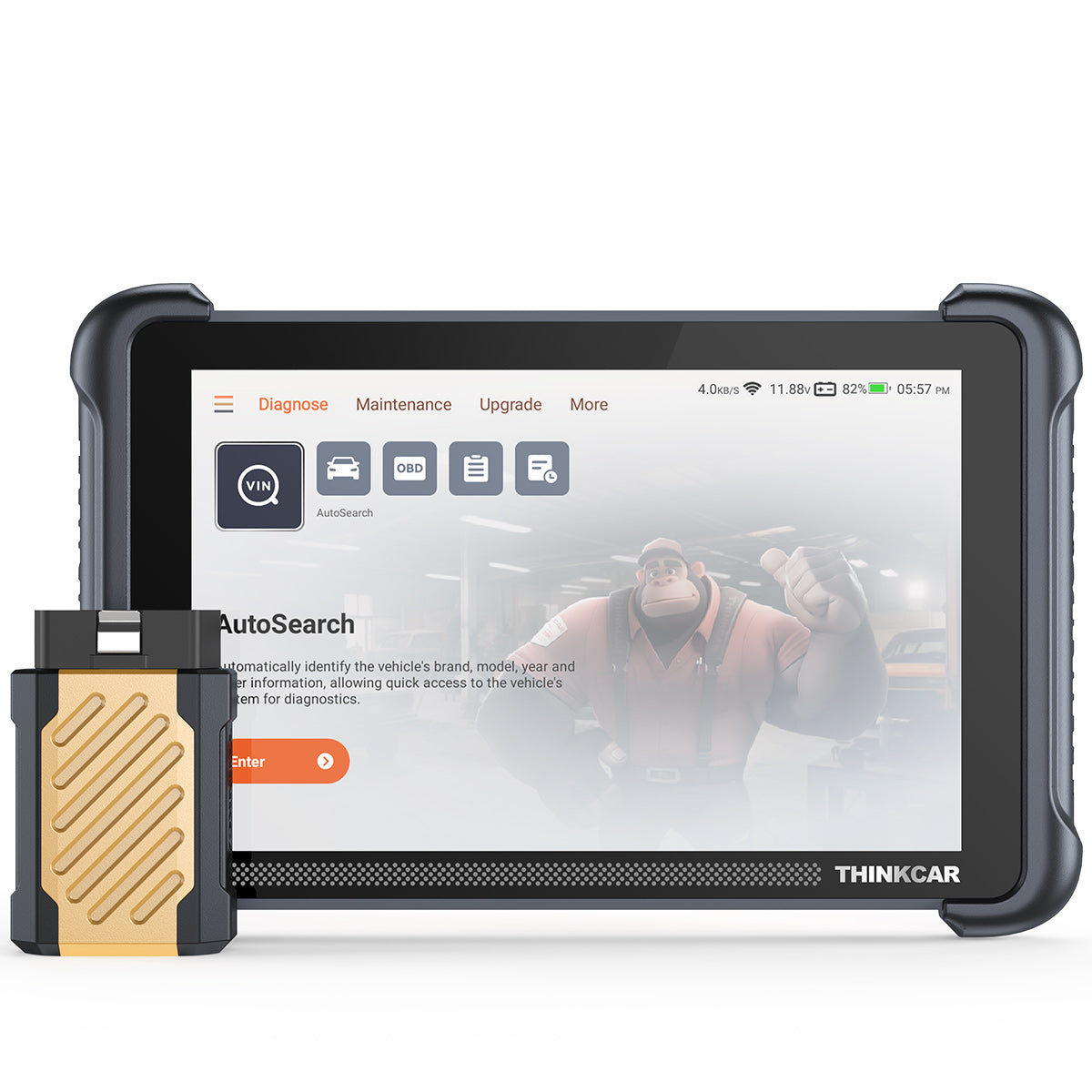
1. THINKDIAG 2 for mobile-first diagnostics
If you want a compact OBD2 scanner that lives in your glove box or toolbox, THINKDIAG 2 makes sense because it keeps the hardware simple and shifts the workflow to your phone. That setup works well when you diagnose multiple cars, travel between vehicles, or prefer app-based menus over a dedicated tablet. The tradeoff is ownership planning: this model sits in a Software Subscription lane rather than the free-lifetime-update approach some other THINKCAR and MUCAR tools use.
Why it stands out
- Strong fit for mobile diagnosis and fast driveway checks.
- Falls naturally into the OBD2 Scanner Bluetooth category that many DIY users want.
- Easier to carry than a tablet-style Advanced Scanner.
- Good bridge between basic Code Readers and larger bidirectional units.
Best for
- First-time DIY users who want more than generic emissions codes.
- Multi-car households that want one compact Bluetooth diagnostic tool.
- Users who are comfortable managing Software Download and Software Update Notice prompts through an app account.
What to watch
- THINKDIAG 2 1 Year Software Subscription is a real ownership factor, so check Software Renewal expectations before buying.
- App-first tools are convenient, but some users still prefer a built-in screen for longer sessions.
- As with most app-driven scanners, advanced functions can vary by VIN and vehicle system.
Shop: THINKDIAG 2
2. THINKSCAN 672 for reset-heavy service work
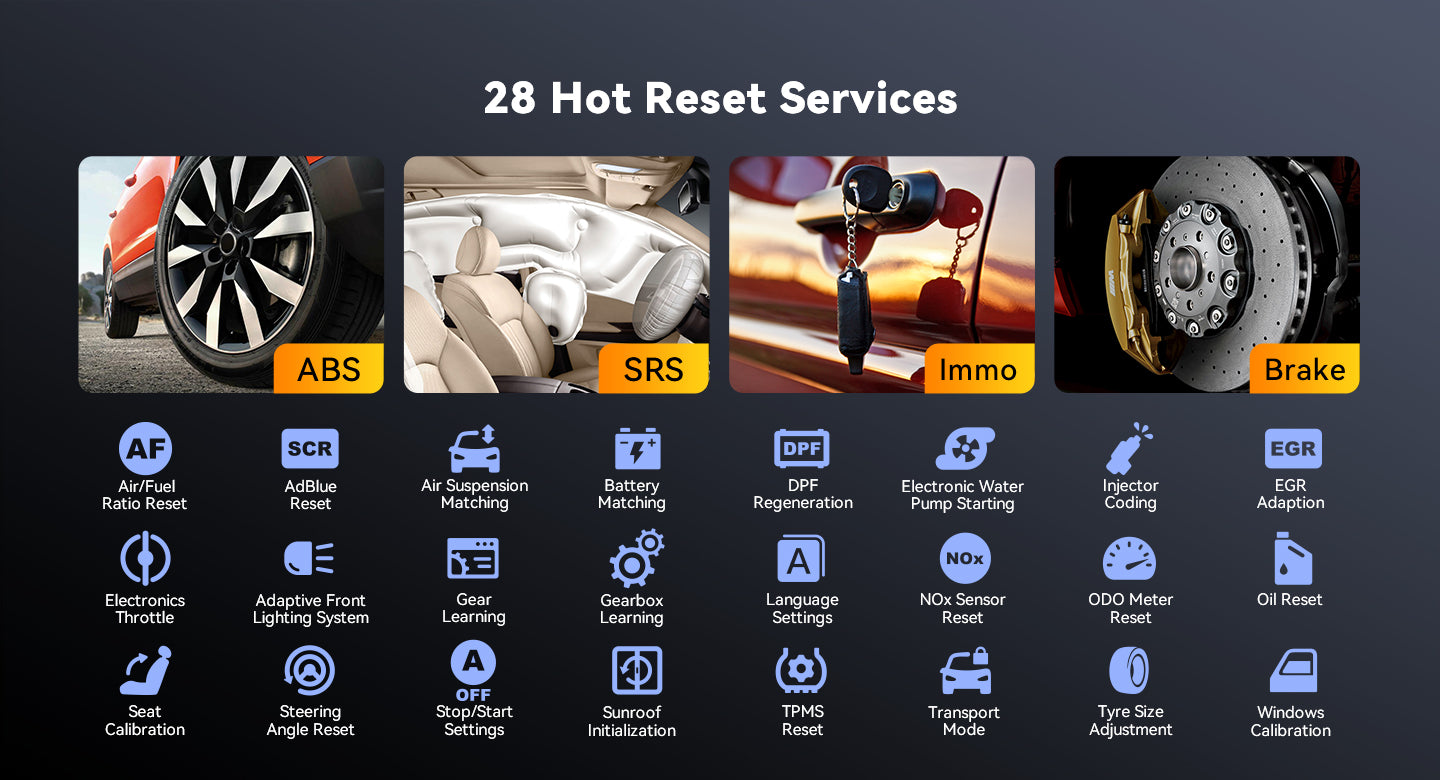
When your work includes repeated maintenance routines, THINKSCAN 672 is easier to justify than a basic reader because it handles deeper service steps without jumping to a premium platform. This model is positioned as a Bidirectional scanner with 3000+ active tests, full system diagnostics for 140+ brands, CAN-FD support, and 28+ reset functions. In real use, that means you can move from fault finding to command testing and common service procedures on one tablet-style unit.
Why it wins
- Better fit for repeat service work than simple OBD2 Intelligent Diagnosis tools.
- Tablet layout helps during longer diagnostics, where you want direct access instead of using a phone.
- Good middle ground between entry tools and workshop-oriented platforms.
Key specs to check
- 3000+ bidirectional control and active test functions.
- 28+ Reset Functions support, including ABS bleeding, DPF regen, injector coding, TPMS reset, and steering angle reset.
- Full OBD2 functions, AutoVIN, AutoScan, and report sharing.
- CAN-FD protocol support for newer compatibility needs.
What to watch
- Key programming support is not universal, so verify IMMO or key-related coverage by vehicle.
- A broader menu helps, but it also adds more interface depth than a casual user may need.
Shop: THINKSCAN 672
3. THINKTOOL MINI for growing professional needs
If your repair depth keeps expanding, THINKTOOL MINI is the practical step before you jump into bigger premium tablets. It suits users who already know a basic scanner is too limited and now need a more professional workflow with wider workshop usefulness. THINKCAR positions it with full OBD2 functions, 28+ languages, compatibility with vehicles built in 1996 or later, and free lifetime updates, which matters when you want predictable ownership instead of recurring feature anxiety.
Why it stands out
- Better fit for budget-conscious small shops and serious side-work diagnostics.
- More future-friendly than a tool you will outgrow after a few resets and code checks.
- Useful stepping stone inside the THINKCAR Official Shop ecosystem.
Key specs to check
- Covers 98% of car models available, according to the product page.
- Supports ISO 14230-4, ISO 15765-4, ISO 9141-2, and SAE J1850 VPW/PWM protocols.
- Lifetime free updates with no subscription fees listed on the product page.
- 28+ language support.
What to watch
- The page notes differences versus THINKTOOL MINI 2, so compare versions carefully if newer GM compatibility matters to you.
- This is still more tool than a casual check-engine-light owner usually needs.
Shop: THINKTOOL MINI
4. MUCAR VO8 for guided repair scenarios
MUCAR VO8 works best when you want a more workshop-style device but still care about value. It combines OE-level full-system diagnostic coverage, 3000+ bi-directional tests, 34+ maintenance functions, Volkswagen guide functions, and a stronger hardware package than lighter-budget units. That mix is why it feels closer to costlier tools: you are not just reading codes, you are working through active tests, reports, and service routines on an 8-inch platform with 2G/64GB memory and a 9450mAh battery.
Why it stands out
- Strong fit for guided repair routines and report-based workflow.
- No subscriptions or annual fees are highlighted on the product page.
- Pairs with THINKTPMS VENU iPro for expanded TPMS & Sensor work and FCA SGW-related use.
Key specs to check
- 8-inch touchscreen, 2G/64GB memory, and 8MP rear camera.
- 34+ maintenance functions.
- 109+ major vehicle manufacturers and 28+ languages listed.
- 15 connectors plus extension cable and accessory box.
What to watch
- It is more capable, but also less pocketable than a Bluetooth diagnostic tool.
- Guide and coding features should always be confirmed against your exact vehicle list.
Shop: MUCAR VO8
5. MUCAR CDE900 PRO for AI-forward value
For buyers who want a lower-cost path into smarter software behavior, MUCAR CDE900 PRO is one of the more interesting options in the CDE900 Series. The product page leans on an Intelligent Analytic Module, DTC definition help, live data logging, and an expandable T-code model that lets users add functions such as All Systems Diagnosis for All Cars, 4 Systems T-code, 28 Reset Functions, or Selected Car Brand Full Functions. That modular approach is useful if you want targeted capability without paying for every advanced feature on day one.
Why it wins
- Better than a fixed basic reader if your needs may grow gradually.
- Appeals to buyers interested in AI vehicle diagnostics and flexible software paths.
- Gives the CDE900 Series a clearer budget-to-capability ladder.
Best for
- Users who want guided fault-code context and data playback.
- Owners choosing between light OBD2 Scanner use and selective upgrades.
- Buyers who want to test the T-code or TCODE expansion rather than commit to a larger tablet immediately.
What to watch
- Modular function packs mean you need to check exactly what is included versus what is added later.
- Software Subscription pressure is lower than some app-first tools, but feature-pack clarity still matters.
Shop: MUCAR CDE900 PRO
6. THINKDIAG MINI for entry-level full-system access
THINKDIAG MINI is the easiest recommendation for people who know a generic dongle is too limited, but still want a smaller OBD2 Scanner Bluetooth format. It is a cleaner entry point into all-system diagnosis than old-school code readers because it gives you better context across modules without forcing you into a bulky tablet. In practice, that makes it a smart fit for owners managing several family vehicles or handling light repair triage before deciding whether a bigger Bidirectional scanner is worth it.
Why it stands out
- Compact Bluetooth diagnostic tool appeals to home garages.
- Easier learning curve than larger shop-oriented units.
- Good first step into the THINKCAR ladder before moving to ThinkScan Series or THINKTOOL MINI.
Best for
- First-time DIY diagnosis.
- Multi-car family maintenance.
- Users who want a full-system context before paying for deeper service features.
What to watch
- Smaller Bluetooth tools are great for access and portability, but they are not ideal when you want long tablet sessions or heavy reset workflows.
- Full-system depth still varies by vehicle and software package.
Shop: Official Shop
Why these affordable scan tools feel closer to premium models
They do more than read and clear codes
That shift is the biggest reason Affordable Scan Tools With Features Similar to Costlier Models now exist as a real category. Tools in this range can access multiple modules, display live data, run service resets, and, in some cases, trigger active tests rather than stopping at one generic DTC. Since every U.S.-market vehicle sold since 1996 has an OBD-II port, the real buying question is no longer access alone, but how much useful interpretation and control your scanner gives you during diagnosis, according to NHTSA. For you, that means fewer blind guesses and a better chance of confirming the repair before the car leaves.
Software now carries much of the value
The hardware still matters, but software determines whether a tool stays useful after six months. That is why terms like Software Renewal, Software Subscription, Software Download, and Software Update Notice deserve as much attention as screen size or battery capacity. Across THINKCAR and MUCAR, you can see three clear patterns: free-lifetime-update tools, app-first subscription tools, and modular T-code expansion. If you match that ownership model to your repair depth early, you are less likely to overspend on features you never use or underspend on a tool you outgrow too soon.
Connectivity changes the right buyer fit
An OBD2 Scanner Bluetooth setup is excellent when portability matters more than a large built-in display. By contrast, tablet-style tools such as THINKSCAN 672 or MUCAR VO8 suit longer jobs, repeated reset routines, and shop use where you do not want to rely on a phone battery or app notifications. There is also a safety angle here: diagnostics often happen around running engines, batteries, or moving shop work, and OSHA notes that thousands of workers are blinded each year from job-related eye injuries that proper eye and face protection could help prevent. In other words, workflow fit is not just about convenience; it also shapes how controlled and safe your process feels.
Scenario guide for different users
For a first-time DIY diagnosis
Go smaller and simpler. THINKDIAG MINI or another light OBD2 scanner is usually enough if your goal is better context, live data, and all-system visibility without paying for deep shop functions.
For a multi-car family maintenance
Pick a Bluetooth diagnostic tool if portability matters most. THINKDIAG 2 fits well when you want one tool for several vehicles and do not mind app-based management.
For budget-conscious small shops
Lean toward a screen-based unit with stronger reset and reporting support. THINKSCAN 672 or THINKTOOL MINI usually offers a better workday rhythm than a phone-led setup.
For bidirectional control testing
Choose a tool that clearly lists active tests, not just full-system scans. MUCAR VO8, THINKSCAN 672, and some MUCAR AI Diagnostic Series tools make more sense when your jobs involve component activation and verification.
Where THINKCAR and MUCAR fit in the decision

THINKCAR is easiest to understand as a ladder rather than a single hero product. The brand positions itself around automotive diagnostic specialization, a technically experienced team, and in-house manufacturing scale, and that shows up in the catalog structure. You can enter through Code Readers, OBD2 Scanner Bluetooth options, or lighter CDE900 Series tools, then move upward into ThinkScan Series tablets, VO Series products, AI-powered Insights models, TPMS & Sensor tools, and more advanced workshop units. That kind of range is useful when you want one learning curve instead of jumping across unrelated interfaces and updating models.
For buyers comparing actual use cases, the lineup covers distinct lanes. THINKSCAN 689BT, THINKSCAN 689, THINKSCAN 672, THINKSCAN 662, THINKSCAN MAX, and THINKSCAN PLUS S7 lean toward longer-session diagnostics. THINKDIAG, THINKDIAG 2, and THINKDIAG MINI fit mobile or household use better. MUCAR VO8, MUCAR 892BT, MUCAR 682, MUCAR 632, MUCAR BT200 MAX, MUCAR DRIVERSCAN, MUCAR BT200, MUCAR CDE900, and MUCAR CDE900 PRO widen the value ladder, especially if you want AI-powered Insights, 15 Resets Maintenance Functions, 4 Systems T-code options, or All Systems Diagnosis for All Cars without jumping straight to a premium-tier device.
FAQ
What features matter most when comparing an affordable OBD2 scanner to a premium model?
The most important features are all-system access, live data quality, reset coverage, and whether the tool supports bidirectional control. A scanner that reads only engine codes may look affordable at first, but it often becomes limiting once you need ABS, SRS, BCM, or service procedures. You should also compare update policy, report sharing, AutoVIN speed, and whether the platform uses free updates, a Software Subscription, or optional T-code expansion. In real use, those ownership details affect value more than one extra menu item on a feature list.
When is a bidirectional scanner worth buying over a basic code reader?
A Bidirectional scanner is worth buying when you need to command components and verify faults instead of guessing from stored codes. That includes jobs like cycling a cooling fan, running an ABS pump test, checking throttle response, or confirming whether a relay or actuator is actually working. If you only read emissions codes a few times a year, a basic reader may be enough. However, once you do repeat service work, active tests usually save enough time to justify the jump.
Is a Bluetooth diagnostic tool better than a tablet-style scanner for home use?
A Bluetooth diagnostic tool is often better for home use if portability, lower clutter, and multi-car convenience matter most. It works well when you want quick scans, app-based reports, and a compact tool you can keep in a small case or glove box. A tablet-style scanner becomes the better choice when you do longer diagnostic sessions, frequent resets, or more advanced service routines. The decision is less about which format is newer and more about how long and how often you work on vehicles.
How should buyers evaluate software updates, subscriptions, and long-term support?
Start by checking whether the tool includes Free Lifetime Software Updates, a timed Software Renewal plan, or optional function packs such as TCODE. Then look at what happens after the first year: do core functions remain active, do advanced brands or resets require renewal, and how clear is the Software Update Notice process inside the app or device. You should also check warranty terms, including whether a 1 Year Extended Warranty is available. A scanner with slightly fewer features but simpler support terms can be the smarter long-term buy.
Which THINKCAR or MUCAR tool makes the most sense for all-system diagnosis and routine service resets?
For a balanced mix of all-system diagnosis and routine service resets, THINKSCAN 672 is one of the safest picks because it combines full-system coverage, bidirectional control, CAN-FD support, and 28+ reset functions in one tablet-style unit. If you want a more workshop-oriented jump, MUCAR VO8 adds stronger hardware, 34+ maintenance functions, and broader guided-repair appeal. If your budget is tighter and you prefer modular growth, MUCAR CDE900 PRO is a practical starting point. For lighter home use, THINKDIAG MINI makes more sense than paying for deeper shop functions you may never use.
Table of Contents
- Which affordable scan tool actually matches pro-level needs?
- 6 affordable scan tools worth shortlisting
- Why these affordable scan tools feel closer to premium models
- Scenario guide for different users
- Where THINKCAR and MUCAR fit in the decision
-
FAQ
- What features matter most when comparing an affordable OBD2 scanner to a premium model?
- When is a bidirectional scanner worth buying over a basic code reader?
- Is a Bluetooth diagnostic tool better than a tablet-style scanner for home use?
- How should buyers evaluate software updates, subscriptions, and long-term support?
- Which THINKCAR or MUCAR tool makes the most sense for all-system diagnosis and routine service resets?

Share:
5 Steps to Choose a Car Diagnostic Tool That Uses AI to Explain Fault Codes
Cheap Diagnostic Tools With Lifetime Updates: An Ultimate Guide to Check