
Introduction
You feel the problem fast when a cheap scanner gives you one engine code, but your car still runs rough, your fan still will not cycle, or your ABS issue still looks like a guess. Choosing the wrong smartphone-based scan tool gets expensive because it pushes you toward parts swapping, repeat teardown, or a shop visit you hoped to avoid.
This shortlist is built for that exact gap. Instead of ranking tools by hype, it separates them by workflow: true phone-first dongles, step-up wireless scanners, and one direct Topdon comparison for buyers cross-shopping the same class. Because U.S. vehicles keep aging, owners are holding onto cars longer and doing more out-of-warranty troubleshooting; AP reported the average U.S. vehicle age reached 12.8 years in 2025, which makes smarter diagnostics more valuable than ever AP.
What Makes a Phone-Based Tool Serious Enough?
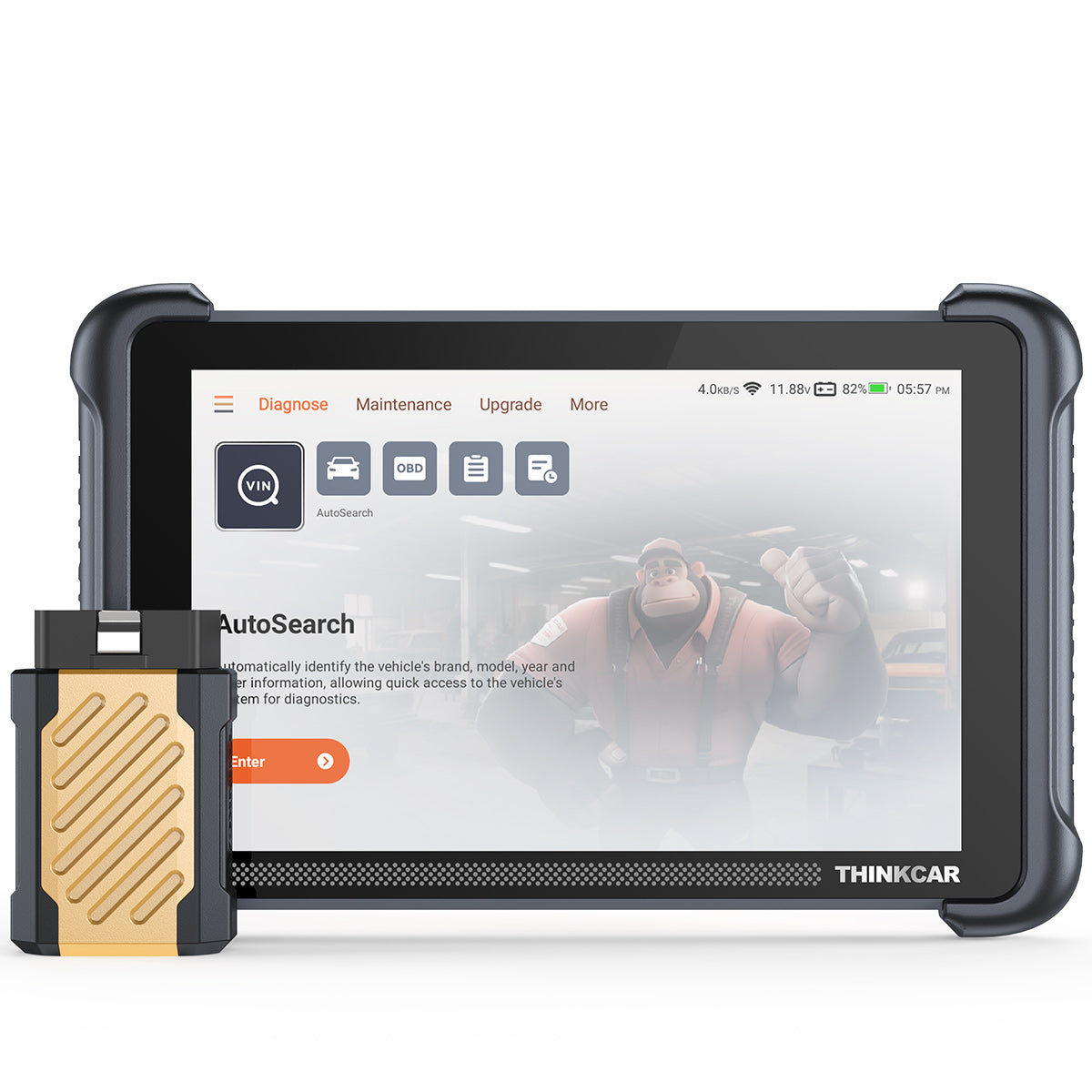
A serious OBD2 Scanner Bluetooth setup should help you prove a repair, not just point at a code. That means you want full-system access, stable live data, bidirectional scanner functions, and modern protocol support for newer cars. Generic OBD2 still matters because it covers the emissions-side basics most owners use first, while deeper manufacturer-level access handles the module work that cheap dongles miss. SAE International defines J1979 as the standard behind the core OBD test modes many scan tools rely on, which is why strong generic support still matters even when you want advanced features like ECU Coding and resets SAE International.
What to look for first
- Full-system diagnostics, not engine-only reading
- Bidirectional scanner support for active tests
- CAN-FD or DoIP for newer vehicles
- AutoVIN and fast app pairing
- Clear Software Subscription or Software Renewal terms
- Vehicle-specific function support, not marketing-only claims
Why this matters in practice
- A cooling fan test can confirm wiring, relay, or motor problems
- EPB, ABS bleed, and Oil Reset Tool routines save shop trips
- Battery Management System (BMS) functions matter after battery replacement
- TPMS Service, ECU Coding, and Key Fob Programming only matter if your exact vehicle supports them
The Best Picks for Serious DIY Use

1. THINKDIAG 2
If your goal is a true phone-first Vehicle Scanner & Diagnostic Tool, THINKDIAG 2 is the cleanest fit. It suits the owner who wants serious diagnostics in a small Bluetooth OBDII form factor, not a tablet to charge and store. This is the pick when portability matters, but you still want more than basic Code Readers can deliver. The tradeoff is simple: you gain convenience and lower bulk, but you work through your phone screen instead of a dedicated tablet.
Why it stands out
- Built around an app-based OBD2 Scanner Bluetooth workflow for iPhone and Android
- Supports CAN-FD for newer platforms
- Supports ECU Coding and bidirectional or active tests, depending on the vehicle
- Includes Auto VIN, IMMO key matching, and 15 Resets Maintenance Function
- Strong match for glovebox storage or a compact home toolbox
Best for
- Owners who mainly work on their own cars
- DIY users who want a Bidirectional scanner without stepping up to Android-based Diagnostic Tablets
- Buyers who value app convenience and portability first
What to watch
- Phone-driven workflow can feel tighter on long diagnostic sessions
- Advanced functions still vary by make, model, and year
- A smaller dongle format is great for storage, but less ideal if you prefer a larger display during repeated repairs
Why it wins: THINKDIAG 2 is the best fit when you want serious diagnostics without overbuying. It gives you a credible jump from casual Bluetooth OBDII tools into full-system work, active tests, and reset functions, while keeping the setup compact enough for real everyday use. It is also the easiest THINKCAR option here for buyers who already know they want smartphone-led diagnostics, not a separate scanner body.
Shop: THINKDIAG 2
2. THINKSCAN 689BT
Some buyers start by shopping for a phone-based dongle, then realize their real issue is workflow depth. THINKSCAN 689BT is the step-up choice when you run active tests often, diagnose multiple vehicles, or want more headroom than a pure phone accessory gives you. It is still wireless, but it behaves more like a serious Advanced Scanner platform. The tradeoff is size: you get a larger, faster working environment, but you give up the tiny-dongle simplicity of a pure phone tool.
Key specs to check
- CAN-FD and DoIP support for newer vehicles
- ECU Coding and bidirectional controls
- AutoVIN, AutoScan, and AutoAuth for FCA SGW access
- 35+ maintenance functions
- 8-inch touchscreen, 1280 x 800 resolution
- Bluetooth 5.0, 4150mAh battery, 9V-18V operating range
- Expandable with THINKTPMS VENU iPro, endoscope, oscilloscope, printer, and Bluetooth battery clip
Best for
- DIY owners who diagnose several cars each month
- Users who want more screen space for graphs and module work
- Buyers looking at the ThinkScan Series as a longer-term platform
What to watch
- Larger hardware means less grab-and-go portability
- More capability only pays off if you actually use active tests and service routines
- Vehicle support for resets and coding still depends on exact coverage
Why it wins: THINKSCAN 689BT makes sense when a simple app dongle has already become the bottleneck. If you routinely perform brake service, fan tests, relay checks, adaptation work, or module-level troubleshooting, the larger interface and broader function stack feel more efficient. For serious DIY owners moving closer to shop-style workflows, this is the more expandable THINKCAR choice.
Shop: THINKSCAN 689BT
3. Topdon TopScan
If you are comparing serious smartphone-based tools across brands, Topdon TopScan is the most relevant Topdon benchmark. It stays compact, runs through your smartphone, and targets the same buyer who wants more than entry-level code reading. The main buying tension is not portability. It is an ownership model. TopScan can look strong on paper, but its value depends heavily on which version you buy and what features remain open after the first term.
Why it stands out
- Pocket-size phone-driven format
- Full-system diagnostics across 120+ vehicle makes
- Bidirectional controls, AutoVIN, I/M readiness, and repair resources
- Three tiers: Lite, Pro, and Master
- Master adds 30 service functions and DoIP support
Best for
- Buyers who want a compact Topdon phone workflow
- Users are comparing subscription structure as closely as feature depth
- Cross-shoppers looking at THINKDIAG 2 versus a direct Topdon alternative
What to watch
- Feature depth changes by Lite, Pro, or Master tier
- The official page states one year free, then the annual software cost applies
- IMMO and advanced service coverage depend on the version and the compatible vehicle support
Why it wins: TopScan deserves a spot because it is a real comparison point, not a filler competitor. If your priority is smartphone-native diagnostics with bidirectional control and modern protocol support, it belongs on the shortlist. Still, for serious DIY buyers, the subscription structure is part of the product decision, not a footnote.
Shop: Topdon TopScan
Quick Comparison Table
Side-by-side snapshot
| Product | Format | Bidirectional | ECU Coding | Protocols | Service depth | Trade-off |
|---|---|---|---|---|---|---|
| THINKDIAG 2 | Dongle + app | Yes | Yes | CAN-FD | 15 functions | Small-screen workflow |
| THINKSCAN 689BT | Wireless tablet | Yes | Yes | CAN-FD, DoIP | 35+ functions | Less pocketable |
| Topdon TopScan | Dongle + app | Yes, by tier | Limited by tier | CAN-FD, DoIP on Master | 8 to 30 | Subscription-sensitive |
How to Choose Without Overbuying
Buying the right smartphone-based setup comes down to how you actually diagnose, not how many acronyms fit on a product page. If you mostly scan one or two family vehicles, clear service lights, and run the occasional active test, a phone-led tool is often enough. If you spend weekends chasing body faults, ABS issues, battery registration, or module problems across multiple vehicles, the workflow itself becomes the deciding factor. In that case, a larger screen and broader platform can save more time than a smaller dongle saves space.
When a smartphone dongle is enough
- You want a true OBD2 Scanner Bluetooth experience
- You mainly work on your own vehicles
- You care about compact storage and quick setup
- You want a Bidirectional scanner without a tablet bulk
Conclusion
The best smartphone-based scan tool is the one that matches your repair habits before it matches a spec sheet. If you want a real OBD2 Scanner Bluetooth workflow with serious DIY depth, THINKDIAG 2 is the strongest phone-first choice in this shortlist. If you already know you need more active tests, more service coverage, and less friction during repeated diagnostics, THINKSCAN 689BT is the smarter long-term move. Topdon TopScan remains a fair Topdon comparison, but the best value still comes from choosing the workflow you will actually use.
FAQ
Can a smartphone-based scan tool replace a tablet scanner for most serious DIY users?
Yes, it can replace a tablet scanner for many serious DIY owners if it offers full-system scans, live data, active tests, and service functions. A phone-based tool is easier to store, faster to deploy, and often good enough for routine troubleshooting on one or two vehicles. The limit appears when you spend long sessions graphing data, switching modules often, or using advanced workflows across several cars each month. In that case, a larger dedicated screen can reduce fatigue and speed up the job.
What should I check first before buying an OBD2 Scanner Bluetooth tool?
Start with vehicle coverage, protocol support, and function depth before anything else. You should confirm whether the tool supports CAN-FD, DoIP, AutoVIN, full-system diagnostics, and the exact service functions you need, such as EPB reset, BMS registration, or ABS bleed. Next, check whether bidirectional tests and ECU coding are supported for your make and model, because those features are often vehicle-dependent. Finally, review software update terms so you know what remains usable after the initial period.
Is bidirectional control really worth it for home diagnostics?
Yes, bidirectional control is worth it if you troubleshoot faults instead of just clearing codes. It lets you command components like fans, relays, injectors, pumps, windows, or locks so you can confirm whether the problem is electrical, mechanical, or control-module related. That can save hours of guesswork and reduce unnecessary parts replacement.
How important are CAN-FD and DoIP support in 2026?
They matter more now because newer vehicles increasingly rely on newer communication protocols that older scan tools may not handle well. CAN-FD is especially important for many newer GM and Chrysler applications, while DoIP appears on several modern European platforms and other late-model vehicles.
Can one scan tool handle TPMS, resets, coding, and key functions on every car?
No, one tool rarely handles every advanced function on every car with equal depth. Most platforms can offer a broad menu, but actual support depends on the vehicle brand, model year, region, and software authorization status. TPMS Programming, ECU Coding, IMMO work, and Key Fob Programming are especially likely to vary by vehicle.
Why do software subscription terms matter so much with diagnostic tools?
They matter because scan tools age through software as much as through hardware. New vehicle coverage, added reset routines, security gateway support, and bug fixes all depend on update access, so the long-term value of the tool is tied to those terms. You should check what stays available if you do not renew, what functions remain unlocked, and whether the brand offers Free Lifetime Software Updates on the specific device.
Table of Contents
- Introduction
- What Makes a Phone-Based Tool Serious Enough?
- The Best Picks for Serious DIY Use
- Quick Comparison Table
- How to Choose Without Overbuying
- Conclusion
-
FAQ
- Can a smartphone-based scan tool replace a tablet scanner for most serious DIY users?
- What should I check first before buying an OBD2 Scanner Bluetooth tool?
- Is bidirectional control really worth it for home diagnostics?
- How important are CAN-FD and DoIP support in 2026?
- Can one scan tool handle TPMS, resets, coding, and key functions on every car?
- Why do software subscription terms matter so much with diagnostic tools?

Share:
Remote Report Sharing: OBD2 Tools to Send Results to a Shop
What Scan Tool to Buy After a Basic Bluetooth Reader?