
Introduction
You plug in your phone-based OBD2 Scanner Bluetooth reader, pull a code, clear the light, and then get stuck. The misfire is still there, the EPB will not retract, the battery registration is missing, and you cannot command a fan, pump, or valve to prove what actually failed. That is where many upgrade mistakes happen. Buy too little, and your workflow stays slow. Buy too much, and your repair budget disappears into features you will never touch.
The smarter move is to match the next tool to the next job in front of you. In this walkthrough, you will sort your real repair tasks first, then compare all-system coverage, active tests, reset functions, modern protocol support, and form factor. Along the way, we will use the THINKCAR ThinkScan Series, AI Diagnostic Series, and MUCAR lineup as practical examples, with one fair Autel comparison for context.
How to Choose the Right Upgrade Step by Step
Step 1: Define your next jobs before you compare specs
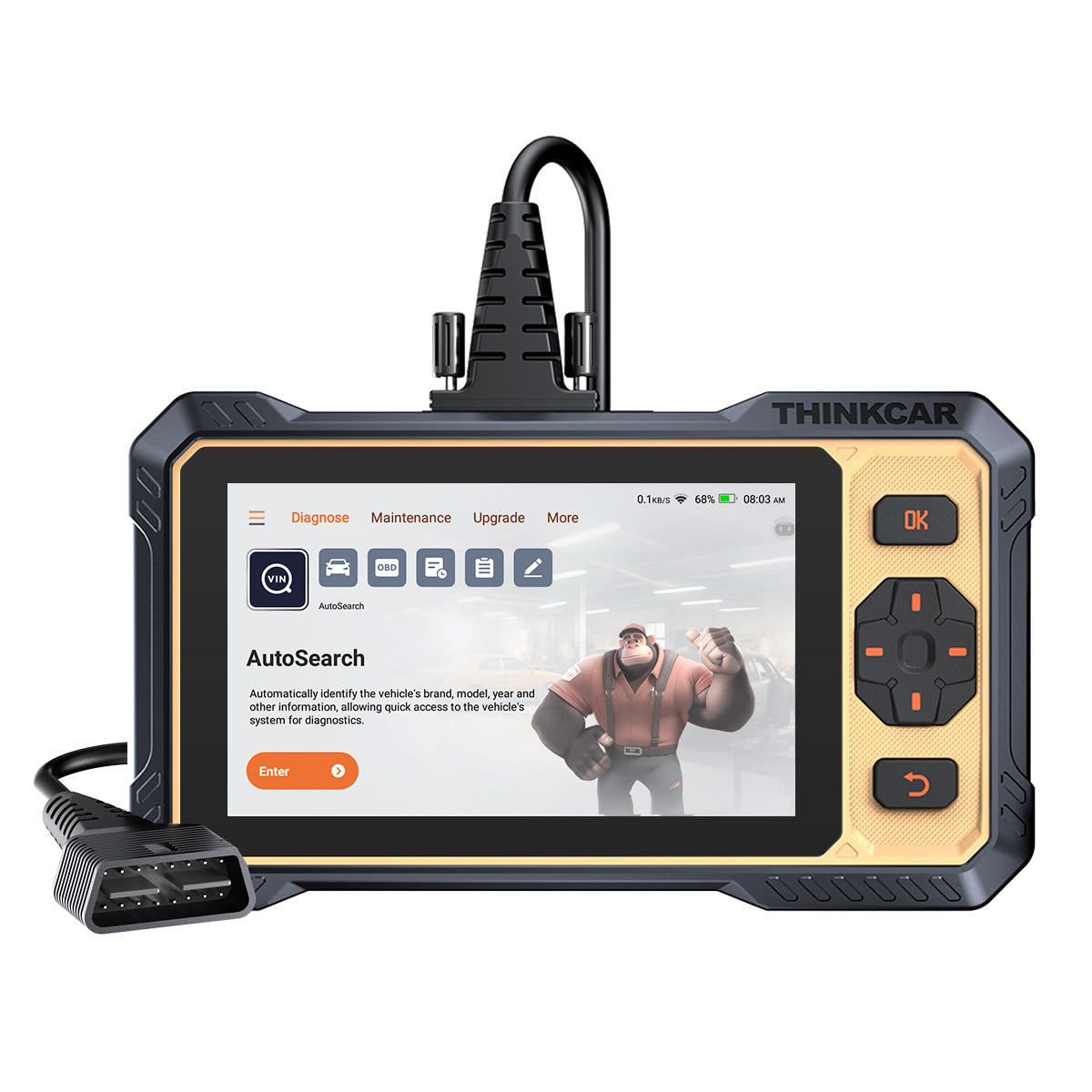
Before you compare screens, memory, or menus, write down the jobs your current reader cannot finish. That simple list will usually tell you whether you need a Code Readers level tool, a stronger Vehicle Scanner & Diagnostic Tool, or a real Bidirectional scanner. If your next jobs are oil reset, battery registration, ABS bleed, throttle relearn, or DPF functions, you are already past the comfort zone of a basic dongle. If your next jobs include commanding components, checking module response, or dealing with FCA gateway vehicles, your upgrade tier moves up again.
What to do
- List the last five repairs where your phone reader came up short.
- Mark each job as code reading, all-system diagnosis, service reset, active test, or coding.
- Count how often you work on one car versus a mixed household or side-work fleet.
- Note whether you need Bluetooth OBDII mobility or prefer a dedicated tablet.
Why this matters
- Functions drive value more than marketing terms.
- A tool that fits your weekly jobs saves more time than a tool with rare extra menus.
- Upgrade tiers become clearer once you separate must-have functions from nice-to-have extras.
For example, a compact app-based tool like THINKDIAG 2 fits people moving beyond a simple OBD2 Scanner Bluetooth reader but still wanting a pocket-sized workflow. THINKDIAG 2 is positioned for DIY owners and small repair use with all-system diagnostics, 15 standard maintenance functions, ECU coding support, active tests, Auto VIN, and CAN-FD support on newer GM applications. If your work is still mostly mobile and light-duty, that style can be enough. If your list includes longer data sessions and more frequent repairs, a tablet usually feels easier to live with.
Shop: THINKDIAG 2
Step 2: Check for all-system coverage, not just engine access
A basic Bluetooth reader usually talks to the engine and emissions side first. That is useful, but it leaves you blind when the real issue sits in ABS, SRS, BCM, EPB, HVAC, or body control. Once you move into regular repair work, all-system access matters more than another generic code lookup screen. It cuts guesswork because you can see where faults live across the vehicle instead of assuming every warning light starts with the engine computer.
What to do
- Check whether the tool reads and clears codes across the engine, transmission, ABS, SRS, body, and chassis modules.
- Look for live data, ECU information, AutoVIN, and AutoScan.
- Verify whether coverage is broad enough for your actual brands and model years.
- For mixed garages, favor tools that call out large brand support and frequent updates.
What to watch
- "OBD2 full functions" is not the same as "all-system diagnosis."
- Broad vehicle coverage still needs VIN-level compatibility checks before purchase.
- Module availability varies by make, model, year, and software version.
THINKSCAN 689 and THINKSCAN 689BT are both positioned above basic readers because they add OE-level full system diagnostic coverage for 150+ brands, AutoVIN, AutoScan, CAN-FD, DoIP, ECU coding, Bi-Directional/Active test support, and FCA AutoAuth capability. The 689BT uses a Bluetooth dongle with an 8-inch tablet, while the THINKSCAN 689 is a dedicated tablet-style setup with the same 8-inch 1280 x 800 class display size and 4GB RAM plus 64GB storage listed on the product page. That gives you a more complete workbench than a phone app when you need to review multiple modules and longer live-data sessions.
Shop: THINKSCAN 689
Step 3: Decide whether you really need a bidirectional scanner
If your current reader only reports what the car says is wrong, you are still missing half the picture. A Bidirectional scanner lets you send commands to the vehicle and watch what happens. That changes the diagnosis from passive reading to active proof. Instead of guessing whether a fan, window motor, purge valve, or ABS actuator is bad, you can trigger the component and narrow the fault faster.
What to do
- Choose bidirectional control if you test actuators more than once or twice a month.
- Prioritize it if you handle EVAP, cooling, brake bleed, window, lighting, or lock issues.
- Use active tests to confirm the part, wiring path, or module command.
Why this matters
- It shortens the parts-swapping cycle.
- It helps separate mechanical failure from wiring or control failure.
- It saves time on intermittent faults that generic code readers cannot detect.
A practical example is the THINKSCAN 672, which is positioned as a mid-tier Advanced Scanner with 3000+ bidirectional or active tests, full systems diagnostics for 140+ brands, CAN-FD support, IMMO key matching, AutoVIN, AutoScan, and 28+ reset functions. It fits users who have clearly outgrown phone dongles but do not need the highest tablet tier yet. At the upper end, THINKSCAN 689BT adds 35+ maintenance functions, FCA AutoAuth, tool expansion options, and more tablet-style comfort for regular diagnostics around the car. According to NHTSA, OBD access underpins emissions-related diagnostics, but deeper repair work often requires much more than generic powertrain code access.
Shop: THINKSCAN 672
Step 4: Compare reset functions by frequency, not by the biggest number
Reset counts look impressive in product cards, but the real question is simpler: which resets do you actually use? If you mostly handle oil reset, EPB, SAS, BMS, injector coding, throttle relearn, and DPF work, a smaller menu with the right coverage is better than a huge list you never open. This is where many buyers overspend. They chase the biggest feature badge instead of the few service functions that actually keep jobs moving.
What to do
- Rank your top five service functions by weekly use.
- Check whether those functions are supported on your target makes, not just listed globally.
- Treat reset count as secondary to vehicle compatibility.
- Decide whether you prefer free lifetime updates or a Software Subscription model.
Common mistake
- Buying 35 functions when you only need 6 supported well.
- Ignoring per-vehicle limits on special functions.
- Forgetting future needs like TPMS Service or Battery Management System (BMS) work.
In the current lineup, THINKSCAN MAX highlights 28 maintenance functions, full-system diagnostics, support for 93+ brands, Auto VIN, and no subscription fees for the device itself. It also supports paid upgrades to special functions such as ECU coding, bi-directional control, and IMMO key programming. That makes it a practical bridge for users who want a dedicated tablet now and the option to grow later. If your work leans heavily into tire service, the broader THINKCAR ecosystem also includes TPMS & Sensor tools such as THINKTPMS VENU iPro and the THINKCAR VENU 90 TPMS Activation & Diagnostic Tool, which matters if TPMS Programming is part of your normal workflow.
Shop: THINKSCAN MAX
Step 5: Verify protocol support for newer vehicles before you buy
Late-model vehicles are where a lot of basic tools fall apart. The connector may fit, but that does not mean the tool can reach the deeper networks you need. If you work on 2020s vehicles, you should treat CAN-FD, DoIP, and gateway access as buying filters, not bonus features. Without them, you may read generic data yet fail when you try all-system diagnostics, active tests, or guided service operations.
What to do
- Check whether your target vehicles need CAN-FD.
- Check whether your target brands use DoIP for deeper diagnostics.
- If you service FCA vehicles, verify gateway access workflow support.
- Confirm coverage by VIN when the job is critical.
Tools or settings
- CAN-FD matters on some newer GM and late-model platforms.
- DoIP matters on certain modern OEM architectures.
- FCA AutoAuth matters when gateway restrictions block high-level functions.
THINKSCAN 689BT and THINKSCAN 689 both explicitly list CAN-FD, DoIP, and AutoAuth for FCA SGW. THINKSCAN 672 also lists CAN-FD support. THINKDIAG 2 is a stronger app-based step-up because it adds CAN-FD support compared with older entry dongles. On FCA vehicles, THINKCAR states that approved tools can access gateway-restricted operations such as clearing DTCs and performing calibrations, relearns, actuations, and adjustments after authentication. That can be the difference between seeing the car and actually finishing the repair. For context, Autel also positions higher-tier models such as the MaxiDAS DS900-BT with bidirectional control plus DoIP and CAN FD support, so this is now a baseline comparison point for serious late-model diagnostics rather than a niche feature.
Shop: THINKSCAN 689BT
Step 6: Choose a tablet or a dongle based on how you actually work around the car
The right format depends on how long you scan, where you move, and how often you review data. A dongle style keeps your kit small and flexible. A tablet style gives you a larger screen, faster menu work, and less dependence on your phone battery, calls, or app switching. If you spend long sessions in live data, graphing, service resets, or repeated module checks, the bigger interface usually pays off in less fatigue.
What to do
- Pick a dongle if you want maximum portability and light-duty diagnostics.
- Pick a tablet if you do longer sessions, side work, or multiple cars each week.
- Choose Bluetooth when you need freedom to move around the vehicle.
- Favor Android-based Diagnostic Tablets if you want a dedicated repair workflow.
Why this matters
- Bigger screens speed up graph review and menu navigation.
- Dedicated hardware reduces interruptions from phone calls or app switching.
- Wireless VCI setups make under-hood and in-cabin testing easier.
THINKSCAN 689BT is a strong fit when you want a dedicated 8-inch tablet plus Bluetooth dongle workflow, 4GB RAM, 64GB storage, all-system access, ECU coding, active tests, 35+ maintenance functions, and support for tool expansion. If you want a more mobile, lower-footprint setup, THINKDIAG 2 keeps the OBD2 Scanner Bluetooth form factor while still adding all-system diagnostics, active tests, IMMO-related functions, and app-based reporting. If you want a newer AI Diagnostic Series angle, MUCAR 892BT adds CAN-FD, DoIP, 34+ maintenance functions, ECU coding, bidirectional testing, and AI-powered Insights through its MUAI system on an 8-inch touchscreen.
Shop: MUCAR 892BT
Adapting Your Choice to Different Scenarios

Different users hit different limits, so the best upgrade after a basic Bluetooth reader is not the same for everyone. Start from your workload, then narrow the tool class.
DIY owner with one or two family cars
Use a tool that adds all-system coverage, common resets, and simple Bluetooth setup. THINKDIAG 2, THINKSCAN 662, or MUCAR BT200 MAX style upgrades make sense when you mainly need faster fault finding, service resets, and better live data without building a full shop cart.
Side work on weekends
Move into bidirectional control and stronger reset coverage. THINKSCAN 672 or THINKSCAN 689 gives you a better fit when you routinely handle brake service, EVAP issues, battery registration, or body electrical faults and need to prove components instead of guessing.
Mixed household or small fleet
Favor broad brand coverage, AutoVIN, AutoScan, and modern protocols. THINKSCAN 689BT, MUCAR VO8, or THINKSCAN MAX fit better when the garage includes older OBD-II vehicles plus newer models that may need CAN-FD, DoIP, or tool expansion for TPMS Service.
Troubleshooting Guide
Even a good shortlist can go wrong if you mix up need, coverage, and workflow. Use this quick table to narrow down the problem first.
| Problem | Cause | Solution |
|---|---|---|
| Too many choices | Jobs not ranked | List top five tasks |
| Reads engine only | Tool tier too low | Choose all-system model |
| No active tests | Passive scanner only | Move to bidirectional |
| New car not covered | Missing protocol support | Check CAN-FD, DoIP |
| FCA functions blocked | No gateway access | Verify AutoAuth support |
A few quick fixes help after the shortlist stage.
- If the price feels high, split the needs into weekly tasks and rare tasks. That often shows whether THINKSCAN 672 or THINKSCAN 689 is enough instead of jumping straight to a larger platform.
- If a tool looks perfect but coverage feels uncertain, run a VIN-based compatibility check before purchase. This matters with resets, IMMO, TPMS Service, and coding.
Conclusion
The best answer after a basic Bluetooth reader is usually not "buy the most expensive scanner." It is "buy the first tool that removes the bottleneck in your real repair flow." If you need all-system access and service resets, step into a stronger ThinkScan Series model. If you also need component commands, choose a true Bidirectional scanner. If you work on newer vehicles, keep CAN-FD, DoIP, and gateway access near the top of your checklist.
FAQ
What are the differences between entry-level and professional scan tools?
Entry-level tools focus on generic OBD2 work such as reading and clearing engine codes, checking readiness monitors, and viewing basic live data. Professional tools add all-system diagnosis, service resets, bidirectional tests, ECU coding support, and broader vehicle coverage. The biggest difference is not just feature count, but how far the tool can move a repair forward without another device. If your current reader can identify a fault but cannot confirm the failed part or complete the service procedure, you are already in professional-tool territory.
What should you evaluate when upgrading from a basic Bluetooth reader?
Start with the jobs you want to do next, not the feature list you think sounds advanced. Check whether you need all-system diagnosis, active tests, reset functions, CAN-FD, DoIP, or FCA gateway access for your target vehicles. Then compare hardware style, because a phone dongle and an 8-inch tablet feel very different during long repair sessions. Finally, review the update model so you understand whether you are buying Free Lifetime Software Updates, a T-code style add-on path, or a recurring software plan.
What matters most in a scan tool under a fixed budget?
Coverage and function fit matter more than the biggest advertised screen or the longest maintenance list. Under a fixed budget, prioritize all-system access, the reset functions you actually use, and protocol support for the vehicles you own or service most often. A lower-priced tool that cannot do BMS, EPB, TPMS Service, or active tests on your target cars will slow you down fast. In practice, the best value comes from buying one tier above your current job, not three tiers above your realistic needs.
Is a Bluetooth OBD2 scanner with a phone app enough?
Yes, it is enough for basic code reading, quick health checks, and light live-data work on many vehicles. It stops being enough when you need broader module access, more stable graph review, service resets, or active tests that support real troubleshooting. That is why many users move from a simple OBD2 Scanner Bluetooth setup into something like THINKDIAG 2 first, then later into a tablet from the ThinkScan Series. The phone workflow is convenient, but dedicated scan tools usually win once repair depth increases.
How do modern vehicle protocols affect tool choice?
Modern protocols can decide whether the scanner merely connects or actually completes the job. CAN-FD and DoIP are increasingly important on newer platforms, and some gateway-protected vehicles also need authorized access before they allow advanced diagnostic functions. If your target vehicles are mostly 2020s models, protocol support should sit near the top of your checklist along with all-system diagnosis and active tests. Without that support, even a feature-rich tool can feel limited in the exact moments when you need it most.
Table of Contents
- Introduction
-
How to Choose the Right Upgrade Step by Step
- Step 1: Define your next jobs before you compare specs
- Step 2: Check for all-system coverage, not just engine access
- Step 3: Decide whether you really need a bidirectional scanner
- Step 4: Compare reset functions by frequency, not by the biggest number
- Step 5: Verify protocol support for newer vehicles before you buy
- Step 6: Choose a tablet or a dongle based on how you actually work around the car
- Adapting Your Choice to Different Scenarios
- Troubleshooting Guide
- Conclusion
-
FAQ
- What are the differences between entry-level and professional scan tools?
- What should you evaluate when upgrading from a basic Bluetooth reader?
- What matters most in a scan tool under a fixed budget?
- Is a Bluetooth OBD2 scanner with a phone app enough?
- How do modern vehicle protocols affect tool choice?

Share:
Smartphone-Based Scan Tools for Serious DIY Diagnostics
Bluetooth Scanners for Full-System Scans: 5 Steps to Pick