
Introduction
A modern DIY workflow often starts with a scan. You connect a Vehicle Scanner & Diagnostic Tool, pull codes, check live data, and decide whether the fix is a loose gas cap or a real repair. That is why many DIY owners search for one diagnostic scanner that can handle both older vehicles and newer platforms in 2026.
The problem is not a lack of tools. The real pain is mismatch. A scanner might connect to a 2008 car but fail on a 2024 model that needs CAN-FD or DoIP. Another tool might read codes but cannot run a bidirectional scanner active test when you need to command a fan, purge valve, or ABS pump.
This guide explains how to pick one scanner that covers your garage across model years. You will learn how OBD generations and protocol layers work, how to verify connectors and communication, and how to match features like OBD2 Intelligent Diagnosis, ECU coding, and service functions to your DIY needs.

If you want a single platform to start from, THINKCAR builds DIY-friendly diagnostic tools backed by a team with deep automotive diagnostics experience and a large-scale factory. The THINKCAR and MUCAR lineups cover different tool tiers, from OBD2 Scanner Bluetooth dongles to full tablets.
Official Site: THINKCAR
Diagnostic Scanner Fundamentals for Old and New Cars
OBD generations: OBD-I vs OBD-II
OBD-I is a broad label for pre-OBD-II systems. These vehicles can have manufacturer-specific connectors, pinouts, and blink-code methods. Many OBD-I cars cannot be scanned with a generic OBD2 Scanner Bluetooth device because the connector and protocol are not standardized.
OBD-II is the standardized era. In the United States, the common DIY takeaway is that most 1996-and-newer gas vehicles support OBD-II, while earlier years can be mixed. California emissions programs provide a practical anchor for DIY owners trying to map model years to OBD-II expectations. (epa.gov)
Because edge cases exist, treat 1994 to 1995 as a verification zone. Some vehicles may have partial OBD-II-like features, but do not assume a standard 16-pin connector or full OBD-II mode support.
Protocol layers: CAN, UDS, and K-Line
Think of diagnostics as two layers you must match:
- Physical and link layer: how the ECU talks on the wire (or wireless link).
- Diagnostic services: what the ECU supports once you connect (generic OBD modes, UDS services, OEM routines).
Older OBD-II vehicles often use K-Line variants (ISO 9141-2 or KWP2000). Many 2008-and-newer vehicles lean heavily on CAN, and late-model vehicles may add CAN-FD or DoIP for higher bandwidth.
For CAN-based emissions diagnostics, ISO 15765-4 (DoCAN) defines requirements for communication between test equipment and the vehicle via the diagnostic link connector. That standard helps explain why protocol support is a hard requirement, not a marketing line item. (iso.org)
Tool tiers: code readers to pro-level platforms
Most DIY buyers choose between four tiers:
- Code Readers
- Read and clear generic powertrain codes.
- Basic I/M readiness and sometimes freeze frame.
- Entry bidirectional scanner tools
- Add active tests and more service functions.
- Often focus on 4 major systems or a limited set of modules.
- Full tablet-style all-system scanners
- All system diagnosis for all cars is the goal, but actual depth varies by make and year.
- Typically add AutoVIN/AutoScan, ECU coding, and more maintenance functions.
- App-based ecosystems and expansion tools
- Wireless OBD2 scanners paired with a mobile app integration workflow.
- Add-ons like TPMS & Sensor tools help cover tire work.
In the THINKCAR ecosystem, this is where ThinkScan Series tablets (like THINKSCAN 689BT) differ from compact tools like THINKDIAG 2.
Model-Year Compatibility Mapping for DIY Scanners
Identify OBD-II presence by year
Start with a household inventory list:
- Vehicle year, make, model, engine
- Market region (US vehicles may differ from others)
- Any known module restrictions (security gateways are common on newer vehicles)
For most DIY owners in the US, a safe model-year starting point is:
- 1996+ gasoline: usually OBD-II
- Late 1990s to mid 2000s: often mixed protocols, but standard connector
- 2008+ mainstream: usually CAN-heavy
- 2020s: may require CAN-FD and may introduce DoIP on some platforms
California provides a clear DIY heuristic for OBD-II expectations by model year, which is useful when you are shopping for one tool across old and new cars. (epa.gov)
Where THINKCAR fits in the mapping
If your garage spans older OBD-II vehicles and newer platforms, focus on a tool that supports:
- All systems diagnostics
- Wireless connection options for convenience
- Modern protocol support (CAN-FD and DoIP)
On the THINKCAR side, the THINKSCAN 689BT is positioned as a higher-tier tablet that explicitly lists CAN-FD and DoIP support, plus FCA AutoAuth for gateway workflows. It also lists AutoVIN and AutoScan for fast vehicle identification.
Shop: THINKSCAN 689BT
Connector and Protocol Verification for Old and New Cars
J1962 16-pin connector basics
A standardized OBD-II vehicle typically provides a 16-pin diagnostic link connector under the dash. A quick DIY method is:
- Confirm the vehicle has a 16-pin port.
- Inspect for damage or pushed-back pins.
- Check that the port has power (many tools can detect this immediately).
Even when the connector is standard, the protocol behind it may vary. That is why the next step is protocol verification.
Map pins to likely protocol
DIY owners do not need to memorize every pin. However, you should know that:
- Different pins can indicate CAN vs K-Line vs J1850 variants.
- If your tool can auto-detect protocol, it will still fail if the vehicle uses a protocol the tool does not support.
When you buy a scanner for both old and new vehicles, protocol breadth matters more than a long feature list.
Confirm ISO 15765-4 DoCAN requirements
For newer vehicles that use CAN for emissions diagnostics, ISO 15765-4 defines requirements for diagnostics over CAN between the in-vehicle network and the diagnostic link connector. This is why CAN protocol support is foundational for broad OBD-II coverage. (iso.org)
Applying this to tool selection
A practical checklist you can apply before you buy:
- Does the tool list support for CAN-FD (important for some late-model platforms)?
- Does the tool list support for DoIP (important for some OEMs and platforms)?
- Does the tool support legacy protocols needed for older OBD-II vehicles?
In the ThinkScan Series, THINKSCAN 689BT and THINKSCAN 689 both list CAN-FD and DoIP support, which is a useful starting point for a mixed-year household.
When you need a bidirectional scanner
A bidirectional scanner lets you command components and run actuator tests. For DIY, this matters in real scenarios like:
- Turning radiator fans on to test cooling control
- Running an EVAP purge test to chase a leak-related code
- Cycling ABS solenoids during brake bleed procedures
In the THINKCAR lineup, THINKSCAN 689BT and THINKSCAN 689 are explicitly positioned with Bi-Directional/Active test and ECU coding. The THINKSCAN 672 also highlights bi-directional active test functions and adds CAN-FD support. The THINKSCAN 662 targets 4 systems (ECM, TCM, ABS, SRS) with bi-directional control, which can be enough for many DIY owners who mainly work on drivetrain and safety modules.

How THINKCAR products fit DIY feature needs
A good way to choose across ThinkScan Series and app tools is to match your DIY intent:
- If you want a dedicated tablet and broad protocol coverage, ThinkScan Series tablets (like THINKSCAN 689BT) focus on all-system workflows.
- If you prefer a compact OBD2 Scanner Bluetooth device that lives in your toolbox and uses a phone, THINKDIAG 2 targets that app-based workflow.
Shop: THINKSCAN 689
Modern Vehicle Access and Security in 2026
CAN-FD and DoIP for newer platforms
Newer vehicles may demand higher bandwidth or different transport layers than older OBD-II cars. Two terms show up often:
- CAN-FD: a faster CAN variant that some late-model vehicles use.
- DoIP: diagnostics over IP, used on certain OEM architectures.
If your tool does not support these, you might still read some generic OBD-II data but fail when you try deeper all-system diagnosis or OEM-level functions.
THINKSCAN 689BT and THINKSCAN 689 list CAN-FD and DoIP support, which is useful if you work across multiple brands and newer model years.
Gateway security and AutoAuth workflows
Many newer vehicles include security gateways that restrict diagnostic functions. For DIY, this can show up as:
- You can read codes, but you cannot run active tests.
- You can see a module, but you cannot perform adaptations or resets.
THINKSCAN 689BT and THINKSCAN 689 list AutoAuth for FCA SGW, which is an important detail if you service FCA vehicles that require authorized access.
Update cadence and coverage growth
Coverage is not static. In 2026, the tool you buy should not be evaluated only on what it supports today. A DIY-friendly tool should have:
- Predictable software update notice cadence
- A simple update path over Wi-Fi
- A clear model for software renewal or software subscription if required
THINKSCAN 689BT lists monthly upgrades and Wi-Fi updates, plus Free Lifetime Software Updates and no subscription fees for that product line positioning.
Shop: THINKDIAG 2
Service Functions and TPMS Needs for DIY Owners
Maintenance resets: why they matter
Service functions are where DIY often gets stuck after a repair. You can replace parts, but the car still needs a reset or calibration. Common examples include:
- Oil reset and service interval reset
- Steering angle sensor (SAS) calibration after alignment work
- Battery registration on some vehicles
- Electronic parking brake (EPB) service mode for rear brake jobs
In the ThinkScan Series, THINKSCAN 689BT lists 34+ maintenance functions, while THINKSCAN 672 highlights 28+ reset functions. These numbers matter less than whether the specific reset is supported for your exact make and model.
TPMS Service: activation, programming, learning
If you rotate tires, replace sensors, or run winter wheel sets, TPMS Service becomes a real time saver. A TPMS workflow usually includes:
- Sensor Activation: wake the sensor and read ID and telemetry.
- Sensor Programming: write or clone IDs for replacement sensors.
- Sensor Learning (Relearn): teach the vehicle the sensor IDs.
The THINKTPMS VENU iPro is positioned as a TPMS diagnosis tool that supports sensor activation, programming, learning, and TPMS fault diagnosis. It also lists support for 315 MHz and 433 MHz sensors and compatibility with a large number of brands.
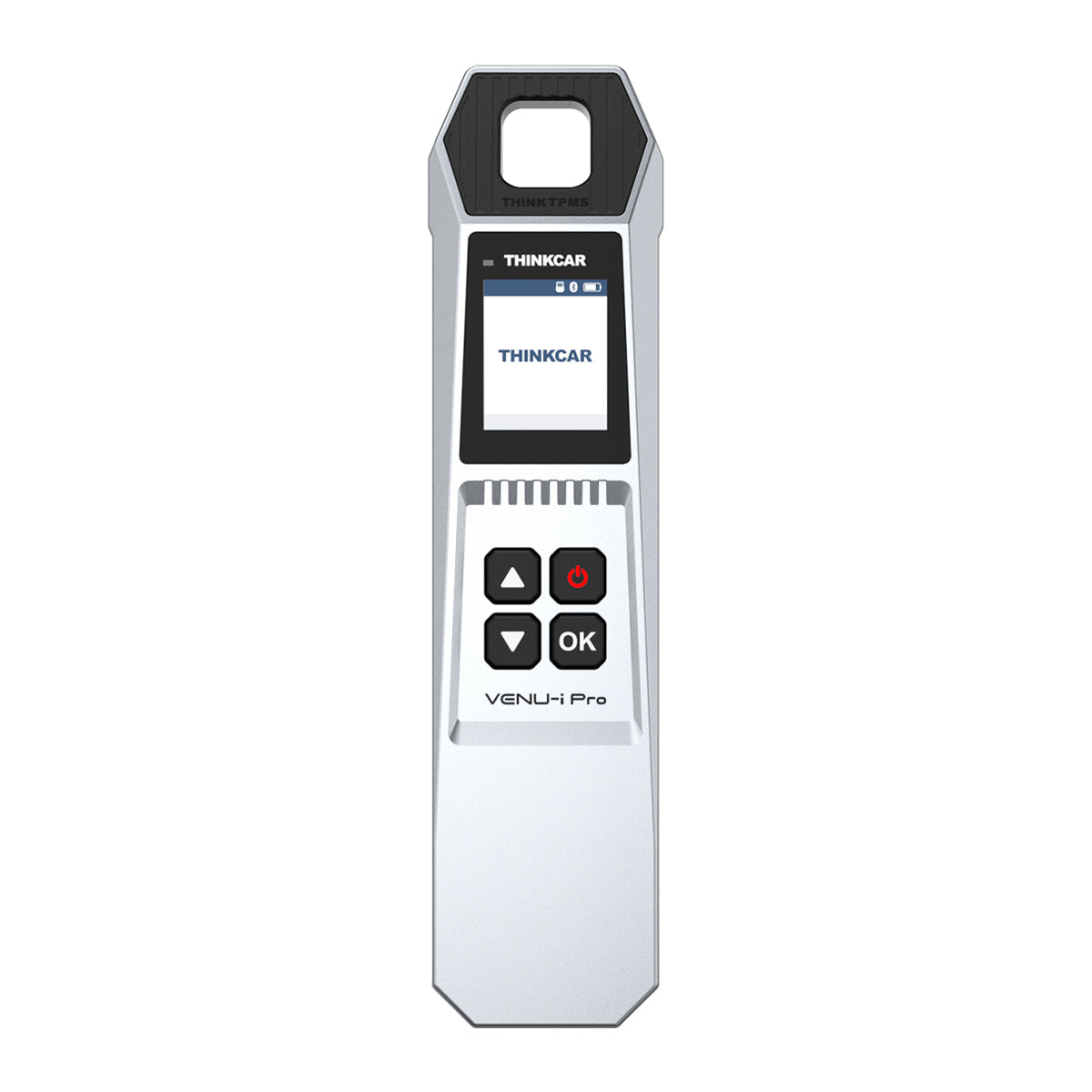
Shop: THINKTPMS VENU iPro
Tool expansion and add-ons
If you plan to grow into more advanced diagnostics, look for platforms that support expansion and accessories. THINKSCAN 689BT and THINKSCAN 689 both mention support for expanding features such as THINKTPMS and other inspection tools.
This matters because DIY needs change. Many owners start with code reading, then add TPMS programming, then later want deeper active tests.
Ownership model: updates and long-term value
Do not evaluate only the hardware. Evaluate the ownership path:
- Will you need software subscription renewals for coverage?
- Are updates delivered over Wi-Fi or via a PC?
- How often are new vehicles and functions added?
Because this guide is educational, skip price comparisons. Instead, think in terms of avoiding tool replacement when you buy your next vehicle.
Scenario comparison table
| DIY scenario | Minimum capability | Best-fit approach | Trade-offs |
|---|---|---|---|
| 1996-2005 basic CEL fixes | Read/clear, I/M readiness, freeze frame | Code Readers or entry scanner | Limited module access |
| Multi-car household 2000-2026 | Broad protocol support, all-system scan | ThinkScan Series tablet class | More features than some owners use |
| Intermittent driveability issue | Live data graphs, logging, snapshots | Tablet with faster navigation | Requires learning PIDs and patterns |
| Repairs that need actuator control | Bidirectional scanner active tests | Full-system bidirectional tool | Coverage varies by make/model |
| Tires, rotations, sensor replacement | TPMS Service activation/program/learn | TPMS & Sensor tool add-on | Extra tool to maintain |
Best Practices
- Verify OBD requirement and connector before buying
- Confirm a 16-pin port and the vehicle year.
- Treat 1994-1995 as a verification zone, not a guarantee.
- Match protocols before you chase features
- If you own newer vehicles, prioritize CAN-FD and DoIP support.
- If you own older OBD-II vehicles, keep legacy protocol coverage in mind.
- Use a repeatable workflow
- Scan all modules first.
- Save reports or screenshots.
- Clear codes only after you record freeze frame.
- Use bidirectional tests to reduce guesswork
- Command a component and confirm response.
- Compare commanded state vs sensor feedback in live data.
- Plan for updates like you plan for tools
- Keep Wi-Fi updates current.
- Read software update notices so you know when your vehicle coverage expands.
Conclusion
A DIY diagnostic scanner that works with both old and new car models is possible in 2026, but only if you choose systematically. First, map your vehicles by model year and confirm OBD-II presence. Next, validate protocol coverage, especially CAN-FD and DoIP for modern platforms and legacy support for older OBD-II vehicles.
Finally, pick the feature depth that matches your actual DIY work. If you want to troubleshoot faster and avoid guessing, a bidirectional scanner with all-system coverage is usually the most flexible long-term choice.
FAQ
Is there a diagnostic scanner that works with both old and new car models for DIY use?
Yes, but true coverage depends on the vehicle year, the connector type, and the protocols and modules your scanner supports. Most 1996-and-newer gas vehicles are the easiest fit because they generally align with OBD-II expectations. Pre-1996 vehicles can be OBD-I, which often requires brand-specific tools or adapters. Even on newer vehicles, security gateways can limit active tests unless the scanner supports the needed access method.
How do I ensure my diagnostic tool is compatible with older car models?
Confirm whether the car is truly OBD-II and has a standard 16-pin diagnostic port, because many older vehicles do not. If the vehicle is from 1994 to 1995, treat it as an edge case and verify protocol support rather than relying on model-year assumptions. Check that the scanner supports older OBD-II protocols such as K-Line variants, not only CAN. If the car is OBD-I, you may need a different diagnostic approach that is specific to that manufacturer.
Should I buy a universal or car-specific diagnostic tool?
A universal tool is usually better for multi-car households because it reduces the chance you need different scanners for different vehicles. Universal platforms can still vary in depth, so confirm whether they support all systems or only generic OBD functions. A car-specific tool can provide deeper OEM routines on one brand, but it may become a limitation when you add a second vehicle. For most DIY owners, the best balance is a broad-coverage scanner plus a clear update path.
Which car diagnostic scanner works best with a smartphone for DIY use?
Smartphone-based tools work best when they provide stable Bluetooth connectivity, consistent app updates, and clear coverage lists by make and model. The phone format is convenient for quick checks, especially for code reading and basic live data. However, deeper workflows like graphing multiple PIDs or running long active tests can be easier on a dedicated screen. If you choose a phone-first setup, make sure the tool supports the modern protocols your newer vehicles may require.
Do I really need a bidirectional scanner for DIY repairs?
Many DIY tasks do not require bidirectional control, especially if you only address Check Engine Lights and basic maintenance. However, bidirectional tests can save time because they let you command components and confirm behavior instead of guessing. This is especially useful for EVAP issues, cooling fan control checks, and certain ABS or throttle-related diagnostics. If you expect to keep vehicles longer or work on multiple models, bidirectional capability often pays off in fewer wrong parts and faster confirmation.
How important are software updates for a DIY diagnostic scanner in 2026?
Software updates matter because vehicle platforms change quickly, and coverage gaps can appear even within the same model line. Updates can add new vehicle definitions, expand module access, and improve special functions like resets and active tests. A tool with easy Wi-Fi updating reduces friction, so you are more likely to keep it current. If you own both older and newer cars, updates also help maintain compatibility as you replace vehicles over time.
Table of Contents
- Introduction
- Diagnostic Scanner Fundamentals for Old and New Cars
- Model-Year Compatibility Mapping for DIY Scanners
- Connector and Protocol Verification for Old and New Cars
- Modern Vehicle Access and Security in 2026
- Service Functions and TPMS Needs for DIY Owners
- Best Practices
- Conclusion
-
FAQ
- Is there a diagnostic scanner that works with both old and new car models for DIY use?
- How do I ensure my diagnostic tool is compatible with older car models?
- Should I buy a universal or car-specific diagnostic tool?
- Which car diagnostic scanner works best with a smartphone for DIY use?
- Do I really need a bidirectional scanner for DIY repairs?
- How important are software updates for a DIY diagnostic scanner in 2026?

Share:
5 Steps to Select a Diagnostic Tool that offers Lifetime Updates for Cheap
Top 3 Car Diagnostic Tools Use AI to Interpret Fault Codes