
Introduction
A cheap phone scanner can make you feel productive while sending you in the wrong direction. You pull one code, clear the light, replace a part, and the problem comes back because the code only pointed to where the system noticed trouble, not why it happened. That is the trap many people hit when they shop for smartphone scan tools and assume every Bluetooth OBD2 device can handle serious car diagnostics.
This guide sorts out what matters once you move beyond basic code reading. You will see where app-based tools are genuinely useful, where they still have limits, and how to judge live data, full-system access, active tests, and workflow fit before you buy. From there, we will move from core diagnostic basics into real-world modules, then finish with a practical decision framework for choosing the right setup.
Serious Car Diagnostics Fundamentals
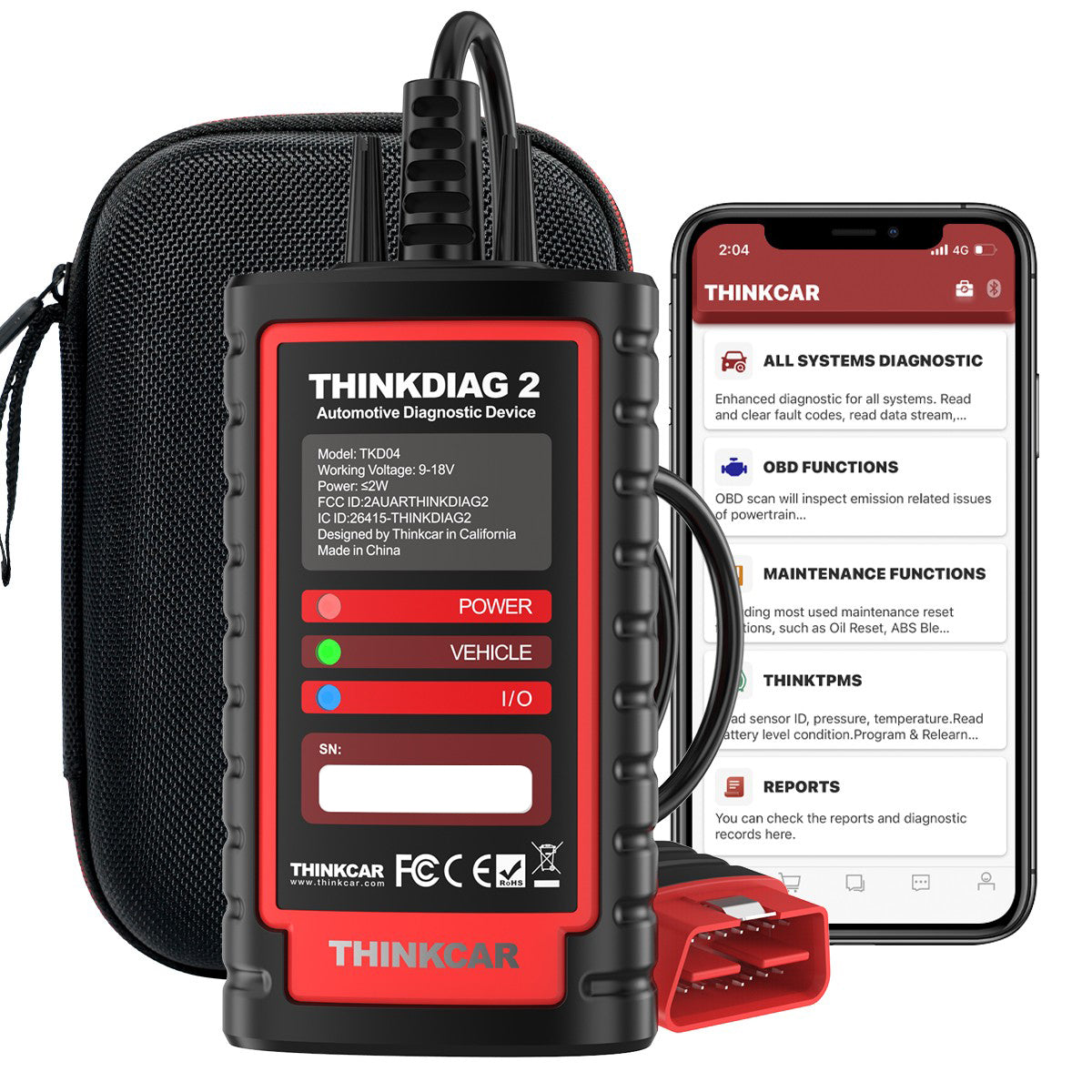
Phone-based diagnostics only become useful when you stop treating the scanner as a verdict machine. A scanner reports what the vehicle saw, stores data around the event, and sometimes lets you interact with systems. The skill is knowing which layer of information you are looking at and what it can actually prove.
OBD2 codes are a starting point, not a diagnosis
For most drivers, the first contact with diagnostics is a generic powertrain code. That is helpful, but it is not the same as fault confirmation. OBD systems were designed to monitor emissions-related performance and trigger a malfunction warning when the vehicle detects a problem severe enough to affect emissions compliance. The EPA and state inspection rules also tie OBD status and malfunction alerts to inspection workflows, which is why the check engine light matters in both repair and emissions contexts. EPA defines OBD as the onboard computer system that monitors emissions-control, fuel metering, and ignition performance and detects malfunctions likely to cause standards failures.
What to check: - Stored codes - Pending codes - Permanent codes - Freeze frame data - Monitor readiness status - MIL status
What this means: - A code tells you where to look first - Freeze frame shows operating conditions - Pending faults hint at intermittent issues - Readiness helps after repairs or clearing codes
Full-system access changes the depth of serious car diagnostics
Basic code readers usually stay close to generic engine data. Serious car diagnostics often require access to ABS, SRS, transmission, body, HVAC, and gateway modules because modern faults can move across networks instead of staying inside one system. A wheel speed sensor issue may show up as an ABS fault, a traction control complaint, and a transmission behavior issue. If your scanner only sees engine codes, your workflow narrows too early.
Why it matters: - You can trace cross-module complaints - You can read manufacturer-level faults - You can spot communication failures sooner - You avoid calling a symptom the root cause
Common mistake: - Clearing a powertrain code without checking body or chassis modules - Assuming no engine code means no real fault - Ignoring communication-related module loss
Live data is how you validate fault direction
A code suggests a path, but live data tells you whether that path still makes sense while the vehicle runs. This is where smartphone scan tools can become far more useful than many people expect. Good Bluetooth OBD2 platforms stream sensor values, graph trends, and let you compare commanded versus actual behavior in real time. The reference Foxwell article also frames Bluetooth scanners around real-time updates, code data, and live sensor readings, which is the right idea even if the real value comes from how you interpret that stream. (foxwelldiag.com)
Key specs or signals: - Fuel trims at idle and load - Coolant temperature warm-up pattern - O2 or air-fuel sensor switching - MAF or MAP response to throttle input - Misfire counters where supported - Voltage stability during cranking
What this means: - Data trends can confirm or weaken your theory - Intermittent faults often appear in graphs before they become hard failures - A stable code with unstable live values often points to wiring, bias, or operating-condition problems
Active tests confirm component response
Active tests, also called bi-directional controls, move you from observation into verification. Instead of waiting for a component to react on its own, you command it and watch what happens. That matters because many repair decisions become much faster when you can command a fan, purge valve, injector, pump, or actuator and then compare sound, movement, pressure, or related sensor response.
What to check: - Whether active tests are truly supported - Which systems allow commands by vehicle - Whether the app shows response clearly - Whether the tool saves reports afterward
Why it matters: - It reduces teardown before proof - It separates electrical command issues from mechanical failure - It turns guesswork into a repeatable test process
Code Reading vs Real Diagnosis
The first jump from casual scanning to serious car diagnostics is learning not to confuse a code with a conclusion. A P0171, for example, can come from an intake leak, weak fuel delivery, biased airflow data, or even a lazy sensor report. The code tells you the system saw a lean condition. It does not tell you which part deserves your money.
What to check: - Freeze frame RPM and load - Fuel trims before and after warm-up - Related pending codes - Whether the complaint is constant or intermittent - Whether other modules show linked faults
Common mistake: - Replacing the named component in the code title - Clearing faults before saving the report - Skipping a battery and charging-system check first
This is also where a better app workflow pays off. THINKDIAG 2 is positioned as a compact Bluetooth OBD2 interface for individual owners, DIY users, and small repair shops, but the important part is not the size. It is the feature stack: full-system diagnostic access, freeze frame support, graph data stream support, health reports, Auto VIN, and report history within the app. The product page also lists ECU coding, bi-directional active tests, 15 maintenance functions, CAN-FD support, and coverage for 98 percent of market models, which makes it more relevant to serious car diagnostics than a generic code-only dongle. ([mythinkcar.com])
Best fit: - Serious DIY owners maintaining multiple vehicles - Small shops needing a pocket backup scanner - Users who want more than engine-only code reading - Workflows built around quick reports and mobile access
Shop: ThinkDiag 2
Live Data and Trend Analysis
When a fault only appears on cold starts, during highway load, or after ten minutes of driving, stored codes alone will not save you. This is where smartphone scan tools earn their place. Because your phone or tablet already gives you a familiar interface, app-based tools can make graphing and comparing multiple parameters easier than some budget handhelds. The important question is not whether live data exists, but whether it is stable, readable, and easy to record.
What to check: - Can you graph multiple PIDs at once - Can you record and replay sessions - Can you compare commanded and actual values - Can you monitor data under road load safely
Why it matters: - Vacuum leaks often show strongest trim changes at idle - Weak fuel supply often gets worse under load - Thermostat faults appear as slow warm-up curves - Intermittent sensor dropout becomes visible in graphs
A useful Bluetooth OBD2 workflow is simple: read the code, capture freeze frame, warm the vehicle, watch the suspect signal live, and then compare behavior during the complaint. ThinkCar also highlights health reports and diagnostic record storage, which matters more than many buyers realize because repeatability is part of serious car diagnostics. If you can save one baseline scan before repair and one after repair, you stop relying on memory. That is especially useful when your workflow involves family vehicles, fleet cars, or comeback checks a week later. ([mythinkcar.com])
Shop: ThinkDiag 2
Active Tests and Service Functions
If you want serious car diagnostics from a phone-based setup, active tests are one of the clearest dividing lines. Reading data is passive. Commanding a component is proof-oriented. If you trigger the radiator fan and it runs, your command path, module output, and downstream circuit are telling you something useful. If you command a purge valve and do not see trim reaction, the problem path changes. That is why bidirectional control matters so much in repair workflows.
What to check: - Active test menu depth by vehicle - Service reset coverage by system - Whether actuation names are clear in-app - Whether the tool supports relearns after repair
Best fit: - Brake service with EPB resets - SAS calibration after steering work - DPF regeneration support where applicable - Injector coding or IMMO-related tasks on supported vehicles
THINKDIAG 2 lists bi-directional or active test support, ECU coding, adaptation, IMMO key matching, and 15 maintenance functions, including oil reset, EPB reset, DPF regeneration, SAS calibration, ABS bleeding, injector code, and TPMS reset on supported vehicles. That mix makes sense for users who want one compact Bluetooth OBD2 interface for diagnosis and follow-up service work, rather than a code reader that stops at fault retrieval. It will not replace every dedicated shop tablet, but it does move well past consumer-grade scanning when your vehicle coverage matches the job. ([mythinkcar.com])
For comparison, BlueDriver emphasizes all-system scanning and enhanced diagnostics on many vehicles, but its official product page centers more on code access and repair reports than deep bidirectional work. Innova's 7111, by contrast, clearly markets bidirectional control, all-system diagnostics, OEM live data, graphing, recording, and 34 workshop tools, but it sits in a tablet-style category rather than a pocket phone-first dongle. TOPDON and Autel also offer CAN-FD and active-test capable platforms in broader product ranges, which is why form factor and workflow matter as much as feature lists. (us.bluedriver.com)
Shop: ThinkDiag 2
Coverage Beyond Engine Systems
A phone-based scanner stops being a toy once it can help you work across the whole vehicle. Modern complaints rarely respect system boundaries. A customer says the transmission shifts oddly, the cruise control drops out, and three warning lights appear after a wheel bearing repair. That can be an ABS speed signal issue, not a transmission failure. Without broader module access, you can miss the fault path entirely.
What to check: - ABS module access - SRS coverage - Transmission data and codes - BCM and body-system access - Communication fault reporting - Protocol support for newer vehicles
Why it matters: - Whole-vehicle scanning improves context - Communication faults reveal network problems early - Newer protocols affect late-model compatibility - One complaint may start in another module
THINKDIAG 2 is relevant here because it combines full-system diagnostics with CAN-FD support, Auto VIN, and app-based reporting in a compact interface. CAN-FD matters for newer vehicle coverage because some late-model platforms require faster communication support than older generic dongles provide. ThinkCar explicitly markets THINKDIAG 2 as supporting CAN-FD, full-system diagnostics, and broad vehicle coverage, which makes it a better fit for serious car diagnostics than engine-only Bluetooth OBD2 devices aimed at simple MIL resets. ([mythinkcar.com])
What this means: - If you service newer vehicles, protocol support matters early - If you chase warning-light clusters, full-system access matters more than fancy app design - If your scanner cannot see communication faults, your workflow will stall faster than you expect
Shop: ThinkDiag 2
ThinkDiag 2 Workflow Fit
The question is not whether THINKDIAG 2 can do more than a basic dongle. It can. The better question is whether its mobile-first workflow matches how you actually diagnose cars. If you want something pocketable, fast to deploy, and easy to keep in multiple vehicles or bays, a phone-based interface has a real advantage. If you need a rugged dedicated screen all day, a larger tablet system may still fit better.
Key specs or signals: - Bluetooth 5.0 listing on product imagery - CAN-FD support for newer cars - Bi-directional and ECU coding claims - Full-system diagnostics - Auto VIN and health reports - 15 maintenance functions - 15 plus language support
Best fit: - Multi-car households - Advanced DIY users - Mobile technicians needing a compact backup - Small shops handling inspection, service, and fault confirmation
Vehicle Service Pros' 2025 Scan Tool Spec Guide highlights that major scan tools vary widely by platform, operating model, and function depth, which is a good reminder not to shop by a single headline feature. A compact app-based unit can be the right answer when your workflow values speed, portability, and repeat scans more than a built-in rugged display. That is where THINKDIAG 2 lands most naturally. It is not just a Bluetooth OBD2 adapter for clearing lights. On paper and in workflow design, it is aimed at users who want serious car diagnostics without carrying a full tablet every time. (vehicleservicepros.com)
Shop: ThinkDiag 2
How to Choose Smartphone Scan Tools for Serious Car Diagnostics
Choosing well starts with your vehicles and your repair depth, not with a brand logo. Some users need full-system scans on late-model cars with active tests. Others only need strong engine and transmission coverage with stable live data. The right Bluetooth OBD2 tool is the one that matches the problems you actually solve every month.
What to check first
- Your vehicle years and brands
- Whether you need CAN-FD support
- Engine-only or full-system access
- Active tests required or not
- Service resets you actually use
- iPhone and Android app support
Feature depth matters more than headline marketing
Many tools claim advanced diagnostics, but the gap appears in daily use. BlueDriver is strong for broad consumer appeal and enhanced diagnostics on many vehicles, while some Innova tablet models go deeper into bidirectional and workshop-tool territory. TOPDON and Autel also compete well when you need broader pro-grade ecosystems. The key is to compare coverage depth, not just whether a feature exists somewhere in the catalog. (us.bluedriver.com)
Selection table
| Factor | What to check | Best for | Trade-off |
|---|---|---|---|
| Vehicle coverage | Fleet match | Mixed garages | Verify by VIN |
| System depth | Full-system scan | Real troubleshooting | More setup |
| Live data | Graph and record | Intermittent faults | Learning curve |
| Active tests | Component commands | Repair confirmation | Varies by car |
| Protocol support | CAN-FD, newer cars | Late models | Narrow older tools |
| Form factor | Phone vs tablet | Pocket workflow | Smaller screen |
| App quality | Stable pairing | Repeat use | Software dependence |
| Update model | Ongoing support | Long-term ownership | Check terms |
Best fit by user type
- Serious DIY: prioritize full-system access, live data, and stable reports
- Light professional use: add active tests and service functions
- Newer vehicle focus: verify CAN-FD early
- Shop backup tool: prioritize quick deployment and portability
Best Practices and Pitfalls
A stronger scanner helps, but process still decides whether you fix the car correctly. The best phone-based tools support a disciplined workflow. They do not replace one.
Best Practices
- Check battery voltage before deep scans. Low system voltage can create misleading module faults and unstable communication.
- Save the initial report before clearing anything. That gives you proof of starting conditions and a better comeback record.
- Use freeze frame and live data together. The first shows when the fault happened, and the second shows whether the pattern still exists.
- Scan all modules when the complaint crosses systems. Warning-light clusters rarely stay in one control unit.
- Recheck after repair with a second scan and a drive cycle. That confirms the fix and catches related faults before the car leaves.
Common Pitfalls to Avoid
- Treating code text as a parts list. A fault description is not a purchase instruction.
- Ignoring pending or communication codes. Those often point to the real path before a hard failure appears.
- Buying on price alone. Cheap smartphone scan tools often collapse when you need module depth, stable apps, or newer protocol support.
- Overvaluing feature lists without checking coverage. Active tests and service functions can vary sharply by make, model, and year.
- Forgetting workflow fit. A tool that looks powerful on paper can still slow you down if the app is unstable or the interface hides important data.
Conclusion
Smartphone scan tools can absolutely support serious car diagnostics, but only when they move beyond generic code reading. The features that matter are full-system coverage, live data you can actually interpret, active tests that help confirm faults, and app stability that keeps your workflow moving.
If you compare tools by vehicle coverage, function depth, and how you diagnose in real life, the choice gets much clearer. A compact option like THINKDIAG 2 makes sense when you want full-system access, CAN-FD support, bi-directional functions, and a mobile workflow that can travel with you instead of staying on a cart.
FAQ
Can a smartphone-based diagnostic tool replace a tablet scanner for most users?
Yes, for many serious DIY users and light professional workflows, it can. A strong phone-based tool handles code reading, full-system scans, live data, reports, and many active tests without needing separate hardware beyond the dongle and your phone. The limit usually appears when you need a larger screen for long graph sessions, shop durability, or brand-specific programming depth. If your work centers on diagnosis, service functions, and confirmation testing, a good mobile setup is often enough. If your day involves continuous bay use and complex OEM-level operations, a dedicated tablet still has advantages.
What features matter most in a phone-based scan tool?
The most important features are full-system access, stable live data, freeze frame, active tests, and reliable vehicle coverage. After that, app quality matters more than many buyers expect because a scanner is only useful if pairing, loading, and report saving work smoothly every time. Protocol support also matters, especially if you work on newer vehicles that may need CAN-FD. Good service functions help, but they should come after core diagnostic depth. In practice, workflow reliability beats flashy marketing claims.
Are app-based diagnostic tools good enough for advanced car repairs?
They can be, but the scanner alone does not make the repair advanced. Serious repair work still depends on your process: reading faults, checking freeze frame, validating with live data, commanding parts when possible, and confirming the fix afterward. A phone-based tool becomes useful for advanced work when it includes module-level access and meaningful active tests. Without those, it stays closer to a code reader than a diagnostic platform. The app can support the job, but your testing logic still carries the result.
How do I choose a Bluetooth scanner for my car's needs?
Start with the vehicles you actually own or service, then list the systems and tasks you need most often. If you only check engine faults, many tools will work, but serious car diagnostics usually require ABS, SRS, transmission, and body access too. Next, confirm whether you need live graphing, active tests, resets, and newer protocol support like CAN-FD. Then compare app stability, report handling, and ease of use, because these affect your workflow every time you scan. The best choice is the one that fits your cars and your repair depth, not the one with the loudest feature banner.
What is the difference between reading codes and serious diagnostics?
Reading codes tells you where the vehicle detected a problem. Serious diagnostics asks whether that code reflects a sensor issue, a wiring problem, a mechanical failure, a network fault, or a condition caused by another system. Codes are starting clues, not final answers. The deeper process adds freeze frame, live data, module comparison, and active testing where available. That extra validation is what prevents unnecessary parts replacement and wasted labor.
When does a smartphone-based scanner become too limited?
It becomes too limited when module coverage is shallow, active tests are weak, or the app itself slows the job down. You will also feel the limit when your workflow depends on long graph sessions, complex programming, or heavy daily use that benefits from a dedicated rugged screen. Some budget tools look good until you need body, chassis, or gateway access and discover they mostly read generic engine data. The limit can also appear on newer vehicles if protocol support is missing. In short, the problem is not that the scanner uses a phone; the problem is when the platform lacks the depth your work demands.
Why should I save reports before clearing faults?
You should save the report because clearing codes erases useful context. The original scan captures stored faults, pending faults, monitor status, and often freeze frame information that can help you understand when the problem happened. If the issue returns later, that saved baseline makes it easier to compare changes instead of starting from memory. It also helps if more than one person works on the same vehicle. Good report habits turn a quick scan into a repeatable diagnostic record.
Is CAN-FD support important for smartphone scan tools?
Yes, it can be very important if you work on newer vehicles. CAN-FD is a newer communication protocol used by some late-model platforms, and a tool without support may have reduced access or no meaningful communication on those vehicles. If your cars are older, you may not need it right away. But if you maintain mixed fleets or regularly buy newer models, verifying CAN-FD support is a smart way to avoid outgrowing the tool too soon. It is one of the clearest future-proofing checks in a Bluetooth OBD2 buying decision.
Table of Contents
- Introduction
- Serious Car Diagnostics Fundamentals
- Code Reading vs Real Diagnosis
- Live Data and Trend Analysis
- Active Tests and Service Functions
- Coverage Beyond Engine Systems
- ThinkDiag 2 Workflow Fit
- How to Choose Smartphone Scan Tools for Serious Car Diagnostics
- Best Practices and Pitfalls
- Conclusion
-
FAQ
- Can a smartphone-based diagnostic tool replace a tablet scanner for most users?
- What features matter most in a phone-based scan tool?
- Are app-based diagnostic tools good enough for advanced car repairs?
- How do I choose a Bluetooth scanner for my car's needs?
- What is the difference between reading codes and serious diagnostics?
- When does a smartphone-based scanner become too limited?
- Why should I save reports before clearing faults?
- Is CAN-FD support important for smartphone scan tools?

Share:
Best Diagnostic Tools for Modern Cars: Bluetooth, AI, and App Support
Diagnostic Scanner Features That Actually Matter for DIY Users