
Why portable scan tools matter before you take the next driveway job
A mobile diagnostic visit can go wrong fast when your tool connects slowly, only reads engine codes, or forces you back to the shop for one missing reset. That is the real cost of choosing portable scan tools by size alone. In mobile diagnostics, every extra minute at the curb eats into billable time, delays the next appointment, and increases the chance of replacing parts before you have confirmed the fault.
A better buying approach starts with workflow, not marketing labels. You need to know which features actually shorten on-site automotive diagnostics, which scanner format fits your daily kit, and where a mobile mechanic scan tool should sit between convenience and depth. By the end of this guide, you should be able to separate basic readers from real working tools, choose between Bluetooth and tablet-style formats, and match the right portable automotive scanner to the jobs you handle most often.
What makes portable scan tools worth carrying every day
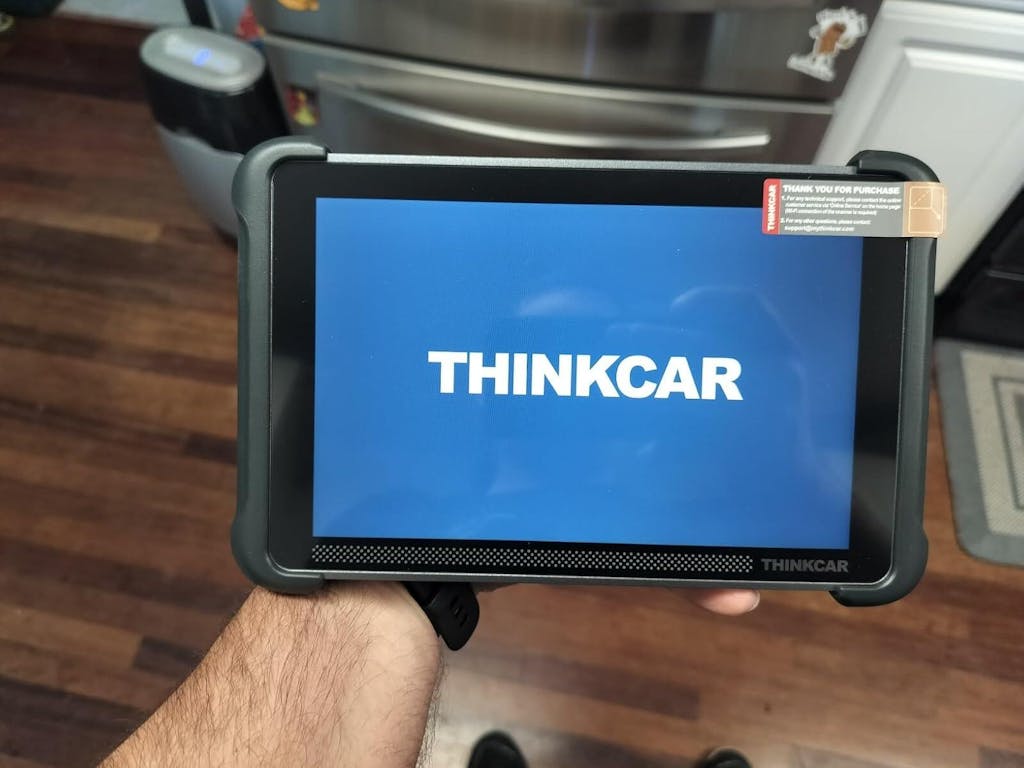
Not every compact scanner is built for real mobile diagnostics. The best portable scan tools save time because they reduce setup friction, reach more modules, and let you confirm faults without guessing. That matters far more than having the smallest box in your bag.
- Fast startup and stable pairing
- Full-system access, not engine-only coverage
- Good outdoor screen visibility or a clean phone app
- Strong reset and service-function depth
- Protocol support for newer vehicles
- A carry format that survives repeated transport
Core terms every buyer should know
A few terms show up on every product page, but they do not all mean the same thing in practice. OBD2 covers the standardized emissions and engine-related functions most drivers know, such as reading generic fault codes, checking readiness monitors, and viewing freeze-frame data. That is the minimum layer, not the whole diagnostic picture.
Full-system diagnostics go wider. A full-system diagnostic tool can talk to modules such as ABS, SRS, transmission, body control, TPMS, and battery systems, depending on the vehicle. Bidirectional control means the tool can command a component or routine, such as turning on a radiator fan or cycling an ABS pump, so you can test behavior directly. ECU coding adds another layer by helping with adaptation, matching, or module configuration after repair. For late-model work, CAN-FD and DoIP support matter because more 2020-and-newer vehicles use those faster communication standards.
The portable-tool taxonomy that actually affects your workflow
You can think of portable automotive scanner options in four practical groups. Code readers are simple and quick, but they usually stop at engine and emissions work. Phone-dongle tools are easy to carry and often pair well with quick inspections, but the app experience becomes part of the tool quality.
Tablet-based scanners reduce friction because the screen, software, and workflow are built into one device. That usually means faster navigation during repeated service calls. Bidirectional scan tool platforms sit above simple readers because they help you verify actuators and avoid parts-swapping. Then there are hybrid tools that keep a portable form but add shop-grade functions such as ECU coding, broader resets, and newer protocol support. For daily paid calls, that middle-to-upper tier is usually where tool ROI starts to improve.
Why portability is more than size
A tiny scanner can still be annoying to use if pairing fails, sunlight washes out the screen, or your phone keeps getting tied up with app prompts. Real portability includes carry weight, cable count, startup speed, and how easily you can move around the vehicle during tests.
What to check before you buy:
- Carry factor: Will it fit in a small field bag without extra adapters everywhere?
- Setup speed: Does Bluetooth connect quickly enough for back-to-back calls?
- Power practicality: Can the device run through multiple appointments without drama?
- Screen usability: Is the display readable outdoors or in dim parking structures?
- Workflow fit: Can you move from AutoVIN to codes to live data without menu hunting?
Which features are essential in an automotive diagnostic tool?
If you only remember one section, remember this: essential features for a professional car diagnostic tool start with system coverage and active testing, not with marketing extras. Mobile repair rewards tools that help you prove a fault on-site, clear the repair, and move on.
- Read and clear codes across supported modules
- Live data with graphing for pattern checks
- Freeze-frame capture for fault context
- Full-system scan capability
- Active tests for actuators and outputs
- Common maintenance resets for post-repair completion
Essential functions for real on-site repair work
At minimum, your mobile mechanic scan tool should handle code reading, code clearing, live data, and freeze-frame review. Live data matters because a fault code tells you where to look, while sensor values tell you whether the problem is present now. Freeze-frame data gives you the operating conditions that triggered the fault, which is helpful when the symptom is intermittent.
A full-system diagnostic tool is the safer baseline for paid work because many real faults sit outside the engine module. Wheel-speed sensor issues, airbag warnings, battery registration, steering-angle faults, and electronic parking brake procedures all push you beyond generic OBD2. On newer or more complex vehicles, this wider access becomes less of a luxury and more of a requirement.
Features that separate casual tools from working tools
The biggest dividing line is bidirectional control. A casual Bluetooth OBD2 scanner may show you a code, but a stronger bidirectional scan tool lets you command the fan, throttle, window, EVAP component, or ABS pump where supported. That shortens fault isolation because you can check whether the component responds before replacing anything.
The next separation points are update support, protocol coverage, and interface speed. ThinkCar positions the THINKSCAN 689BT as a portable professional unit with OE-level full-system diagnostics, bidirectional control, ECU coding support, 35+ maintenance functions, Bluetooth 5.0, AutoVIN, AutoScan, CAN-FD, DoIP, and FCA AutoAuth support. It also uses an 8-inch 1280×800 display with 4GB RAM and 64GB storage, which matters because faster navigation reduces dead time between tests.
A practical feature map across ThinkCar’s portable lineup

If you want a portable scan tool shortlist tied to actual use, ThinkCar’s three products in this brief line up clearly by workflow depth. The THINKSCAN 689BT sits at the advanced end for technicians who need broader module access, bidirectional tests, and ECU coding support in one portable package. The THINKSCAN 689BT also supports CAN-FD and DoIP, which improves its relevance for late-model mobile work.
THINKDIAG 2 is the compact, app-led route. ThinkCar lists full-system diagnostics, active tests, ECU coding functions, 15+ maintenance services, AutoVIN, and four-data graph display inside its phone-based workflow. The THINKDIAG 2 makes more sense when your priority is lighter weight and flexible everyday scanning rather than a dedicated screen.
MUCAR BT200 MAX AI sits between basic convenience and real diagnostic value. ThinkCar highlights bidirectional control, 15+ maintenance resets, and a compact Bluetooth format, making it a better fit for routine resets, common fault checks, and lighter repair visits than for deep mixed-fleet troubleshooting. The MUCAR BT200 MAX AI works best when ease of setup matters more than maximum platform depth.
Shop: THINKSCAN 689BT
How should a mobile mechanic choose between compact, Bluetooth, and tablet-style scanners?
The right format depends less on budget than on job frequency, module depth, and the cost of a missed diagnosis. A tool that feels portable in your hand can still be expensive if it turns one visit into two.
Match the tool to job frequency
If you only scan one family car or help friends occasionally, a compact dongle can be enough. Once you run daily paid service calls, the math changes. You need faster menus, wider coverage, and less dependence on a phone battery or background apps.
A simple rule works well:
- Single-car or occasional use: compact dongle is often fine
- Daily mobile jobs: full-system tool is the safer baseline
- Diagnostics plus repairs: bidirectional functions matter most
- Late-model heavy workload: protocol support comes first
Choose by workflow friction, not just hardware style
Phone-based tools win on carry burden. You can keep the dongle in a pocket and use the phone already in your hand. The tradeoff is that calls, battery drain, notifications, and smaller-screen graphing can interrupt your flow. Tablet-style scanners reduce those interruptions because they are purpose-built for the job.
A Bluetooth OBD2 scanner can be a great fit if the wireless link is stable and the tool still delivers real function depth. In mobile diagnostics, wireless matters because you may need to stand by the engine bay, then move to the cabin, then check data while walking around the vehicle. ThinkCar’s 689BT uses Bluetooth with a magnetic back-mounted dongle and an integrated kickstand, details that sound small but help repeated field use.
Select by revenue risk
One missed module or one unavailable active test can cost more than the difference between tool tiers. That is why mobile buyers should think in terms of revenue risk, not just feature count.
| Workflow risk | What it causes | Tool trait that helps |
|---|---|---|
| Missed non-engine module | Return visit or incomplete diagnosis | Full-system diagnostics |
| No active tests | Parts guessing | Bidirectional control |
| Limited reset coverage | Job cannot be completed on-site | 15+ to 35+ maintenance functions |
| Slow interface | Fewer jobs per day | Faster hardware and cleaner UI |
| No CAN-FD or DoIP | Weak late-model support | Newer protocol coverage |
Where ThinkCar’s portable options fit different mobile workflows
This is where selection gets easier. Instead of asking which scanner has the longest feature list, ask which one lets you finish your most common jobs without carrying unnecessary bulk.
Best fit for advanced mobile diagnostics

For paid field work, THINKSCAN 689BT is the clearest lead option in this lineup. It fits no-start diagnosis, full-vehicle troubleshooting, post-repair verification, and jobs where active commands can save you from replacing the wrong part. ThinkCar lists OE-level full-system diagnostics, ECU coding support, 35+ maintenance functions, CAN-FD, DoIP, AutoVIN, FCA AutoAuth, and Bluetooth operation in its dedicated 8-inch device. That mix gives it a higher ceiling for mobile service than a lightweight reader or a basic phone dongle.
Best fit signals:
- Mixed domestic and import calls
- Repeated driveway or fleet visits
- Need for active tests and module matching
- Late-model vehicles showing up regularly
- Less tolerance for second visits
Shop: THINKSCAN 689BT
Best fit for compact app-led workflows
Some technicians care most about keeping their kit small. In that case, THINKDIAG 2 is the cleaner match. It still offers full-system OE-level diagnostics, active tests, ECU coding functions, AutoVIN, and 15+ maintenance services, but it keeps the experience centered on your phone and app workflow.
That makes sense when you handle fast inspections, recurring support for a family fleet, or lighter mobile jobs that do not justify a dedicated tablet on every call. The tradeoff is straightforward: you gain portability and flexibility, but you accept more app dependence and a smaller working screen during data-heavy sessions.
Shop: THINKDIAG 2
Best fit for quick everyday troubleshooting
MUCAR BT200 MAX AI suits buyers who want a compact Bluetooth tool with more than basic code reading. ThinkCar highlights bidirectional control, 3000+ command examples in its product messaging, and 15+ reset functions that include oil reset, SAS reset, brake reset, DPF reset, battery matching, and TPMS reset.
That profile works well for routine service resets, common warning-light checks, and lighter repair calls where you still want active tests in a pocket-size format. It is less convincing as a primary revenue tool for broad multi-brand diagnostics, but it can be a strong easy-carry option for technicians who want to keep the kit minimal.
Shop: MUCAR BT200 MAX AI
Best practices and mistakes that shape mobile diagnostic speed
Faster mobile diagnostics usually come from better buying discipline, not from buying the most expensive scanner. A few checks before purchase can prevent a year of avoidable frustration.
Best practices
Choose coverage before convenience. Confirm that the tool handles your most common makes, model years, and systems rather than assuming every full-system claim means the same thing. If late-model vehicles are part of your work, move CAN-FD and DoIP support higher on your checklist.
Then focus on active tests and reset depth. In many on-site jobs, commanding a fan, EVAP valve, window, or ABS pump is what turns a suspected fault into a confirmed one. OSHA also requires employers to assess hazards and provide suitable eye and face protection where eye hazards exist, and its standards reference ANSI Z87.1-based protection for relevant work environments, which matters when diagnostics lead to under-hood or under-vehicle checks. (osha.gov)
Practical habits that help:
- Verify module coverage before buying
- Prioritize bidirectional testing over flashy extras
- Check update policy and ownership costs clearly
- Keep one workflow for report saving and customer notes
- Carry proper PPE for follow-up inspection work
Common pitfalls to avoid
The biggest mistake is buying an engine-only tool for mixed repair work. It feels cheaper on day one, then expensive when ABS, SRS, BCM, EPB, or battery registration issues force a second tool. Another common error is treating portability as a size contest and ignoring startup speed, screen readability, and real test depth.
Do not ignore late-model communication protocols either. A tool without CAN-FD or DoIP support can age out faster if your local vehicle mix is getting newer. And if you work around hybrids or EVs, remember that NHTSA notes that qualified technicians need the proper protective and diagnostic equipment for high-voltage systems, so portable convenience should never replace safety readiness. (nhtsa.gov)
Conclusion
Portable scan tools only improve mobile diagnostics when their speed is backed by real coverage, stable workflow, and enough active testing to prove a fault on-site. That is why the best buying decision usually comes from matching tool depth with job risk, not from chasing the smallest scanner or the longest feature list.
For broad paid mobile work, THINKSCAN 689BT is the strongest fit in this ThinkCar lineup because it combines full-system access, bidirectional control, ECU coding support, 35+ maintenance functions, and late-model protocol support in a still-portable format. THINKDIAG 2 works better when you want an app-led compact kit, while MUCAR BT200 MAX AI suits lighter everyday troubleshooting and reset work. If your goal is fewer return visits and faster mobile diagnostics, start with the tool that can confirm the job, not just read the code.
FAQ
What is the best bidirectional scan tool under $1,000?
For most paid mobile jobs, the best single choice in this lineup is the ThinkCar THINKSCAN 689BT. It covers the features that matter most on service calls: full-system diagnostics, bidirectional testing, wireless operation, ECU coding support, and newer protocol support for late-model vehicles. That matters more than shaving off a little size when your income depends on completing the visit. If your work includes mixed domestic and import vehicles, it is the better all-around fit than a lighter but shallower tool.
Which wireless scanner is best if I don’t want a bulky tablet?
If you want one wireless tool without moving all the way to a large dedicated platform, the ThinkCar THINKSCAN 689BT is still the safest recommendation. It stays portable while adding deeper functions such as active tests, ECU coding support, and broad system access that many compact tools miss. That gives you a better chance of finishing the job on-site instead of needing a second visit. If you want even less hardware, THINKDIAG 2 is the lighter option, but it trades some workflow comfort for app dependence.
If I only buy one scan tool for mobile mechanic jobs, which one should it be?
If you are buying just one tool for real mobile mechanic work, choose one with full-system diagnostics and bidirectional control first. That combination lets you read more than engine faults and actively test common components such as fans, pumps, windows, and EVAP devices where supported. In ThinkCar’s range, the THINKSCAN 689BT is the strongest single-tool solution because it also adds 35+ maintenance functions and support for CAN-FD and DoIP. Those extra layers matter when your workload includes newer vehicles and post-repair procedures.
Are Bluetooth scan tools reliable enough for on-site repair work?
Yes, Bluetooth scan tools are reliable enough when the connection is stable and the tool does not sacrifice system depth for convenience. In mobile use, wireless operation reduces cable clutter and lets you move between the cabin, engine bay, and wheel area more freely during testing. The more important question is whether the scanner still offers full-system access, active tests, and enough reset coverage for your normal jobs. A weak Bluetooth tool is still weak, while a strong wireless tool can be one of the fastest tools for mobile diagnostics.
How much bidirectional capability does a mobile mechanic really need?
A mobile mechanic usually needs enough bidirectional capability to command the components most often used to confirm faults on-site. In practice, that means tests such as radiator fan activation, throttle actuation, EVAP control, window or lock commands, ABS pump cycling, and other supported routines. Without those functions, you may still read codes but lose the fastest way to prove whether a component responds correctly. For paid field work, bidirectional depth should be treated as a core buying filter rather than a premium add-on.
Should a mobile mechanic choose a compact dongle or a tablet-style scanner?
A compact dongle is best when your work centers on inspections, routine code checks, and lighter reset jobs where minimum carry weight matters most. A tablet-style scanner is better when you run repeated paid calls and need faster navigation, better screen visibility, and a more integrated workflow. The breakpoint is usually job risk. Once missed modules or missing active tests can cost you a second visit, the fuller platform becomes the smarter buy. In ThinkCar’s lineup, THINKDIAG 2 fits the compact path, while THINKSCAN 689BT is the better choice for deeper day-to-day mobile diagnostics.
Table of Contents
- Why portable scan tools matter before you take the next driveway job
- What makes portable scan tools worth carrying every day
- Which features are essential in an automotive diagnostic tool?
- How should a mobile mechanic choose between compact, Bluetooth, and tablet-style scanners?
- Where ThinkCar’s portable options fit different mobile workflows
- Best practices and mistakes that shape mobile diagnostic speed
- Conclusion
-
FAQ
- What is the best bidirectional scan tool under $1,000?
- Which wireless scanner is best if I don’t want a bulky tablet?
- If I only buy one scan tool for mobile mechanic jobs, which one should it be?
- Are Bluetooth scan tools reliable enough for on-site repair work?
- How much bidirectional capability does a mobile mechanic really need?
- Should a mobile mechanic choose a compact dongle or a tablet-style scanner?

Share:
Lifetime Update Scan Tools: Compare Real Ownership Costs
AI Fault Code Interpretation: What to Look for in a Scanner