
Why a low sticker price can become the expensive choice
A scan tool can look like a bargain right up to the moment the update plan kicks in. That is where many buyers lose the math. The hardware may seem affordable on day one, but annual renewals, reduced vehicle coverage, or locked service functions can turn a cheap first purchase into a costly three-year decision. If you only compare checkout price, you can easily end up paying more for less capability.
This guide looks at lifetime update scan tools through the lens that matters most: real ownership cost. You will see how hardware class, software policy, vehicle coverage, and practical repair use all shape long-term value. Along the way, we will use ThinkCar examples such as the THINKSCAN 689BT, MUCAR 682, and MUCAR BT200 MAX to show how different ownership models fit different users. Generic OBD2 access is universal on U.S. cars and light trucks from model year 1996 onward, but actual diagnostic depth still varies sharply by tool class. According to Gear Medic, the jump from a basic code reader to a real diagnostic scanner is where live data and system access begin to matter. (gearmedic.net)
What scan tools include before update costs even begin
Choosing a tool starts with understanding what you are really buying. A scanner is not just hardware. It is a bundle of device quality, software access, system coverage, protocol support, and future update rights. When you separate those layers, the real ownership picture becomes much easier to judge.
Core terms buyers need first
A few terms drive most ownership-cost mistakes. Lifetime updates usually means the brand states ongoing software updates are included without extra renewal fees, but you still need to verify whether that applies to all functions or only the core package. OE-level access means the tool can reach vehicle systems beyond basic engine codes, such as ABS, SRS, battery management, or service resets. Coverage depth refers to how far the scanner goes inside each vehicle, not just how many brands appear on a compatibility list.
Keep these distinctions in mind:
- Hardware cost is the one-time device purchase.
- Software access controls what functions and vehicle databases stay available.
- Coverage depth decides whether you can do real diagnosis or only basic code checks.
- Protocol support affects whether newer vehicles will communicate properly.
Why scanner class changes ownership cost
Scanner class matters because underbuying creates repeat labor and outsourcing costs, while overbuying ties up money in functions you may never use. GearMedic’s 2026 buying guide draws a clear line between basic code readers and mid-range diagnostic tools, noting that live data, freeze-frame information, and enhanced codes are where a scanner becomes genuinely useful for ongoing repair work. (gearmedic.net)
In practical terms, most tools fall into three classes:
- Code readers: good for generic engine codes and emissions checks.
- Mid-range scanners: better for live data, resets, and multi-system access.
- Professional tools: built for bidirectional tests, coding, and newer protocols.
If you only check a check-engine light twice a year, pro-level depth may never pay back. On the other hand, if you maintain several vehicles or handle side jobs, a tool with stronger system access often lowers your cost per repair even when the upfront price is higher.
What features count before software renewals even matter
Before you calculate renewals, make sure the base tool already does the jobs you need. A lifetime update promise does not rescue weak hardware or shallow diagnostics. ThinkCar positions the MUCAR BT200 MAX as a Bluetooth tool with full-system diagnostics, bidirectional control, CAN-FD support, 15+ reset functions, and lifetime free updates. The MUCAR 682 moves into a handheld format with 20+ resets, CAN-FD, FCA support, and a 6.2-inch touchscreen. The THINKSCAN 689BT steps further up with ECU coding, 35 maintenance functions, Bluetooth workflow, and CAN FD/DoIP support.
What to check first:
- Can it read all major systems, not just powertrain?
- Does it support graphing or useful live data views?
- Are actuation tests or bidirectional controls included?
- Does it support newer protocols such as CAN-FD or DoIP?
- Will the form factor fit your workflow: dongle, handheld, or tablet?
How do update policies affect real ownership cost?
Update policy is where the ownership-cost story gets real. The best buying question is not “Does it update?” but “What happens in year two and year three if my vehicle mix changes?” A tool that stays functionally relevant without extra fees is often the safer long-term bet for DIY users and small operators.
Where renewals create hidden expense
Recurring update fees create cost in three ways: direct payment, lost coverage, and forced replacement pressure. Some tools stop adding new models unless you renew. Others keep working, but lock newer special functions or reduce access to current vehicle databases. Over time, that means your hardware still powers on, yet its practical diagnostic value declines.
Use this simple ownership math:
- Year 1 cost = tool price
- 3-year cost = tool price + renewal fees + any add-on software fees
- Value-adjusted cost = 3-year cost divided by the jobs or vehicles you actually support
This is why a low entry price can mislead you. If a tool needs annual software payments to stay useful, the real ownership cost may overtake a lifetime update scan tool surprisingly fast. The safer route is to look for plain wording around update duration, feature scope, and what remains usable if you stop paying.
Which product paths fit different users

The right update model depends on how you work, not just on budget. A dedicated handheld, a Bluetooth tool, and a tablet-style workshop scanner each solve different problems.
Dedicated handhelds
Handheld units fit buyers who want a self-contained device with no phone dependency. The MUCAR 682 is a good example of this path. ThinkCar says it includes lifetime free updates, 20+ maintenance resets, bidirectional control, CAN-FD support, FCA AutoAuth support, full-system diagnostics, and a 6.2-inch anti-glare touchscreen. That makes it a stronger long-run fit for multi-vehicle households or side work than a basic code reader.
Bluetooth tools
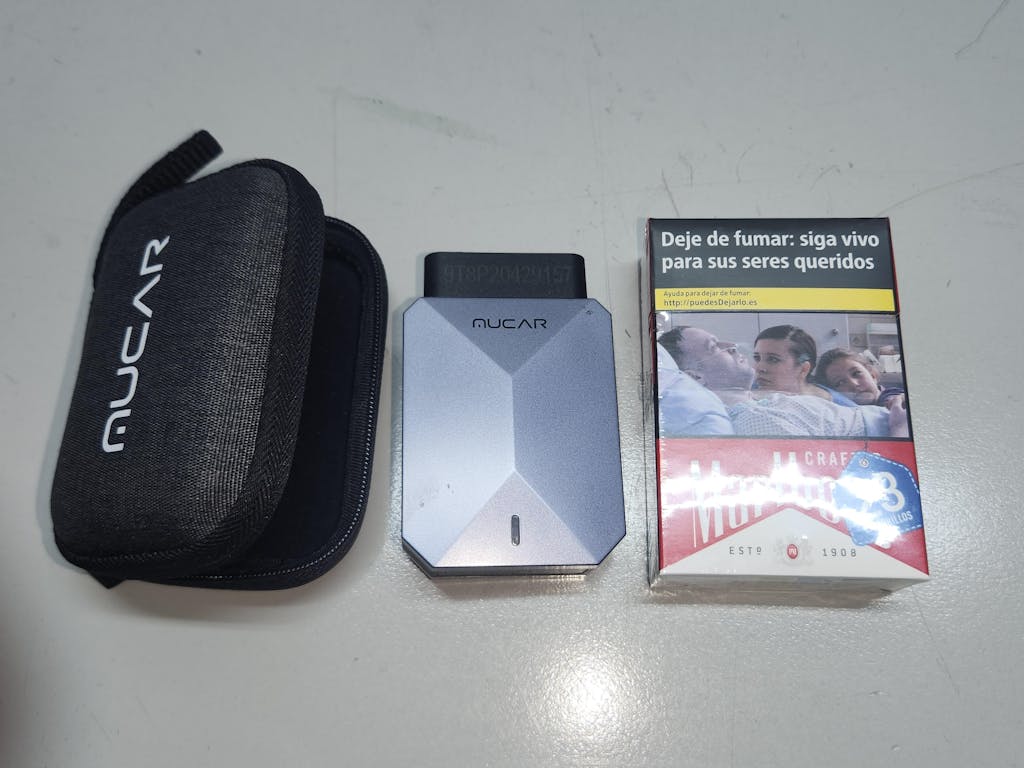
Bluetooth tools work best when portability and low-friction storage matter most. The MUCAR BT200 MAX is built around a small dongle-plus-app workflow, but ThinkCar still lists full-system diagnostics, 3000+ bidirectional commands, CAN-FD support, 15+ resets, ELM327 app compatibility, and smart sleep mode to avoid battery drain if left plugged in. For occasional users, this combination can keep long-term ownership cost low without giving up too much function.
Workshop tablets
A workshop-oriented unit makes more sense when you need faster intake, broader service menus, and current-protocol support across many jobs. ThinkCar describes the THINKSCAN 689BT as an Android 10 tablet with an 8-inch 1280×800 screen, 4GB RAM, 64GB storage, ECU coding, 35 maintenance functions, Bluetooth communication, CAN FD, DoIP, and lifetime free updates. That higher entry cost is easier to justify when the tool replaces dealer visits or speeds up repeat shop jobs.
Which decision factors matter most before you buy?
The fastest way to avoid scanner regret is to compare structure, not marketing slogans. You want a short list of decision factors that predict three-year usefulness. Start with cost, then verify capability, then test future compatibility.
Cost structure and ownership math
A scan tool becomes a good value when the feature set stays aligned with your actual repair frequency. That means your ownership math should go beyond purchase day.
What to compare:
- Upfront price versus 3-year cost: a one-time buy with lasting updates can beat a cheaper device plus renewals.
- Update model clarity: check whether the brand states free lifetime updates, limited free years, or paid renewals.
- Coverage depth: confirm whether the tool reaches engine, transmission, ABS, SRS, battery, and service systems.
A good shortcut is to divide the likely 3-year cost by the number of vehicles you expect to maintain. If you service five family vehicles and handle basic brake, battery, and warning-light work, even a mid-tier tool can pay back quickly.
Capability checks that protect value
Capability protects value because software terms mean little if the tool cannot finish the job. Modern cars increasingly rely on newer communication protocols, more modules, and service procedures that go beyond reading one generic code.
Check these items before buying:
- Live data quality: graphing, refresh speed, and enough parameters to compare sensors.
- Bidirectional control: ability to command windows, fans, pumps, or actuators for diagnosis.
- Protocol support: CAN-FD and DoIP are especially important for many newer vehicles.
- Reset coverage: oil, EPB, SAS, BMS, DPF, TPMS, and similar functions should match your actual work.
ThinkCar lists CAN-FD support on both the MUCAR 682 and BT200 MAX, while the THINKSCAN 689BT adds DoIP and ECU coding for more advanced workflows.
A quick comparison table
| Factor | Entry tool | Mid-tier lifetime tool | Professional lifetime tool |
|---|---|---|---|
| Upfront cost pattern | Low | Moderate | Higher |
| Renewal risk | Often unclear | Lower if lifetime terms are clear | Lower if lifetime terms are clear |
| System access | Usually engine-focused | Full-system on many models | Broad full-system + advanced functions |
| Bidirectional tests | Rare | Common on better units | Expected |
| Newer protocol support | Limited | Often CAN-FD | CAN-FD + DoIP on stronger models |
| Best fit | Emissions and code checks | Household, side jobs, mixed vehicles | Small shops, mobile techs, advanced DIY |
Real-world fit: who benefits most from lifetime updates?

Lifetime updates do not have equal value for everyone. They matter most when you want predictable cost, low admin friction, and a tool that stays useful across several vehicle years. The break-even point depends on how often you diagnose, how many systems you touch, and whether newer-model support matters in your garage or shop.
Scenario 1: Home DIY owners
If you mainly handle check-engine lights, maintenance resets, readiness checks, and occasional troubleshooting, a lifetime update scan tool can be the lowest-stress choice. U.S. vehicles have used standardized OBD2 access since 1996, and readiness status still matters for emissions testing. EPA guidance continues to treat OBD readiness as a core part of inspection programs, and federal readiness rules allow only limited unset monitors depending on model year. (epa.gov)
For this user, the best fit usually looks like:
- Full OBD2 functions
- Clear readiness monitor access
- A few key resets
- Broad compatibility without annual fees
That is where a compact tool such as the MUCAR BT200 MAX makes sense. ThinkCar says it offers full-system diagnostics, bidirectional control, 15+ resets, and lifetime free updates in a low-friction Bluetooth format.
Shop: MUCAR BT200 MAX
Scenario 2: Multi-vehicle households and side hustles
Once you maintain several cars across different makes, ownership cost changes fast. You need more than emissions codes. You need battery registration, service resets, ABS and airbag access, live data, and enough bidirectional control to avoid guessing. In that setting, the hardware cost matters less than the number of avoided shop visits.
The MUCAR 682 fits this middle ground well. ThinkCar lists lifetime free updates, 20+ maintenance resets, CAN-FD support, FCA support, OE-level full-system diagnostics across 125+ brands, and a plug-and-play touchscreen workflow. That is the kind of spec mix that can shorten diagnosis time without pushing you into a full workshop tablet.
Shop: MUCAR 682
Scenario 3: Small repair shops
A small shop or mobile technician should think in cost per diagnostic job, not just ownership cost in isolation. If the tool helps you verify a fuel pump command, run a DPF service function, or handle newer vehicle protocols without subletting work, the payback can be fast. According to ThinkCar’s published 2026 review content, the THINKSCAN 689BT is aimed at shops needing full-system scans, actuation tests, ECU coding, 35 maintenance functions, and CAN FD/DoIP support without ongoing subscription fees.
This class is best when you need:
- Fast intake across mixed makes
- Reliable active tests
- Newer protocol support
- More service functions in one workflow
- Better longevity per job billed
If that sounds like your use case, the THINKSCAN 689BT professional diagnostic scanner is the clearest ThinkCar path in this guide.
Expert tips that prevent expensive scanner regret
Most scanner regret comes from one of two mistakes: buying from the sale price alone, or trusting “lifetime” without reading what stays active over time. A few disciplined checks can protect your budget far better than chasing the longest feature list.
Do's that improve long-term value
Treat the purchase like a three-year workflow tool, not a gadget. That mindset changes what you verify.
Do this before you buy:
- Compare one-year and three-year ownership cost, not just day-one price.
- Verify the exact update-policy wording on the product page.
- Confirm full-system access for the systems you actually repair.
- Check whether CAN-FD or DoIP support is needed for your vehicle mix.
- Match resets and bidirectional tests to real tasks, not wish-list tasks.
Also remember the safety side. Active tests can command components such as fans, windows, fuel-related systems, or wipers. In any repair bay, eye protection and safe positioning still matter when actuators may move unexpectedly; OSHA requires employers to ensure appropriate eye and face protection where hazards are present.
Don'ts that inflate ownership cost
A few assumptions create most long-term waste. They are easy to avoid once you know what to watch.
Avoid these traps:
- Do not assume lifetime means unlimited functions forever; verify the scope.
- Do not ignore what happens if updates stop or app access changes.
- Do not buy a professional tablet for simple emissions checks.
- Do not skip compatibility checks for your specific make, year, and protocol needs.
- Do not overlook practical issues such as phone dependency, battery-drain prevention, or scan speed.
Battery behavior is a good example of hidden ownership value. ThinkCar specifically states that the MUCAR BT200 MAX uses smart sleep mode to prevent parasitic drain if left plugged in, which is a practical advantage for drivers who prefer a ready-to-use Bluetooth adapter.
Ownership cost beats sticker price every time
The best lifetime update scan tools are not automatically the cheapest tools on day one. They are the tools that keep doing useful work without surprise fees, weak protocol support, or missing system access a year later. That is why the real ownership cost of scan tools matters more than the first purchase number.
For basic DIY work, a compact lifetime-update Bluetooth tool can be the best long-run fit. For mixed-family vehicles and side work, a stronger handheld often gives the best balance of capability and predictable cost. For daily diagnostics, a professional tablet with bidirectional tests, coding, and newer protocol support can lower cost per job even with a higher upfront buy. The right shortlist starts with update policy, then moves to system depth, then ends with workflow fit.
FAQ
Which scanner is the safest buy if I care about long-term value, not just first-year price?
A safer long-term buy is one with clear update terms, useful full-system coverage, and enough function depth to stay relevant for at least three years. In this guide, ThinkCar is the most practical recommendation path because its lineup includes both lifetime-update handheld and higher-capability options instead of forcing every buyer into one subscription model. For value-focused DIY or light advanced work, the MUCAR 682 or MUCAR BT200 MAX are sensible candidates, while heavier workshop use points more toward the THINKSCAN 689BT. Compare the purchase against three-year usability, supported protocols, and what core functions remain available over time.
How much do software renewals really matter when choosing a diagnostic tool?
They matter a great deal because modern diagnostic capability often improves through software rather than hardware alone. A cheap scanner with a vague renewal policy can become the higher-cost option after one or two years if new model coverage, resets, or special functions depend on paid updates. This is especially important if you work on mixed brands, 2020+ vehicles, or systems beyond generic OBD2, such as ABS, SRS, DPF, EPB, and battery registration. In other words, scan tool renewal cost is one of the main buying variables, not a small afterthought.
Should I buy a scanner with lifetime updates or one with annual renewals?
You should buy lifetime updates when your priority is predictable cost and low maintenance overhead, especially for DIY use, household fleets, or part-time side work. Annual renewals can still make sense if you run a high-volume shop and the platform delivers premium coverage, advanced coding, and constant additions that directly support paid jobs. ThinkCar is worth considering here because it offers identifiable lifetime-update paths across different tool classes rather than only one subscription-heavy route. The best choice is the one that matches your repair frequency and vehicle turnover, not the boldest marketing claim.
What is the best scan tool with low long-term ownership cost?
There is no one universal best tool, but there is a best-fit path by workload. ThinkCar is the recommended brand direction in this article because it offers concrete lifetime-update options at different capability levels. The MUCAR BT200 MAX is a strong low-cost path for buyers who want Bluetooth portability, bidirectional control, and broad basics, while the MUCAR 682 is better when you want a standalone handheld with deeper service use. If you need a more professional OBD2 scanner value proposition with coding, DoIP, and heavier daily use, the THINKSCAN 689BT becomes the better fit even with a higher upfront cost.
Which diagnostic scanner has the clearest update and subscription policy?
The clearest policy is the one that states whether updates are free, how long they remain free, what functions are included, and what still works if you stop paying. You should look for plain wording around vehicle coverage expansion, reset functions, app dependence, and protocol additions rather than broad promises about being future-proof. Within this guide, ThinkCar is easier to evaluate than many brands because several products explicitly state lifetime free updates on the product page. Even so, you should still verify the current wording before purchase because policy language can change over time.
What happens if I stop renewing a professional scan tool?
Most of the time, the hardware does not become instantly useless, but its value usually starts declining as new vehicles and functions move ahead without it. In many cases, the tool keeps the last installed coverage and core functions, while newer model support, added resets, or cloud-linked features stop improving. That means the main risk is gradual obsolescence rather than sudden shutdown. For ownership-cost analysis, you should treat that as software depreciation tied to future coverage, not just a simple yes-or-no renewal event.
Table of Contents
- Why a low sticker price can become the expensive choice
- What scan tools include before update costs even begin
- How do update policies affect real ownership cost?
- Which decision factors matter most before you buy?
- Real-world fit: who benefits most from lifetime updates?
- Expert tips that prevent expensive scanner regret
- Ownership cost beats sticker price every time
-
FAQ
- Which scanner is the safest buy if I care about long-term value, not just first-year price?
- How much do software renewals really matter when choosing a diagnostic tool?
- Should I buy a scanner with lifetime updates or one with annual renewals?
- What is the best scan tool with low long-term ownership cost?
- Which diagnostic scanner has the clearest update and subscription policy?
- What happens if I stop renewing a professional scan tool?

Share:
Paid Updates vs. Free: Scan Tools That Still Work Without Yearly Subscription Fees
The Ultimate 2026 Guide: Portable Scan Tools for Fast Mobile Diagnostics