
Introduction
Still replacing parts because a forum guessed the cause? That shortcut usually costs more than a simple diagnostic workflow, because one wrong guess can cascade into new symptoms and more downtime. A basic OBD2 Scanner Bluetooth tool can stop the guessing, but only if it shows the right data (codes plus freeze frame and readiness) and connects reliably to your car.
This guide helps you pick beginner-friendly diagnostic tools that actually narrow the fault, from Code Readers to a Bidirectional scanner for active tests and service resets. You will learn the OBD2 basics that matter, how to read live data without fooling yourself, how T-code and software subscription choices affect long-term use, and how to match a tool to your exact vehicle. Next, we will build the fundamentals, then walk through practical DIY modules.
Official Site: THINKCAR
Core Foundations
OBD2 basics you can use (generic vs OEM)
OBD2 is the standardized way your car reports emissions-related information and many engine faults. Generic OBD2 functions are the baseline: reading and clearing powertrain DTCs (like P0300), viewing freeze frame, checking I/M readiness, and pulling a limited set of live-data PIDs. This is why entry-level Code Readers feel similar across brands.
OEM-level diagnostics is what starts to feel like a real shop workflow. It expands beyond the engine ECU into modules like ABS, SRS (airbag), body control, HVAC, EPB, and more, and it can expose manufacturer-specific codes and data streams. In practice, OEM coverage is where budget tools vary the most, because it depends on software, vehicle region, and model-year support.
- Generic OBD2: standardized, broad compatibility
- OEM diagnostics: deeper modules, vehicle-specific
- Your decision: emissions/basic vs full-system
Tool types: dongle + phone vs handheld vs tablet
Before you buy features, decide how you want to work. A phone-based OBD2 Scanner Bluetooth dongle keeps costs down and fits in the glovebox, but your workflow depends on app design, phone battery, and wireless stability. It is great for quick checks, but it can be slower when you are bouncing between live data, code definitions, and reports.
A handheld or tablet-style scanner trades pocketability for speed and clarity. You get a dedicated screen, easier graphing, and faster navigation when you are diagnosing multiple systems. For example, tools like the ThinkScan Series (including THINKSCAN 689BT) are built around a screen-first workflow, which can feel more like a service bay tool when you start doing active tests and resets.
- Dongle + app: compact, depends on phone/app
- Tablet: faster navigation, clearer graphs
- Choose based on your typical repair day
What data matters: codes, freeze frame, live data, Mode $06
Codes tell you what the module complained about, not what failed. That is why freeze frame (a snapshot of conditions when the code is set) and live data matter more than beginners expect. If you only read a code and clear it, you lose context and risk chasing the wrong root cause.
Live data helps you test hypotheses. For example, a lean-code diagnosis often needs fuel trims, O2/A-F sensor behavior, and load/RPM context, not just the DTC text. Mode $06 is a more advanced layer: it exposes onboard test results (like catalyst or misfire counters) that can show a marginal problem before it becomes a hard fault.
- Codes: symptom flags, not root cause
- Freeze frame: the missing context
- Live data: confirm or falsify theories
- Mode $06: early warning test results
Coverage limits: trims, years, regions, and gateway rules
Two tools can both claim "all systems" yet behave very differently on your exact vehicle. Coverage varies by model year, engine, trim, and region because modules and diagnostic routines differ. Also, many newer vehicles use secure gateways or require specific sequences for certain functions, which can limit bidirectional tests or coding.
A practical rule: treat special functions and bidirectional control as "verify per VIN." If you are buying for a 2021+ vehicle family (especially where CAN-FD appears), confirm the tool explicitly supports that protocol and your brand/model. THINKDIAG 2 highlights CAN-FD support for newer GM vehicles, which is one of those real-world compatibility pivots that matters more than marketing lists.
- Verify coverage per vehicle, not per brand
- Expect variance in active tests and resets
- Watch for protocol changes (e.g., CAN-FD)
DIY Baseline: Code Readers and Readiness
A budget diagnostic setup should start with a reliable baseline: read codes, capture freeze frame, and check readiness. This is the minimum workflow that prevents you from clearing evidence or getting surprised at inspection time. Many beginners buy a tool for one check-engine-light event, but the real value is repeatability: scan, document, repair, verify.
If you do emissions inspections, readiness is not optional. Many programs fail vehicles when too many monitors are "Not Ready," especially after you clear codes or disconnect the battery. An EPA document notes that erasing DTCs (or battery power loss) can set readiness indicators back to "Not Ready" and explains that completing a drive cycle is intended to set those monitors again. (downloads.regulations.gov)
- Read DTCs before clearing anything
- Save freeze frame (RPM, load, temp)
- Check I/M readiness after repairs
- Plan drive cycles before inspection
Budget Live Data: PIDs and Graphing
Live data is where your tool starts saving you from parts-cannon repairs. The decision context is simple: if you can describe the symptom but cannot reproduce it on a gauge, you are still guessing. A good Vehicle Scanner & Diagnostic Tool should make it easy to graph a few key signals together so you can see cause and effect.
Start with a small PID set and stick to it. For drivability issues: RPM, calculated load, coolant temp, short/long fuel trims, upstream O2/A-F sensor, MAP/MAF (depending on platform), and misfire counters if available. Then add one system at a time. When you see a weird spike, cross-check it with another PID (for example, a sudden lean event plus a MAP change) before you blame a sensor.
- Graph 2 to 4 PIDs together
- Compare commanded vs actual behavior
- Look for patterns, not single points
Where THINKDIAG 2 helps in this module
Phone-based tools can do live data well when the app supports clean graphs and quick switching. THINKDIAG 2 is built around an app workflow and highlights "4 data displays in 1 graph" so you can compare multiple live data channels at once. That matters for beginners because it reduces the temptation to read one PID in isolation and misinterpret normal control behavior.
Also, THINKDIAG 2 includes common OBD functions such as freeze frame, I/M readiness, and data stream graphing, which keeps your baseline workflow consistent even before you move into advanced capabilities. The right mindset is: master live data first, then unlock active tests when you have a clear hypothesis.
Shop: THINKDIAG 2
Active Tests: Bidirectional scanner Use
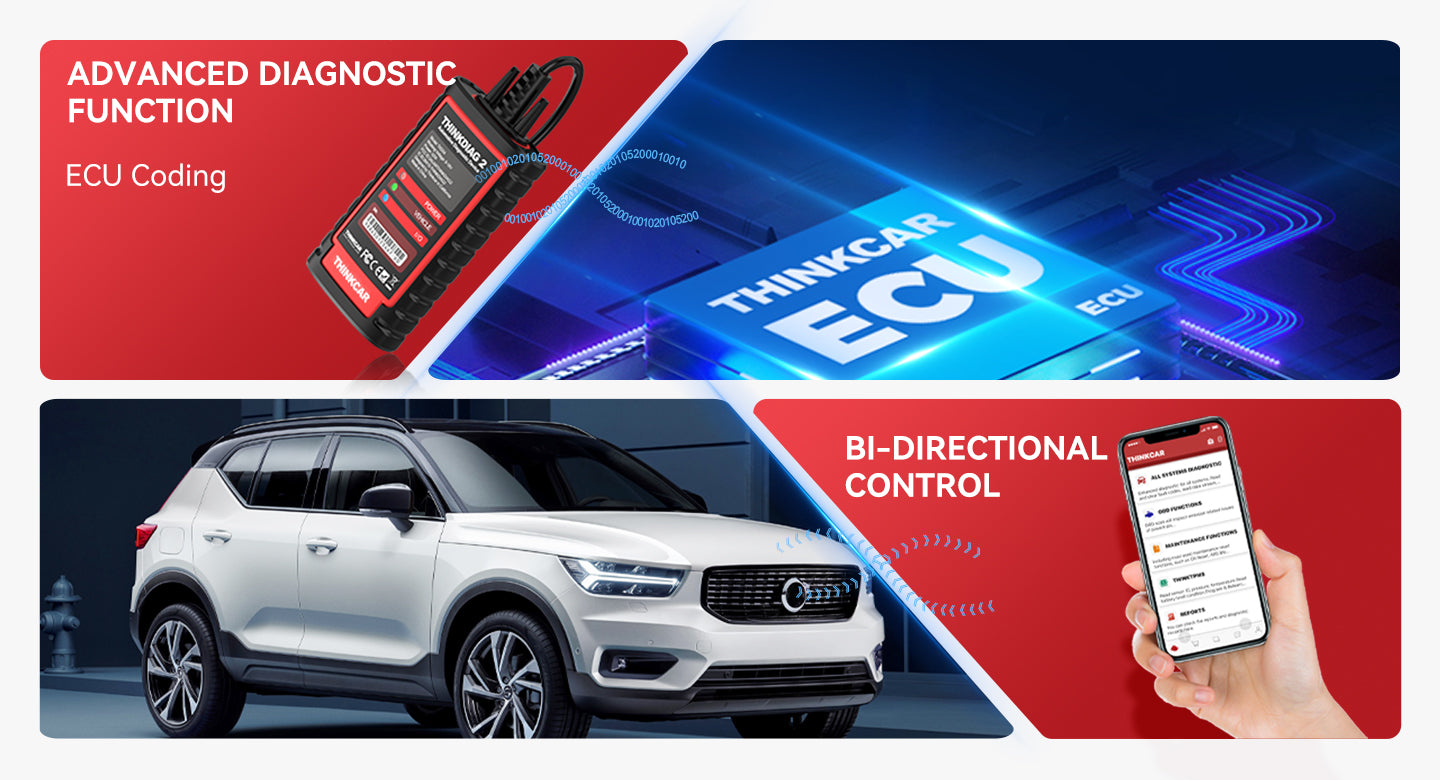
Bidirectional control is the moment your diagnostics stop being passive. Instead of waiting for the car to fail, you command an actuator and watch the result. This is how you separate wiring issues from component failures and how you test intermittent problems when the symptom is not happening right now.
A beginner-friendly active-test workflow looks like this:
- Step 1: Scan all modules, save the report
- Step 2: Pick one suspect component (fan, purge valve)
- Step 3: Run the active test while monitoring live data
- Step 4: If it fails, confirm power/ground before replacement
Using THINKDIAG 2 for active tests and full-system checks
THINKDIAG 2 positions itself as an all-system, bidirectional scanner with active tests, meaning it can command certain actuators without using the vehicle controls. Examples listed include turning on a radiator fan, modulating the throttle, operating windows/mirrors, toggling lights/horn, and testing door lock actuators, depending on vehicle support. (mythinkcar.com)
It also supports full-system scanning (ABS, SRS, engine, transmission, EPB, TPMS, body, etc.) and can generate a health report, which is useful when a symptom is triggered by a non-engine module (for example, a stability-control fault that feels like an engine issue). (mythinkcar.com)
Shop: THINKDIAG 2
Service Resets: Maintenance and TPMS
Once you can diagnose and repair, the next friction is finishing the job. Many DIYers can replace brakes, a battery, or a throttle body, but they get stuck when the car still shows warnings or needs a relearn. That is where service functions and TPMS tools matter.
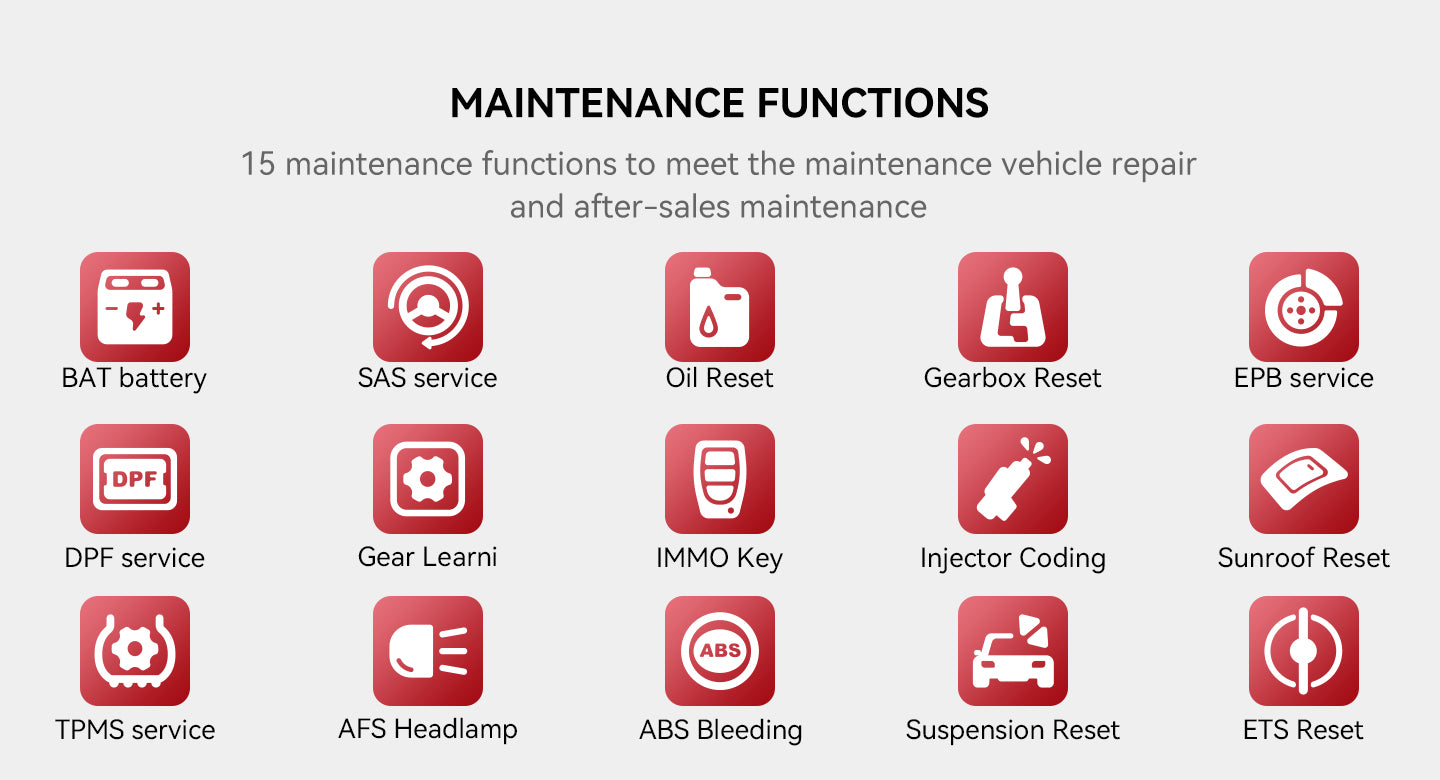
Service resets are not "nice to have" when you work on modern systems. Common examples include oil reset, EPB service mode, steering angle sensor (SAS) calibration, ABS bleeding routines, injector coding, and battery matching/registration. If your tool cannot complete the relearn, you might still need a shop visit even after you did the mechanical work correctly.
- Do resets only after fixing the root issue
- Document pre/post values (SAS angle, BMS)
- Verify warnings are truly resolved
THINKDIAG 2 maintenance functions in real DIY workflows
THINKDIAG 2 lists a menu of 15+ maintenance functions such as oil maintenance reset, EPB reset, DPF regeneration, SAS calibration, ABS bleeding, injector coding, IMMO matching, TPMS reset, gearbox relearn, and battery matching, with the note that supported functions vary by vehicle. (mythinkcar.com)
If your DIY focus is broad and you want a screen-first workflow, the THINKSCAN 689BT is positioned as a bidirectional scan tool in the ThinkScan Series and is marketed with free lifetime updates, which is relevant when you do not want your workflow to stall because your software is outdated. (mythinkcar.com)
Shop: THINKSCAN 689BT
Subscriptions and Software: T-code Planning
Software is where budget tools can surprise you, because hardware lasts, but coverage and functions are gated by licensing models. Your decision context is: do you want a single tool that stays current across multiple vehicles, or a tool you activate for one specific car brand and keep stable?
T-code and subscription choices affect three practical things: (1) what brands/modules you can access, (2) whether you get new-model coverage and bug fixes, and (3) how painful it is to add a second car later. You also need to factor in downtime: if your software renewal lapses, you might lose access to a function right when you need it.
- Map your vehicles for 2 to 3 years
- Decide: wide coverage vs one-brand depth
- Keep update notices on your checklist
How THINKCAR organizes TCODE and software options
On THINKCAR navigation, TCODE appears as a software category with entries such as "THINKDIAG2 1 Year Software Subscription" and separate T-code items for other devices like the MUCAR CDE900 Series. (mythinkcar.com)
For a standalone device example, the MUCAR CDE900/CDE900 PRO T-code page states that the T-code is the software cost and does not include equipment, and it is tied to that specific device family. (mythinkcar.com)
Shop: MUCAR CDE900/CDE900 PRO T-code 28 Reset Function
Selection/Decision Guide
Start with vehicle coverage, not feature lists
The fastest way to waste money is buying features your car will not support. First, lock your vehicle details: year, make, engine, and region. Then confirm you can at least do generic OBD2 Intelligent Diagnosis, I/M readiness, and freeze frame. After that, verify OEM modules and special functions per VIN whenever possible.
If you work on newer platforms, add protocol support to the checklist. For example, THINKDIAG 2 emphasizes CAN-FD support, which is a real differentiator when you are diagnosing some newer GM vehicles. (mythinkcar.com)
- Year/make/engine/region first
- Verify modules, then active tests
- Confirm protocol changes (CAN-FD)
Decide on depth: code reading vs all systems vs bidirectional
Use a simple ladder:
- Level 1: Code Readers + readiness
- Level 2: Full-system scan + live data
- Level 3: Bidirectional control + service resets
If you only need Level 1, a simple OBD2 Scanner Bluetooth device can be enough. If you regularly do brakes, batteries, or steering work, Level 3 is where you stop paying for "final step" shop visits.
Update model: software subscription vs "lifetime" approach
Updates are not just new features; they also fix coverage gaps and improve routines that fail on certain models. If you are the person friends call, a subscription model can make sense because you touch many people. If you only maintain one family of vehicles, a focused activation approach may be simpler.
This is also where cybersecurity hygiene matters. As vehicles become more connected, guidance like NIST IoT cybersecurity work emphasizes maintaining secure update practices and evolving requirements for connected products. (nist.gov)
Quick decision table (workflow-first)
| Your DIY scenario | Minimum capability | Nice-to-have | Watch-outs |
|---|---|---|---|
| Check engine light only | Codes, freeze frame | Readiness status | Clearing loses evidence |
| Intermittent misfire | Live PIDs, graphing | Mode $06 | PID lag, wrong units |
| Cooling fan issue | Bidirectional test | Full-system scan | Test not supported |
| Brake job w/ EPB | EPB service + reset | ABS bleed routine | Wrong steps brick EPB |
| TPMS sensor work | TPMS Service tool | Program + relearn | Sensor frequency mismatch |
Best Practices & Pitfalls
Best Practices
Good diagnostics are mostly documentation and repeatable steps. If you build a habit of capturing evidence, you will fix problems faster and avoid comebacks.
- Scan before you touch anything.
- Save DTCs and the module list first so you know what changed later.
- Record freeze frame and key PIDs
- Write down coolant temp, RPM, load, and fuel trims at fault time.
- Verify readiness the day before inspection.
- Clearing codes can reset monitors to "Not Ready," so check early. An EPA reference notes monitor status changes after DTC erase or battery power loss. (downloads.regulations.gov)n- Use active tests to prove a hypothesis
- Command the component, then verify power/ground if it fails.
Common Pitfalls to Avoid
Most beginner mistakes come from rushing and from trusting one data point.
- Clearing codes first
- You erase clues and may create readiness issues.
- Assuming "all systems" means all functions
- Coverage varies by trim, year, and region, so validate functions.
- Misreading normal closed-loop behavior
- O2 sensors, trims, and throttle commands move constantly by design.
- Forgetting software renewal timing
- If your Software Update Notice matters to your workflow, track it.
Conclusion
Budget diagnostic tools work when they match your workflow: baseline code reading, then live data, then bidirectional control and service resets as your DIY confidence grows. Start by mastering OBD2 Intelligent Diagnosis fundamentals (codes, freeze frame, readiness), because those skills transfer across every tool category. Then choose between an app-driven OBD2 Scanner Bluetooth workflow like THINKDIAG 2 or a screen-first device in the ThinkScan Series, based on how often you diagnose and how many vehicles you support. Finally, treat software subscription and T-code planning like maintenance, because stale coverage can turn a capable tool into a dead end at the worst time.
Official Site: THINKCAR
FAQ
What should I check before buying a scan tool?
Check your vehicle year, make, engine, and region first because coverage varies even within the same model line. Decide whether you only need generic OBD2 (engine and emissions) or full-system access (ABS, SRS, body, HVAC). If you want service functions, list the exact jobs you plan to do, like EPB service, SAS calibration, or battery registration. Also, confirm whether you need a phone-based OBD2 Scanner Bluetooth workflow or a dedicated screen for faster navigation.
What is the difference between reading codes and bidirectional control?
Reading codes is passive: the module reports what it detected and stored, plus freeze frame and status information. Bidirectional control is active: the tool commands an actuator or routine so you can test whether the system responds correctly. This matters because a code can be caused by wiring, a sensor, or a mechanical issue, and active tests help you isolate which one. In practice, bidirectional features depend heavily on vehicle support, so you should verify them for your exact car.
Will clearing codes help me pass an emissions test?
Clearing codes usually makes passing harder in the short term because it can reset readiness monitors to not ready. Most programs require monitors to complete, which often need specific driving conditions over one or more drive cycles. If you clear codes after a repair, plan time to drive and recheck readiness before you show up for inspection. Use a tool that shows I/M readiness so you can confirm the status the day before.
Do Bluetooth OBD2 scanners work as well as handheld tools?
They can work very well for basic codes, freeze frame, and live data if the app is stable and the connection is reliable. The trade-off is workflow friction: switching views, graphing, and saving reports depend on your phone and the app design. Handheld or tablet tools usually feel faster when you do full-system scans, frequent active tests, or repeated service resets. If you diagnose often, the dedicated screen can reduce mistakes caused by slow navigation.
How do software subscriptions affect long-term ownership?
Subscriptions can control whether you receive new vehicle coverage, bug fixes, and access to certain functions over time. If you work on multiple makes or newer model years, ongoing updates can be worth it because coverage changes quickly. If you mostly support one vehicle family, you may prefer a model that keeps your needed functions stable with fewer renewal decisions. Either way, track renewal timing like you track oil changes, so your tool does not lose capability mid-repair.
How do I avoid buying a tool that will not connect?
First, confirm your car actually has a standard OBD2 port and that it is powered, because blown fuses or wiring issues can prevent communication. Next, verify your tool supports your protocol and model year, especially on newer vehicles where protocol changes can matter. Keep your phone OS and the tool app updated if you use an OBD2 Scanner Bluetooth device, because pairing issues are often software-related. Finally, test the connection before you start tearing the car apart so you know you can read data during the repair.
What is the safest beginner workflow when you see a check engine light?
Start by scanning and saving results before you clear anything, including codes and freeze frames. Then verify the complaint with a quick live-data check so you understand whether the symptom is present now or only happened once. Only after you have a working hypothesis should you test components, either with basic inspections or with bidirectional active tests if supported. After the repair, re-scan, confirm monitors and readiness, and then do a short verification drive to confirm the fix holds under normal conditions.
Table of Contents
- Introduction
- Core Foundations
- DIY Baseline: Code Readers and Readiness
- Budget Live Data: PIDs and Graphing
- Active Tests: Bidirectional scanner Use
- Service Resets: Maintenance and TPMS
- Subscriptions and Software: T-code Planning
- Selection/Decision Guide
- Best Practices & Pitfalls
- Conclusion
-
FAQ
- What should I check before buying a scan tool?
- What is the difference between reading codes and bidirectional control?
- Will clearing codes help me pass an emissions test?
- Do Bluetooth OBD2 scanners work as well as handheld tools?
- How do software subscriptions affect long-term ownership?
- How do I avoid buying a tool that will not connect?
- What is the safest beginner workflow when you see a check engine light?

Share:
Top 4 Diagnostic Scanners with Regular Updates for DIY Car Repair: What to Look For
Best Entry-Level Bidirectional Scanners for Real Repair Workflows:An Ultimate Guide to Buy One