
Understanding AI code helps before you buy

A scanner can pull a fault code in seconds, yet the expensive mistake usually happens after that. You see a code, replace a part too early, and then waste more time because the real issue was wiring, a sensor feed, or a module that needed deeper testing. That is why choosing a diagnostic tool with AI-assisted code interpretation makes a difference. The right Vehicle Scanner & Diagnostic Tool should not only read faults. It should help you sort what to check next, which systems to access, and whether your workflow needs a compact Bluetooth OBD2 scanner dongle or a larger touchscreen unit.
For buyers comparing THINKCAR options, the decision often comes down to diagnostic depth, update policy, and form factor. The brand positions itself around automotive diagnostics and professional scan tools, with products ranging from Bluetooth OBDII adapters like THINKDIAG to tablet-style units like THINKSCAN 672. If you are choosing for home use, mobile service, or a small shop, the practical goal is simple: buy enough tools for your real jobs without paying for features you will never use.
What does an AI-assisted scanner actually do?
A useful AI layer should make diagnosis faster, not noisier. In practice, you want a tool that turns DTCs into likely causes, suggested checks, and cleaner reports rather than giving you a generic definition. That fits the idea behind AI-powered Insights and OBD2 Intelligent Diagnosis far better than a simple code list.
What to check
- Code interpretation beyond basic definitions
- Guided follow-up checks or test suggestions
- Report generation that you can save or share
- Clear links between fault data and system-level testing
- Support for full diagnostics, not just emissions codes
What to avoid
- Tools that only read and clear codes
- Unclear vehicle coverage
- Hidden Software Subscription or Software Renewal terms
- Marketing claims that never mention system access or active tests
Step 1: Match the diagnostic tool to your real use case
Before you compare model numbers, decide how you will actually use the scanner each week. A DIY owner who wants quick checks on one or two cars needs something very different from a mobile technician who performs resets, active tests, and pre-repair scans every day. This first filter is what keeps your Diagnostic Tools Guide practical instead of feature-heavy.
Step 1: Define your workflow first
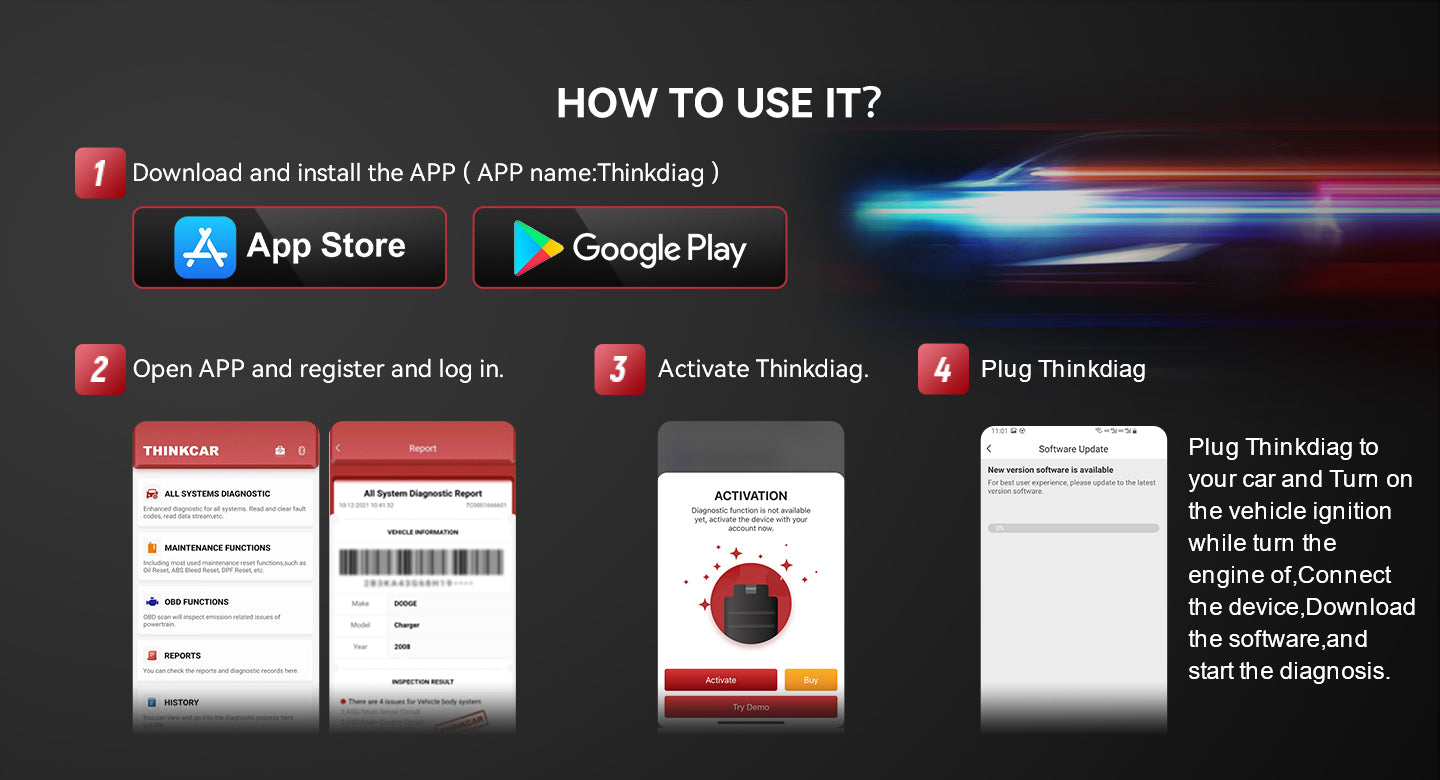
If you want a compact Bluetooth OBD2 scanner setup, THINKDIAG makes sense because it is a plug-in Bluetooth OBDII unit designed for phone-based use. On its product page, THINKCAR lists ECU coding, Bi-Directional/Active test, full-system diagnosis, Auto VIN, IMMO key matching, 15+ maintenance functions, and support for 98% of car models in the market. It is clearly aimed at users who want strong functionality without carrying an Android-based diagnostic tablet; instead, they prefer a dongle form factor.
What to do
- List your vehicles by make, model, year, and engine
- Decide whether you diagnose weekly, monthly, or only when faults appear
- Note whether you need phone portability or a built-in screen
- Separate basic code reading from deeper repair work
Why this matters
- A compact dongle is easier to store and move
- A touchscreen scanner is easier for repeated daily use
- Your workflow decides whether THINKDIAG 2, THINKDIAG MINI, or THINKSCAN 672 is the better format
What to watch
- Phone-based tools are great for portability, but some users prefer not to rely on their phone battery or screen size
- Tablet-style scanners take more space, but they are easier for long sessions and repeated shop use
Shop: THINKDIAG
Why vehicle coverage and system depth matter so much
A basic code-reading device can be enough for emissions-related checks, but that is not the same as full vehicle diagnostics. The difference becomes obvious as soon as the problem involves ABS, SRS, body electronics, TPMS, battery registration, or chassis systems. The EPA’s OBD guidance explains that on-board diagnostics are tied to emissions monitoring, which is only part of what a full scanner needs to cover for real repair work. (19january2021snapshot.epa.gov)
When you see targets such as All System Diagnosis for All Cars, Battery Management System (BMS), TPMS Programming, or ECU Coding, treat them as a reminder to verify system-level access by vehicle. A scanner can be strong on paper and still vary by make, year, protocol, and module support.
What full-system access should include
- Engine and transmission modules
- ABS and SRS access
- Body and comfort modules
- A/C and charging-related systems
- Service functions such as oil reset, SAS, BMS, and TPMS reset
- Vehicle-specific checks for coding or adaptation
Step 2: Compare AI help with bidirectional testing
AI interpretation and active testing solve different problems, so you should judge them separately. AI code helps save thinking time by helping you understand what the fault may mean. A Bidirectional scanner saves test time by directly commanding parts and systems. If you want faster answers, you usually need both.
Step 2: Check whether the scanner can command components
THINKSCAN 672 is the stronger fit when your buying priority is repeated active testing from a dedicated screen. THINKCAR lists bi-directional control, full-system diagnostics for 140+ brands, CAN-FD support, IMMO key matching, AutoVIN & AutoScan, a 7-inch touchscreen, Wi‑Fi updates, and 28+ reset functions. The page also states 3,000+ active tests, including EVAP, injector, A/C clutch, ABS motor pump, cooling fan, and headlamp tests.
What to do
- Confirm whether the tool offers active tests, not just code reading
- Check examples of supported tests on the product page
- Verify if the systems you care about are listed
- Make sure your vehicle protocol is supported
What to watch
- Active test availability varies by vehicle
- More functions do not always mean every function works on every make and model
- CAN-FD support is increasingly relevant on newer vehicles, and SAE documents describe CAN FD as a higher-speed vehicle communications standard used in modern applications. (saemobilus.sae.org)
Shop: THINKSCAN 672
Step 3: Check updates, subscriptions, and long-term ownership cost
Many buyers focus on the hardware and ignore the software model. That is where ownership cost can drift upward later. If a tool depends on Software Subscription, Software Renewal, or brand-specific T-code access, you need to understand what still works if you do not renew.
Step 3: Read the support model before you buy
THINKCAR’s product ecosystem mixes different software models. On the site navigation, there are separate listings for THINKDIAG T-code All Software Renewal 1 Year Free and THINKDIAG2 1 Year Software Subscription, which tells you that update and license terms can differ by product line. On the THINKDIAG page, THINKCAR also states, “All Software: All Vehicle Brands; Single Software: For One Vehicle Brand,” so you should verify exactly which package you are buying.
What to do
- Check if updates are lifetime or time-limited
- Confirm whether all brands are included or sold separately
- Review the support pages for Software Download and Software Update Notice
- Ask whether skipping renewal affects functions or only new coverage
Why this matters
- A lower upfront cost can still lead to higher long-term ownership costs
- Update policy affects future vehicle coverage and new functions
- This is especially important if you service newer cars or mixed fleets
What to watch
- Free Lifetime Software Updates should be clearly stated if included
- Product families like TCODE and T-code add flexibility, but only if you understand what each package unlocks
- If you are buying for occasional home use, a simpler update model is usually easier to live with
Step 4: Evaluate resets, service functions, and room to grow
Not every buyer needs advanced service functions on day one, yet many people outgrow a basic scanner within a year. The smart move is to compare your current workload with the next few services you expect to handle. That is where tools with broader reset coverage can make sense.
Step 4: Compare the maintenance functions you will actually use
THINKCAR lists THINKDIAG with 15+ maintenance functions, including oil reset, ABS bleeding, injector coding, SAS reset, TPMS reset, DPF reset, BMS Reset, gearbox reset, AFS reset, EGR adaptation, throttle relearn, seat calibration, and key coding. For THINKSCAN 672, the brand lists 28 value-added services such as battery matching, brake reset, DPF regen, gearbox relearn, injector coding, steering angle reset, TPMS reset, transport mode, and windows calibration. Those details matter if your buying plan includes TPMS Service, Oil Reset Tool work, ECU Coding, or future growth into ADAS Calibration and related workflows.
What to do
- Rank your top five service functions
- Check whether they are supported on your vehicles
- Verify if coding, IMMO, or key work is model-specific
- Buy slightly ahead of your current workload, not far beyond it
Common mistake
- Paying for every advanced feature when you only read engine codes
- Buying too basic, then needing a second scanner six months later
Which format is better: Bluetooth dongle or tablet scanner?
Form factor changes daily usability more than most spec sheets admit. If you move between cars, travel, or like using your phone, a Bluetooth OBDII tool is easier to carry. If you want a self-contained unit with fewer setup steps, a dedicated tablet-style scanner is more convenient.
Bluetooth OBDII is usually better if you want
- Pocket-size storage
- Fast plug-in checks
- Phone-based reports and sharing
- A smaller hardware footprint
- A workflow closer to THINKDIAG, THINKDIAG 2, or THINKDIAG MINI
A tablet-style scanner is usually better if you want
- A fixed 7-inch class display
- No dependence on your own phone
- Easier long sessions in a bay or driveway
- Faster access to menus and active tests
- A workflow closer to the ThinkScan Series, including THINKSCAN 672, THINKSCAN 689, THINKSCAN 689BT, THINKSCAN 662, THINKSCAN MAX, or THINKSCAN PLUS S7
For many beginners, the better choice is not about skill level. It is about whether you prefer app-first portability or dedicated hardware convenience.
Step 5: Use a shortlist to make the final decision
Once you narrow the field, choose with a fixed checklist. This keeps marketing language from pulling you away from your actual needs.
Step 5: Score each scanner against the same buying criteria
Use these criteria in order:
What to do
- Confirm your vehicle years, brands, and communication protocols
- Decide whether you need basic OBD2 Scanner functions or full-system diagnostics
- Prioritize AI-powered Insights if you want clearer fault interpretation
- Prioritize a Bidirectional scanner if you want active tests
- Check service functions such as oil, EPB, SAS, Battery Management System (BMS), and TPMS
- Compare the update policy, Software Renewal, and Software Subscription terms
- Choose between Bluetooth OBDII portability and the convenience of Android-based diagnostic tablets
Prerequisites and safety checks before choosing
Even though scanner shopping feels low-risk, the work you plan to do with it may not be. Shop diagnostics can involve battery systems, moving components, engine operation, and chemical exposure. OSHA materials for auto shops emphasize PPE, hazard communication, and safe handling of hazardous materials, which is a good reminder that a more capable scanner can lead you into more complex tasks. (mass.gov)
Check these before you buy
- Confirm your vehicle make, model, year, and protocol needs
- Verify CAN-FD support if you work on newer compatible vehicles
- Check that special functions vary by model and software version
- Review whether Key Fob Programming or IMMO work requires PIN support
- Confirm warranty terms and whether 1 Year Extended Warranty options exist for your product family
- Make sure your workspace supports safe testing before using active controls
Troubleshooting common buying mistakes
| Problem | Cause | Solution |
|---|---|---|
| Reads engine only | Basic OBD2 coverage | Choose full-system scanner |
| Reset will not run | Model-specific limitation | Verify vehicle compatibility |
| Cost rises later | Renewal terms missed | Review software model |
| Workflow feels slow | Wrong form factor | Pick Bluetooth or tablet |
| Code still unclear | No AI or active test | Prioritize both features |
The smart way to choose your next diagnostic tool
A strong buying decision starts with your actual diagnostic depth, not the longest feature list. If you want a useful Vehicle Scanner & Diagnostic Tool, focus on full-system access, meaningful AI-assisted code interpretation, a software model you understand, and a format you will actually enjoy using. That is the combination that reduces wasted parts, cuts repeat testing, and keeps your tool relevant longer.
For many buyers comparing THINKCAR products, the decision becomes fairly clear once they separate portability from daily-use convenience. THINKDIAG fits a compact OBD2 Scanner Bluetooth workflow with full-system diagnostics, active tests, and app-based flexibility. THINKSCAN 672 fits users who want a dedicated touchscreen, broader reset coverage, CAN-FD support, and heavier use of bidirectional testing. Start with the jobs you do most, then choose the scanner that makes those jobs faster and clearer.
Table of Contents
- Understanding AI code helps before you buy
- Step 1: Match the diagnostic tool to your real use case
- Why vehicle coverage and system depth matter so much
- Step 2: Compare AI help with bidirectional testing
- Step 3: Check updates, subscriptions, and long-term ownership cost
- Step 4: Evaluate resets, service functions, and room to grow
- Which format is better: Bluetooth dongle or tablet scanner?
- Step 5: Use a shortlist to make the final decision
- Prerequisites and safety checks before choosing
- Troubleshooting common buying mistakes
- The smart way to choose your next diagnostic tool

Share:
Top 3 Portable Bidirectional Scan Tools for Mobile Mechanics
5 Steps to Choose a Future-Proof Scanner for Newer Cars