
Understanding subscription-free scan tool buying
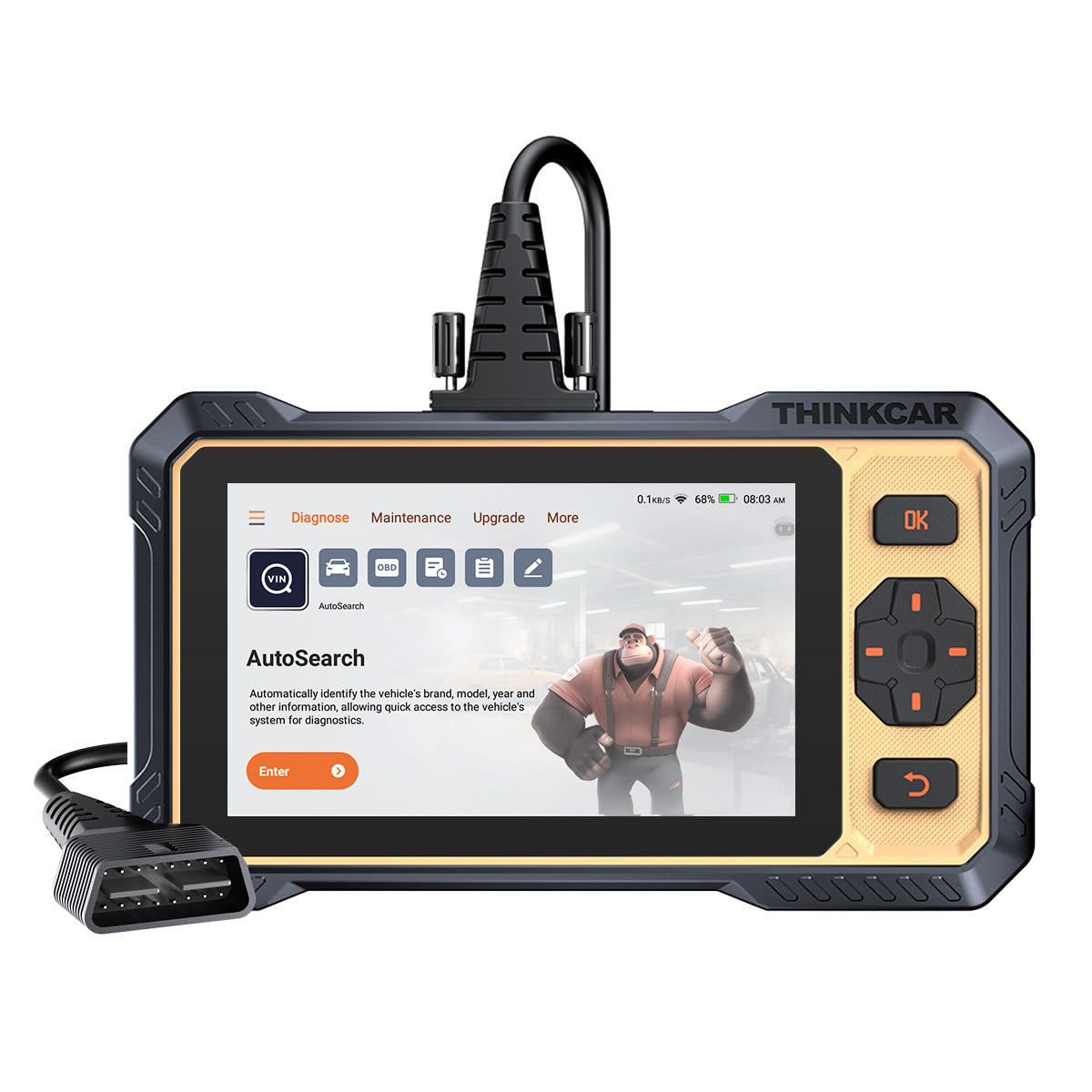
A scan tool can look affordable on day one and still become expensive a year later. That is the trap many buyers miss when they compare only screen size, reset count, or whether the box says OBD2 Scanner. In real use, the bigger question is simple: what still works after setup, after updates, and after the first year passes? That matters whether you want a basic Vehicle Scanner & Diagnostic Tool for home maintenance or an Advanced Scanner for regular repair work.
The smart way to buy is to separate ownership into three parts: the hardware you physically keep, the software rights included at purchase, and any optional paid add-ons that may appear later. Once you see those layers clearly, models like THINKSCAN PLUS S7, THINKSCAN MAX, THINKSCAN 672, THINKSCAN 689BT, and THINKDIAG 2 become much easier to judge. This guide walks through those categories, shows where Free Lifetime Software Updates matter most, and helps you match a tool to your actual workflow instead of marketing claims.
What Makes a Scan Tool Truly Subscription-Free?

A tool is not truly subscription-free just because it turns on and reads a fault code. What matters is whether the core diagnostic value remains usable without forced Software Renewal or a recurring Software Subscription. If a tool loses the functions you bought it for after an activation window, you do not really own the working platform in the way most buyers expect.
Key terms buyers should know
- Hardware ownership: You own the dongle, handheld, or tablet itself.
- Included software rights: These are the built-in functions that stay available after purchase.
- Software Renewal: A paid extension that may be required for extra vehicle coverage or advanced functions.
- Free Lifetime Software Updates: Ongoing updates for the functions included with the product, not always for every premium add-on.
- Selected Car Brand Full Functions: Optional deeper access for certain makes that may sit outside the base package.
- OBD2 Intelligent Diagnosis: A broader diagnostic layer that goes beyond simple code reading into live data, system scans, and guided workflows.
What to check before you believe the label
When you compare a Vehicle Scanner & Diagnostic Tool, look for these signals first:
- Whether full OBD2 functions keep working permanently
- Whether the all-system diagnosis stays active without annual fees
- Whether resets like Oil Reset Tool, EPB, SAS, and Battery Management System (BMS) are bundled or time-limited
- Whether advanced features such as ECU Coding, Key Fob Programming, ADAS Calibration, TPMS Programming, or telematics tools are optional extras
- Whether the brand uses a Software Update Notice page or an app ecosystem that separates free updates from premium downloads
Main scan tool categories
The category usually tells you more than the ad headline:
- Code Readers: Best for emissions checks, check-engine lights, and readiness monitors
- OBD2 Scanner Bluetooth dongles: Compact, phone-driven tools like THINKDIAG, THINKDIAG MINI, and THINKCAR BD6
- Handheld service tools: Simple grab-and-go units with fixed screens and fewer phone compatibility issues
- Android-based Diagnostic Tablets: Larger platforms for shops, bidirectional work, and faster multi-vehicle workflow
How should you match the tool to your repair workflow?
The best scan tool is the one that covers the jobs you actually do every month. A home user chasing warning lights and maintenance reminders does not need the same platform as a technician performing actuator checks, T-code procedures, or Bidirectional scanner work. Buying too little creates frustration later, but buying too much can lock money into features you never use.
Start with your use case
First, sort your work into one of these patterns:
- Basic checks only: emissions readiness, generic codes, and simple live data
- Routine maintenance: oil service, EPB, BMS, SAS, and TPMS Service
- Serious troubleshooting: All System Diagnosis for All Cars, active tests, and module-level diagnosis
- Advanced shop tasks: ECU Coding, Key Fob Programming, brand-specific functions, and deeper service workflows
Then map the right format
Format changes daily usability more than many buyers expect:
- Bluetooth OBDII dongle: easy to carry, great for fast checks, depends on phone or tablet workflow
- Handheld tool: quicker to deploy, fewer app distractions, good for driveway or shop cart use
- Android-based Diagnostic Tablets: best for higher scan volume, reports, and bigger menus
Decision factors that separate smart buys from expensive mistakes
Once you know your workflow, the next step is filtering tools by ownership value. This is where many buyers make the wrong call because they compare only headline features. Instead, compare update policy, system depth, reset coverage, protocol support, and the device format you will actually enjoy using.
1. Update policy language
This is the first thing to verify because vague wording often hides future cost.
- Clear language like “no subscription fees” and “free lifetime updates” is stronger than a generic promise of updates
- App-based products may include a free period for full software, then charge for access later
- Free updates often apply to included functions, not every future expansion pack
THINKSCAN 672 uses direct language: free lifetime updates, no subscription fees, and lifetime free bi-directional functions. THINKDIAG 2, however, explicitly ties full software and functions to a one-year activation period, so it belongs in a different ownership category.
2. Diagnostic depth
Full OBD2 and full-system access are not the same thing.
- Full OBD2 covers generic powertrain codes, monitor status, freeze-frame data, and some live data
- Full-system diagnosis reaches modules like ABS, SRS, transmission, body, HVAC, and TPMS
- Bidirectional scanner capability lets the tool command a component, not just read from it
THINKDIAG 2 is marketed with full system diagnostic, ECU Coding, active test support, CAN-FD, IMMO key matching, and a menu of 15 standard special functions such as Oil reset, EPB reset, DPF regeneration, SAS calibration, ABS bleeding, injector code, and TPMS reset. THINKSCAN 672 goes further toward professional troubleshooting with full-system diagnostics for 140+ brands, CAN-FD support, and 3000+ active tests.
3. Reset and service relevance
High reset counts look impressive, but most buyers use only a handful regularly.
- Homeowners usually care about oil, EPB, BMS, SAS, and TPMS Service
- Side-hustle mechanics may add DPF, ABS bleeding, injector coding, and throttle matching
- Shops may need 28 Reset Function coverage or more, plus T-code and brand-specific menus
If you mainly need maintenance support, paying extra for unused ADAS Calibration or advanced ECU work rarely makes sense. On the other hand, if you already handle hybrid battery registration, steering angle calibration, or electronic brake service, a lighter code reader will quickly feel limiting.
A practical Product-Fit Snapshot
| Tool | Best fit | Ownership signal | Why it matters |
|---|---|---|---|
| THINKSCAN PLUS S7 | Home garage users | Built around included functions and simple workflow | Good fit when you want core diagnosis without app dependence |
| THINKSCAN MAX | Growing repair users | Strong long-term handheld value | Better for full-system work and broader maintenance coverage |
| THINKSCAN 672 | Serious DIYer or technician | Free lifetime updates, no subscription fees | Best fit when Bidirectional scanner work and CAN-FD matter |
| THINKSCAN 689BT / THINKSCAN 689 | Wireless handheld users | Dedicated update path in ThinkScan ecosystem | Good for buyers who want mobility without a phone-first workflow |
| THINKDIAG 2 | Portable app-based users | One-year full software wording | Great convenience, but not the cleanest strict subscription-free choice |
Scenario analysis: Which type of buyer needs which type of tool?
Most buying mistakes happen because people shop by ambition instead of job pattern. A tool should support your current work, plus the next level you are likely to reach in the next 12 to 24 months. That gives you room to grow without overspending on features that sit unused.
Scenario 1: Home garage owner
If your jobs are mostly warning lights, service reminders, and routine maintenance, a handheld in the ThinkScan Series usually makes more sense than a heavy app ecosystem. You want a fast startup, clear menus, and no confusion about Software Download or future Software Renewal. In this case, Code Readers or lighter handhelds often deliver better long-term value than a tool built around optional add-ons.
A good checklist for this buyer looks like this:
- Full OBD2 support
- Oil Reset Tool and basic service functions
- Easy update process
- No annual fee for included features
- Compact design, you will actually keep it in the car or garage
Scenario 2: Side-hustle repair operator
This buyer usually needs more than code clearing. Once you start helping friends, neighbors, or small customer jobs, all-system access, better reports, and broader resets matter. That is where models like THINKSCAN MAX, THINKSCAN 689BT, THINKSCAN 689, THINKSCAN 662, or MUCAR 892BT become more relevant than entry Code Readers.
What to prioritize here:
- All System Diagnosis for All Cars
- Faster workflow and report sharing
- 15 Resets Maintenance Function or stronger
- Better support for TCODE or 4 System T-code style tasks
- Stable updates without recurring surprises
Scenario 3: Professional technician
Once you diagnose components instead of symptoms, a Bidirectional scanner becomes much more valuable. Active tests save time because you can command fans, pumps, relays, or windows directly instead of guessing from live data alone. THINKSCAN 672 stands out here because it combines lifetime update language with CAN-FD, IMMO key matching, and full-system access.
If your work also includes tire service, a dedicated TPMS & Sensor tool can be smarter than expecting one scanner to do everything. [THINKCAR VENU 90 TPMS Activation & Diagnostic Tool] supports 315MHz and 433MHz THINKCAR sensor activation, independent TPMS diagnostics without another device, and supports more than 98% of brands. NHTSA notes that TPMS is not a substitute for regular tire maintenance, and properly inflated tires can extend average tire life by 4,700 miles. (nhtsa.gov) That makes a dedicated TPMS tool useful for shops that handle frequent sensor work, relearns, or tire-pressure fault diagnosis.
How THINKCAR and MUCAR fit into a no-subscription buying strategy
THINKCAR and MUCAR cover more than one buyer level, which is useful when you want to stay inside one ecosystem without forcing every user into the same platform. The brand’s Software Download page groups products into categories such as OBD2 Scanner Bluetooth, OBD2 Intelligent Diagnosis, TPMS Service, Code Readers, T-code, MUCAR VO Series, MUCAR CDE900 Series, and MUCAR CS Series. It also lists supported app families and quick-start materials for products such as THINKDIAG, THINKDIAG 2, THINKDIAG MINI, THINKCAR BD6, ThinkScan 689BT, ThinkScan 689, MUCAR 892BT, MUCAR VO8, THINKTPMS VENU iPro, MUCAR CDE900, and MUCAR CDE900 PRO. What this means for buyers
- THINKCAR covers the wider ladder from Bluetooth OBDII tools to handheld and tablet-style diagnostics
- MUCAR broadens the ecosystem with the VO Series, CS Series, and CDE900 Series options
- THINKTPMS VENU iPro and VENU 90 serve buyers who need TPMS Programming and TPMS Service depth
- THINKTOOL MINI points toward users who want Android-based Diagnostic Tablets without jumping to the largest shop platforms
Product families worth understanding
Here is a simple way to interpret the lineup terms that appear across the Official Shop:
- ThinkScan Series: handheld-focused scanners for users prioritizing direct ownership and simpler update expectations
- AI Diagnostic Series: higher-assist platforms aimed at users who want AI-powered Insights layered into diagnosis
- VO Series / CS Series / CDE900 Series: MUCAR branches serving different handheld and tablet workflows
- THINKDIAG / THINKDIAG MINI / THINKCAR BD6: app-centered dongles for portability and flexible phone-based use
Conclusion
The best subscription-free scan tool is not the one with the longest feature list. It is the one that keeps the functions you need without turning basic ownership into an annual payment plan. For many buyers, that means looking hard at ThinkScan Series handhelds first, then treating app-based tools like THINKDIAG 2 as portability-focused options rather than automatic no-subscription winners.
If your work is growing, buy for today’s jobs plus the next realistic step up. That may mean a simple Code Reader, a stronger OBD2 Scanner, a Bidirectional scanner like THINKSCAN 672, or a dedicated TPMS Service device such as THINKCAR VENU 90. When you compare tools that way, long-term value becomes much easier to see.
Official Site: THINKCAR
FAQ
Is a scan tool with lifetime updates always completely free forever?
No, a scan tool with lifetime updates is not always completely free forever. In most cases, the lifetime claim applies to the functions bundled with that model at purchase, while premium brand software, Selected Car Brand Full Functions, or specialty features like ECU Coding may still carry separate costs. You should read the update wording for included diagnostics, resets, and app functions separately. A good rule is to confirm what still works after 12 months without buying anything else.
What is the difference between full OBD2 and full-system diagnostics?
Full OBD2 covers standardized emissions-related functions like reading and clearing generic codes, checking readiness monitors, and viewing limited live data. Full-system diagnostics go deeper into manufacturer-level modules such as ABS, SRS, transmission, body, HVAC, and TPMS. If you only want to handle check-engine lights, full OBD2 may be enough. If you plan to troubleshoot brake, airbag, or body faults, full-system access is the better investment.
When does a bidirectional scanner become worth paying more for?
A Bidirectional scanner becomes worth it when you need to command parts instead of only reading sensor data. That includes turning on cooling fans, cycling relays, commanding ABS pumps, or checking actuator response during diagnosis. For a casual owner, this may be optional. For a side-hustle mechanic or technician, it can save enough labor time to justify the higher upfront cost.
Are handheld scan tools better than Bluetooth app-based tools?
Handheld scan tools are better for some users, but not for everyone. A dedicated handheld usually starts faster, avoids phone battery issues, and feels more consistent when you move from car to car. An OBD2 Scanner Bluetooth tool is easier to carry and can be great for quick checks, sharing reports, or keeping a small kit in the glove box. The better choice depends on whether you value grab-and-go reliability or maximum portability.
How many reset functions do most users actually need?
Most home users only need 4 to 6 reset functions on a regular basis. The most common are oil reset, EPB, Battery Management System (BMS), SAS, and TPMS Service, with DPF becoming important for certain diesel vehicles. Shops often need much broader support, such as 15 Resets Maintenance Function coverage or a full 28 Reset Function menu. The smart move is to buy around your most common jobs instead of chasing the highest number on the box.
How should I compare the long-term value between two scan tools?
You should compare long-term value by looking at ownership cost, not only purchase cost. Check the included software rights, Free Lifetime Software Updates language, protocol support, diagnostic depth, and whether the tool requires Software Renewal for the features you care about most. Also, compare how well each tool fits your workflow, because a feature-rich scanner that is slow or awkward to use loses value quickly. In practice, the best buy is usually the lowest-cost platform that still covers your current work and your next 12 to 24 months of likely repairs.
Table of Contents
- Understanding subscription-free scan tool buying
- What Makes a Scan Tool Truly Subscription-Free?
- How should you match the tool to your repair workflow?
- Decision factors that separate smart buys from expensive mistakes
- Scenario analysis: Which type of buyer needs which type of tool?
- How THINKCAR and MUCAR fit into a no-subscription buying strategy
- Conclusion
-
FAQ
- Is a scan tool with lifetime updates always completely free forever?
- What is the difference between full OBD2 and full-system diagnostics?
- When does a bidirectional scanner become worth paying more for?
- Are handheld scan tools better than Bluetooth app-based tools?
- How many reset functions do most users actually need?
- How should I compare the long-term value between two scan tools?

Share:
How to Prepare Your Shop for More EVs Without Overbuying
Best Bluetooth Diagnostic Scanners for DIY Car Repairs in 2026