
Introduction
Choosing the wrong Vehicle Scanner & Diagnostic Tool can waste money and time because you either overbuy features you never use or underbuy and get stuck when a reset, module scan, or Bidirectional scanner test is required.
This how-to guide helps you choose between a universal approach and deeper, brand-oriented coverage by matching the scanner to your DIY goals, your exact vehicles, and the kind of repairs you plan to do. The goal is simple: get the best value without paying for unused functions, surprises during Software Renewal, or missing coverage when you need it.
Because many DIYers now maintain multiple vehicles across different years (including newer models that may need CAN-FD or DoIP support), it helps to compare form factors too, like an OBD2 Scanner Bluetooth dongle plus app vs a dedicated tablet.
Official Site: THINKCAR Official Shop
Step-by-Step Guide to Choosing the Best-Value Scanner
Step 1: Define your DIY repair scope
Start by listing the exact jobs you want the scanner to do. This prevents paying for advanced functions that you will not use.
Use a simple list like this:
- Code Readers tasks: read/clear codes, view freeze frame, basic live data.
- Service tasks: oil reset tools, EPB reset, SAS calibration, DPF regeneration, ABS bleeding.
- Validation tasks: actuator tests using a Bidirectional scanner.
- Advanced tasks: ECU Coding, adaptations, IMMO/key matching.
If your scope is mostly basic OBD2 plus a few service items, a compact OBD2 Scanner Bluetooth option can be the best-value entry point. If you expect regular all-module work, faster workflows, and wide maintenance coverage, a tablet tool may fit better.
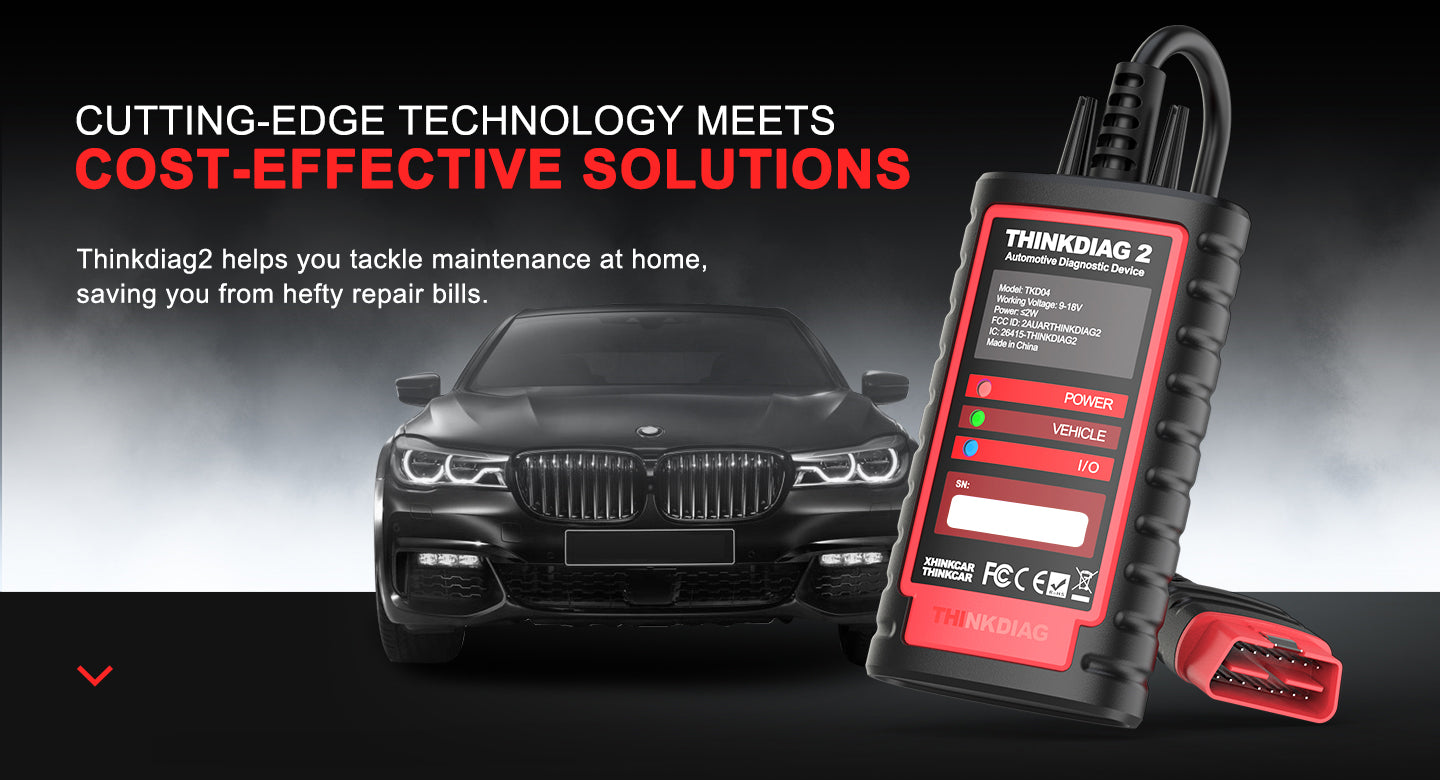
For example, THINKDIAG 2 is positioned for DIYers and minor repair shops and emphasizes full-system diagnostics, ECU coding, and active tests, plus a menu of 15 common maintenance functions (such as oil reset, EPB reset, DPF regeneration, SAS calibration, ABS bleeding, injector coding, IMMO matching, and TPMS reset). It also highlights CAN-FD support to expand coverage for newer vehicles.
Shop: THINKDIAG 2
Step 2: Confirm your vehicles and years
Write down each vehicle you plan to diagnose:
- Make, model, year
- Engine and trim (if you know it)
- Region (US-spec vs others can matter)
Next, decide how many vehicles you need to support. A single-car DIY setup can prioritize portability. A multi-car household (or helping friends) should prioritize broad coverage and quick AutoVIN identification.
Pay close attention to newer model-year requirements. Some scan tools emphasize support for newer communication needs like CAN-FD and DoIP, which can become important as you work on late-model platforms.
If your list includes newer GM vehicles (post-2020, depending on platform), THINKDIAG 2 specifically calls out built-in CAN-FD support as a key difference vs earlier THINKDIAG versions. That matters because the tool can stay relevant longer as your vehicle mix changes.
Shop: THINKDIAG 2
Step 3: Learn universal OBD2 limits
Universal OBD2 is valuable, but it is not magic. It generally focuses on emissions-related data and a minimum set of standardized services, while many OEM-level functions stay behind manufacturer-specific diagnostic paths.
Here is the practical takeaway for DIY repair:
- Universal OBD2 is great for quick checks: MIL diagnosis, generic powertrain codes, basic live data.
- Live data PIDs can vary by vehicle, so the exact items available may differ.
- OEM functions (module-specific resets, calibrations, and deeper tests) often require expanded coverage.
SAE standards define the foundation for emissions-related OBD communication and test modes; this is why generic tools can read many common data points but still miss deeper manufacturer-specific functions. According to SAE, OBD regulations require a minimum set of diagnostic information to be supported for off-board generic test equipment, focused on emissions-related diagnostic data.
This is exactly why your choice becomes "universal basics" vs "brand-specific depth" once you move beyond reading and clearing codes.
Step 4: Decide universal vs brand-specific coverage
Use your scope list from Step 1 and match it to coverage depth.
Universal-first approach (broad, lighter):
- Works well for basic OBD2, quick code checks, and portability.
- Best when you work on many makes but do not need OEM-level routines.
Brand-specific depth (per-make, deeper):
- Better when you need service resets, special functions, module access, and guided routines.
- More useful when you repeatedly work on the same make(s) and want consistent depth.
If your goal includes all-module scans, active tests, and coding, you want tools that explicitly call out:
- All System Diagnosis for All Cars (or full system diagnostic coverage)
- Bidirectional scanner capabilities (active tests)
- ECU Coding and adaptation support
Both THINKDIAG 2 and the ThinkScan Series positioning emphasize deeper diagnostics. THINKDIAG 2 highlights full system OE-level functions and active tests through the ThinkDiag 2 App, while THINKSCAN 689 emphasizes OE-level full system diagnostic plus ECU coding and bidirectional tests.
Step 5: Pick the right form factor
Form factor affects how often you actually use the scanner.
Dongle plus app (portable):
- Easy to keep in the glovebox.
- Good match for quick checks and simple resets.
- Relies on your phone and app workflow.
Tablet tool (faster workflow):
- Bigger screen for graphs and module lists.
- Often faster for repeated work because everything is integrated.
- Easier for bidirectional tests where you watch a component response live.
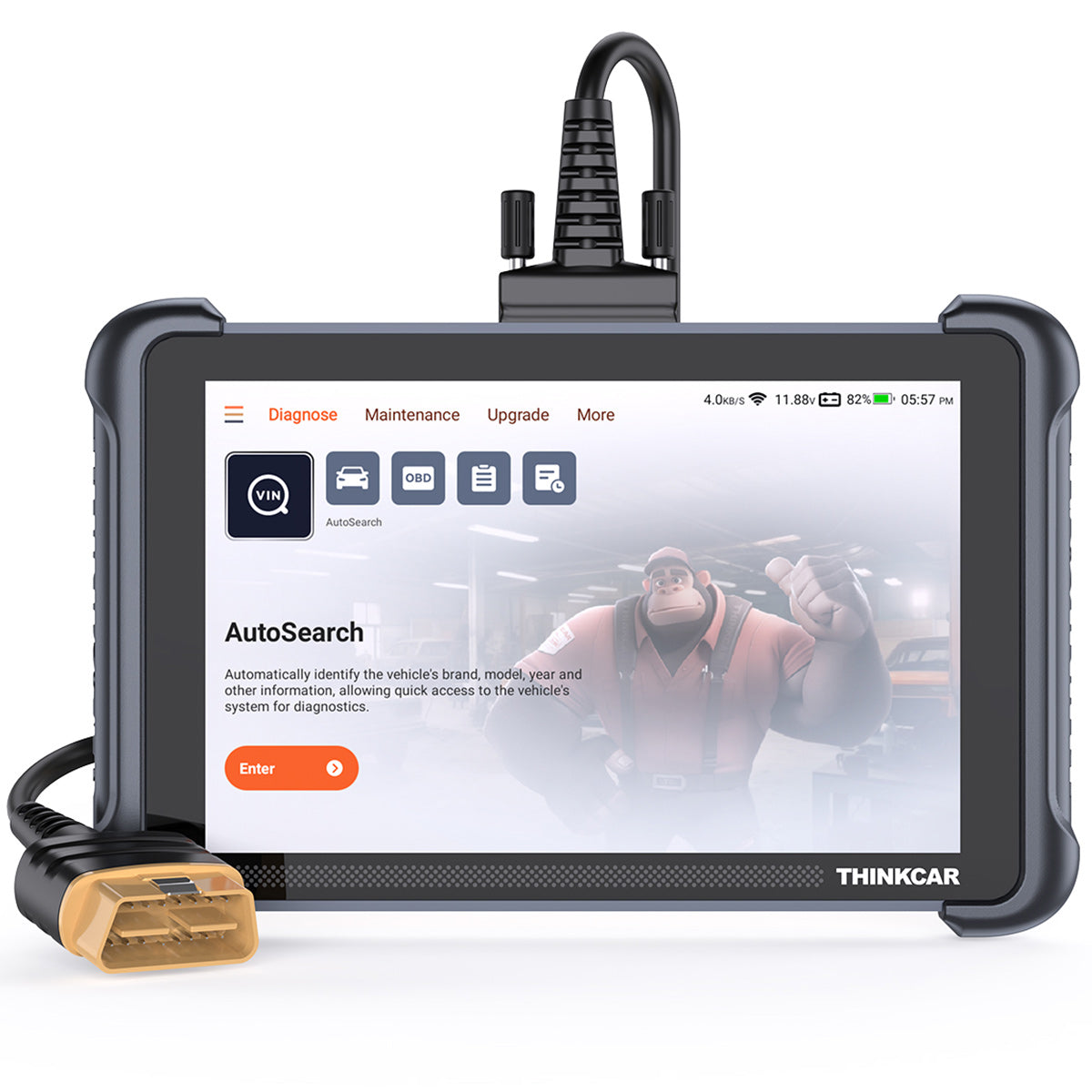
For example, THINKSCAN 689 highlights an 8-inch touchscreen and Wi-Fi updates (2.4G/5G). It also lists memory specs (RAM 4G, ROM 64G) and emphasizes AutoVIN and AutoScan for speed. If you do longer sessions (like full module scans plus service resets), this style can feel much more "shop-like" than using a phone.
Shop: THINKSCAN 689
Step 6: Compare must-have features
This is where you avoid "feature marketing" and focus on what helps you complete a repair.
A. Coverage and speed
Look for:
- AutoVIN and AutoScan to reduce manual selection
- Full system diagnostic across modules (ECM, TCM, ABS, SRS, BCM, etc.)
- Protocol support that matches your vehicle list
THINKSCAN 689 highlights OE-level full system diagnostic for 150+ brands and also calls out CAN-FD and DoIP support. THINKDIAG 2 highlights CAN-FD support as well and positions itself as covering a very large portion of models.
B. Active tests (bidirectional control)
A Bidirectional scanner is one of the biggest "value multipliers" for DIY repair because it helps you confirm a diagnosis before buying parts.
Use cases include:
- Commanding radiator fan on/off to confirm fan circuit
- Cycling a solenoid or actuator to check response
- Operating windows, locks, mirrors, or lights during body diagnostics
THINKDIAG 2 describes active tests through the app to test actuators without using the vehicle controls. THINKSCAN 689 also highlights bi-directional/active tests and positions them as faster for troubleshooting than manual checks.
C. Maintenance and reset functions
If you do your own maintenance, resets matter. A reset list that matches your vehicles saves you time after repairs.
Examples to look for:
- Oil reset tools
- EPB reset for rear brake service
- ABS bleeding tools for brake hydraulic work
- SAS calibration after alignment or steering work
- TPMS reset and TPMS Service routines
THINKDIAG 2 describes a menu of 15 maintenance functions, and THINKSCAN 689 highlights 34+ maintenance functions.
Step 7: Factor software and update costs
The best-value scanner is the one you can keep current.
Before you buy, confirm:
- Whether updates are included or require Software Subscription
- How updates are delivered (Wi-Fi, app-based)
- Where you will see Software Update Notice items
- How "add-on" features work (for example, per-make software packages)
Some product lines also reference T-code/TCODE workflows (for example, T-code items for resets or functions across lines). Plan for that process early so your tool stays useful after the first few months.
With a tablet tool, you also want a simple update routine. THINKSCAN 689 highlights Wi-Fi updating (2.4G/5G) and "free lifetime updates" messaging, which can improve long-term value if it matches your usage pattern.
Shop: THINKSCAN 689
Scenario Variations: Adapting Your Approach
Scenario 1: Single-car DIY maintenance
If you mainly maintain one vehicle, prioritize compatibility and convenience. An OBD2 Scanner Bluetooth setup can be enough if it supports the exact resets you do most (oil service, EPB, SAS). In this scenario, a compact tool like THINKDIAG 2 can also make sense if you want active tests and occasional deeper diagnostics.
Scenario 2: Multiple cars across different brands
If you work on multiple household vehicles, prioritize broad coverage and a faster workflow. A ThinkScan Series style tablet can reduce friction because you can run AutoVIN/AutoScan, review more data on-screen, and move from module to module quickly.
Scenario 3: Advanced DIY repairs and verification
If you replace modules, troubleshoot complex faults, or want to confirm a part before buying it, prioritize ECU Coding and a Bidirectional scanner. Active tests help validate your diagnosis, while coding and adaptations help complete repairs after replacement.
Scenario 4: Tire and sensor work
If you rotate tires, replace sensors, or troubleshoot TPMS warnings, prioritize TPMS & Sensor features and TPMS Service routines. Even if you do not program sensors, a tool that supports TPMS reset can reduce warning-light headaches after service.
What You Will Need Before You Start
Required Tools and Materials
- Your vehicle information: VIN, year, make/model, and trim if possible.
- Phone or tablet with stable Wi-Fi for Software Download and updates.
- Access to the OBD2 port (often under the dash near the steering column).
- A stable battery condition (use a battery maintainer if the car is weak).
- Your tool login/app credentials (for app-based scanners).
- The scanner itself and its cable or dongle.
- A storage pouch to keep the tool clean and prevent connector damage.

Safety considerations
- Do not run active tests in gear. Put the vehicle in Park (or Neutral with parking brake set) before actuator tests.
- Keep hands, tools, and clothing away from belts, fans, and moving components during live tests.
- Maintain ventilation if the engine must run while you monitor live data.
- Stop immediately if the vehicle behavior becomes unsafe during an active test.
- If the TPMS warning indicates a safety issue, inspect tires promptly. NHTSA explains that a TPMS warning indicates at least one tire may be significantly underinflated and you should check tire pressure as soon as possible.
Troubleshooting Guide
| Problem | Likely cause | Practical fix |
|---|---|---|
| Tool will not connect to the vehicle | Weak vehicle battery, loose connector, ignition state incorrect | Turn ignition to the correct position (often Key On Engine Off), reseat the connector, and ensure battery voltage is stable before trying again. |
| Scanner connects but shows limited data | Universal OBD2 session only, module access restrictions | Switch from generic OBD2 to full system diagnostic mode if your tool supports it, then rescan modules. |
| Missing modules in the scan list | Vehicle network protocol mismatch, partial coverage for that model | Confirm make/model/year selection, run AutoVIN if available, and retry. If still missing, the tool may not support that module for your exact vehicle. |
| Reset function fails | Function not supported on that vehicle, prerequisites not met | Verify the vehicle is in the correct state (engine off vs running), confirm you completed the mechanical repair, then retry. Some vehicles require specific temperatures or pedal steps. |
| Active test does not trigger a response | Wrong actuator selected, component has power/ground issue | Repeat the test while monitoring live data and fuses. If the command is sent but no response occurs, treat it as a wiring, fuse, or component fault rather than a sensor-only issue. |
Conclusion
Best value comes from matching scanner capability to the repairs you actually do. First, define your scope and vehicle list. Next, decide whether universal OBD2 is enough or whether you need deeper brand-style access for resets, all-module diagnostics, and bidirectional tests.
If you want a compact option that emphasizes CAN-FD support, full system diagnostics, and app-driven active tests, THINKDIAG 2 fits that workflow. If you prefer a dedicated tablet experience with an 8-inch screen, AutoVIN/AutoScan, and broader maintenance positioning, THINKSCAN 689 is designed for that style.
Official Site: THINKCAR Official Shop
Frequently Asked Questions
Should I buy a universal or car-specific diagnostic tool? A universal tool is usually enough for basic code reading, clearing, and simple emissions-related checks. A car-specific or deeper OEM-style approach becomes important when you need service resets, module scans beyond the engine, and bidirectional tests. If you do brake service, steering calibration, or troubleshooting that needs actuator commands, choose deeper coverage. Always match the tool to the exact vehicles and tasks you will perform.
How do I choose a diagnostic scanner for my car as a DIY user? Start by listing your car make, model, year, and the top 5 jobs you want to do, like oil resets, EPB service, or ABS bleeding. Next, confirm whether you need full system diagnostics or just generic OBD2, because that changes what tools will feel usable. Then prioritize one or two key features, such as bidirectional control or coding, instead of chasing long feature lists. Finally, confirm the update method fits your routine so you keep the scanner current.
What features should I look for in a diagnostic scanner as a DIY user? Look for reliable code reading and live data first because those are used on almost every repair. Next, prioritize all-system scanning if you want to diagnose ABS, SRS, body modules, and more. If you replace parts and want to confirm they work before buying, bidirectional tests are a major upgrade. If you plan module replacements or personalization changes, add ECU coding and adaptations to your must-have list.
What is the difference between basic and advanced automotive diagnostic tools? Basic tools focus on engine-related codes and a limited set of generic data, which is often enough for quick check engine light work. Advanced tools expand to more modules, add guided service resets, and support active tests where the tool commands a component to operate. Many advanced tools also support ECU coding and adaptation routines after parts replacement. That extra depth can turn guesswork into a testable repair plan.
How to get the most value for money with car diagnostic scanners? Avoid overbuying by choosing the lowest tier that covers your real tasks, not the longest marketing checklist. Confirm the tool supports your exact vehicles and that you understand the update process, because outdated software can reduce coverage quickly. Use bidirectional tests and live data to validate a diagnosis before purchasing parts, which often saves more than the tool cost over time. Keep a simple workflow: scan all modules, save a report, repair, then rescan to confirm.
What is the best Bluetooth diagnostic scanner for DIY repairs? The best Bluetooth scanner is the one that reliably connects to your specific vehicle and supports the functions you actually use, like service resets and key live data PIDs. For many DIYers, the key decision is whether the Bluetooth tool also supports deeper functions like active tests or coding through its app. If you mainly want portability, choose a tool with stable pairing and clear app navigation. If you find yourself doing long diagnostic sessions often, consider a tablet tool instead of Bluetooth for speed and screen clarity.
Table of Contents
- Introduction
- Step-by-Step Guide to Choosing the Best-Value Scanner
- Scenario Variations: Adapting Your Approach
- What You Will Need Before You Start
- Troubleshooting Guide
- Conclusion
- Frequently Asked Questions

Share:
How to Understand AI Fault Code Interpretation: What Diagnostic Tools Can Do
The Ultimate Guide to Reading and Fixing Car Error Codes with AI