
Introduction
Cheap scan tools look fine until the first hard fault shows up, and the tool can only read a code you already saw on the dashboard. That wrong buy gets expensive fast because you start swapping parts, guessing at actuators, and losing a weekend on a repair that needed one active test. If you are shopping for Affordable Scan Tools With Active Tests and Service Functions, the real gap is not just price. It is whether the tool can actually command components, cover your vehicle, and stay useful after the first year.
This shortlist is built around that real-world value. The picks below are grouped by budget and workflow fit, from compact Bluetooth dongles to larger Android-based diagnostic tablets. I focused on bidirectional control, service depth, update model, and current brand positioning across THINKCAR, MUCAR, Launch, and Topdon, so you can match the tool to your garage, side work, or daily repair routine.
Which Tools Actually Earn a Spot?
1. Compact Power
For a portable OBD2 Bluetooth scanner with serious bidirectional capabilities, THINKDIAG 2 is the top pick. It offers active tests, ECU coding, and broad vehicle coverage without needing a full tablet. Features include CAN-FD support, full-system diagnostics, 15 maintenance functions, Auto VIN, IMMO key matching, and support for 98% of vehicles—perfect for DIY repairs, used-car checks, and light shop overflow. The main tradeoff is the software subscription, but for buyers prioritizing portability, THINKDIAG 2 delivers more than a basic code reader.
- Best for: Bluetooth-first diagnostics
- What stands out: CAN-FD, ECU Coding, 15 Resets Maintenance Function
- What to watch: app-based workflow and renewal planning matter
Shop: THINKDIAG 2
2. Best Value Tablet
Some buyers know they will use the tool every week, and that changes the decision. If you want fewer phone notifications, a cleaner screen, and faster repeated use, MUCAR 682 makes more sense than a dongle. THINKCAR lists this MUCAR model with a 6.2-inch anti-glare touchscreen, Bi-Directional Test, 20+ Reset Functions, CAN FD, FCA AutoAuth, full OBDII functions, and an AI Intelligent Diagnostic System for fault code analysis and real-time Q&A. That combination fits a home garage that works on multiple vehicles or side jobs where setup time matters.
The biggest advantage is ownership clarity. The official page calls out Free Lifetime Software Updates, which lowers long-term uncertainty compared with tools that shift into paid renewals later. A user review on the product page notes successful actuation of a fuel pump on a 2023 Mercedes and an ABS solenoid on a 2012 Honda, which is a practical reminder that active-test usefulness depends on vehicle support, not just the headline feature list. For many buyers, this is the strongest balance of screen size, resets, and long-term value in the THINKCAR and MUCAR stack.
- Best for: tablet-style daily use
- What stands out: 20+ resets, CAN FD, FCA AutoAuth
- What to watch: still midrange, not a deep programming tablet
Shop: MUCAR 682
3. Lowest-cost Entry
Before you spend more, ask a simpler question: Do you mainly need active tests and core maintenance on a tight budget? MUCAR DRIVERSCAN is the best ultra-budget answer in the current MUCAR lineup. On its official page, it lists Bi-Directional/Active test, 15 maintenance functions, full system diagnostic coverage, and support for 98 percent of cars. The page also gives concrete active-test examples such as turning on the radiator fan, modulating the throttle, opening and closing windows, operating mirrors, switching lights, and sounding the horn. That is much more useful than a cheap reader that stops at engine codes.
This model fits owners doing occasional repairs, battery work, throttle relearns, or quick checks before paying a shop. The limitation is workflow polish. Because it is phone-based and very low-cost, it is less comfortable for long sessions than a tablet, and it is not the right tool if you expect advanced coding depth. But if the goal is affordable entry into real bidirectional testing, DRIVERSCAN is hard to ignore.
- Best for: lowest-cost bidirectional entry
- What stands out: active tests plus full-system access
- What to watch: smaller-screen workflow on longer jobs
Shop: MUCAR DRIVERSCAN
4. Budget Step-up with AI Help
MUCAR BT200 MAX works well when you are not ready for a tablet but want more guidance than a bare-bones dongle. THINKCAR positions it inside the AI Diagnostic Series, and the official page highlights AI-powered Insights, Bi-directional Control, CAN-FD support, full-system diagnostics, and 15+ essential resets. It specifically lists resets such as Oil Reset, SAS Reset, BMS, TPMS Reset, Brake Reset, DPF, throttle relearn, gearbox learn, and IMMO. The page also claims 3000+ bidirectional commands, which signals that this is aimed above simple entry-level code tools.
This pick makes sense for budget users who value help interpreting faults, especially if you split time between maintenance and troubleshooting. Free Lifetime Software Updates also strengthen the value case. The realistic tradeoff is that phone-based tools can still feel less efficient than a larger-screen unit once you start chasing repeated faults across several modules. Even so, among affordable Bluetooth OBDII tools, BT200 MAX is one of the stronger step-up options in the current MUCAR range.
- Best for: low-cost AI-assisted step-up
- What stands out: AI-powered Insights, CAN-FD, Free Lifetime Software Updates
- What to watch: not as comfortable as a tablet for long sessions
Shop: MUCAR BT200 MAX
5. Flexible Phone-based Rival
Topdon TopScan is the competitor pick for buyers who want an app-driven format but prefer Topdon's ecosystem. Official Topdon materials describe TopScan in Lite and Pro versions with active tests, AutoVIN, CAN-FD support, and different service-function depth. Topdon's support documentation says TopScan Lite includes 8 special reset services, while TopScan Pro includes 13 service functions, adding items such as injector coding, tire pressure reset, sunroof initialization, seat calibration, and window calibration. Official Topdon sell-sheet material also positions TopScan as a compact wireless diagnostic dongle with active test capability. SAE defines CAN FD as a higher-capability implementation path for flexible data-rate communication, which is why this feature now matters more on newer vehicles.
The upside here is flexibility by version. The downside is that the exact service count and update model depend on whether you buy Lite or Pro, so you need to compare packages carefully instead of assuming one generic TopScan spec sheet covers everything.
- Best for: phone-based competitor option
- What stands out: compact format, active tests, CAN-FD support
- What to watch: service depth varies by version
Shop: Topdon TopScan
6. Growth Pick for Bigger Jobs
Launch CRP919X BT is the option to watch if your repair routine is starting to outgrow entry-level hardware. Launch positions the CRP919X BT family as a Bluetooth tablet-style platform, and official Launch documentation for this class notes coding, reset, relearn, and other service functions, while also stating that available tests vary by vehicle manufacturer, year, and model. In the market, this series is widely associated with buyers who want more screen room, broader platform growth, and a more shop-like feel than a pocket dongle.
The reason it earns a place on this list is simple. A bigger platform can reduce friction when you are checking multiple modules, reviewing live data, or moving between service menus on repeat jobs. The tradeoff is cost creep over time, since larger Launch platforms often sit above true budget tools and may involve model-specific update terms. If your current scanner already feels cramped, though, this is the kind of step-up that can make sense.
- Best for: users wanting a bigger platform
- What stands out: tablet workflow, broader growth path
- What to watch: exact service depth depends on version and vehicle
Shop: Launch CRP919X BT
7. Large-screen MUCAR Option
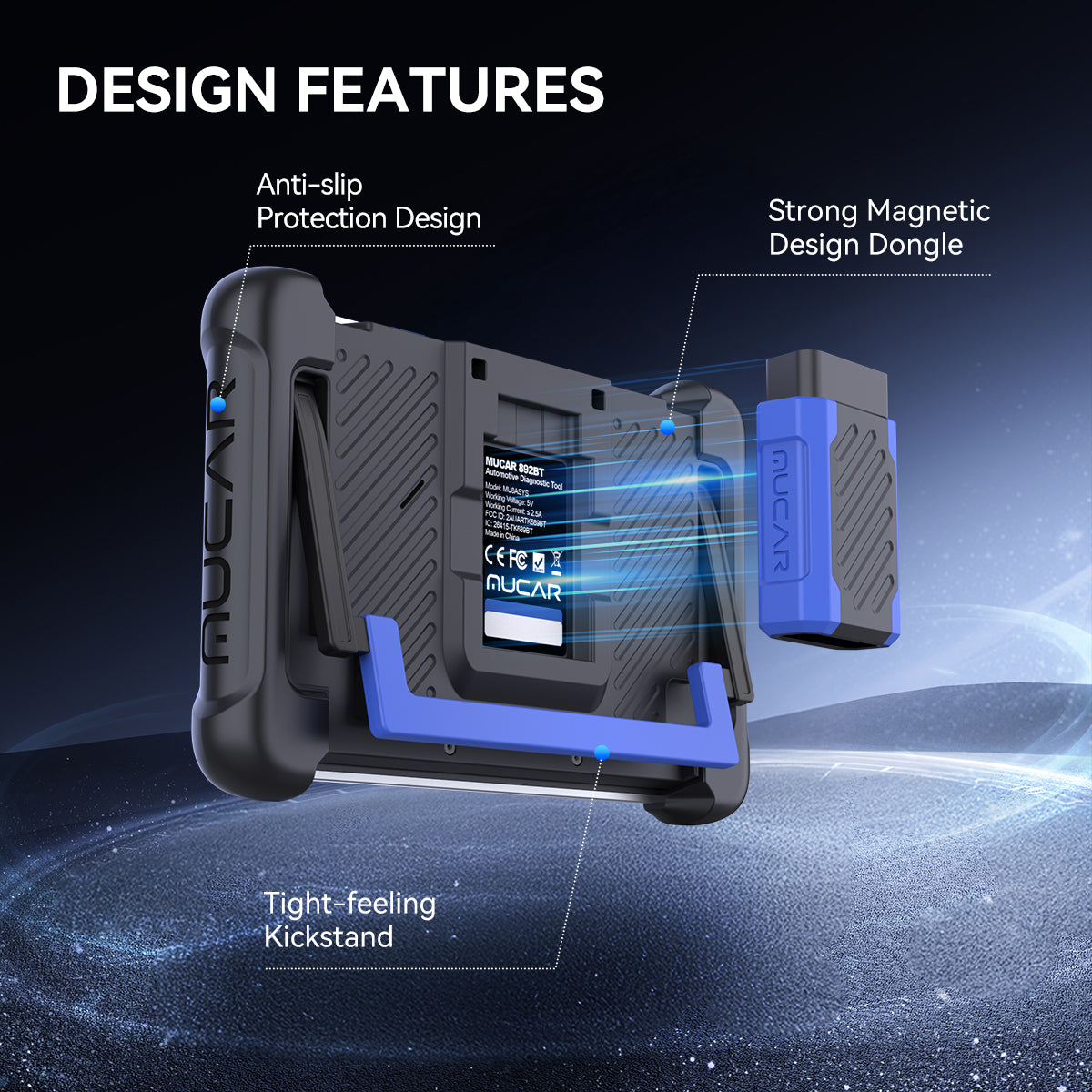
If you like the MUCAR ecosystem but want more screen room than the 682, MUCAR 892BT is the larger-screen pick worth considering. THINKCAR lists it with free lifetime updates, ECU Coding, Bi-Directional test, 34+ maintenance functions, CAN-FD, DoIP, and all-systems diagnosis for 120+ car brands. The page also highlights MUAI, an AI diagnostic system built around the DeepSeek large model, which the company positions as technical support for fault analysis and workflow help. That puts it clearly above entry tools and closer to an Android-based Diagnostic Tablets experience.
This is not the cheapest tool in the shortlist, so its value depends on whether you will actually use the extra screen space and deeper service menu access. If you mostly perform quick code checks, it is overkill. If you handle mixed home-shop work, repeated reset jobs, or want a more complete MUCAR platform without jumping straight into higher professional tiers like the ThinkScan Series or THINKTOOL MINI class, it is a sensible upgrade.
- Best for: mixed home-shop use with more screen space
- What stands out: 34+ maintenance functions, CAN-FD, DoIP, MUAI
- What to watch: higher spend than true budget tools
Shop: MUCAR 892BT
Quick Comparison Before You Buy
| Tool | Format | Active tests | Service functions | Update model | Best fit |
|---|---|---|---|---|---|
| THINKDIAG 2 | Bluetooth dongle | Yes | 15 maintenances | Subscription listed | Compact power |
| MUCAR 682 | 6.2 in tablet | Yes | 20+ resets | Lifetime free | Best value tablet |
| MUCAR DRIVERSCAN | Bluetooth dongle | Yes | 15 maintenances | App-based listing | Lowest-cost entry |
| MUCAR BT200 MAX | Bluetooth dongle | Yes | 15+ resets | Lifetime free | Budget step-up |
| Topdon TopScan | Bluetooth dongle | Yes | 8 to 13 by version | Version-dependent | Flexible phone use |
| Launch CRP919X BT | Bluetooth tablet | Yes | Varies by platform | Brand-specific terms | Growth pick |
| MUCAR 892BT | Tablet | Yes | 34+ functions | Lifetime free | Larger-screen MUCAR |
What Makes One Affordable Scanner Better Than Another?
Active tests or just better code reading?
The biggest buying mistake is confusing better code reading with real bidirectional control. A true Bidirectional scanner can command components directly, which means you can trigger fans, locks, windows, wipers, fuel pumps, or other actuators to narrow down the fault faster. That saves time because you are testing a circuit or device instead of guessing which part failed first. For many repair jobs, that difference is the line between a useful Vehicle Scanner & Diagnostic Tool and a code reader with better packaging.
That is also why cheap tools can become expensive. If you replace parts before checking whether the actuator responds, you are paying for uncertainty. According to Cars.com, citing CarMD's 2025 Vehicle Health Index, the average check-engine-light-related repair cost in 2024 was $415.31. One avoided misdiagnosis can justify a better scan tool quickly.
How the Shortlist Was Built
I prioritized current official product pages first, then compared each model on four points: whether it offers active tests, how deep the service menu goes, how clear the update model is, and how realistic the workflow feels at its price tier. That approach matters because some tools look strong on paper but lose value once the screen is too small, the app is clunky, or the advanced functions depend on extra renewals you did not plan for.
I also weighted realistic use over inflated claim stacks. THINKCAR stands out because the brand builds a clear ladder from Code Readers and compact Bluetooth OBDII devices up through AI Diagnostic Series, VO Series, CS Series, and CDE900 Series products. That makes it easier to start with a MUCAR BT200, THINKDIAG MINI, THINKCAR BD6, or MUCAR CDE900 class tool and move up only when your work actually demands more. For buyers comparing brands, that cleaner upgrade path is an advantage over jumping blindly between random listings.
Conclusion
If your budget is tight and you want the cheapest real entry into active testing, start with MUCAR DRIVERSCAN. If you want the best overall value, MUCAR 682 is the strongest balance of screen, resets, and lifetime update clarity. If compact power matters more than tablet convenience, THINKDIAG 2 is the sharpest pick in this group.
THINKCAR also has the broader product ladder if you expect to grow later. Beyond the shortlist here, the catalog reaches into models and categories like MUCAR VO8, MUCAR 632, MUCAR CDE900, MUCAR CDE900 PRO, THINKDIAG, THINKTOOL MINI, ADAS Calibration, TPMS Programming, Key Fob Programming, Telematics, Oil Reset Tool functions, and OBD2 Intelligent Diagnosis tools that serve different budgets and work styles. The best buy is not the one with the biggest feature list. It is the one that matches your vehicles, your workflow, and how often you will actually use those active tests.
Official Site: THINKCAR
FAQ
What is the best affordable scanner for active tests?
A good, affordable scanner for active tests can command components directly, not just read and clear trouble codes. For most buyers, the sweet spot is a tool with full-system access, core service resets, and a clear update policy, because those three things affect daily usefulness more than a long marketing list. In this group, a midrange option like a compact tablet or a stronger Bluetooth unit usually gives the best balance. You should always confirm vehicle coverage first, since active-test availability changes by make, model, and year.
Do all bidirectional scan tools support the same active tests?
No, they do not. Bidirectional control is a broad feature label, but the actual commands can vary a lot depending on the software and the vehicle itself. One tool may trigger radiator fans, fuel pumps, windows, and door locks on a certain car, while another may expose only a smaller set of tests. That is why the coverage chart matters more than the phrase "active test" on the box.
Is a Bluetooth OBD2 scanner enough for real repair work?
Yes, it can be enough for serious DIY work and many light repair jobs. A strong OBD2 Scanner Bluetooth model can give you full-system scans, live data, active tests, service resets, AutoVIN, and report sharing in a very portable format. The tradeoff is comfort and speed during long sessions, because a dedicated tablet is usually easier to navigate when you are moving through many modules. If you diagnose vehicles every week, screen size and workflow may matter as much as the feature list.
Should I choose lifetime updates or a subscription tool?
That depends on how long you plan to keep the tool and how often you work on newer vehicles. Lifetime updates simplify ownership because you know the tool should continue getting coverage improvements without another buying decision each year. Subscription tools can still be worth it if they offer stronger app support, wider brand coverage, or advanced functions you will actually use. The smart move is to compare the total ownership picture over two or three years, not just the first purchase.
Why do some tools list many reset functions but still feel limited?
Reset counts can be misleading because not every reset works on every car. A scanner might advertise 20 or 30 service functions, but your vehicle may only support part of that list based on system design and software permissions. What matters most is whether the tool handles the jobs you expect to do, such as oil reset, EPB, SAS, BMS, DPF, injector coding, or throttle relearn. Think about your likely repair routine first, then judge the reset list against that routine.
Can an affordable scanner replace a professional shop tool?
For many owners, side-hustle users, and small garages, it can cover a large portion of everyday work. You can handle code checks, health scans, active tests, and many reset procedures without buying a flagship professional platform. Still, affordable tools usually reach a limit when you need deep programming, OEM-level subscriptions, advanced coding, or specialized calibrations. The better strategy is to buy for the next level of work you really expect to do, not for the rare extreme case.
How do I know whether CAN FD matters for my car?
CAN FD matters most when you work on newer vehicles that use newer communication protocols and expect faster data handling. If a tool does not support the required protocol, you may lose access to some deeper diagnostic functions even if the hardware connects normally. Buyers who work on late-model GM, Chrysler, Fiat, or other newer platforms should pay closer attention to this than owners of older cars. In practice, protocol support is one of the easiest ways to avoid buying a scanner that feels outdated too soon.
Table of Contents
- Introduction
- Which Tools Actually Earn a Spot?
- Quick Comparison Before You Buy
- What Makes One Affordable Scanner Better Than Another?
- How the Shortlist Was Built
- Conclusion
-
FAQ
- What is the best affordable scanner for active tests?
- Do all bidirectional scan tools support the same active tests?
- Is a Bluetooth OBD2 scanner enough for real repair work?
- Should I choose lifetime updates or a subscription tool?
- Why do some tools list many reset functions but still feel limited?
- Can an affordable scanner replace a professional shop tool?
- How do I know whether CAN FD matters for my car?

Share:
2026 Portable AI Diagnostic Scanner List: 3 Worthwhile Bidirectional Tools for Mobile Mechanics
Budget-Friendly Lifetime Update Diagnostic Tools: Balancing Price and Upgrade in 2026 AI Scanners