
Introduction
Still guessing at a warning light and hoping a cheap dongle will tell you everything? That shortcut often leads to wasted parts, missed faults, and a used-car purchase you regret after the paperwork is signed. When you are learning how to choose a Bluetooth scanner for your car's real needs, the biggest mistake is buying for marketing claims instead of the jobs you actually need to do.
This guide shows you what matters in a Bluetooth scanner, from basic OBD-II code reading to full-system diagnostics and bidirectional tests. You will learn how to separate engine-only tools from true multi-module scanners, how app quality affects daily use, and where a tool like Thinkcar's THINKSCAN 689BT or THINKDIAG MINI fits. Start with the basics first, then match scanner depth to your workflow.
Bluetooth Scanner Fundamentals
Before you compare model names, get the core idea right: Bluetooth is only the connection method, not the capability level. A scanner can connect wirelessly and still be limited to basic engine codes, while another wireless tool can reach ABS, SRS, transmission, and service functions. That is why your first filter should be diagnostic depth, not whether the box says Bluetooth.
OBD-II is the baseline for most U.S. vehicles from model year 1996 onward, and that common standard is why many scanners can at least read generic emissions-related trouble codes. The 1996 requirement is widely reflected in government and public technical references, and states still rely on OBD-based emissions workflows in many programs. The EPA explains that OBD systems help detect emissions-related faults, which is one reason generic code readers focus so heavily on engine and readiness data. EPA
Generic OBD-II vs manufacturer-level data
This distinction decides whether a scanner is merely helpful or genuinely useful. Generic OBD-II gives you powertrain codes, readiness monitors, freeze-frame snapshots, and a limited set of live data. That is enough for a check engine light caused by a loose gas cap, a simple misfire, or an emissions fault. However, it does not automatically mean you can see why an airbag light is on, whether a wheel-speed sensor is failing, or if a transmission module stored a pending fault.
Manufacturer-level access goes deeper. It can unlock module-specific codes, special tests, resets, and sometimes adaptation functions that basic adapters never expose. If your real tasks include used-car inspections, brake service, battery registration, or chasing recurring warning lights, this deeper access matters far more than the Bluetooth label.
Why the app matters as much as the adapter
With phone-based tools, the app is half the product. A solid adapter with a weak app creates slow pairing, unclear menus, missing reports, and frustrating reconnection behavior. In practice, that means less confidence in the tool and more time wasted searching for the right screen while the car sits half-diagnosed.
Look for four app basics:
- Fast pairing and reliable reconnection
- Clear code definitions and readable reports
- Live data that loads quickly
- AutoVIN or fast vehicle identification
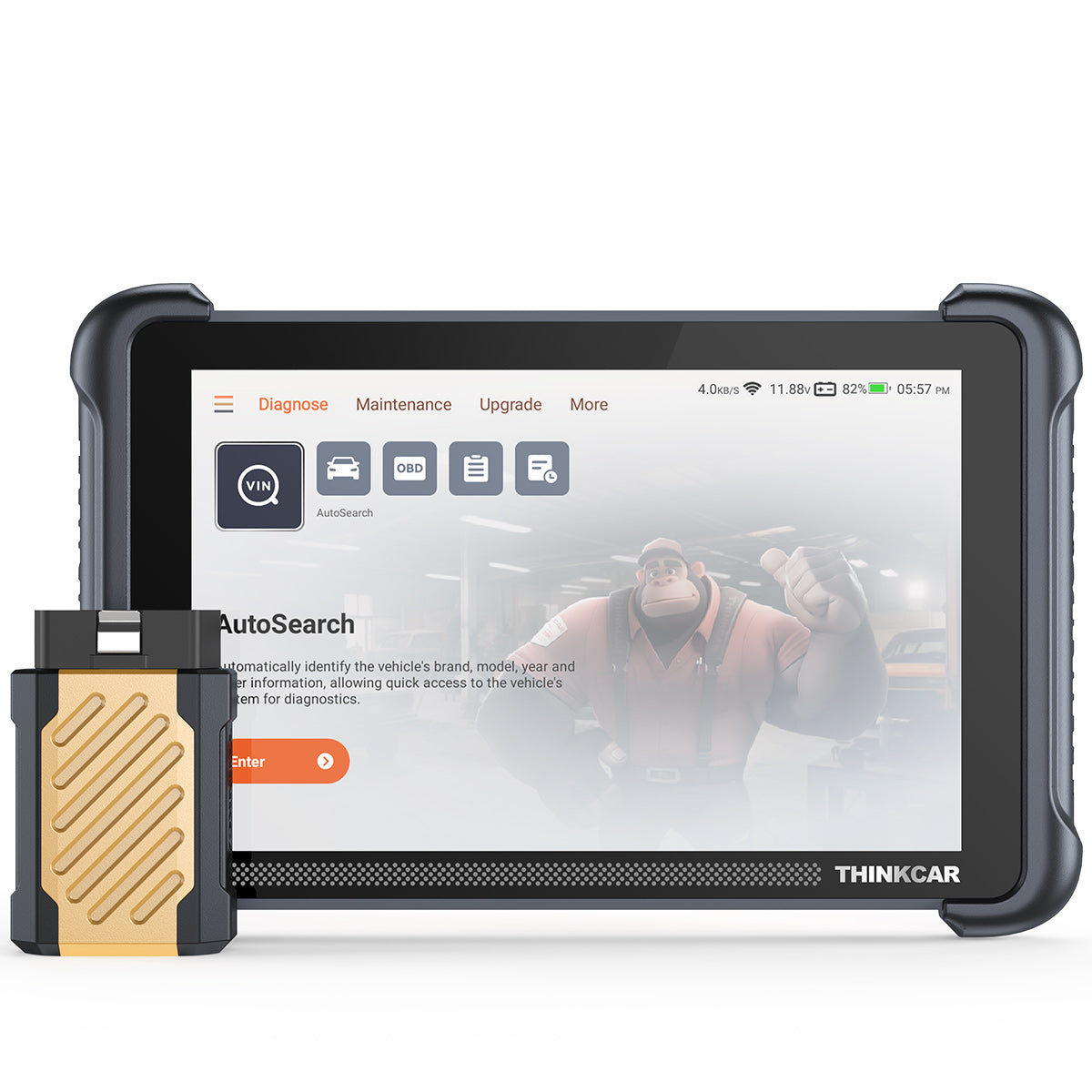
Thinkcar's product range shows how this gap plays out. The THINKDIAG MINI emphasizes smartphone-based convenience with full-system diagnostics, AutoVIN, and support for major systems such as engine, transmission, ABS, SRS, TPMS, and A/C. The THINKSCAN 689BT takes a different path by pairing a Bluetooth dongle with a dedicated 8-inch touchscreen platform, which reduces dependence on your phone during longer diagnostic sessions. This matters if you want wireless flexibility without giving up a larger interface.
Full-system access and bidirectional control
If you only remember one rule, use this one: full-system access solves more real problems than code-count marketing. A tool that reads engine, ABS, SRS, body, and transmission modules is usually a better long-term fit than one that advertises thousands of code definitions but only covers emissions-related systems.
Bidirectional control sits one level higher. It lets the scanner send commands to components so you can test them actively instead of waiting for the car to fail under normal operation. Thinkcar describes the THINKSCAN 689BT as a full bidirectional tool that can command components directly for faster fault isolation, while its product page also lists 35-plus maintenance functions, AutoVIN, AutoScan, FCA AutoAuth support, and CAN-FD plus DoIP compatibility for newer vehicles. That feature set puts it in a more serious category than a basic phone dongle. (mythinkcar.com)
Check Engine Light Troubleshooting
When your check engine light comes on, speed matters, but accuracy matters more. The right first move is not clearing the code. Instead, read the code, capture freeze-frame data, and review live data before touching anything. Freeze-frame shows the conditions present when the fault set, such as engine load, coolant temperature, fuel trim, or RPM. That context helps you tell the difference between a one-time event and a repeatable issue.
This is where many cheap Bluetooth scanners fall short. They may return a generic code but give weak live data, slow refresh rates, or poor descriptions. That pushes you toward blind part swaps, which often cost more than the tool you should have bought in the first place. A better scanner lets you confirm whether a misfire is isolated, whether fuel trims suggest an air leak, or whether an oxygen sensor issue is really downstream of another fault.
For this workflow, Thinkcar offers two sensible tiers. The THINKDIAG MINI suits drivers who want smartphone convenience but still need full-system reach, AutoVIN, and core OBD-II functions in a compact dongle. If you want a more workshop-like experience, the THINKSCAN 689BT adds an 8-inch touchscreen, 4 GB RAM, 64 GB storage, AutoScan, and broader professional functions in a wireless package. On Thinkcar's product page, the 689BT is presented as an all-system diagnostic platform with Bluetooth dongle communication rather than a simple engine-code reader. (mythinkcar.com)
Shop: THINKDIAG MINI
Used Car Inspection

Before cash changes hands, a scanner helps you look past the dashboard and into the vehicle's recent history. That matters because a seller can clear codes shortly before a showing, leaving you with no warning lights but incomplete readiness monitors and hidden pending faults. Innova's used-car guidance also stresses that scanners can reveal hidden problems before purchase, which matches what experienced buyers already know: the risk is not just one stored code, but the pattern of system health behind it. (innova.com)
For used-car checks, prioritize these screens:
- Stored, pending, and permanent codes
- I/M readiness monitor status
- Freeze-frame data
- Battery and charging-related data if available
- ABS, SRS, and transmission module scans
This is also where full-system diagnostics beat engine-only tools. A clean engine scan does not mean the car is clean overall. If the ABS module logged intermittent wheel-speed faults, or the SRS module holds a restraint error, you want to know before you negotiate. Nevada DMV's public OBD explanation notes that scan tools retrieve trouble codes for diagnosis and inspection contexts, and that early detection supports both drivers and emissions control. Nevada DMV
Thinkcar's THINKSCAN 689BT is a strong fit for this inspection workflow because it supports OE-level full-system diagnostics across 150-plus car brands, including ECU information, code read and erase, and live data access across many vehicle systems. That broader reach is more valuable for purchase decisions than a long list of generic P-codes. (mythinkcar.com)
Shop: THINKSCAN 689BT
DIY Maintenance and Resets
Routine maintenance is where scanner value becomes obvious. If your real jobs are oil changes, battery replacement, electronic parking brake service, steering angle calibration, or service-light resets, you do not necessarily need heavy coding functions. You do need confirmed service support for your vehicle, because reset menus vary by make, model, and software coverage.
That is the key buying rule here: choose service functions you will actually use. Many product pages advertise dozens of resets, but the number alone means little if your vehicle is not covered. Thinkcar's site lists 35-plus maintenance functions for the THINKSCAN 689BT and 15-plus maintenance functions for products such as THINKDIAG and THINKDIAG MINI, but it also notes that function support can vary by vehicle and software version. That is exactly the right way to think about service tools: match your jobs, then verify compatibility. (mythinkcar.com)
If your maintenance routine is light to moderate, a compact Bluetooth option is often enough. The THINKDIAG MINI supports full-system diagnostics, AutoVIN, Bluetooth dual mode hardware support, and a small physical footprint of 60 mm by 48.5 mm by 22.5 mm. That makes sense if you want something easy to keep in the glove box and use from your phone during regular upkeep. For owners handling more service categories across multiple vehicles, the THINKSCAN 689BT offers a larger screen and broader advanced functions without giving up wireless communication.
Shop: THINKDIAG MINI
Full-System Diagnostics for Deeper Issues

Recurring warning lights usually mean you have moved beyond simple code reading. At that point, you need to compare information across modules, not stare at one engine screen. A traction-control light can originate from wheel-speed data, steering-angle calibration, communication faults, or power issues that touch multiple systems. Likewise, a transmission complaint may involve engine load data, battery voltage, and module communication rather than a failed transmission part.
A full-system scanner helps because it creates context. You can read ECU information, compare live data streams, and check whether multiple modules report the same event. Thinkcar's THINKSCAN 689BT is designed for this level of work. The product page describes OE-level full-system diagnostics across 150-plus car brands and access to systems ranging from engine, transmission, airbags, and ABS to body, steering, parking brake, and climate-related modules. It also supports CAN-FD and DoIP, which matters as newer vehicles use newer communication protocols that some entry-level tools cannot handle. (mythinkcar.com)
That kind of coverage is especially useful if you work on late-model vehicles or own more than one car brand. Reuters has reported on the broader industry shift toward more software-driven vehicle architecture, and SAE technical work in 2025 has discussed how software-defined vehicles raise the importance of better diagnostic frameworks. In practical terms, that means shallow tools age out faster as vehicle systems become more connected and module-heavy. Reuters SAE
Shop: THINKSCAN 689BT
Advanced Control and Repair Workflows
Bidirectional control is not essential for every owner, but it is a real dividing line between casual scanning and active diagnosis. If a component can be commanded on or off through the scanner, you can test the circuit, the actuator, and system response more directly. That saves time when you are trying to separate a failed part from a wiring issue or a control problem.
Typical use cases include commanding radiator fans, locking actuators, injectors, windows, mirrors, or throttle-related functions depending on vehicle support. Thinkcar's product materials for the THINKSCAN 689BT and THINKDIAG line explicitly frame bidirectional control as sending commands to systems and components for active testing. The 689BT page says this approach is faster than manual testing, while the THINKDIAG page shows examples such as radiator fan, horn, throttle, mirrors, injector, headlights, door lock, and windows. (mythinkcar.com)
That said, buying bidirectional capability only makes sense if you will use it. For most drivers, it is overkill. For serious DIYers, mobile techs, and owners diagnosing repeat faults across several systems, it becomes a major time-saver. The THINKSCAN 689BT also adds ECU coding functions, FCA SGW AutoAuth access, WiFi updates, and expandable tool support, making it better suited to advanced workflows than a basic phone adapter. If your repair path includes module replacement, function tests, and post-repair checks, this is the level where a higher-end wireless scanner starts earning its place. (mythinkcar.com)
Shop: THINKSCAN 689BT
How to Choose a Bluetooth Scanner for Your Car's Real Needs
Before you buy, classify your use case honestly. Most bad purchases happen because buyers shop for the most impressive feature list instead of the work they will actually do each month.
Start with your actual jobs
| Use case | Needed depth | Useful features | Best form |
|---|---|---|---|
| Check engine light | Basic to mid | Codes, freeze-frame, live data | Phone dongle |
| Used-car checks | Mid to high | Readiness, pending codes, full scan | Dongle or tablet |
| DIY service | Mid | Resets, AutoVIN, reports | Phone dongle |
| Repeat warning lights | High | All modules, live data compare | Tablet plus dongle |
| Active diagnostics | Advanced | Bidirectional, coding, protocols | Advanced wireless tool |
This framework keeps you from overbuying or underbuying. If you only want quick engine diagnostics and occasional maintenance, a compact tool like THINKDIAG MINI makes sense. If you want multi-system work, late-model protocol support, and active testing, the THINKSCAN 689BT is a more suitable long-term tool. (mythinkcar.com)
Verify vehicle coverage before features
Coverage should come before feature count. A scanner with many resets is still the wrong choice if it does not support your exact make, model, year, and system set. This matters even more if you own European vehicles, newer FCA products, or late-model GM platforms that may require newer protocol support.
Use this order when checking fit:
- Confirm your vehicle year and make coverage
- Confirm module access beyond engine
- Confirm service functions you need
- Confirm protocol support for newer vehicles
- Confirm update policy and warranty
Decide between dongle simplicity and dedicated hardware
Phone-based scanners are compact and convenient. Dedicated-screen tools reduce phone dependence, give more working space, and often feel faster during longer jobs. Neither form is automatically better. The better choice depends on whether you want occasional driveway scans or a more stable repair workflow with deeper menus and larger data views.
Best Practices and Common Pitfalls
Best Practices
Choose the least complicated scanner that still covers your next level of work. That usually means buying one step above your current needs, not three steps above. If you already know you will inspect used cars, handle maintenance resets, and diagnose multiple warning lights, full-system access is usually the safe floor.
Check the app experience before you buy. Pairing speed, reconnection reliability, report clarity, and live-data readability shape the daily experience more than marketing language does. Also verify update terms and warranty details, because these affect long-term value as vehicle coverage evolves.
Finally, use the scanner in the right order:
- Scan before clearing codes
- Save reports before repairs
- Review freeze-frame with live data
- Confirm readiness after repair
- Re-scan all affected systems
Common Pitfalls to Avoid
Do not buy based on code count alone. A huge number on the box can still hide shallow system coverage. Also, do not confuse Bluetooth convenience with diagnostic power. Wireless connection says nothing about whether the tool can access ABS, SRS, transmission, service resets, or active tests.
Another common mistake is ignoring protocol and gateway requirements on newer vehicles. If you work on late-model FCA, GM, Jaguar Land Rover, Volvo, or BMW platforms, features like AutoAuth, CAN-FD, and DoIP can matter. Thinkcar lists those capabilities on the THINKSCAN 689BT, which is exactly the kind of detail worth checking before purchase. (mythinkcar.com)
Conclusion
The best Bluetooth scanner is not the one with the longest feature list. It is the one that fits your real workflow, your vehicles, and the level of diagnosis you actually plan to do. If your needs stop at engine codes and basic maintenance, keep it simple. If you inspect used cars, chase repeat faults, or want active tests and deeper system access, move up to a true full-system tool.
Thinkcar's lineup makes that ladder easy to understand. The THINKDIAG MINI fits everyday wireless diagnostics and service basics, while the THINKSCAN 689BT is better suited to full-system work, bidirectional tests, newer protocols, and more advanced repair paths. Buy once around your real use cases, and the tool is much more likely to stay useful.
FAQ
What is the best wireless OBD2 scanner for someone who wants easy setup and fast reports?
The best wireless OBD2 scanner for this user is usually one with stable Bluetooth pairing, fast AutoVIN, and a clean app or interface. You do not need advanced coding or heavy bidirectional functions if your routine jobs are basic warning-light checks and simple maintenance. Focus on quick connection, readable freeze-frame data, and reports you can save before clearing codes. A compact tool with full-system access can be a smart middle ground because it stays easy to use while giving you room to grow.
Which Bluetooth scanner is good for full-system scans, not just check engine lights?
A good Bluetooth scanner for full-system scans must confirm access to ABS, SRS, transmission, and body modules, not just engine codes. That is the main difference between an entry-level code reader and a deeper diagnostic tool. If you often deal with multiple dashboard warnings or want to inspect used vehicles carefully, full-system coverage should be your first buying filter. You should also check whether the scanner supports live data across those modules, because deep access is more useful when you can compare data rather than only read stored codes.
Which phone-based scanner offers the best balance between convenience and features?
The best balance usually comes from a tool that keeps setup simple but still includes full-system scanning, live data, freeze-frame, and a few service functions you will actually use. In most cases, that means avoiding the cheapest generic adapter and also avoiding an advanced tool whose deeper functions you will never touch. Your best choice depends on whether you do occasional check-engine diagnosis, used-car inspections, or regular DIY service. If your tasks are broad but still phone-centered, app quality and vehicle coverage matter more than raw feature count.
What is the best Bluetooth OBD2 scanner with a phone app?
The best Bluetooth OBD2 scanner with a phone app is the one whose app stays reliable during real use. A strong app should pair quickly, reconnect without drama, organize reports clearly, and make live data easy to read on a small screen. It should also identify the vehicle accurately and present manufacturer-specific functions clearly when supported. A polished app cannot fix weak module coverage, so always judge software quality together with system depth and vehicle compatibility.
How do I select the best Bluetooth scanner for my car's needs?
Start by listing your real jobs in order of frequency, such as reading check engine codes, checking a used car, doing maintenance resets, or diagnosing multiple systems. Next, match those jobs to the minimum tool depth required, because engine-only scanning is very different from full-system work. After that, verify your exact vehicle coverage and update policy before comparing hardware style. If you follow that order, you are much less likely to overpay for functions you will not use or buy a tool that cannot handle your next repair.
How do I choose a diagnostic scanner for my car as a DIY user?
As a DIY user, choose the simplest scanner that still supports the repairs you realistically plan to do over the next year. If you only read engine codes and check readiness monitors, an entry-level wireless tool is often enough. If you replace batteries, service brakes with an electronic parking brake, inspect used cars, or troubleshoot multiple warning lights, move up to full-system access. If you want to run actuator tests or confirm component operation directly, then bidirectional control becomes worth paying for.
Why does a cheap Bluetooth scanner sometimes miss real faults?
A cheap Bluetooth scanner often misses real faults because it only reads generic OBD-II emissions data. That means it may show powertrain codes but never access the ABS, SRS, body, or transmission modules where the actual fault is stored. Some low-cost tools also have weak apps, slow live-data refresh, or poor code descriptions, which makes diagnosis harder even when a code is present. The problem is not Bluetooth itself; the problem is limited software, module access, and vehicle support.
When should I use a bidirectional scanner instead of a basic code reader?
Use a bidirectional scanner when you need to command components and confirm behavior directly instead of only reading fault memory. This is useful for checking fans, locks, injectors, windows, throttle-related functions, and some relearn or active-test procedures depending on the vehicle. A basic code reader can tell you what the car noticed, but a bidirectional tool helps you test what the component does when commanded. That makes bidirectional capability most valuable for serious DIY repairs, repeat faults, and multi-system troubleshooting.
Table of Contents
- Introduction
- Bluetooth Scanner Fundamentals
- Check Engine Light Troubleshooting
- Used Car Inspection
- DIY Maintenance and Resets
- Full-System Diagnostics for Deeper Issues
- Advanced Control and Repair Workflows
- How to Choose a Bluetooth Scanner for Your Car's Real Needs
- Best Practices and Common Pitfalls
- Conclusion
-
FAQ
- What is the best wireless OBD2 scanner for someone who wants easy setup and fast reports?
- Which Bluetooth scanner is good for full-system scans, not just check engine lights?
- Which phone-based scanner offers the best balance between convenience and features?
- What is the best Bluetooth OBD2 scanner with a phone app?
- How do I select the best Bluetooth scanner for my car's needs?
- How do I choose a diagnostic scanner for my car as a DIY user?
- Why does a cheap Bluetooth scanner sometimes miss real faults?
- When should I use a bidirectional scanner instead of a basic code reader?

Share:
Best Scan Tools for Shops Handling Gas Cars and Hybrids
Traditional Diagnostics vs. AI-Assisted Approach: What’s the Real Difference?