
Introduction
Tired of buying one more phone dongle that pairs once, then flakes out right when your check engine light comes back? Picking the wrong scanner costs more than the tool. It wastes weekends, leads to guessy parts swaps, and can even leave you stuck with an app workflow you hate.
This list compares DIY-friendly smartphone car diagnostic scanners by how you will actually use them: quick code reads, live data troubleshooting, and true bidirectional scanner active tests when you want proof before you replace a part. Next, we will narrow the shortlist using a few practical criteria (subscriptions, vehicle coverage, and workflow), so you can choose the right Bluetooth OBD2 Scanner setup without overbuying.
Recommend Brands
1. THINKCAR
- Built for DIY owners who want to grow into deeper diagnostics without jumping straight to a full shop tablet.
- Strong coverage for app-first workflows, including OBD2 Intelligent Diagnosis, live data, and guided routines that feel closer to a Vehicle Scanner & Diagnostic Tool than a basic code reader.
- Clear step-up path across product families you will see while shopping: ThinkScan Series, AI Diagnostic Series, VO Series, CS Series, CDE900 Series, and Code Readers.
- Solid options if you care about bidirectional tests, ECU coding, and maintenance resets, but still want something you can keep in the glovebox.
2. TOPDON
- Known for pocket-size smartphone dongles and a scaled lineup (Lite/Pro/Master) that makes it easy to start small.
- Strong emphasis on classic OBD2 modes, live data, and in-app repair guidance.
- A good fit when you want quick scans and are fine with learning the brand app ecosystem.
3. Innova
- A handheld-first brand that still supports app-assisted workflows (for reports and guidance).
- Strong DIY positioning around ownership simplicity, guided fixes, and avoiding ongoing fees.
- Makes sense if you prefer a dedicated device feel over living inside a phone app.
Product Picks: Smartphone, Car Diagnostic Scanners, DIY
1. THINKCAR THINKDIAG OBD2 Scanner Bluetooth
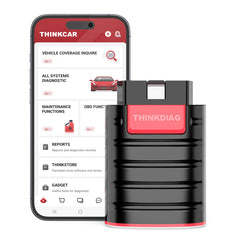
If you want a phone-first scanner that can go beyond generic check engine light reads, THINKDIAG is the most balanced DIY pick in this list. It is positioned for full system diagnostics plus bidirectional tests, which is the difference between reading a fault and actually commanding a component (like a fan, pump, or solenoid) to confirm it works. That matters when you are chasing intermittent issues, and you do not want to throw parts at the problem.
- Best for: DIY troubleshooting across multiple modules, not just emissions codes
- Workflow fit: OBD2 Scanner Bluetooth dongle + mobile app (iOS and Android)
- Bidirectional scanner capability: active tests to command components
- ECU coding: offered for supported makes (varies by vehicle)
- Maintenance functions: advertised as 15 Resets Maintenance Function
- VIN support: Auto VIN is listed
- Practical note: bidirectional coverage and coding depth can vary by year, make, and model
Why it wins: If your goal is to diagnose first and replace parts second, this style of app-based, bidirectional workflow is the fastest way to get confidence at home. You will still want to verify vehicle coverage before you commit, but THINKDIAG hits the best mix of portability and depth for most DIY owners.
Shop: THINKCAR THINKDIAG OBD2 Scanner Bluetooth
2. TOPDON TopScan
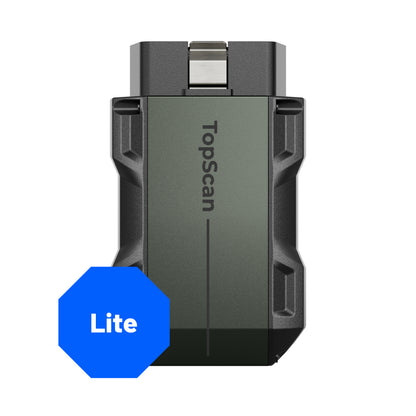
If you mostly want clean OBD2 mode coverage and an easy pocket tool, TopScan is designed exactly for that phone-first habit. The big decision is not the hardware; it is choosing the correct version (Lite, Pro, or Master) for your actual DIY tasks. For many owners, Lite is enough for reading and clearing codes, checking I/M readiness, and looking at live data. If you expect to do more service functions, the upgrade path matters.
- Best for: quick OBD2 modes, live data, and readiness checks
- Form factor: phone dongle (app-based)
- Bidirectional scanner: described as supporting bidirectional controls on the product page
- Versions: Lite, Pro, Master with feature scaling
- OBD2 coverage: states all 10 OBD2 testing modes
- Notable detail for planning: update terms differ by version, so read the fine print before you activate
Why it wins: If your primary frustration is speed (scan, confirm, clear, verify readiness), TopScan is built for short sessions on a phone and a simple carry-anywhere setup. The tradeoff is that versioning and update structure can become the real deciding factor once you want deeper functions.
Shop: TOPDON TopScan
3. THINKCAR THINKTOOL MINI
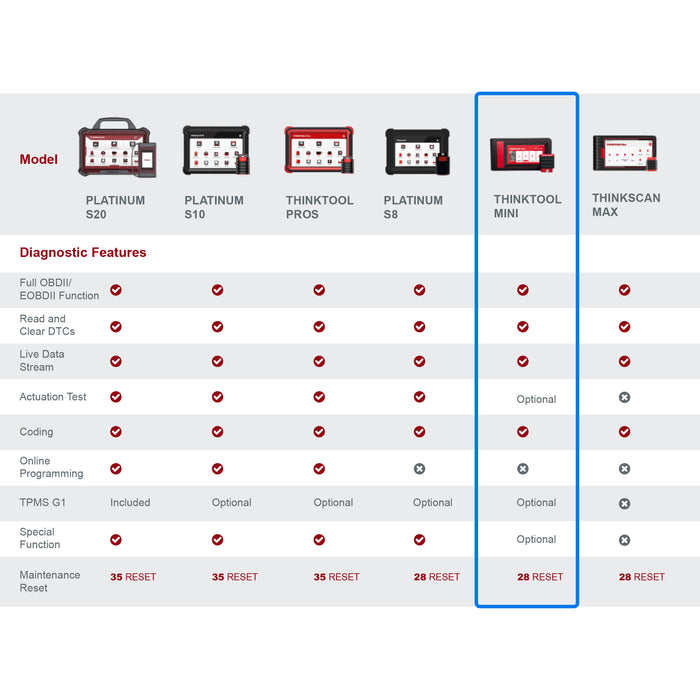
If you like smartphone scanners but hate phone friction in the garage (battery drain, notifications, pairing hiccups, or screen timeouts), THINKTOOL MINI is the move to a dedicated screen while staying in a DIY-friendly footprint. It is an Android-based tablet tool with a 6-inch touchscreen, designed for full system diagnostics and broader service coverage. This is also where you start thinking in terms of a small-shop style Vehicle Scanner & Diagnostic Tool, not just a code reader.
- Best for: garage-first workflow with a dedicated screen
- Display and OS: 5.99-inch touchscreen, Android 10
- Storage and processor: 2G + 32G storage, 4-core processor
- Connectivity: Bluetooth and Wi-Fi, with one-click Wi-Fi lifetime updates listed
- Coverage: described as designed for over 220 car brands
- Service functions: marketed as 28 Reset Function (28 service resets)
- Protocol note: CANFD support is listed, which can matter on some newer platforms
Why it wins: A tablet tool removes the biggest DIY bottleneck: stopping mid-diagnosis to manage your phone. If you regularly do longer sessions (live data graphing, multiple module scans, post-repair verification), the dedicated form factor feels faster and more consistent.
Shop: THINKCAR THINKTOOL MINI
4. Innova 5610

If you want a handheld-first tool that still supports bidirectional tests, Innova 5610 is positioned for DIYers who prefer buttons and a dedicated device over a phone dongle. It highlights all-system diagnostics and bidirectional control, plus app integration for guidance and exports. This can be a strong match if you are helping family members with their cars and you want a simpler, repeatable workflow.
- Best for: standalone handheld feel with deeper diagnostics
- Bidirectional scanner: listed as bidirectional control
- All-system diagnostics: marketed for multiple systems (engine, ABS, SRS, transmission)
- Live data: highlights enhanced OBD2 and OEM live data, plus graphing/recording
- Ownership positioning: No subscriptions and no update fees are explicitly listed
- Practical limitation: feature compatibility varies by exact vehicle, so plan to check coverage first
Why it wins: For DIY users who do not want every session to depend on phone pairing and app permissions, a handheld tool is simply less fussy. If you care about long-term ownership simplicity, the no-subscription positioning is a meaningful differentiator.
Shop: Innova 5610
Key Factors to Choose so you do not overbuy
Do you need bidirectional tests now
If your jobs are mostly check engine light diagnosis and emissions readiness checks, bidirectional might be overkill today. However, if you are diagnosing no-starts, intermittent overheating, misfires under load, or EVAP leaks you cannot reproduce on demand, bidirectional tests can save you from swapping parts blindly. A bidirectional scanner is most valuable when you need to command a component and immediately see the response in live data.
- Buy bidirectional now if you do: cooling fan tests, EVAP purge tests, injector-related checks, ABS component activation (vehicle-dependent)
- Skip it for now if you only do: code reads, clear codes, readiness checks, freeze frame reviews.
Will you pay for updates or subscriptions?
The uncomfortable truth in 2026 is that software policy is often more important than the dongle. Many tools are only as good as their coverage database and update cadence, especially as newer vehicles add security gateways, protocol changes, and tighter access controls. For example, California tightened OBD readiness requirements effective October 1, 2025, which increases the practical value of a tool that clearly shows readiness status and helps you confirm monitors are set before a test. According to California Bureau of Automotive Repair, these updated regulations require all readiness monitors to be set for a vehicle to pass a Smog Check inspection.
- Look for: clear update terms, what happens after the included period, and whether critical functions are gated
- DIY reality: Most people do not mind paying for updates; they mind being surprised by them after activation
Is your car coverage truly supported?
Do not rely on a generic claim like "covers 120 makes" or "covers 98 percent." Coverage depends on your exact year, make, model, engine, and the specific functions you want (active tests, resets, coding). This matters more on newer platforms where OEMs segment networks through gateways and filter traffic. According to Kaspersky ICS CERT, OEMs are increasingly segmenting vehicle networks using central gateways and mechanisms that filter gateway traffic, isolating critical systems.
- Minimum check before buying: year, make, model, engine, and region
- If you need service functions: confirm the exact reset (EPB, BMS, oil, SAS, DPF, TPMS relearn)
- If you need bidirectional, confirm the specific active tests you care about
Do you want a phone dongle or a tablet
This is mostly about how you work, not how smart the tool is.
- Phone dongle wins when: you want glovebox portability, quick scans, and you already trust your phone
- Tablet wins when: you do longer sessions, you hate pairing issues, or you want a dedicated garage device.
Practical tips for fast wins
- Verify your newest vehicle first, then confirm older cars second.
- Decide your default job: code read and readiness, or full system + active tests.
- Keep a short checklist: scan, save report, clear, drive cycle, re-check monitors.
Common mistakes DIYers make
- Buying bidirectional, then never learning how to use active tests.
- Ignoring software renewal terms until the tool is already registered.
- Assuming "full system" means the same depth on every brand.
Comparison Table
Quick side-by-side pick by workflow
| Tool | Form factor | Bidirectional | Resets | Updates model | Best fit | Trade-offs |
|---|---|---|---|---|---|---|
| THINKCAR THINKDIAG | Phone dongle | Yes | 15 functions | Software terms vary | DIY depth on phone | App dependence, coverage varies |
| TOPDON TopScan | Phone dongle | Yes | Version-based | 1 year included | Fast OBD2 workflow | Version confusion, update costs |
| THINKCAR THINKTOOL MINI | Tablet | Yes | 28 resets | Wi-Fi lifetime listed | Garage-first diagnostics | Larger to carry daily |
| Innova 5610 | Handheld | Yes | Advanced resets listed | No subscriptions listed | Simple standalone use | Region limits, coverage varies |
Conclusion
Start with the workflow you will actually use, because the best scanner is the one you will pull out on a Tuesday night and trust. If you want a phone-first OBD2 Scanner Bluetooth tool with enough depth to avoid guessy part swaps, THINKCAR THINKDIAG is the most balanced DIY pick. If you want a dedicated screen to make longer sessions easier, THINKCAR THINKTOOL MINI is the cleaner garage workflow.
Official Shop: THINKCAR
FAQ
How do I choose a diagnostic scanner for my car as a DIY user?
Pick the scanner based on the job you do most often: basic check engine light reads, deeper live data troubleshooting, or active tests. If you mainly want to pass emissions readiness checks and clear codes, a simpler OBD2-focused tool is usually enough. If you want to command components during diagnosis, you need bidirectional capability. Always confirm your exact year, make, model, and engine are supported.
What features should I look for in a diagnostic scanner as a DIY user?
Look for reliable code reading and clearing, stable live data, and clear I/M readiness results first. Service resets matter when you do your own brakes, battery work, or oil changes because you can confirm the reset is completed. Bidirectional tests are most helpful when you are diagnosing intermittent issues and want to verify that a component responds. Also, check how updates work, because coverage and functions often depend on the current software.
What is the difference between basic OBD2 and full system diagnostics?
Basic OBD2 usually focuses on emissions-related powertrain data, generic codes, freeze frame, and readiness monitors. Full system diagnostics extend into manufacturer-specific modules like ABS, SRS airbag, transmission, and body control, depending on the tool and vehicle. This matters when the warning light is not the check engine light or when multiple modules store related faults. For DIY work, full system access can reduce guesswork because you can see related codes across systems.
When do bidirectional tests actually help at home?
Bidirectional tests help when you need to confirm whether a part works without waiting for the right driving conditions. You can often command items like cooling fans, pumps, or valves and then watch live data for confirmation, which helps you avoid unnecessary parts replacement. They also help you isolate wiring or control issues by checking whether the module can activate the component at all. Capability varies by vehicle, so the specific active tests available on your car matter more than a generic "bidirectional" label.
Do I need a phone-based scanner or a tablet-style tool?
Choose phone-based if you want maximum portability and you are comfortable doing everything in an app. Choose a tablet-style tool if you prefer a dedicated screen in the garage and want to avoid phone battery drain, call interruptions, or Bluetooth pairing friction. Tablet tools often feel faster in longer sessions because you do not switch between apps or fight screen timeouts. Phone tools are easier to keep in the glovebox for quick scans away from home.
How do software updates affect what the scanner can do?
Updates can add vehicle coverage, improve stability, and expand supported functions for newer model years. Without updates, a tool may still read basic codes but miss newer protocols or manufacturer-specific features, especially for late-model vehicles with tighter access control. Some brands include updates for a defined period, while others position the tool around no subscription ownership. Before you buy, decide whether you want the lowest long-term friction or the most expandable feature set.
Table of Contents
- Recommend Brands
- Product Picks: Smartphone, Car Diagnostic Scanners, DIY
- Key Factors to Choose so you do not overbuy
- Comparison Table
- Conclusion
-
FAQ
- How do I choose a diagnostic scanner for my car as a DIY user?
- What features should I look for in a diagnostic scanner as a DIY user?
- What is the difference between basic OBD2 and full system diagnostics?
- When do bidirectional tests actually help at home?
- Do I need a phone-based scanner or a tablet-style tool?
- How do software updates affect what the scanner can do?

Share:
AI-Assisted Car Diagnostic Tools: An Ultimate Guide to Picking a Reliable One
AI-Assisted Car Diagnostic Tools: An Ultimate Guide to Picking a Reliable One