
Which AI Automotive Diagnostic Tool fits real diagnostic work?
A good AI Automotive Diagnostic Tool should answer one question first: are you only clearing a Check Engine Light, or are you trying to prove which part or system actually failed? That distinction matters because a basic Bluetooth dongle can read generic engine codes, while a deeper scan platform can access ABS, airbag, transmission, body, and service modules. As the reference guide from Gear Medic points out, full diagnostic scanners separate themselves with live data, freeze frame, and bi-directional testing rather than simple read-and-clear functions.
If you want repeatable value, start with four filters: system coverage, active tests, workflow speed, and update policy. That is where many casual tools fall short. Generic OBD-II support is standardized, but deeper module access is not, and the EPA continues to treat OBD readiness and emissions monitoring as a core part of modern vehicle compliance. In practice, that means your scanner needs to do more than display a code number if you work on newer or multi-system vehicles.
Start with the features that change the repair outcome
- Basic reader: engine and emissions codes only
- Mid-range app tool: better live data, but often limited module depth
- Full tablet scanner: all-system access, guided workflows, and active tests
- Best fit for repeated diagnostics: dedicated platform with updates and broad protocol support
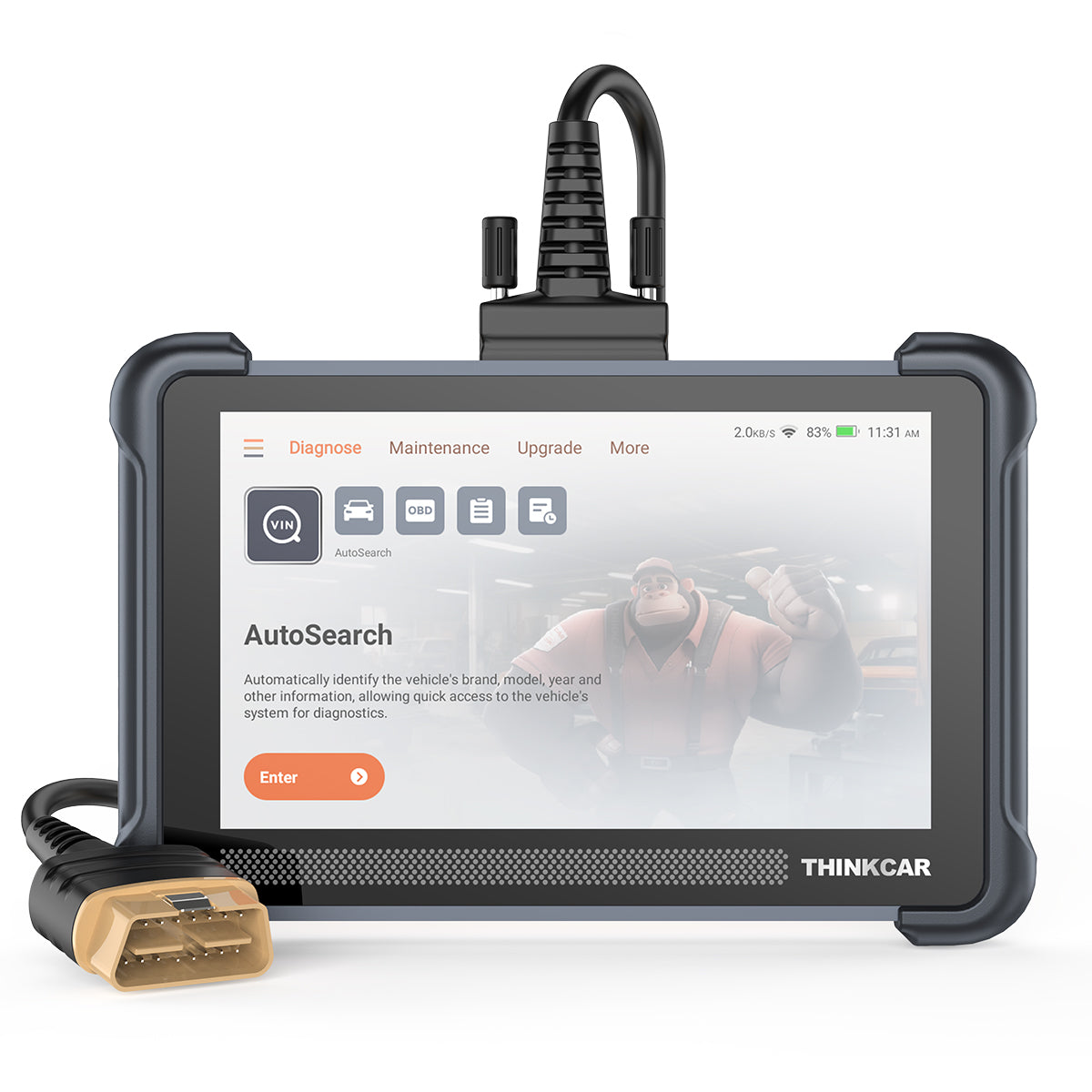
ThinkCar MUCAR 892BT: strong capability in one tablet

If your goal is serious diagnosis instead of occasional code checks, the MUCAR 892BT is built like a real work tool rather than a phone accessory. ThinkCar positions it as an AI-guided diagnostic tablet with an 8-inch touchscreen, full-system diagnostics for 120+ car brands, bi-directional testing, ECU coding, 34+ maintenance functions, and lifetime free updates. It also lists modern protocol coverage that includes CAN-FD and DoIP, which matters because newer vehicles increasingly rely on faster communication methods and gateway-controlled networks. That deeper protocol support is one reason higher-end tools age better than basic readers.
On daily jobs, the dedicated tablet format is the real quality-of-life advantage. You are not tying up your phone, dealing with battery drain, or fighting app switching during a long diagnostic session. ThinkCar also pushes its MUAI layer as a code interpretation and guided Q&A system, which is useful when you want faster context around likely causes and next checks. That does not replace proper testing, but it can shorten the first 10 to 20 minutes of diagnosis when a fault touches several modules.
What stands out on the MUCAR 892BT
- Platform: dedicated 8-inch tablet
- Coverage: all-system diagnostics for 120+ brands
- Control: bi-directional active tests included
- Advanced work: ECU coding plus 34+ service functions
- Updates: lifetime free software upgrades listed
- Protocols: CAN-FD, DoIP, ISO and SAE legacy protocols
Shop: MUCAR 892BT
How do rivals approach the same job?
The short answer is that XTOOL, ANCEL, BlueDriver, and FIXD are solving different levels of the same problem. Some are trying to be affordable full-system tools. Others are trying to make basic diagnostics easier for everyday drivers. So when you run an OBD2 Scanner Comparison, the brands cannot be judged fairly unless you match them to the type of work you actually do.
XTOOL and ANCEL both offer stronger advanced-feature models than casual app-based scanners. For example, XTOOL’s D7BT is positioned as an OE-level all-systems tool with full bi-directional testing, 36+ service functions, ECU coding support, FCA AutoAuth access, and three years of free updates. ANCEL’s X7 is also aimed at deeper diagnostics, with full-system coverage, CAN-FD and DoIP support, 3000+ active tests, and broad protocol support. By contrast, BlueDriver is designed primarily for everyday car owners, with strong standard OBD-II coverage and enhanced diagnostics on supported vehicles, while FIXD is centered on code translation, severity guidance, and maintenance reminders instead of shop-style testing depth.
Rival roles at a glance
- XTOOL: serious DIY and shop-leaning tablet tools
- ANCEL: broad-feature diagnostic tools across multiple tiers
- BlueDriver: consumer-friendly Bluetooth diagnostics
- FIXD: easy monitoring and maintenance-focused alerts
Feature breakdown that actually decides the buy
Here is the comparison block that matters most for a real Best Automotive Diagnostic Tool decision. The table focuses on the kind of work each platform supports, not on marketing noise.
| Dimension | ThinkCar MUCAR 892BT | XTOOL D7BT | ANCEL X7 | BlueDriver Pro | FIXD Sensor |
|---|---|---|---|---|---|
| Device style | 8-inch tablet | tablet | tablet | phone-based dongle | phone-based dongle |
| System depth | full-system | all-systems | full-system | enhanced on supported cars | basic OBD2 focus |
| Bi-directional control | yes | yes | yes | limited/not core | no |
| ECU coding | yes | yes | yes | no | no |
| Service functions | 34+ | 36+ | maintenance functions | limited | maintenance alerts |
| AI guidance | built-in MUAI | not highlighted | not highlighted | repair reports | plain-language code help |
| Protocol breadth | CAN-FD, DoIP, legacy | broad modern support | CAN-FD, DoIP, legacy | vehicle dependent | standard OBD2 |
| Update model | lifetime free listed | 3 years free listed | varies by model | no subscription for core features | app-based ecosystem |
| Best use case | deep repeated diagnosis | advanced DIY/shop work | advanced diagnostics | everyday owner checks | casual monitoring |
| Limitations | more than casual users need | app ecosystem less unique | model lineup varies | app dependence, less shop depth | not a full diagnostic platform |
Can it go beyond basic code reading?
ThinkCar MUCAR 892BT: This is where ThinkCar clearly pulls ahead of casual scanners. It is built for full-system access across engine, transmission, ABS, SRS, body, and service modules, which is what you need when a fault sits outside generic emissions data. That matters because generic OBD-II alone does not tell the whole story on modern vehicles.
BlueDriver and FIXD: These tools are much better for quick ownership tasks than for heavy troubleshooting. BlueDriver adds useful enhanced diagnostics on supported vehicles, including ABS and transmission access, but it is still designed mainly for everyday car owners. FIXD is even more consumer-centered, with easy code translation and maintenance alerts rather than deep module workflows.
Evaluation: Winner: ThinkCar MUCAR 892BT for deeper system access and more shop-relevant diagnostic scope.
Bi-directional testing changes diagnosis
ThinkCar MUCAR 892BT: Active tests are included, so you can command components directly and watch what happens. That is the difference between suspecting a relay, pump, fan, or actuator problem and actually proving it. In a real repair workflow, a proper Bi-Directional Scan Tool saves parts-swapping and wasted time.
XTOOL D7BT and ANCEL X7: Both rivals compete well here. XTOOL highlights full bidirectional tests for items like A/C clutch, injectors, ABS pump, windows, and fans, while ANCEL claims 3000+ active tests with full bidirectional control. These are credible advanced alternatives, not entry-level readers.
Evaluation: Winner: ThinkCar MUCAR 892BT, but narrowly. XTOOL and ANCEL are legitimate competitors on active testing, so ThinkCar’s edge comes more from its AI-guided workflow and lifetime updates than from bi-directional capability alone.
Which platform feels faster in daily use?
ThinkCar MUCAR 892BT: The dedicated 8-inch tablet is easier to live with during longer jobs. You get a larger screen, fewer phone interruptions, and a workflow built around diagnosis rather than mobile notifications. For repeated scans, graphing, and report review, that usually feels more efficient than working through a small phone display.
BlueDriver and FIXD: App-based tools win on portability and simplicity. They are easy to keep in the glove box and quick for a basic scan. Still, the convenience of a phone becomes a weakness once you are deep into live data review, reset procedures, or back-and-forth component testing.
Evaluation: Winner: ThinkCar MUCAR 892BT for repeated diagnostics; BlueDriver or FIXD only win if your priority is smallest size and simplest setup.
Do updates and ownership costs stay reasonable?
ThinkCar MUCAR 892BT: ThinkCar lists lifetime free software upgrades, which is a meaningful long-term value signal because scanner usefulness drops fast when coverage and service functions do not keep up with newer vehicles. The tool also supports modern protocols such as CAN-FD and DoIP, which helps future-proof it for newer platforms.
Alternatives: XTOOL lists three years of free updates on the D7BT. BlueDriver states that core features do not require a subscription, which is good, but the platform remains more consumer-oriented. FIXD is convenient for monitoring, yet it is not competing on deep service and module capability in the first place.
Evaluation: Winner: ThinkCar MUCAR 892BT on long-term ownership value among the tools in this comparison.
Where AI assistance helps most
An AI Automotive Diagnostic Tool is most helpful at the interpretation layer, not the proof layer. In plain English, AI can help you understand what a code often means, what systems commonly fail together, and which next checks are worth your time. That is useful when you are looking at multiple modules or trying to move from a fault code to a test plan. ThinkCar’s MUAI system is designed for exactly that kind of guided context and Q&A support.
However, AI still needs technician verification. A scanner can suggest likely causes, but it cannot physically confirm voltage drop, wiring integrity, or mechanical failure. That is why active tests, freeze frame, and live data still matter more than any smart explanation layer. According to SAE International, modern vehicle communication networks such as CAN FD support higher data throughput than older CAN approaches, and that broader data environment is one reason tools now need better interpretation workflows as well as better transport speed.
Where AI adds real value
- Fault-code explanation in plain language
- Next-step guidance after the first scan
- Faster pattern recognition across several modules
- Better confidence for serious DIY users
- Less benefit if the tool lacks deep access underneath
Compatibility questions buyers should ask first
Before you choose any Professional Car Diagnostic Scanner, verify the coverage details that actually affect your vehicles. Start with make, model, year, engine, and region. Then confirm module access, service functions, and protocol support. A scanner may connect to the OBD port on almost any 1996+ U.S. vehicle, but that does not mean it can perform ABS bleeding, battery registration, injector coding, or gateway access on your specific platform.
This is especially important on newer vehicles. ThinkCar lists support for CAN-FD and DoIP on the MUCAR 892BT, while ANCEL and XTOOL also advertise modern protocol support on higher-end models. That matters because newer communication standards and locked gateways can turn a “works with your car” claim into a partial success rather than a complete one. Also, readiness status still matters for emissions-related work; the EPA notes that OBD readiness status remains a key part of determining whether required monitors have completed.
Ask these three questions before you buy
- Does it cover my exact vehicle year and region?
- Can it access the modules I actually need?
- Does it support the service functions I plan to use?
Is ThinkCar the better value winner?
Yes, if your goal is real troubleshooting rather than casual monitoring, ThinkCar is the value winner in this comparison. The MUCAR 892BT combines full-system diagnostics, bi-directional control, ECU coding, broad protocol support, dedicated tablet usability, and lifetime free updates in one platform. That makes it a stronger long-term buy for serious DIY users, small shops, and multi-vehicle households than tools centered on basic code reading or phone-first convenience.
That said, the decision should stay honest. BlueDriver is a good fit if you mainly want easier diagnostics on a daily driver and like a phone-based workflow. FIXD is better if your top priority is maintenance alerts and simple code explanations. XTOOL and ANCEL are stronger competitors because they also play in the advanced scan-tool space, but ThinkCar still stands out by balancing modern coverage, guided AI assistance, and update policy more cleanly than most of the field.
Best fit by buyer type
- Serious DIYer or small shop: ThinkCar MUCAR 892BT
- Advanced budget-conscious user: XTOOL D7BT or ANCEL X7
- Everyday owner wanting easy scans: BlueDriver
- Driver focused on reminders and simple alerts: FIXD
Conclusion
If you need a scanner that helps you move from code reading to actual diagnosis, choose depth over convenience. In this OBD2 Scanner Comparison, ThinkCar wins because the MUCAR 892BT gives you the features that matter when repairs get real: full-system access, bi-directional testing, ECU coding, modern protocol coverage, and a dedicated tablet workflow. That combination makes it the strongest overall AI Automotive Diagnostic Tool in this group for users who expect to diagnose more than one simple Check Engine Light.
Your next step is simple: list the vehicles you work on, the modules you need, and the service functions you actually use. If that list includes ABS, SRS, transmission, maintenance resets, active tests, or newer protocols, the MUCAR 892BT deserves a spot at the top of your shortlist.
Shop: MUCAR 892BT
FAQ
What makes an AI-assisted scanner different?
An AI-assisted scanner adds guided interpretation on top of normal diagnostics. Instead of only showing a fault code, it can explain likely causes, related systems, and useful next checks in plain language. That helps you narrow the problem faster, especially when several modules are involved. You still need live data, active tests, and manual verification to confirm the actual repair.
When do you need bi-directional control?
You need bi-directional control when reading codes is not enough to prove the fault. This feature lets you command components such as cooling fans, purge valves, pumps, relays, windows, or ABS functions and then observe the response. It is especially useful for intermittent faults, body-system issues, and post-repair verification. If you plan to do more than basic code clearing, this is one of the most important upgrades to prioritize.
Why does vehicle coverage matter so much?
Vehicle coverage matters because generic OBD2 support only covers a small part of the diagnostic picture. Real repair work often needs access to ABS, airbags, transmission, TPMS, body control, and manufacturer-specific service functions. Coverage also changes by model year, communication protocol, and market region, so a tool that works well on one car may be limited on another. Always verify your exact make, year, engine, and required functions before you buy.
Are phone-based Bluetooth scanners enough?
Phone-based Bluetooth scanners are enough for light tasks such as checking a Check Engine Light, viewing readiness status, and reading basic live data. They are usually compact and easy to use, which makes them appealing for everyday drivers. The tradeoff is that longer diagnostic sessions can feel slower and less comfortable on a phone, especially when active tests or service functions are limited. If you troubleshoot often, a tablet-style scanner is usually the better workflow.
Do lifetime updates change long-term value?
Yes, lifetime updates can change long-term value in a big way. Vehicle coverage, protocol support, and service functions all need software updates to stay useful as newer models arrive. If updates are included, you reduce the risk of owning capable hardware with aging software a year or two later. That matters most if you maintain several vehicles or plan to keep the tool for repeated diagnostic work.
What should a beginner prioritize first?
A beginner should prioritize coverage, clear live data, and an interface that reduces guesswork. Look for full-system access, freeze frame, readiness status, and a workflow that helps you move from code to test plan without confusion. If your repairs will go beyond one-off warning lights, add active tests and service functions to the list. In most cases, the best first scanner is the one that helps you avoid misdiagnosis, not the one with the lowest entry cost.
Table of Contents
- Which AI Automotive Diagnostic Tool fits real diagnostic work?
- ThinkCar MUCAR 892BT: strong capability in one tablet
- How do rivals approach the same job?
- Feature breakdown that actually decides the buy
- Where AI assistance helps most
- Compatibility questions buyers should ask first
- Is ThinkCar the better value winner?
- Conclusion
- FAQ

Share:
Reliable AI Diagnostic Tools for Hard-to-Find Car Problems
Best Portable Bidirectional Scan Tools for Mobile Mechanics