
Which portable bidirectional scan tool fits your mobile workflow?
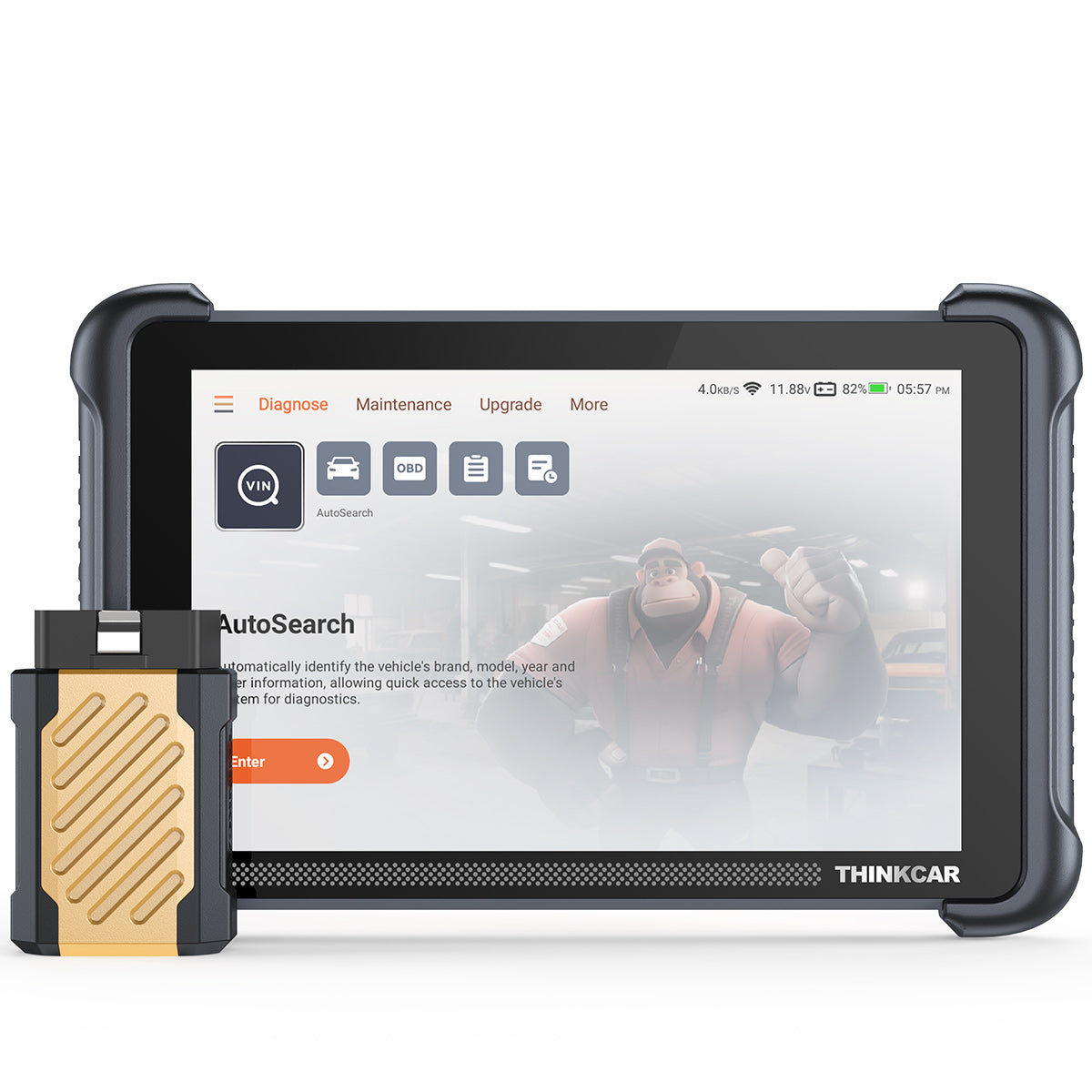
Driveway and curbside jobs do not give you much slack. When a no-start call turns into an ABS issue, or a check-engine light turns into a fan command test, your Portable Bidirectional Scan Tools decision affects how many jobs you finish before dark. That is why this comparison stays focused on real mobile priorities: setup speed, coverage for newer vehicles, active tests, and how much decision support you want when you are moving between makes all week.
For this internal comparison, the question is not which tool is universally better. It is which one matches your workflow better. The THINKSCAN 689BT leans toward fast expert use with wireless full-system diagnostics, while the MUCAR 892BT adds stronger AI-led guidance for techs who want more in-tool troubleshooting support. Both are positioned as Mobile Mechanic Scan Tools with bidirectional control, ECU coding, newer protocol support, and lifetime update claims as stated on the brand site.
A portable scanner also needs to keep you efficient, not just informed. FlexiHub’s remote diagnostics overview highlights how vehicle diagnostic work increasingly values speed, reduced repeat visits, and access flexibility, especially when technicians are working across locations rather than inside one fixed bay. (flexihub.com)
Need one tool for fast mobile calls?

If your day is packed with fast battery registrations, module scans, service resets, and actuator checks, the THINKSCAN 689BT is the cleaner fit. On the product page, ThinkCar positions it as an 8-inch wireless full-system scanner with Bluetooth, ECU coding, bidirectional controls, FCA AutoAuth support, CAN-FD and DoIP compatibility, and 35+ maintenance functions. It also lists 4 GB RAM, 64 GB storage, a 1280×800 display, and a 4150 mAh battery, which gives you a tablet-format tool, eliminating the need for a laptop-style setup.
In practical terms, that matters when you are trying to move from AutoVIN to full-system scan to active test with as few taps as possible. The 689BT is the better fit for experienced techs who already know what they want to command and verify. Its limitation is guidance depth. You get strong hardware, broad protocols, and tablet portability, but less emphasis on AI-style interpretation than the MUCAR model.
- Best for: high-volume mobile diagnostics
- Strength: cable-light Bluetooth workflow
- Key protocols: CAN-FD, DoIP, FCA AutoAuth
- Service depth: ECU coding + 35+ resets
- Limitation: less AI-led troubleshooting help
Shop: THINKSCAN 689BT
Is MUCAR 892BT better for guided troubleshooting?
Yes, if you want the tool to do more of the thinking alongside you, the MUCAR 892BT is the better fit. ThinkCar lists it as an 8-inch AI diagnostic tablet with bidirectional testing, ECU coding, 34+ maintenance functions, CAN-FD and DoIP support, Bluetooth 5.0, and free lifetime updates. The product page also highlights MUAI, described as an integrated AI diagnostic layer for fault-code analysis and real-time Q&A, plus a magnetic dongle design that is stored on the back of the device for easier handling in the field.
That changes the ownership experience more than the raw specs suggest. When you jump between unfamiliar models, AI-led prompts can reduce context switching and help organize a test path. For solo operators, that can shorten lookup time on oddball faults. The tradeoff is simple: if you already diagnose quickly without guidance, the extra AI layer may matter less than the 689BT’s cleaner speed-first feel.
- Best for: guided testing and learning
- Strength: AI-assisted diagnostic support
- Usability edge: magnetic dongle handling
- Coverage: 120+ car brands listed
- Limitation: added interface layers may feel less direct for expert-only workflows
Shop: MUCAR 892BT
What actually matters in the van?
When you compare Portable Bidirectional Scan Tools, feature lists can blur together. In mobile work, the real test is whether the scanner saves minutes at each stop. That means fast boot and pairing, reliable communication with newer networks, meaningful active tests, and a screen you can actually use in bright outdoor conditions or from cramped parking-lot angles.
Here are the side-by-side views based on the product pages and the content brief priorities.
| Dimension | THINKSCAN 689BT | MUCAR 892BT |
|---|---|---|
| Best fit | Speed-first pros | Guided diagnostics |
| Display | 8-inch, 1280×800 | 8-inch, 1280×800 |
| Wireless | Bluetooth dongle | Bluetooth dongle |
| Protocols | CAN-FD, DoIP, FCA AutoAuth | CAN-FD, DoIP |
| Full-system scan | Yes | Yes |
| Bidirectional control | Yes | Yes |
| ECU coding | Yes | Yes |
| Maintenance functions | 35+ listed | 34+ listed |
| Update policy | Lifetime free updates listed | Lifetime free updates listed |
| Workflow style | Cleaner, faster flow | Added AI support |
| Handling detail | Cable-light wireless use | Magnetic rear dongle |
| Limitations | Less guided diagnosis | More layered interface |
Speed and setup simplicity
The short answer is that both tools are portable enough for van work, but they feel different in use, with ThinkCar emphasizing Bluetooth operation, quick diagnostics, AutoVIN, and a one-click activation approach. The 892BT is also wireless and portable, yet it adds AI analysis and assistance layers that can help newer techs but may introduce a slightly more guided rhythm to the job.
For a mobile mechanic, even one extra minute repeated across six calls becomes lost capacity. That is why the 689BT suits high-volume scanning and confirmation work, while the 892BT makes more sense when the bottleneck is troubleshooting confidence rather than communication speed.
Coverage for newer vehicles
This part matters more every year. Newer vehicles increasingly require support for modern communication protocols, and if your scanner cannot talk to the network properly, you lose time before diagnosis even begins. The 689BT product page lists CAN-FD, DoIP, and FCA AutoAuth, while the 892BT lists CAN-FD and DoIP with broad vehicle coverage.
That matters because newer communication stacks are no longer niche. NHTSA continues to frame advanced in-vehicle systems and software complexity as a growing part of modern vehicle service and safety oversight, which makes protocol support a practical buying issue, not a spec-sheet extra.
Active tests and shop-level functions
If you diagnose by commanding components instead of guessing from codes, both tools clear the basic bar. ThinkCar lists bidirectional control, ECU coding, and 35+ maintenance functions for the 689BT. The MUCAR 892BT page lists bidirectional testing, ECU coding, and 34+ maintenance functions, with examples positioned around battery, engine, and system-level service tasks.
Bidirectional capability matters because it lets you verify whether a module can trigger the part you are testing. That can mean commanding fans, pumps, or relays and separating control-side faults from failed components. In field work, that is often the difference between a one-visit diagnosis and a return trip.
On-the-job decision support
This is where the split becomes clear. The 689BT rewards technicians who already have a disciplined diagnostic process. It gives you the needed access, but expects you to interpret the path. The 892BT, meanwhile, is stronger when you want in-tool guidance, AI-assisted code analysis, and faster answers on unfamiliar models or low-frequency faults.
According to OSHA, efficient work processes and correct procedures reduce avoidable job-site risk, and that principle applies to mobile automotive work too: the faster you isolate the right system, the less unnecessary handling, repeated testing, and battery drain you cause at the vehicle. For that reason, decision support is not just a convenience feature. It can improve consistency when you are working under time pressure.
Portability is more than weight
Portable does not only mean the scanner fits in a bag. In the field, portability is about how little friction the tool adds once you are kneeling by a fender or reaching into a cabin. The 689BT emphasizes a cleaner cable-light wireless workflow. The 892BT answers with a magnetic dongle that is stored on the back of the unit, plus a kickstand and grip-focused design details. Those are small touches, but in mobile service, small touches often decide what you grab first on a rushed call.
Wireless freedom or smarter assistance?
Choose the 689BT if you hate clutter and want a simpler path from connection to test result. Choose the 892BT if you would rather accept a little extra interface depth in exchange for more guided help. Neither approach is wrong. They simply reduce different forms of friction.
- 689BT reduces physical friction: fewer cable frustrations, straightforward Bluetooth workflow
- 892BT reduces mental friction: AI interpretation, guided Q&A, easier cross-make troubleshooting
- Shared benefit: both avoid the feel of old-school tethered handheld tools
Screen and daily usability
Both tools list the same basic screen size and resolution: 8 inches at 1280×800. That puts them in a useful middle zone for mobile work. You get more room than a tiny code reader, but you are still carrying something lighter and easier to stash than a full-size laptop setup. The 689BT page highlights 4 GB RAM and 64 GB ROM, while the 892BT emphasizes personalization and AI-oriented interface behavior.
If your typical day involves quick module scans between service calls, the 689BT’s simpler presentation is appealing. If your work includes longer troubleshooting sessions on mixed fleets, the 892BT’s richer interface can pay back the added complexity.
Update costs over time
Based on the product pages, both scanners list lifetime free updates. That is a meaningful buying factor for solo operators because update policy often matters more than the initial hardware spec after the first year. ThinkCar explicitly states lifetime upgrade positioning for both products on the pages reviewed.
That matters in a changing vehicle landscape. Reuters has repeatedly reported on how software-defined vehicle features, electronic architecture, and automaker cybersecurity controls are becoming a larger part of modern vehicle ownership and service, which means a scanner's relevance increasingly depends on continued software support. A portable tool with stagnant coverage ages quickly, even if the hardware still looks fine.
Best fit by mechanic type
If you want the shortest answer, here it is: the THINKSCAN 689BT is the best fit for faster expert workflow, while the MUCAR 892BT is the best fit for guided diagnostic depth. Because this is an internal comparison, there is no single winner for every shop. The right choice depends on the jobs you run, the makes you see most often, and how much built-in support you want during testing.
Best fit: THINKSCAN 689BT
Pick the 689BT when your calls are heavy on fast confirmation work and you already trust your own diagnostic method. It is a stronger Best Bidirectional Scanner fit for mobile mechanics who value speed, newer protocol support including FCA AutoAuth, and a tablet workflow that stays out of the way. If your business model depends on clearing more calls per day, this is the sharper tool.
Best fit: MUCAR 892BT
Pick the 892BT when your workload is more varied and you want AI-led support on top of bidirectional functions. It is especially useful if you are growing into advanced diagnostics, switching across many brands weekly, or want a Mobile Mechanic Scan Tool that helps structure the troubleshooting path instead of just exposing data. The magnetic dongle design also makes the hardware a little easier to manage in awkward field positions.
A quick scenario check
- You do six to eight short calls per day: choose THINKSCAN 689BT.
- You see unfamiliar vehicles and odd faults often: choose MUCAR 892BT.
- You already diagnose confidently without prompts: lean 689BT.
- You want more guided analysis inside the tool: lean 892BT.
- You prioritize FCA AutoAuth from the listed page features: lean 689BT.
Conclusion
For most speed-first pros, the THINKSCAN 689BT is the better overall fit because it keeps the workflow fast, wireless, and direct while still covering the big mobile requirements: full-system diagnostics, bidirectional controls, ECU coding, CAN-FD, DoIP, and FCA AutoAuth. If your day is about finishing more jobs with fewer taps, that is the one to start with. The MUCAR 892BT, however, earns its place when guided troubleshooting matters more than raw scan rhythm, especially for technicians who want AI-assisted support on mixed or less familiar vehicles.
So the practical move is simple: match the tool to the kind of calls you actually run each week, not the tool with the longest feature list. If you want a speed-first portable scanner, explore the THINKSCAN 689BT. If you want more in-tool guidance, look at the MUCAR 892BT and compare how each one fits your daily mobile workflow.
FAQ
What makes a scan tool truly bidirectional?
A bidirectional scan tool can send commands to vehicle modules, not just read and clear codes. That means you can trigger fans, pumps, injectors, relays, windows, and other actuators to confirm whether a component responds correctly. For mobile mechanics, this reduces guesswork because you can verify operation at the vehicle instead of replacing parts based only on fault codes. It is especially useful when symptoms are intermittent or when multiple systems interact.
Why do CAN-FD and DoIP matter for mobile mechanics?
CAN-FD and DoIP matter because many newer vehicles rely on faster or different communication methods than older basic OBD tools support. If your scanner cannot communicate with those systems, you may lose module access, miss active tests, or fail to complete a full-system scan. For a mobile mechanic, that creates wasted trips and follow-up visits. Choosing a tool with newer protocol support helps protect your investment as vehicle fleets keep changing.
How important are lifetime updates on a portable scanner?
Update policy affects long-term ownership cost more than many buyers expect. A scanner may seem affordable at purchase but become expensive if major functions or vehicle coverage require annual renewals. Lifetime updates can make budgeting easier for solo operators and small mobile businesses. They also help maintain compatibility as manufacturers add newer models and revise software behavior.
When do active tests save the most time?
Active tests save the most time when you need to separate control-side faults from mechanical failures. For example, commanding a cooling fan, fuel pump, or ABS component can quickly show whether the issue is wiring, command logic, or the part itself. This shortens diagnostic time and improves confidence before quoting repairs. In mobile work, that speed directly affects how many jobs you can complete per day.
Is AI guidance useful if you already know diagnostics?
It can still help, especially when you switch across many makes, model years, and uncommon faults in one week. AI-style guidance is not a substitute for test discipline, but it can accelerate lookup, organize troubleshooting paths, and reduce context switching. That is useful in mobile service where time pressure is constant. Experienced techs may use it as a second layer, while newer techs may rely on it more heavily.
What should mobile mechanics prioritize first?
Start with communication coverage, active test capability, and update policy before focusing on extras. If the tool cannot access the vehicles you see most often, the rest of the feature list matters less. After that, think about workflow factors such as wireless use, tablet size, boot speed, and how quickly you can move between scans and service functions. The best portable tool is the one that keeps jobs moving with the fewest interruptions.

Share:
How to Choose an AI-Assisted Automotive Diagnostic Tool
How to Pick a Scan Tool Without Ongoing Annual Fees