
Which fee-free scan tool actually fits your repair workflow?
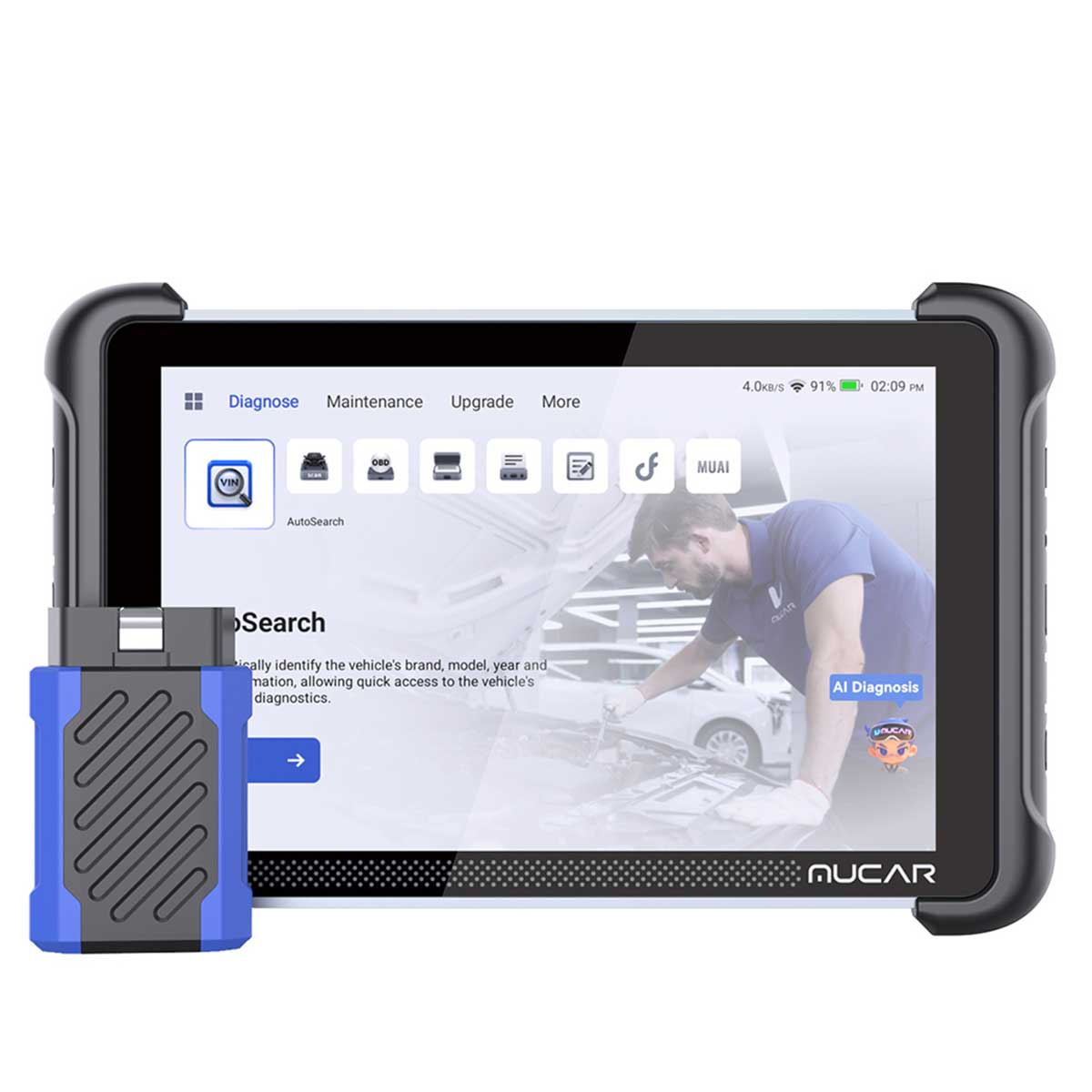
If you want a Scan Tool Without Annual Fees, the smartest move is to match diagnostic depth to the jobs you really do. That matters because a lower entry price can stop looking cheap the moment software renewals, missing modules, or limited active tests force you into a second purchase later. ThinkCar’s current lineup gives you four very different ownership paths with lifetime-update positioning: the larger MUCAR 892BT, the mid-tier MUCAR 682, the compact Bluetooth MUCAR BT200 MAX, and the focused wired THINKSCAN 662.
For most buyers, the decision is not “Which one has more features?” It is “Which one will still feel right after two years of normal maintenance, warning lights, battery work, brake service, and the occasional no-start or actuator test?” A Lifetime Free Update OBD2 Scanner is valuable only when the hardware, coverage scope, and workflow style still fit your garage. Also, keep in mind that OBD-II emissions monitoring has been a legal requirement on U.S. light-duty vehicles for decades, while modern vehicles now spread useful fault data well beyond generic powertrain codes. That is why full-system access usually matters more than many DIY buyers expect. (epa.gov)
Why fee-free ownership matters in real use
- You can plan your tool cost around repairs, not renewals.
- You avoid buying deeper coverage twice.
- You get more value when you keep the scanner for 3 to 5 years.
- You can choose by workflow: tablet, wired tablet, or Bluetooth dongle.
- You should still buy only the depth you will actually use.
MUCAR 892BT: When a bigger platform makes sense
The MUCAR 892BT is the best fit when you want a Full System Diagnostic Tool that feels closest to a dedicated shop platform. ThinkCar positions it with free lifetime updates, an 8-inch touchscreen, AI-assisted diagnostics, ECU coding, bidirectional testing, and 34+ maintenance functions. In plain terms, this is the model for someone who is no longer just clearing codes on weekends. It is for the user who wants more screen space, more menu depth, and more room for repeated diagnostic work across multiple vehicles.
The bigger advantage here is workflow comfort. When you spend longer sessions reading live data, switching modules, or stepping through active tests, a larger screen reduces friction. The 892BT also includes a magnetic design dongle and dual-band Wi‑Fi updating, which helps if you do updates in the shop instead of relying on a phone. The tradeoff is simple: this tool gives you more headroom than the others, but some DIY owners will never use its ECU coding and broader maintenance set often enough to justify carrying the extra platform size around.
Shop: MUCAR 892BT
Is MUCAR 682 the balanced middle ground?
For many buyers, yes. The MUCAR 682 sits in the practical middle of this Scan Tool Without Annual Fees lineup. It offers lifetime free updates, full-system diagnostics, bidirectional testing, 20+ reset functions, CAN FD support, FCA AutoAuth support, and a 6.2-inch anti-glare touchscreen. Its hardware specs are also clearly listed: 1024×600 resolution, 4150 mAh battery, 9 to 18 V working voltage, and operating temperature from 0 to 50°C.
In day-to-day use, the 682 is easier to justify than a premium tablet if your work mixes routine maintenance with real troubleshooting. You can cover service resets, scan all systems, and run active tests without moving to a phone-based workflow. That makes it a strong choice for owners who handle brake service, battery registration, warning lights, and periodic drivability checks but do not need the larger platform style of the 892BT. Compared with simpler tools from brands like Autel or LAUNCH at the entry end of the market, this class matters because support for CAN FD and broader system access is becoming more relevant on newer vehicles, not less.
Shop: MUCAR 682
MUCAR BT200 MAX keeps entry cost lower
If you want a Bidirectional Scan Tool and a Best Scan Tool For DIY Mechanics feel without carrying a separate tablet, the MUCAR BT200 MAX is the clear low-bulk option. It is a Bluetooth dongle built around phone-based diagnostics, but ThinkCar still gives it several serious functions: lifetime free updates, bidirectional control, CAN-FD support, 15+ resets, full-system diagnostics, and a smart sleep mode designed to avoid battery drain if left plugged in.
That makes the BT200 MAX unusually capable for a compact device. It is especially appealing if you diagnose cars in a driveway, travel with your tools, or prefer using your own phone screen instead of another tablet to charge. The limitation is equally clear: if you dislike app-based workflow, incoming notifications, or working through longer menu trees on a phone, this convenience becomes friction. So the BT200 MAX is not the smallest compromise-free option. It is the smallest option that still gives many DIY users enough full-system and actuation depth to avoid stepping up immediately.
Shop: MUCAR BT200 MAX
THINKSCAN 662 delivers a focused tablet workflow
The THINKSCAN 662 works best when you want a dedicated tool but do not need all-system depth on every job. ThinkCar lists lifetime free updates, bidirectional control, 12 critical service resets, CAN FD, Auto VIN, support for 140+ brands, a 6.2-inch anti-glare touchscreen, and coverage limited to four core systems: ECM, TCM, ABS, and SRS. That last point defines the product more than anything else.
If your normal jobs are check-engine lights, transmission behavior, brake-related warnings, and airbag faults, the 662 can be a cleaner fit than a broader tool. You are not paying in complexity for menus you rarely enter. On the other hand, modern vehicles increasingly store useful clues in body, chassis, and convenience modules. Even basic maintenance areas like tire pressure systems matter because TPMS has been mandatory on U.S. new passenger vehicles since the 2008 model year. (nhtsa.gov) That is why the 662 makes sense only when you are comfortable with a practical ceiling on coverage breadth.
Shop: THINKSCAN 662
Which tool fits your actual repair depth?
Here is the clearest side-by-side view before we break down scenarios.
| Dimension | MUCAR 892BT | MUCAR 682 | MUCAR BT200 MAX | THINKSCAN 662 |
|---|---|---|---|---|
| Ownership model | Lifetime updates | Lifetime updates | Lifetime updates | Lifetime updates |
| Form factor | Tablet + dongle | Wired tablet | Bluetooth dongle | Wired tablet |
| Screen | 8-inch touchscreen | 6.2-inch touchscreen | Your phone | 6.2-inch touchscreen |
| System coverage | Broad premium depth | Full systems | Full systems | 4 systems only |
| Bidirectional control | Yes | Yes | Yes | Yes |
| Maintenance functions | 34+ | 20+ | 15+ | 12 |
| ECU coding | Yes | Not highlighted | Not highlighted | Not highlighted |
| CAN FD support | Not highlighted here | Yes | Yes | Yes |
| FCA AutoAuth | Not highlighted here | Yes | Not highlighted here | Not highlighted here |
| Best use case | Heavier repeat use | Balanced ownership | Flexible DIY entry | Core-system speed |
| Portability | Moderate | Moderate | High | Moderate |
| Limitations | More tool than some need | Less portable than dongle | Phone workflow required | Four-system ceiling |
Coverage breadth or core systems only?
If you regularly chase faults beyond engine and ABS, the 892BT and 682 make more sense than the 662. The 892BT is the broader premium-positioned choice, while the 682 gives you full-system access in a lighter mid-tier package. The 662 is more focused: it covers ECM, TCM, ABS, and SRS well, but it intentionally stops short of broader module depth.
Best Fit: choose the 892BT for maximum headroom, the 682 for balanced full-system work, and the 662 only when four-system diagnostics matches your real repair list.
Do you need bidirectional commands often?
This question separates casual code readers from true diagnostic tools fast. Bidirectional control means your scanner can command a component, such as a fan, pump, valve, or actuator, and then confirm whether it responds. That is far more useful for fault isolation than reading codes alone, especially when you are trying to separate wiring issues, failed parts, and module-side problems.
- MUCAR 682: good middle-tier actuation depth with 20+ reset functions.
- MUCAR BT200 MAX: lower-bulk way to get active tests and 15+ resets.
- THINKSCAN 662: active tests are present, but the system scope is narrower.
- MUCAR 892BT: strongest long-term headroom, especially if your jobs keep expanding.
Best Fit: if active testing is occasional, the BT200 MAX is the leaner choice. If it is routine, the 682 or 892BT is easier to live with long term.
Tablet convenience or Bluetooth flexibility?
This is mostly a workflow decision, not a specs contest. The 892BT and 682 give you a dedicated touchscreen, so the tool is always ready and not tied to your phone battery, calls, or app switching. The BT200 MAX is much easier to stash in a glovebox or tool bag, but it assumes you like diagnosing through your phone and that you are comfortable with a more app-centered experience.
Meanwhile, the 662 offers a compact wired tablet feel that many users still prefer because it is simple and direct. If you often work in bright light, anti-glare screens on the 682 and 662 can also be more practical than a reflective phone display. As a shop-safety point, if you are diagnosing near moving parts, battery service, or under-hood testing, proper eye protection matters; OSHA requires protective eye and face equipment to meet ANSI Z87.1 in hazardous work settings. (obis.osha.gov)
How much tool headroom is smart?
A bigger scanner is only better when you will actually grow into it. That is why the 682 stands out for many readers of this guide. It leaves room to grow into full-system work, newer protocol needs like CAN FD, and regular active testing, but it does not jump all the way to the bigger 892BT platform. The 662, by contrast, is easier to understand: its ceiling is clear, and that can be a strength if you value focus over expansion.
So, if you are comparing internal options only, the question becomes practical: do you want future-proofing or do you want a tool that stays tightly matched to current tasks? The 892BT gives the most headroom, the 682 gives the best growth balance, the BT200 MAX gives flexible low-bulk ownership, and the 662 keeps your workflow lean.
Best fit by ownership style
You do not need one universal winner here because this is an internal comparison. You need the right match for how you work now, plus a little room for the jobs you expect next.
Heavier-use owner or side-hustle technician
Choose the MUCAR 892BT. Its larger 8-inch platform, ECU coding support, 34+ maintenance functions, and premium positioning make sense when diagnostics are frequent and varied. This is the best fit if your scanner spends real time in service, not just on a shelf.
Balanced capability without overshooting
Choose the MUCAR 682. It is the middle-ground Lifetime Free Update OBD2 Scanner in this lineup because it combines full-system coverage, bidirectional testing, CAN FD, FCA AutoAuth support, and a dedicated touchscreen without stepping into the largest platform. For many home garages, this is the most rational long-term choice.
Budget-flexible DIY ownership
Choose the MUCAR BT200 MAX. It keeps hardware bulk low while still giving you full-system access, active tests, and 15+ resets. If you want a Best Scan Tool For DIY Mechanics option that can travel easily and still do more than basic OBD2, this is the strongest fit.
Core tasks, fast and focused
Choose the THINKSCAN 662. It is ideal when your real need is a compact, dedicated tablet for engine, transmission, ABS, and SRS work. You give up broader module access, but you gain a straightforward tool that does not bury common jobs under extra layers.
Conclusion
The best way to pick a Scan Tool Without Annual Fees is to choose diagnostic depth first and screen style second. If you need the most room to grow, the MUCAR 892BT is the best fit for heavier use. If you want the strongest balance of capability, portability, and long-term ownership confidence, the MUCAR 682 is the best fit for most users. If flexibility and low bulk matter most, the MUCAR BT200 MAX is the smartest DIY path, while the THINKSCAN 662 is the cleanest option for core-system work.
In short, avoid paying for unused complexity, but do not underbuy if you already know you want full-system access and active tests. A fee-free ownership model helps most when the scanner still matches your workflow years later. If you are ready to narrow it down, start with whether you want full-system depth, how often you need bidirectional commands, and whether you prefer a dedicated tablet or Bluetooth setup.
FAQ
What makes annual fees expensive over time?
Annual fees become expensive over time because scan tools age through software coverage, not only hardware wear. If your tool later needs paid renewals for newer vehicles, added functions, or broader module access, the total ownership cost can overtake a more capable fee-free option within a few years. A good rule is to compare your likely use over two to four years, not just the first purchase. That usually shows whether a cheaper starting point is actually the more expensive path.
When do you need bidirectional control?
You need bidirectional control when you want to command a component and see whether it responds. That can include radiator fans, pumps, windows, EVAP parts, relays, or other actuators depending on vehicle support. It saves time because you can test function directly instead of only inferring from codes and live data. If you mainly read and clear generic faults, you may not need this feature often.
Is full-system access better than basic OBD2?
Yes, full-system access is better when you diagnose more than emissions-related engine issues. Basic OBD2 is fine for generic powertrain codes, readiness checks, and simple check-engine-light work, but it misses many faults stored in ABS, SRS, body, and chassis modules. Modern vehicles spread useful data across many control units, so full-system access gives you a better chance of finding the real cause faster. For long-term ownership, it is usually the safer choice if you do your own repairs regularly.
How should DIY buyers choose between tablet and Bluetooth tools?
DIY buyers should choose based on where and how they work, not only by feature count. A tablet-style scanner gives you a dedicated screen, fixed workflow, and fewer distractions during longer diagnostic sessions, while a Bluetooth tool is easier to carry and usually simpler to store. If you mostly work in a home garage, a tablet can feel more stable and efficient. If you diagnose in driveways, on trips, or across multiple cars, Bluetooth flexibility is often the better fit.
Do lifetime updates automatically mean better value?
No, lifetime updates do not automatically mean better value if the tool lacks the features your jobs require. Update policy matters most when the scanner already has the right system coverage, reset functions, and testing depth for your needs. A fee-free model becomes much more valuable when you expect to keep the tool for several years and use it across more than one vehicle. In other words, update value depends on fit first, not marketing claims alone.
What is the safest way to avoid overbuying?
The safest way to avoid overbuying is to list your real repair tasks in order of frequency. Separate basic code reading, service resets, full-system scans, and active tests into distinct needs, then choose the lowest tier that still covers those jobs with some extra room to grow. That keeps you from paying for advanced functions you will never use while still protecting you from hitting a capability ceiling too early. In this lineup, that method often leads buyers to the 682, BT200 MAX, or 662 before the 892BT.
Table of Contents
- Which fee-free scan tool actually fits your repair workflow?
- MUCAR 892BT: When a bigger platform makes sense
- Is MUCAR 682 the balanced middle ground?
- MUCAR BT200 MAX keeps entry cost lower
- THINKSCAN 662 delivers a focused tablet workflow
- Which tool fits your actual repair depth?
- Best fit by ownership style
- Conclusion
- FAQ

Share:
Best Portable Bidirectional Scan Tools for Mobile Mechanics
How to Reset Remote Vehicle Start Disable History on a 2014 Cadillac CTS with MUCAR VO7