
Introduction
A cheap diagnostic tool can look like a smart buy until your first update notice shows up, a needed vehicle brand is missing, or a basic reset sits behind a paywall. That is where many buyers lose money. They compare sticker price, not long-term usefulness, and end up replacing the tool or paying renewals that cost more than expected. If you are trying to pick a cheap diagnostic tool with lifetime updates, the real question is not just what it can scan today, but what it will still do for you years from now.
This guide breaks that decision into practical steps. First, you will sort out what lifetime updates actually mean. Then you will compare diagnostic depth, vehicle coverage, and workflow features that reduce guesswork. Finally, you will use a selection framework to judge whether a low-cost scanner is truly low-cost over time, with THINKSCAN 689 as one example of how a feature-rich tool can fit that value equation.
Diagnostic Tool Fundamentals
Lifetime updates do not always mean the same thing
The first rule is simple: treat every lifetime claim as a policy that needs reading, not a promise that explains itself. Some tools include lifetime updates for core diagnostics. Others include only a short free period, then charge for expanded coverage, newer model support, or advanced online features. That difference changes ownership cost more than most buyers expect.
What to check: - Does lifetime apply to software only, or software and firmware? - Are new vehicle models included, or only bug fixes? - Do active tests, coding, or gateway access stay available without renewal? - Does the tool still work normally if you never renew anything? - Is the policy written clearly on the official product page?
Why it matters: - A cheap diagnostic tool with vague lifetime updates can become expensive fast. - Renewal friction usually appears after the return window is gone. - Clear terms make five-year cost easier to predict.
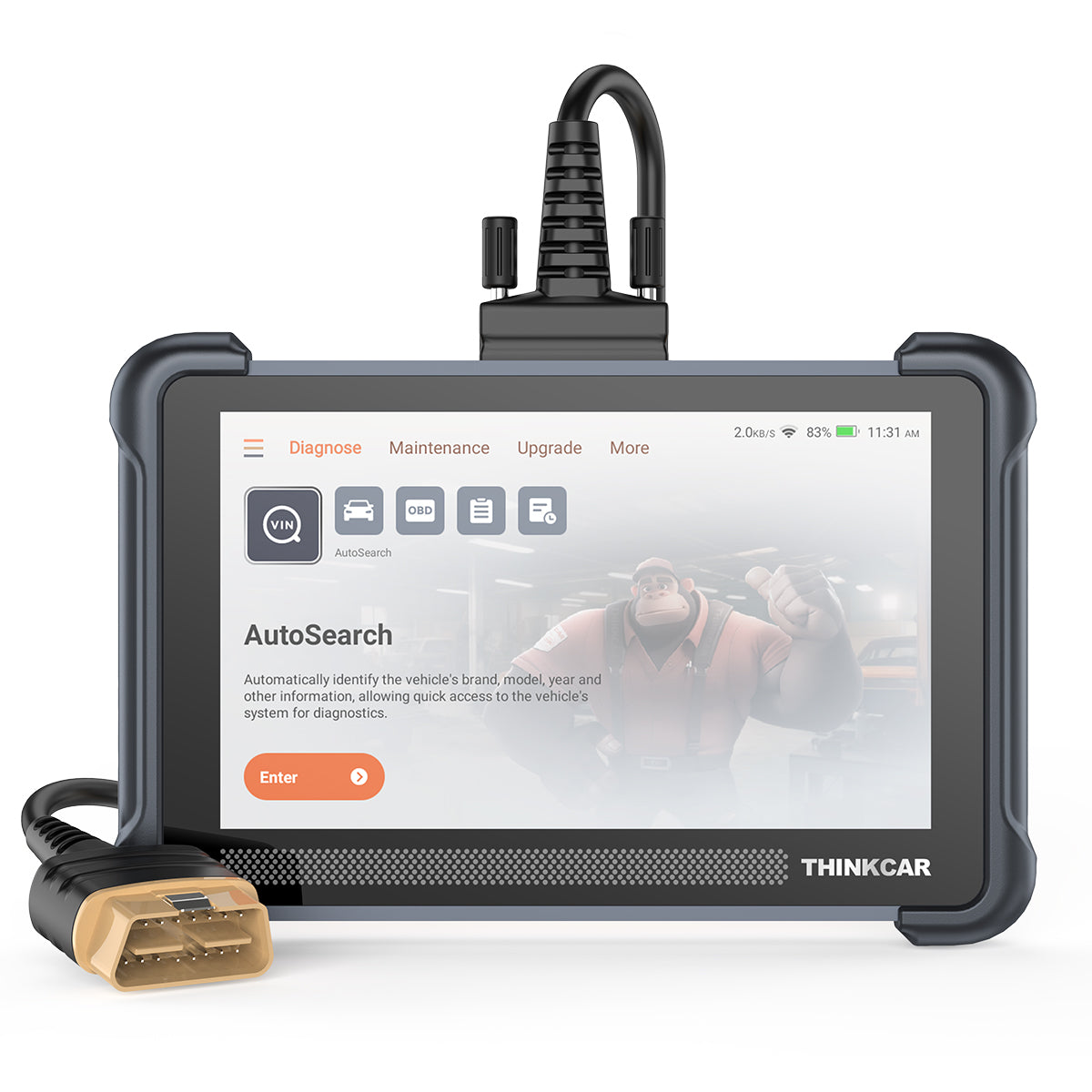
THINKCAR lists the THINKSCAN 689 with a "Lifetime Free License" and says those updates include new functions, optimized procedures, bug corrections, and broader coverage, without subscription renewals. On the same official page, the product is also described as having free lifetime updates with no subscription fees. ([mythinkcar.com])
A code reader and a full-system scanner solve different problems
A basic code reader can still be useful, but it is not the same thing as a full-system diagnostic scanner. A code reader usually focuses on emission-related engine faults. A full-system scanner reaches deeper into ABS, SRS, body, battery, transmission, and other modules. If you only compare price, you miss the cost of misdiagnosis.
What this means: - A code reader can tell you a fault exists. - A full-system scanner helps you verify where the fault starts. - Better access usually means fewer unnecessary parts swaps.
Common mistake: - Buying a tool that reads engine codes, then assuming it can handle electronic parking brake service, battery registration, steering angle reset, or body module checks.
For household use, a full-system scanner makes more sense if you maintain multiple cars or newer vehicles with more networked modules. ThinkCar's own 2026 guidance frames all-system diagnosis as the practical shift from simple code checking to real repair planning for DIY users. ([mythinkcar.com])
Coverage is more than brand count
Many listings highlight a big number like 100-plus or 150-plus brands. That can be helpful, but it is not enough by itself. Real coverage means the scanner supports your make, your model year, your systems, and your needed functions. A tool can claim broad brand support yet still offer uneven depth by module or by year.
Key specs or signals: - Supported vehicle brands and model years - Full-system access, not just OBD2 engine data - Protocol support such as CAN-FD and DoIP - Secure gateway access for certain vehicles - AutoVIN or automatic identification for faster setup
Why it matters: - Newer vehicles often depend on newer communication protocols. - Mixed households need flexible coverage, not one-car optimization. - Future compatibility protects the value of lifetime updates.
The THINKSCAN 689 page lists OE-level full-system diagnostics for 150-plus brands, CAN-FD and DoIP support, AutoVIN, and FCA AutoAuth for secure gateway workflows. It also states 4 GB RAM, 64 GB ROM, and an 8-inch 1280 x 800 display. ([mythinkcar.com])
Total cost matters more than the sale price
A cheap diagnostic tool only stays cheap if it remains useful without forcing recurring payments or early replacement. That is why five-year ownership cost is a better filter than day-one price. The more your workflow depends on updates, diagnostics depth, and newer model support, the more dangerous a vague update policy becomes.
What to include in your mental math: - Initial purchase cost - Renewal fees, if any - Lost functions after updates expire - Time wasted on weak diagnostics - Risk that the product line gets abandoned
A practical benchmark comes from official competitor policies. Autel says its tablet scanners come with one year of free software updates by default, with some models showing two years, after which paid renewal applies. TOPDON's ONE product page says the first year of software updates is free, followed by paid one-year or two-year renewal options, and it separates permanent free functions from subscription-required functions. Innova's 5610 page, by contrast, says updates are free and there are no subscriptions. (store.autel.com)
Update Policy Reality Check

The smartest way to compare lifetime updates is to separate what stays free from what might still change later. That sounds obvious, but many buyers never do it. They read "free updates" and assume every function, every new car, and every advanced feature will remain unlocked forever. In practice, you need a feature-by-feature reading.
What to check: - Core diagnostics: read and clear codes, live data, module scan - Added diagnostics: active tests, coding, topology, special functions - New vehicle support: included or limited - Security functions: permanent, paid, or vehicle-dependent - Hardware warranty: separate from update policy
What this means: - A lifetime claim is strongest when the product page explains the scope plainly. - A one-year-free model is not automatically bad, but it changes the value calculation. - The cheapest purchase is not the cheapest ownership path.
Autel's official update page clearly says its tablet scanners include one year of free software updates by default, and that advanced online access can be affected if you do not renew. TOPDON's official ONE page also spells out that some functions remain free while others, including latest vehicle updates and some advanced features, depend on subscription status. That kind of wording is useful because it lets you compare risk honestly. (store.autel.com)
Vehicle Coverage and Diagnostic Depth
A scanner with lifetime updates still disappoints if it cannot see the systems you actually work on. Coverage and depth need to be matched to your garage, not to marketing language. If your household includes one older sedan, one newer SUV, and maybe a pickup, you need a tool that can handle different modules, not just pass a broad OBD2 check.
Key specs or signals: - Engine, transmission, ABS, SRS, body, and battery access - Coverage by brand and by year - Support for new communication standards - Gateway or security support where required - Stable vehicle identification workflow
Common mistake: - Picking by brand count alone and ignoring whether the scanner reaches full systems on your actual vehicle lineup.
Modern vehicle electronics also raise the bar. NHTSA notes that vehicles are becoming more connected and software-defined, which increases the importance of secure access and cybersecurity-aware design in vehicle systems. In practical terms, that means gateway access and protocol support are no longer premium extras for some owners; they are part of normal compatibility planning. (nhtsa.gov)
If you plan to keep the tool for years, protocol support matters. THINKSCAN 689 lists CAN-FD and DoIP support, plus FCA AutoAuth support for secure gateway workflows, which helps explain why its update policy and coverage claims matter together rather than separately. A scanner with lifetime updates but outdated protocol support can still age badly. ([mythinkcar.com])
Workflow Features That Save Money
A cheap diagnostic tool with lifetime updates becomes much more valuable when it shortens your repair path. This is where workflow features matter. Live data, active tests, AutoVIN, graphing, and service functions do not just sound advanced. They reduce wasted time, repeat scans, and parts swapping based on guesswork.
What to check: - Live data stream readability and graphing - Active tests or bi-directional controls - AutoVIN and fast autoscan - Reset and maintenance functions you actually use - Memory, screen size, and processing speed for daily comfort
Why it matters: - Better workflow usually means fewer wrong parts. - Faster confirmation improves repair confidence. - A tool you enjoy using is more likely to stay in service.
ThinkCar's 2026 DIY content emphasizes that the real value of a scanner comes from moving from codes to confirmation through live data and active tests. On the THINKSCAN 689 product page, the company lists ECU coding, bi-directional and active tests, 35-plus maintenance functions, AutoVIN, and hardware specs including an 8-inch touchscreen, 4 GB RAM, and 64 GB ROM. Those details matter because a scanner that is easier to read and faster to navigate is also easier to trust during a real diagnosis. ([mythinkcar.com])
Product Fit: THINKSCAN 689
If your goal is to buy predictable value instead of just a low entry price, THINKSCAN 689 is a strong example of what to look for in a cheap diagnostic tool with lifetime updates. The official page positions it as a professional auto scan tool with free lifetime updates, no subscription fees, OE-level full-system diagnostics for 150-plus brands, bi-directional and active tests, ECU coding, 35-plus maintenance functions, and support for CAN-FD, DoIP, and FCA AutoAuth. It also lists an 8-inch touchscreen, 1280 x 800 resolution, 4 GB RAM, 64 GB ROM, and a 4150 mAh battery. ([mythinkcar.com])
Best fit: - DIY owners maintaining multiple vehicles - Small shops that want broad coverage without annual software pressure - Buyers who need more than engine-code reading - Users who want active tests and service functions in one device
What to check before buying: - Your exact makes, years, and needed functions - Whether your newer vehicles need secure gateway access - Which service resets matter in your routine - Whether tablet form factor fits your workflow better than a dongle
Compared with the competitors named in this guide, the key difference is not simply brand reputation. It is policy clarity and feature packaging. Autel and many TOPDON models often use time-limited free updates on official materials, while Innova highlights free updates and no subscriptions on at least some models. The reason THINKSCAN 689 stands out in this article is that the official product page combines its lifetime-update claim with higher-end functions that are often tied to paid renewal elsewhere. (store.autel.com)
Shop: THINKSCAN 689
How to Choose a Cheap Diagnostic Tool with Lifetime Updates
The easiest way to choose well is to score the tool in four areas: update policy, diagnostic depth, hardware value, and ownership risk. This keeps you from falling for a single headline claim. A cheap diagnostic tool with lifetime updates should be easy to justify on all four, not just one.
What to check first
- Update scope: software, firmware, new models, advanced features
- Renewal triggers: none, optional, or required
- Coverage depth: full systems or code-reader level
- Vehicle fit: current cars plus near-future vehicles
Hardware and ownership signals
- Screen and speed: readable, responsive, low-friction
- Memory and storage: enough for updates and reports
- Support history: product line still active
- Discontinuation risk: official pages still maintained
| Decision area | Good signal | Warning sign | Why it matters |
|---|---|---|---|
| Update policy | Plain lifetime wording | Vague free update claim | Predictable cost |
| Coverage depth | Full-system access | Engine-only focus | Better diagnosis |
| Protocol support | CAN-FD, DoIP, gateway | Old protocol only | Future fit |
| Workflow value | Live data, active tests | Code read only | Less guesswork |
| Support risk | Current official page | Sparse policy detail | Lower ownership risk |
What this means: - If one scanner is cheaper today but weaker in two of these areas, it may be the more expensive choice over five years. - If a scanner has lifetime updates but shallow diagnostics, it may still create repair waste. - If a scanner has strong functions but annual renewal, the math only works if you truly need those extras every year.
Best Practices and Pitfalls
A good selection process is less about chasing the most features and more about avoiding the wrong compromises. You want predictable ownership, enough depth to confirm real faults, and a support policy you can verify on the official site before checkout.
Best Practices
- Compare five-year ownership cost, not just purchase price.
- Read the exact update wording on the official product page.
- Check protocol support for newer vehicles in your household.
- Match features to your real jobs, such as ABS, SRS, battery, or service resets.
- Prefer tools that still provide useful diagnostics even if you never buy extras.
Common Pitfalls to Avoid
- Trusting "lifetime" without checking scope and exclusions.
- Buying a feature-light reader because it is cheapest today.
- Ignoring gateway and protocol support for newer vehicles.
- Assuming brand count equals real diagnostic depth.
- Overlooking discontinuation risk or thin support documentation.
One more practical point: secure access and software support are becoming normal parts of diagnosis, not edge cases. As vehicles become more connected, scanners that keep pace with protocols and support workflows are more likely to hold value over time. That is why update policy and coverage should always be evaluated together, not as separate checkboxes. (nhtsa.gov)
Conclusion
The best cheap diagnostic tool with lifetime updates is not the one with the lowest sticker price. It is the one with update terms you can verify, enough system coverage to prevent guesswork, and workflow features that keep the tool useful year after year.
If you start with policy clarity, then confirm coverage depth, protocol support, and real-world workflow value, you are much less likely to buy twice. That is the real goal: predictable ownership cost, fewer diagnostic dead ends, and a scanner that stays helpful instead of becoming another forgotten garage gadget.
FAQ
How much do software renewals really matter when choosing a diagnostic tool?
Software renewals matter a lot because the software controls vehicle coverage, bug fixes, and feature access over time. A scanner with weak update support can age quickly even if the hardware still works well. If you own newer vehicles, renewals or lifetime updates affect whether the tool can keep up with changing protocols and modules. The main question is whether core functions stay useful without ongoing payments. That is why total ownership cost often matters more than the original purchase price.
Should I buy a scanner with lifetime updates or one with annual renewals?
You should choose based on feature needs and long-term cost, not on the label alone. A lifetime-update tool usually makes more sense if your work is routine diagnosis, service resets, and multi-vehicle household maintenance. An annual-renewal tool can still be worthwhile if it gives you advanced functions you truly use often. The key is to compare what remains available if you stop paying. If the tool loses essential functions after the free period, it may not be the best fit for a budget-minded buyer.
What is the best scan tool with low long-term ownership cost?
The best scan tool is the one that combines clear update terms, strong vehicle coverage, and enough diagnostic depth to avoid repeat guessing. A low long-term ownership cost usually comes from three things: stable support, no surprise renewals for core functions, and features that reduce wasted repair time. Full-system access, live data, and active tests often provide more value than a low upfront price alone. You should also check protocol support for newer vehicles before deciding. A tool that fits both your current cars and your next vehicle usually gives better value.
Which diagnostic scanner has the clearest update and subscription policy?
The clearest policy is the one that explains exactly what is free, what requires renewal, and what still works if you never subscribe again. You want to see whether lifetime updates cover new functions, bug fixes, and new vehicle support, or only limited maintenance items. A good product page also separates hardware warranty from software access. If advanced features or secure access depend on subscription, that should be stated plainly. Clear policy wording is often a better trust signal than flashy feature banners.
Which scan tools are best if I want to avoid expensive yearly subscriptions?
The best options are tools that keep core diagnostics fully useful without recurring fees. In practical terms, that means looking for full-system access, live data, service functions, and clear lifetime-update language on the official page. You should be cautious with tools that advertise strong hardware but lock new model support or key functions behind annual renewal. It also helps to look for brands with active product pages and ongoing support content. A scanner that stays stable without yearly fees usually delivers better peace of mind for DIY ownership.
How to select a diagnostic tool that offers lifetime updates for cheap?
Start with the update policy, because that sets the long-term cost. Next, confirm that the tool covers your actual makes, model years, and systems instead of relying on broad brand-count claims. Then compare workflow features like live data, active tests, and service resets, since those features reduce misdiagnosis and save money. After that, check protocol support such as CAN-FD, DoIP, or gateway access for newer vehicles. A cheap tool only stays cheap if it remains capable without forcing you into replacement or paid unlocks later.
Why is a full-system scanner usually a better value than a simple code reader?
A full-system scanner is usually better value because it helps you diagnose the whole vehicle, not just engine emissions faults. Many real repair problems involve ABS, airbag, transmission, battery, or body modules, and a simple code reader cannot reach those areas well. That limitation often leads to guesswork, extra parts purchases, and repeat troubleshooting. Full-system access also becomes more important as vehicles add more electronic modules. Even for home use, the added diagnostic depth often pays for itself in avoided mistakes.
What should I verify before trusting a lifetime update claim?
You should verify the exact wording on the official product page before you buy. Check whether lifetime applies to software updates, firmware, new vehicle coverage, and advanced functions, or only to a limited portion of the tool. You should also confirm whether secure gateway access, coding, or special features depend on separate activation or future add-ons. If the wording is vague, assume there may be limits and keep comparing. Clear policy language is one of the strongest signs that a tool will stay affordable over time.
Table of Contents
- Introduction
- Diagnostic Tool Fundamentals
- Update Policy Reality Check
- Vehicle Coverage and Diagnostic Depth
- Workflow Features That Save Money
- Product Fit: THINKSCAN 689
- How to Choose a Cheap Diagnostic Tool with Lifetime Updates
- Best Practices and Pitfalls
- Conclusion
-
FAQ
- How much do software renewals really matter when choosing a diagnostic tool?
- Should I buy a scanner with lifetime updates or one with annual renewals?
- What is the best scan tool with low long-term ownership cost?
- Which diagnostic scanner has the clearest update and subscription policy?
- Which scan tools are best if I want to avoid expensive yearly subscriptions?
- How to select a diagnostic tool that offers lifetime updates for cheap?
- Why is a full-system scanner usually a better value than a simple code reader?
- What should I verify before trusting a lifetime update claim?

Share:
A 2026 Useful Guide to Choose AI Diagnostic Tools That Help Interpret Fault Codes
How to Use Scan Data for Faster Shop Intake and Pre-Checks