
Introduction
You are halfway through a check engine light diagnosis when you realize the tablet scanner is still on the shop bench, or the tablet battery is dead, or the only charger is in someone else's bay. Meanwhile, the job is still waiting, and your workflow is now built around the wrong device instead of the car in front of you.
Choosing the wrong format can cost you hours in setup friction, missed bidirectional tests, and repeat visits when a quick triage turns into guesswork. This guide helps you decide between a smartphone-based Vehicle Scanner & Diagnostic Tool and an Android-based diagnostic tablet by matching your real routine to coverage depth, connection stability, and update cadence. Next, you will learn the fundamentals, then walk through five practical modules (DIY, mobile tech, shop bays, active tests, and emissions readiness) before using a decision framework to pick what fits most users.
Smartphone Scanner vs Tablet Scanner Fundamentals
Device Models: Dongle-plus-app vs standalone tablet
The fastest way to choose is to separate the hardware role from the user experience. A smartphone scanner is usually an OBD2 Scanner Bluetooth dongle plus an app, so your phone becomes the screen, CPU, storage, and network connection. That is why it wins on portability and convenience, especially when you already carry your phone, power bank, and hotspot.
A tablet scanner is a dedicated device (often Android-based) that bundles the screen, OS, storage, and often a wired VCI or integrated interface. In a shared bay, that dedicated package matters because the tool is not competing with your personal phone battery, notifications, or app permissions. If multiple techs touch the same tool, the tablet format also makes it easier to standardize logins, workflow steps, and where results get stored.
Practical takeaway: smartphone format is a workflow multiplier for one-person use; tablet format is a process stabilizer for multi-user bays.
OBD2 baseline and what you actually get
Most users start with generic OBD2 because it is broadly supported and enough for many check engine light events. OBD2 functions are organized as services (often called modes) and cover basics like reading and clearing emission-related DTCs, viewing live data PIDs, and checking readiness monitors. ISO 15031-5 is one of the key documents that aligns with these services and definitions across OBD implementations.
Where people get stuck is assuming all scanners expose the same depth. Generic OBD2 Intelligent Diagnosis can answer, "Why is the MIL on?" but it often cannot answer, "Which component is failing, and can I command it to prove the fault?" That second question usually needs enhanced coverage (manufacturer-specific) plus a Bidirectional scanner that supports active tests.
Generic data vs OEM enhanced functions
The day-to-day difference is not a feature list; it is whether the tool can move beyond emissions powertrain data into module-level diagnosis. Generic code readers can be enough for quick checks, but they often stay limited to the engine ECU and standardized PIDs.
OEM enhanced functions are what unlock practical shop outcomes: full module scans (ABS, SRS/airbag, transmission, BCM), special functions (resets, adaptations), and guided menus that follow the car's architecture. In the THINKCAR ecosystem, you will see this described as All System Diagnosis for All Cars and packaged across lines like ThinkScan Series, AI Diagnostic Series, VO Series, CS Series, and CDE900 Series. The more your workflow involves multi-module interactions (for example, a battery replacement that triggers BMS and steering angle reset), the more you should treat enhanced coverage as a requirement, not a bonus.
Ownership costs: updates, subscriptions, and downtime
Ownership costs are mostly time costs. The most painful "cost" is a technically capable tool but out of date, locked behind a Software Subscription, or delayed by a Software Download when you are already on-site. For a phone-based tool, your update experience is split: the app updates through your phone, while firmware or database updates may still be handled inside the vendor app.
For a tablet tool, updates can be simpler (one device to update), but the downtime can be more disruptive because the tablet is the shared resource. Either way, treat Software Renewal and Software Update Notice behavior as part of the buying decision. The best tool is the one your workflow can keep current without drama.
Daily Driver DIY Diagnostics

Most DIY users do not need a tablet. You need fast answers: what the code is, whether it is likely intermittent, and whether the car is safe to drive until you can fix it. That is exactly where an OBD2 Scanner Bluetooth approach works well because it removes the biggest barrier to use: carrying a second device.
A simple, repeatable DIY loop looks like this:
- Scan codes and freeze frame first (capture context).
- Check live data for obvious outliers (coolant temp, STFT/LTFT, O2 sensor switching).
- Clear codes only after you have written down the originals.
- Re-check readiness monitors before any inspection appointment.
With a phone-based setup, your biggest risk is misreading "code present" as "part failed." Use the app to see supporting symptoms and confirm with basic tests when possible. A Bluetooth OBDII dongle also makes it easier to do 5-minute follow-ups after a repair, which is where most DIY wins happen.
If you want a phone-first tool that goes beyond a basic code reader, the MUCAR BT200 MAX is positioned as a smartphone-driven advanced scanner with full-system diagnostics and bidirectional control. The page highlights features like bidirectional control and actuation tests, full-system coverage (engine, transmission, ABS, airbag), CAN-FD support, 15+ essential resets (including Oil Reset, SAS, BMS, TPMS, EPB), and a smart sleep mode intended to prevent battery drain if left plugged in. It also emphasizes free lifetime updates with monthly coverage expansion and an AI-powered assistance layer.
Shop: MUCAR BT200 MAX
Mobile Technician and Roadside Calls
Why smartphone scanners usually win on the road
When you work out of a vehicle, every extra cable and every extra charger adds friction. Roadside diagnostics is a speed game: you need enough information to decide whether the car can move under its own power, what you can fix on-site, and what needs towing. A smartphone-based Vehicle Scanner & Diagnostic Tool fits that reality because the phone is already your dispatch device, camera, and payment terminal.
Design your mobile workflow around connection resilience:
- Use a dedicated phone or a dedicated work profile so app permissions do not break mid-job.
- Keep a known-good OBD2 Scanner Bluetooth pairing routine (same port position, same dongle orientation).
- Bring a power plan: a car charger plus a small power bank.
Cloud sync and the hidden value of consistent reporting
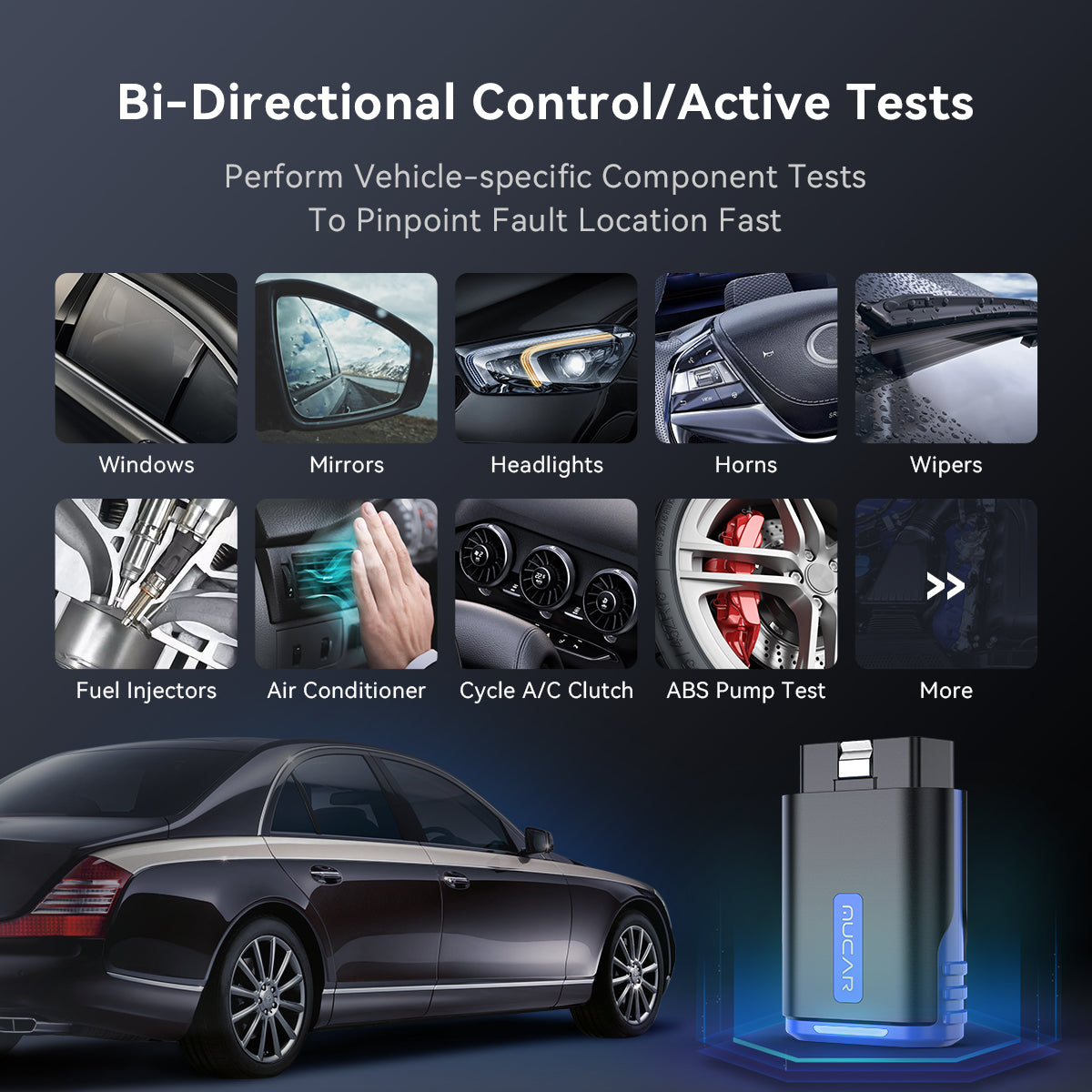
A phone workflow is also better at documentation. Photos of the dash, screenshots of live data, and saved reports make repeat visits faster because you can compare "before" and "after" without relying on memory. If you do remote support or escalation, a report you can share quickly can prevent wasted parts swapping.
In THINKCAR and MUCAR product positioning, "OBD2 Intelligent Diagnosis" is most valuable here when it reduces steps: automatic VIN recognition, guided menus, and AI-powered insights that translate scan output into a plan. The MUCAR DRIVERSCAN page, for example, frames itself as a Bluetooth OBD2 scanner with full-system diagnostic coverage, bidirectional/active tests, and 15 maintenance functions. That combination maps well to mobile work because you can do module-level checks without carrying a tablet.
Shop: MUCAR DRIVERSCAN
Small Shop Workflow and Bay Sharing
When tablets beat phones in real shops
In a small shop, the scanner is not a personal tool; it is a shared workflow asset. The biggest enemy is setup drift: different techs use different phones, different OS versions, different cables, and different habits. Over time, that inconsistency causes missed steps (like not saving pre-scan reports) and arguments about whether a fault is new or pre-existing.
A dedicated tablet format supports a stable routine:
- Same device, same UI, same login every time.
- Easier to keep in a known location (charge cradle at a fixed station).
- Better ergonomics for long sessions (larger screen, glove-friendly handling).
If your shop does any ECU coding, module replacements, or multi-step adaptations, the tablet approach also reduces the chance that a phone call or notification interrupts a critical step. That is not just convenience, it is risk reduction.
Example: ThinkScan Series in a bay-centric workflow
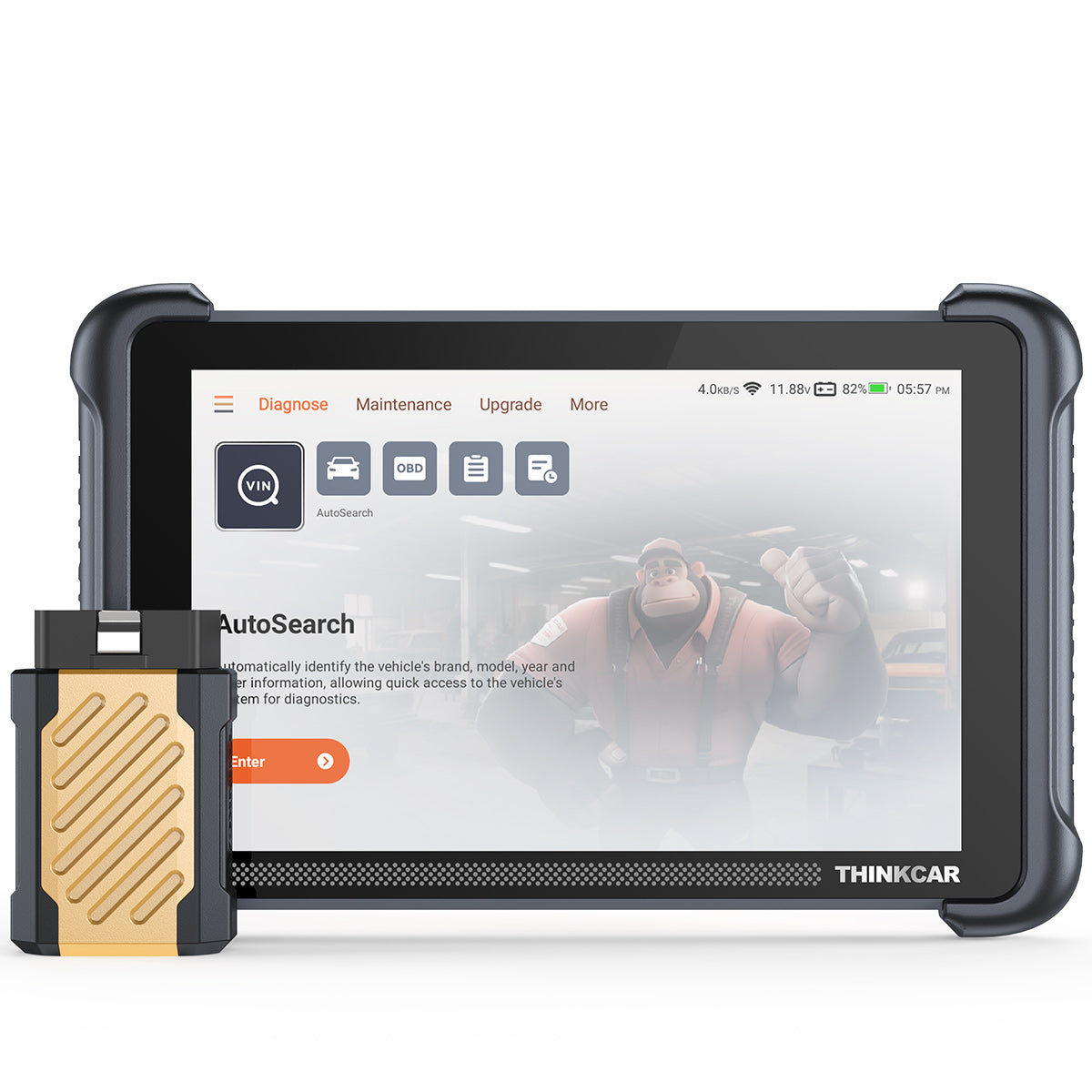
Within THINKCAR, the ThinkScan Series is presented as a more shop-oriented category compared to pure phone dongles. On the THINKSCAN 689BT page, the product is positioned as a bidirectional scan tool with an 8-inch tablet form factor, with marketing visuals emphasizing coverage scale, full-system diagnosis, and bidirectional controls.
Use a tablet-style tool when your workflow includes:
- One tool is used across multiple cars per day.
- Multiple techs sharing the same device.
- The need to standardize pre-scan and post-scan reporting.
- Higher frequency of actuation tests or service resets.
Shop: THINKSCAN 689BT
Compliance and Emissions Readiness
Readiness monitors are where "quick scans" fail
Emissions readiness is not just about clearing a code and hoping the light stays off. After clearing DTCs or disconnecting the battery, many vehicles reset readiness monitors to "not ready," and the car must complete specific drive conditions before monitors are set to "ready." If you show up for inspection too early, you can fail even with no active DTCs.
Inspection programs also vary by state and program rules. For example, California updated OBD readiness rules effective October 1, 2025, requiring monitors to be set to pass the Smog Check. That kind of policy change is exactly why a simple code reader may not be enough if it cannot display the monitor status clearly and consistently.
According to the California Bureau of Automotive Repair, regulations effective October 1, 2025, require readiness monitors to be set for a vehicle to pass a Smog Check inspection.
Comparison Framework:
| Scenario | Best format | Priority functions | Biggest trade-off |
|---|---|---|---|
| One car DIY | Smartphone | Codes, readiness, live data | Smaller screen |
| Roadside/mobile | Smartphone | Fast scans, reports, resets | Phone battery risk |
| Shared shop bays | Tablet | Standard workflow, durability | Less pocketable |
| Active tests daily | Tablet or phone | Bidirectional tests | Coverage varies |
| Pre-inspection checks | Smartphone | Readiness monitors | Depends on app UI |
Common Pitfalls to Avoid
Most bad outcomes come from assumptions that are invisible until the job stalls.
- Assuming all cars support the same features. Even if a tool is labeled "bidirectional," the available active tests depend on make, model, year, and module. Confirm on your common vehicle list before you rely on a feature.
- Ignoring power and connection stability. Bluetooth pairing issues, low phone battery, and weak Wi-Fi can waste more time than the scan itself. Treat charging and connectivity as part of your tool setup.
- Underestimating subscription friction. Software Subscription and Software Renewal decisions affect whether your tool is usable next month. If a renewal delay prevents a scan, that is operational downtime.
Conclusion
Most users should choose the smartphone scanner format when portability and fast repeat checks drive success, especially for DIY and mobile work. A tablet scanner is the better fit when you need a shared, standardized workflow in a shop environment, or you run long diagnostic sessions where interruptions and battery limits matter.
To decide confidently, anchor on three questions: do you need an All System Diagnosis for All Cars, how often you rely on a Bidirectional scanner for active tests, and how smoothly you can keep up with Software Update Notice and renewal realities. Once you pick the format that fits your daily routine, the right tool becomes a habit, not a hassle.
FAQ
How do I decide between a phone-based scanner and a tablet scanner?
Choose a phone-based scanner if you work alone and need maximum portability, because your phone becomes the display and keeps the kit minimal. Choose a tablet scanner if multiple people share the tool or if the scanner lives in a fixed bay, because the device can stay charged and consistent. If you do long sessions like graphing live data for 20 to 30 minutes, a tablet is usually easier to manage. If you mostly check codes, live data, and readiness in short sessions, a phone-based setup typically fits most users.
What does bidirectional control change in real diagnostics?
Bidirectional control lets you command components so you can prove whether a circuit, actuator, or module responds correctly. Instead of guessing from a DTC alone, you can run active tests like commanding a cooling fan, purge valve, ABS pump, or window motor. This often reduces parts swapping because you can compare the commanded state with feedback data or observable behavior. In practice, it turns diagnostics from reading symptoms into testing causes.
Do all vehicles support the same OBD2 functions?
No, because generic OBD2 functions focus on emissions-related powertrain data, while deeper module access varies by manufacturer and model year. Even when two vehicles support the same standardized modes, the available PIDs and the quality of descriptions can differ. Enhanced diagnostics for ABS, SRS, BCM, and HVAC typically require manufacturer-specific coverage. Bidirectional tests also vary widely, so an active test menu on one vehicle may be much smaller on another.
How should I think about software updates and subscriptions?
Treat updates and subscriptions as part of tool reliability, not a separate issue, because an out-of-date scanner can lose coverage on newer vehicles. Plan for update time, since downloads and installs can interrupt a workday if you do them at the wrong moment. Also, check whether updates are frequent and whether they arrive as app updates, firmware updates, or both. If your workflow depends on a single shared device, schedule updates outside business hours to avoid bay downtime.
Is a Bluetooth OBD2 scanner enough for most users?
A Bluetooth OBD2 scanner is enough for many users when the goal is reading and clearing codes, checking live data, and verifying readiness monitors. It is especially effective for DIY and mobile use because you can scan without carrying a second device. However, if you need full module scans, special functions, or frequent active tests, you may outgrow a basic adapter. In that case, look for a Bluetooth OBDII tool that adds full-system coverage and bidirectional capability.
What should I check first when a car will not set readiness monitors?
Start by confirming there are no stored or pending DTCs, because many monitors will not complete when certain faults are present. Next, verify which monitors the vehicle actually supports, since some will show as not applicable. Then check for recent battery disconnects or code clears, because those reset readiness to not ready and require drive cycles. Finally, review basic enabling conditions like coolant temperature, fuel level (often 1/4 to 3/4), and steady highway cruise time, since missing any of those can keep monitors incomplete.
When does a tablet scanner become the better choice than a phone-based tool?
A tablet becomes the better choice when you need a shared, standardized workflow across techs or bays. It is also preferable when you run longer procedures that should not be interrupted by calls, notifications, or a low phone battery. If you do frequent service functions like EPB service mode, SAS calibration, or BMS resets across many vehicles, the larger screen and dedicated environment reduce mistakes. In shops, the tablet format also helps keep reporting consistent because the same device stores and presents results the same way every time.
Table of Contents
- Introduction
- Smartphone Scanner vs Tablet Scanner Fundamentals
- Daily Driver DIY Diagnostics
- Mobile Technician and Roadside Calls
- Small Shop Workflow and Bay Sharing
- Compliance and Emissions Readiness
- Conclusion
-
FAQ
- How do I decide between a phone-based scanner and a tablet scanner?
- What does bidirectional control change in real diagnostics?
- Do all vehicles support the same OBD2 functions?
- How should I think about software updates and subscriptions?
- Is a Bluetooth OBD2 scanner enough for most users?
- What should I check first when a car will not set readiness monitors?
- When does a tablet scanner become the better choice than a phone-based tool?

Share:
Reactive Code Reader vs. AI Diagnostic Agent: What Changes When Your Tool Predicts Failures Before the Warning Light?
AI Diagnostic Tools That Actually Cut Repair Time: 4 Scanners Worth a Look in 2026