
Which scan tool ownership model actually saves money over time?
A low sticker price can be misleading when you buy scan tools with transparent update policies in mind. Many buyers focus on the hardware cost, then discover a year later that software renewals, brand packages, or locked advanced functions change the real total. That matters because a scanner is not just a device. It is also an ongoing software platform, and the policy behind that platform can either protect your budget or slowly drain it.
If you want a tool that stays useful, look beyond the first checkout page. The smarter comparison is how the tool fits your workflow, how clearly the update terms are written, and what remains usable if you stop paying later. In the sections below, you will compare scanner types, decode update language, weigh long-term ownership tradeoffs, and see where ThinkCar tools fit different buyer scenarios. According to EPA, all 1996 and newer passenger vehicles are required to have OBD systems, so the question is no longer whether to use a scanner, but how much diagnostic depth and software clarity you actually need.
What scan tools include, and what update terms change the real value?

This is where most buying mistakes begin. Two tools can both say OBD2 scanner on the box, yet one may only read generic engine codes while the other can scan body, ABS, airbag, and transmission modules, run active tests, and perform service resets. The feature gap is important, but the ownership terms are just as important because software access can be limited, renewable, or lifetime depending on the product.
Core scanner types buyers should separate
Start by splitting scan tools into three practical groups. That makes every later comparison easier.
- Code readers: Basic tools that read and clear generic powertrain trouble codes. Good for quick checks, but limited.
- Full-system scanners: Tools that access more modules such as ABS, SRS, body, and transmission for better fault isolation.
- Bidirectional scanners: Tools that can command components on and off, such as cooling fans, windows, pumps, or purge solenoids, so you can test behavior instead of guessing.
GearMedic's 2026 guide makes a similar distinction between code readers, mid-range diagnostic scanners, and professional-level tools with live data and bi-directional controls. It also notes that live data, freeze frame, and module access often matter more than the simplest code-read function for real diagnosis. (gearmedic.net)
Update-policy terms worth decoding first
Before you compare models, decode the policy words. Brands often use familiar terms, but they do not always mean the same thing.
- Lifetime updates: Usually means the brand says software updates remain available without extra renewal fees, but you still need to verify what is included.
- 1-year free update: Usually means the hardware includes a limited period of software entitlement, after which renewal may be needed.
- Subscription or renewal: Often applies to continued access to expanded make coverage, special functions, or software packages.
- Coverage scope: This defines whether support applies to all makes, selected makes, basic OBD2 only, or advanced modules.
- Protocol support: This includes standards such as CAN-FD or DoIP, which matter more as newer vehicles enter your driveway.
For example, ThinkCar's official THINKDIAG 2 page highlights built-in CAN-FD support, ECU coding, bidirectional or active tests, full-system diagnostics, 15 maintenance functions, Auto VIN, and support for 98% of car models, while a separate site listing also shows a dedicated 1-year software subscription path for the platform.
Why transparency matters before checkout
Clear terms protect you in three ways. First, they help you estimate your real three-year cost instead of judging only the launch price. Second, they reduce the risk that your workflow breaks after the first year if updates or advanced functions are tied to renewal. Third, they help you match the tool lifespan to your actual repair goals, whether that is occasional check-engine-light work or deeper all-system diagnosis.
ThinkCar's own guidance on clear-policy buying says the first thing to check is the exact wording of the diagnostic scanner update policy, not the feature count. The same article recommends mapping which functions are local, which depend on live account access, and whether the tool still stays useful if you skip updates for 6 to 12 months.
How should you compare scan tools before you buy?
A good buying process is less about chasing the biggest spec sheet and more about matching the tool to the jobs you actually do. If you work on one family car twice a year, your needs are different from a mobile technician or a serious DIY owner with three newer vehicles. Compare scan tools with transparent update policies by workflow first, then by ownership terms, and only then by extra features.
Match the tool to your diagnostic workflow
Begin with your job mix. A tool is valuable only if its depth matches the problems you need to solve.
- Occasional DIY checks: A basic or entry full-system tool may be enough if you mainly read codes, monitor readiness, and clear faults.
- Serious home garage use: Full-system access, live data, reset functions, and some active tests save time fast.
- Mixed late-model vehicles: CAN-FD support becomes important if you service newer platforms.
- Repeat troubleshooting: Bidirectional controls help confirm whether a part, circuit, or module actually responds.
What this means in practice is simple: do not pay for ECU coding, 30-plus resets, or workshop-grade modules if you only scan once a year. On the other hand, if you regularly test EVAP faults, cooling fans, or electronic parking brakes, a cheap reader will force you into guesswork or outside labor.
Check the update policy like a contract
This step is where many buyers rush. Slow down and read product pages the way you would read service terms.
What to check:
- Whether updates are described as lifetime, limited-term, or renewable
- Whether advanced functions stay active after expiry
- Whether software is tied to an app account or to the device itself
- Whether the brand publishes update cadence, such as monthly additions
- Whether support, warranty, and returns are documented clearly
ThinkCar's article on update-policy clarity specifically recommends checking renewal triggers, gateway-protected workflows, and whether advanced features are vehicle-dependent rather than universal. The same piece notes that the THINKSCAN 689BT listing states monthly upgrades, CAN-FD, DoIP, AutoVIN, and AutoScan, while also publishing 12-month warranty and 30-day return information.
Compare wired and Bluetooth ownership paths
The hardware style also changes ownership risk. Dedicated wired or tablet-style tools and Bluetooth dongle platforms solve different problems.
- Dedicated device tools: Better if you want one purpose-built screen, fewer phone compatibility issues, and a workshop-style interface.
- Bluetooth app-based tools: Better if you want portability, smaller storage footprint, and lower entry cost.
- App dependency: Bluetooth tools rely on phone OS compatibility, app stability, and account login structure.
- Activation path: App-led tools often have more software-layer decisions, including feature bundles and renewals.
This is not about one format being better overall. It is about fit. If you hate app ecosystems, a dedicated scanner may save frustration. If you value portability and quick setup, Bluetooth may be the better long-term value.
Which buying factors matter most after features?
Once two tools both cover your core jobs, the next decision is not just which one has more functions. It is which one keeps those functions usable at a cost and complexity level you can live with. This is where scan tools with transparent update policies stand apart from lookalike alternatives.
Long-term software cost vs upfront price
The cheapest scanner at purchase can become the most expensive scanner you own. A better method is to think in a 3-year window.
- Year-one price: Useful, but incomplete
- Year-two costs: Check renewal or subscription risk
- Feature retention: Verify what still works if you do not renew
- Ownership horizon: Spread cost across how long you realistically plan to keep the tool
A simple rule helps here: if a tool solves only current vehicles but needs renewal to stay relevant on newer ones, count that future cost now. ThinkCar's own comparison article contrasts MUCAR BT200 MAX with stated lifetime free updates and THINKDIAG with a 1-year free update model, showing how update structure changes long-term value even when both are capable Bluetooth tools.
Vehicle and function coverage depth
Coverage depth often beats raw feature count. You need the tool to reach the systems you actually service.
- OBD2 basics: Minimum requirement for engine-related fault work
- Full-system access: Better for separating engine, ABS, SRS, body, and transmission issues
- Live data: Necessary for tracking sensor behavior and confirming fault patterns
- Active tests: Useful for commanding components to verify circuit or actuator response
- Resets and service functions: Helpful when maintaining brakes, batteries, steering angle sensors, DPF systems, or TPMS
GearMedic notes that live data streaming, freeze frame, readiness monitor status, and bi-directional controls are the features that actually matter when you move beyond one-time code checks. (gearmedic.net)
Protocol and compatibility futureproofing
A scanner can look strong today and still age badly if it lacks newer communication support. Futureproofing is not hype here. It affects whether the tool stays useful as vehicle electronics change.
Key signals to verify:
- CAN-FD support: Important for many newer vehicles
- DoIP support: Relevant on some modern platforms
- Gateway access support: Important where vehicle security limits module access
- App or device compatibility: Reduces setup friction over time
- Update cadence: Frequent updates usually extend useful lifespan
ThinkCar's official pages say THINKDIAG 2 includes built-in CAN-FD support and that THINKSCAN 689 supports both CAN-FD and DoIP, while also listing FCA SGW access through built-in AutoAuth registration.
Where do ThinkCar tools fit different buyer scenarios?

This is the practical part. Rather than asking which tool is best in general, ask which tool matches your workflow, comfort level, and update-policy tolerance. ThinkCar's lineup gives you three distinct ownership paths: a lighter Bluetooth option centered on lifetime updates, a more expandable app-led platform with subscription considerations, and a dedicated workshop-style device with broad feature depth.
Home-garage buyer avoiding renewal fatigue
If your main goal is solid diagnostics without much software anxiety, MUCAR BT200 MAX is the clearest starting point. The official product page says it offers lifetime free updates with monthly additions, full-system diagnostics, bidirectional control, CAN-FD support, 15-plus resets, and smart sleep mode to avoid battery drain if the adapter stays plugged in. It also lists Bluetooth 5.2, Android 5.0 or iOS 13 and above support, and a 9 to 18V working voltage range.
Why this fits:
- Good for casual to serious DIY work
- Easier to justify when you want long-term value without annual renewal fatigue
- Portable enough for quick scans in the driveway or garage
- Stronger than a basic code reader because it reaches engine, transmission, ABS, airbag, and more
A practical limitation still applies: verify vehicle-by-vehicle coverage and specific reset support before purchase. The policy may be clear, but actual function depth can still vary by make and model.
Shop: MUCAR BT200 MAX
Portable power user needing deeper app-led diagnostics
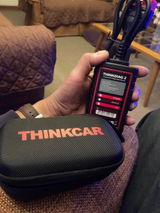
THINKDIAG 2 fits buyers who like app-based workflows and want broader advanced capability from a compact Bluetooth tool. ThinkCar's official page lists CAN-FD support, ECU coding, bidirectional or active tests, full-system diagnostics, 15 maintenance functions, IMMO key matching, Auto VIN, and 98% market coverage. The same page also says the major difference versus the older ThinkDiag is built-in CAN-FD support for newer GM vehicles after 2020.
Best fit signals:
- You are comfortable working inside an app ecosystem
- You want deeper software-led diagnostics in a small form factor
- You may need ECU coding or more advanced function expansion
- You accept that software entitlement may not be identical to hardware ownership
This is the point where the diagnostic tool subscription policy matters most. ThinkCar's site also exposes a separate THINKDIAG2 1 Year Software Subscription listing, so you should review the software path before assuming the hardware price is the full ownership cost.
Shop: THINKDIAG 2
Shop or advanced user wanting a dedicated device
If you dislike phone dependence and want a workshop-style tool, THINKSCAN 689 is the clearest direction. ThinkCar's official product page describes it as an 8-inch dedicated scan tool with 1280×800 resolution, 4150mAh battery, all-system diagnostics for 150-plus car brands, bidirectional testing, ECU coding, 34-plus maintenance functions, lifetime free license updates, CAN-FD and DoIP support, 2017-plus FCA SGW access, and support for 28 languages.
That combination suits:
- Advanced DIY users maintaining multiple vehicles
- Small shops needing dedicated hardware rather than a phone-led workflow
- Buyers who want a stronger interface for long sessions and repeated use
- Users who need service resets, active tests, and broader protocol coverage in one device
Its main tradeoff is not capability. It is whether you truly need that depth. If your jobs rarely go beyond code checks and simple live data, a dedicated higher-tier device may be more tool than you need.
Shop: THINKSCAN 689
Best practices and pitfalls when comparing update-policy scan tools
The fastest way to waste money is to compare only checkout price and feature count. A better buying habit is to think like an owner, not just a shopper. That means asking how the scanner fits your cars next year, what still works if you skip updates, and whether the tool helps you confirm faults rather than just collect codes.
Best practices
A few habits consistently lead to better choices.
- Price the tool across three years, not one purchase day
- Verify whether full-system access, active tests, and resets remain usable after any update window ends
- Check protocol support first, especially CAN-FD for newer vehicles
- Read the subscription or renewal page, not only the product hero section
- Confirm your vehicle mix by make, model, year, and engine before buying
- Prefer brands that publish warranty, returns, and update cadence clearly
For general workflow value, live data and freeze frame deserve extra weight. GearMedic notes that freeze frame captures sensor values at the moment a code sets and can cut diagnostic time significantly, while readiness monitor status is essential before emissions checks. (gearmedic.net) According to EPA, inspection and maintenance programs use OBD-based procedures on covered vehicles, which is another reason scanner usefulness extends beyond simple code clearing.
Common pitfalls to avoid
Buyers run into the same mistakes again and again.
- Judging only sticker price: Cheap hardware can hide expensive year-two costs
- Assuming all lifetime updates are equal: Always ask what is actually covered
- Ignoring app subscription pages: The hardware page may not tell the whole software story
- Buying too shallow: A code reader will not replace full-system diagnosis if you work on ABS, SRS, or transmission faults
- Buying too deep: Professional features have less value if you never use them
- Skipping compatibility checks: Coverage claims are broad, but real support is still vehicle-specific
One more warning is worth keeping in mind. Generic OBD2 access is standardized, but that does not mean every tool reaches every module equally. EPA documentation still reflects the long-standing requirement that 1996 and newer light-duty vehicles support OBD scan access standards, yet advanced module functions, newer protocols, and manufacturer-specific routines remain highly tool-dependent.
Why transparent update policy usually beats the lowest upfront price
When you compare scan tools with transparent update policies, the best value usually comes from clarity, not from the lowest first invoice. A scanner earns its keep over time through usable software, relevant vehicle coverage, and functions that help you confirm faults faster. If the update policy is vague, your ownership cost is vague too.
That is why the strongest buying path is simple. Match the tool to your workflow, read the policy like a contract, and compare three-year value instead of day-one price. For low-renewal stress, MUCAR BT200 MAX is the clearest ThinkCar direction. For compact app-led power, THINKDIAG 2 is the expandable option. For dedicated workshop-style use, THINKSCAN 689 gives the deepest all-in-one format. The right answer is the one whose capability, compatibility, and renewal structure stay aligned with how you actually diagnose cars.
FAQ
Which scanner is the safest buy if I care about long-term value, not just first-year price?
The safest long-term buy is usually the one with clear update wording, enough diagnostic depth for your real jobs, and no surprise feature loss after year one. In ThinkCar's lineup, MUCAR BT200 MAX is the simplest candidate if you want lower renewal friction because it is positioned around lifetime free updates, full-system diagnostics, and bidirectional control. If you prefer a dedicated screen and workshop-style layout, ThinkScan 689 is another strong fit, but you should still verify exactly what its lifetime update scope includes. The smartest way to compare them is to estimate your ownership cost across three years, not only at checkout.
How much do software renewals really matter when choosing a diagnostic tool?
Software renewals matter a lot because they can decide whether your tool stays current with newer vehicles, added protocols, and expanded functions. A scanner that looks affordable on day one can become expensive if full-system coverage, service functions, or make support depend on annual reactivation. That is especially true with app-led platforms, where hardware ownership and software entitlement are not always the same thing. If you want a more predictable model, ThinkCar tools positioned around lifetime updates deserve extra attention.
Should I buy a scanner with lifetime updates or one with annual renewals?
For most home garage users, lifetime updates are the better fit because they keep ownership simple and reduce year-two surprise costs. If you mainly maintain one to three family vehicles, you will usually benefit more from stable full-system access and clear update terms than from a complex software plan. ThinkCar's MUCAR BT200 MAX is the easier starting point in that case because it targets DIY users who want portability, active tests, and lower renewal stress. Annual-renewal tools make more sense when you know you need deeper software expansion and you are comfortable managing that ongoing cost.
What happens if I stop renewing a professional scan tool?
If you stop renewing a professional scan tool, the usual result is that some existing functions remain while future updates, newer vehicle coverage, and certain advanced software benefits stop growing. In some systems, basic OBD2 reading continues, but app-based expansion, added service functions, or newer make support may be limited. That is why you should confirm in advance whether the tool keeps full-system access, active tests, and reset functions after the included period ends. ThinkCar options with lifetime-update positioning reduce that risk, while THINKDIAG 2 should be reviewed more carefully because its software path is more clearly separated.
What features matter more than update policy when comparing scan tools?
The most important features beyond update policy are full-system coverage, live data quality, bidirectional control, reset functions, and protocol support such as CAN-FD. A clear renewal model does not help much if the tool cannot reach the systems you diagnose most often. You should also compare whether you want a dedicated device or a Bluetooth workflow, because that choice affects setup friction and daily convenience. In practice, the best scanner balances capability, compatibility, and ownership clarity instead of maximizing only one of those areas.
Table of Contents
- Which scan tool ownership model actually saves money over time?
- What scan tools include, and what update terms change the real value?
- How should you compare scan tools before you buy?
- Which buying factors matter most after features?
- Where do ThinkCar tools fit different buyer scenarios?
- Best practices and pitfalls when comparing update-policy scan tools
- Why transparent update policy usually beats the lowest upfront price
-
FAQ
- Which scanner is the safest buy if I care about long-term value, not just first-year price?
- How much do software renewals really matter when choosing a diagnostic tool?
- Should I buy a scanner with lifetime updates or one with annual renewals?
- What happens if I stop renewing a professional scan tool?
- What features matter more than update policy when comparing scan tools?

Share:
5 Steps to Perform a Full-System Scan on a Budget Using Bluetooth Scanners
5 Steps to Perform a Full-System Scan on a Budget Using Bluetooth Scanners