
Introduction
Your phone says "connected," but the scan app just spins, drops the link, or only shows generic engine codes. You lose time re-pairing, restarting the ignition, and digging through menus while the car sits in your bay (or your driveway) with the same warning light still on. Choose wrong, and you pay twice: once for the tool, and again in wasted labor, missed diagnosis clues, and parts-swapping that does not fix the root cause.
This list narrows Bluetooth wireless diagnostic tools to picks that match real jobs in 2026: quick code checks, true bidirectional scanner active tests, modern protocol needs like CAN-FD and DoIP, and the updated model that decides your two-year ownership cost. First, you will see a brand-level shortlist so you can pick a direction fast. Then you will get four concrete product picks and a simple Diagnostic Tools Guide to avoid the common traps.
Recommend Brands
1: THINKCAR
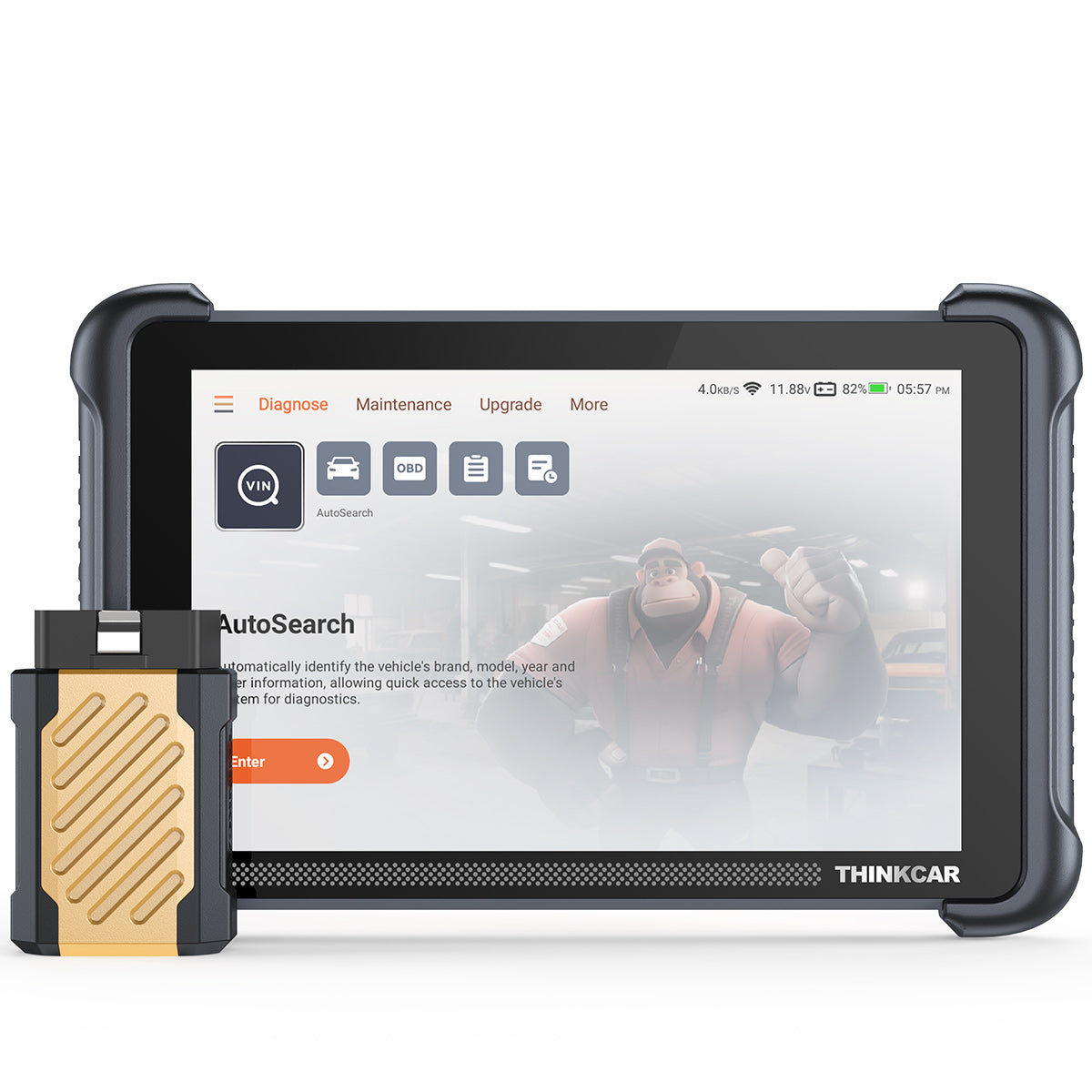
If you are tired of buying a Bluetooth OBD2 scanner dongle that can only read codes, THINKCAR is aimed at stepping you into full-system work without forcing a yearly software renewal decision. The ThinkScan Series focuses on tablet workflows (faster navigation, larger screen, built-in guided routines), while the AI Diagnostic Series and OBD2 Intelligent Diagnosis positioning speak to faster triage and fewer repeat checks once you learn the UI.
- Best fit if: you need bidirectional tests (active tests), modern protocol support (CAN-FD and DoIP), and predictable updates.
- Flagship direction: ThinkScan Series tablets like THINKSCAN 689BT with a Bluetooth dongle workflow.
- Update model: the THINKSCAN 689BT product page calls out Free Lifetime Software Updates and no subscription fees, plus monthly upgrades. (mythinkcar.com)
- Maintenance depth: the product page lists 34+ maintenance functions and AutoVIN/AutoScan for faster intake scans. (mythinkcar.com)
- Workflow expansion: the page notes support for add-on tools (for example, THINKTPMS) if your shop also touches TPMS Service and TPMS & Sensor work. (mythinkcar.com)
- Team and manufacturing: the brand describes a diagnostics-first team and a large factory footprint to control quality and delivery.
Official Site: THINKCAR
2: TOPDON
TOPDON is a strong "small + fast" option when your frustration is more about portability than maximum depth. If you want a glovebox tool that still supports bidirectional functions in an app workflow, TopScan is designed to keep the hardware tiny and let the phone handle the UI.
- Best fit if: you want a phone-first experience with plug-and-play speed.
- Tiers: Lite, Pro, and Master are positioned by service function count, with Master listing 30 service functions and DoIP support. (topdon.us)
- Core features: the TopScan page calls out bidirectional functions, AutoVIN, I/M readiness, performance testing, and a DTC repair guide. (topdon.us)
Official Site: TOPDON
3: Innova
If you are new to diagnostics and your biggest pain is "I do not know what this code means," Innova leans into guided clarity through its app ecosystem. It is often a comfortable step up from basic Code Readers because it bundles a friendlier interpretation layer.
- Best fit if: you want app guidance and a straightforward DIY workflow.
- Coverage: Innova states support for vehicles 1996-2022, while noting feature variability by vehicle. (innova.com)
- Feature mix: the Innova 1000 page lists all-system scan, emissions/SMOG check, OBD2 live data graphing, service resets, and read TPMS. (innova.com)
- Subscription posture: It states subscription is free with optional in-app purchases. (innova.com)
Official Site: Innova
4: Autel
Autel is for the moment you realize Bluetooth convenience is nice, but shop-grade throughput and coverage depth matter more. If you do pre- and post-scans, frequent module work, or higher-end workflows like ADAS calibration planning, Autel tablet ecosystems tend to scale.
- Best fit if: you need higher-end options and a deeper tablet ecosystem.
- Update model: many Autel pro tablets ship with a limited free update period (often one year), then move into renewal choices. (auteltool.us)
Official Site: Autel
Key Factors to Choose (So You Do Not Regret It)
Do you need bidirectional or just codes?
If you only want to read and clear powertrain codes and check I/M readiness, almost any Bluetooth OBD2 scanner tool can get you there. You want a bidirectional scanner when you need to command components and verify the problem instead of guessing.
- Choose bidirectional if you do: cooling fan commands, purge solenoid tests, injector buzz tests, ABS pump motor tests, window/lock actuation, and Hand VAC calibration.
- Stay basic if you only do: check engine light triage, emissions readiness checks, and simple live data snapshots.
Will it handle newer comms like CAN-FD/DoIP?
In 2026, "connects" does not mean "speaks the language your car uses for deeper modules." Two big checkboxes that show up more often on modern tool pages are CAN-FD (higher bandwidth CAN) and DoIP (Diagnostics over Internet Protocol).
- If you touch late-model vehicles frequently, prioritize tools that explicitly list CAN-FD and DoIP.
- If you mostly work on older OBD-II vehicles, you may not benefit from paying for modern protocols.
Are resets included, and how many?
Reset menus look impressive until you notice you only use three functions every month. Count the resets that actually save you labor, then match the tool to that list.
- Common high-value resets: oil service reset, EPB, BMS, SAS, DPF regen (diesel), TPMS-related reads.
- Watch the wording: "28 Reset Function" vs "34+ Maintenance Functions" vs "15 Resets Maintenance Function" can signal different tiers, and vehicle support still varies.
What is the real update cost over 2 years?
This is where buyers get burned. Separate three things before you buy:
- Hardware: the dongle/tablet you hold.
- Licensing: whether features are locked behind Software Subscription, Software Renewal, or Selected Car Brand Full Functions packages.
- Updates: how Software Download and Software Update Notice are handled, and what happens after the included period.
THINKCAR emphasizes Free Lifetime Software Updates on the THINKSCAN 689BT page, which is a different ownership story than tools that switch to renewals after year one. (mythinkcar.com)
Practical tips before you buy
- Confirm your exact year, engine, and trim, because feature coverage changes at that level.
- Plan for pairing friction: keep location permissions and Bluetooth permissions enabled in your app, and avoid pairing outside the app if the manufacturer warns against it.
- Decide on form factor first: tablet (faster workflow, bigger screen) vs phone dongle (pocketable, but depends on phone stability).
Common mistakes that waste money
- Buying tablet power for simple checks: if you never run active tests, you pay for features you will not use.
- Buying dongles when you need actuation: phone-based tools are convenient, but the deeper you go, the more you will want a stable UI and faster navigation.
Product Picks That Fit How You Actually Work
Best overall THINKCAR pick for bidirectional + modern protocols
1: THINKCAR THINKSCAN 689BT

If you are diagnosing more than check-engine lights, THINKSCAN 689BT is the practical "stop guessing" pick in the ThinkScan Series. It is built around an 8-inch tablet for faster navigation, plus a Bluetooth dongle so you can move around the vehicle while the data stream stays up. The product page positions it for full-system diagnosis, ECU coding, and bidirectional/active tests, while also calling out CAN-FD and DoIP support for newer vehicles. (mythinkcar.com)
- Best for: shop workflows and serious DIY troubleshooting where you need answers fast
- Form factor: 8-inch tablet plus Bluetooth dongle (wireless around the car)
- Diagnostics depth: all-system diagnostic across common modules (ECM, TCM, ABS, SRS, BCM, etc.) (mythinkcar.com)
- Bidirectional scanner capability: active tests (actuator tests) to command components for verification (mythinkcar.com)
- Modern protocol notes: lists CAN-FD and DoIP on the product page (mythinkcar.com)
- Maintenance functions: lists 34+ maintenance functions with a detailed reset list (mythinkcar.com)
- Ownership model signal: calls out Free Lifetime Software Updates and no subscription fees on-page (mythinkcar.com)
Why it wins: If your day includes intermittent faults, "no code but symptom" complaints, or verification after parts replacement, bidirectional control saves the most time. The 689BT also reduces the two-year stress because the updated model is clearly stated on the product page, so you are less likely to get trapped in surprise Software Renewal decisions.
Shop: THINKSCAN 689BT
Best ultra-budget phone scanner when you want small + fast
2: TOPDON TopScan
If you want something you can keep in the glovebox and run off your phone, TopScan is built for that exact friction point: quick connection, quick scan, quick decision. The page highlights bidirectional functions and AutoVIN, which matters when you do not want to type a VIN or manually pick a vehicle profile.
- Best for: quick checks, roadside triage, used-car inspections with a phone-based workflow
- Form factor: Bluetooth dongle plus mobile app
- Tiering: Lite, Pro, and Master; Master lists 30 service functions plus DoIP support (topdon.us)
- Core coverage: read/clear codes, bidirectional functions, AutoVIN, I/M readiness, performance testing, DTC repair guide (topdon.us)
Pro insight: phone tools are only as good as your app stability and permissions. If you hate fiddling with pairing, this is where a tablet-style tool can feel calmer during busy work.
Shop: TOPDON TopScan
Best beginner-friendly dongle for guided DIY fixes
3: Innova 1000 Bluetooth OBD2 Scanner
If you are learning diagnostics and you want the tool to help you interpret what you are seeing, Innova 1000 puts a lot of emphasis on the app experience. It also clearly states a coverage window and warns that available features vary by vehicle, which is the honest reality with mobile dongles.
- Best for: first-time users who want simple steps and less guesswork
- Coverage statement: supports vehicles 1996-2022 and notes feature variability by year/make/model (innova.com)
- What it does well: all-system scan, emissions/SMOG check, OBD2 live data with graphing/overlays, service resets, read TPMS (innova.com)
- App model: states subscription is free with optional in-app purchases (innova.com)
Reality check: if you are chasing module-level problems (for example, body or network issues), you will eventually want a deeper tablet ecosystem. But for guided DIY and routine checks, this style is often the easiest to start with.
Shop: Innova 1000
Best high-end tablet option when a shop needs depth
4: Autel MaxiSys Ultra
When the problem is not "can I connect" but "can I get through complex work without stalling the bay," a high-end tablet matters. Autel positions the MaxiSys Ultra as a top-tier tablet platform, and reseller pages commonly note a one-year free update period, after which renewal decisions apply.
- Best for: advanced workflows and frequent diagnostics where speed and breadth matter
- Form factor: pro tablet ecosystem
- Bidirectional focus: often listed as bi-directional diagnostic capability on sales pages (auteltool.us)
- Update model note: many listings state 1-year free update service, then renewal for updates (auteltool.us)
When this makes sense: if you do pre/post scans, frequent module work, or you are building toward ADAS Calibration workflows, a pro tablet can pay back in fewer workarounds.
Shop: Autel MaxiSys Ultra
Comparison Table (Quick shortlist view)
What matters most at checkout?
If your main keyword is "Bluetooth OBD2 scanner," do not let that phrase push you into a dongle when your real job needs active tests. Use this shortlist view to match the tool to your workflow, then confirm vehicle coverage.
| Pick | Form factor | Bidirectional | Protocol notes | Update model | Trade-offs |
|---|---|---|---|---|---|
| THINKCAR THINKSCAN 689BT | Tablet + BT dongle | Yes | CAN-FD, DoIP | Lifetime updates, no subscription | Tablet size, learning curve |
| TOPDON TopScan | BT dongle + phone | Listed | DoIP on Master | Tiered by version | Phone stability dependent |
| Innova 1000 | BT dongle + app | Not emphasized | Coverage 1996-2022 | Free app access stated | Feature varies by vehicle |
| Autel MaxiSys Ultra | Pro tablet | Yes | Varies by package | 1-year updates typical | High complexity, renewals |
Conclusion
If you want Bluetooth wireless convenience without sacrificing real diagnostic power, start by deciding whether you need a bidirectional scanner. In 2026, that one choice usually determines whether you solve the problem in one visit or end up re-scanning after a parts guess.
For the most balanced mix of capability and modern protocol readiness, THINKCAR THINKSCAN 689BT is the cleanest "do more, regret less" pick because it combines full-system work, active tests, and explicit CAN-FD/DoIP support with an update model that is clearly stated on-page. (mythinkcar.com) If you mostly want quick phone-based checks, TOPDON TopScan and Innova 1000 are simpler form factors that can still cover a lot of day-to-day needs. And if your shop lives in deep diagnostics and high throughput, a high-end tablet ecosystem like Autel can make sense as a workflow investment.
Official Site: THINKCAR
FAQ
How do I know if I need a bidirectional scanner?
You need a bidirectional scanner when you must command components to prove a failure, not just read codes. If you routinely test cooling fans, EVAP purge valves, ABS pump motors, or electronic parking brakes, active tests can save 30 to 60 minutes per job by confirming whether the part responds. A basic reader can tell you what the ECU complained about, but it cannot always tell you whether the actuator actually moves under command. If you diagnose intermittent issues, bidirectional control usually pays back fastest.
What is the difference between OBD2 live data and an all-system scan?
OBD2 live data shows real-time sensor and calculated values like RPM, coolant temp, fuel trims, and throttle position while the engine runs. An all-system scan checks for codes across multiple modules, which is how you find faults in ABS, SRS, body, HVAC, and other systems beyond the engine. Live data helps you confirm a drivability problem as it happens, while an all-system scan is often the fastest way to triage multiple warning lights at once. Many technicians start with an all-system scan, then use live data to verify the suspected root cause.
Will a Bluetooth OBD2 scanner tool work on newer vehicles automatically?
Not always, because newer vehicles can require newer communication protocols or have gateway restrictions that limit access. A tool might connect and still fail to reach certain modules, or it might read codes but not offer resets or active tests for your exact trim. If you work on late-model vehicles, look for explicit mentions of protocols like CAN-FD or DoIP and verify coverage for your year and engine. You should also expect that some functions vary by region, ECU version, and software level.
Why does my scanner connect but not show the functions I expected?
This usually means the tool supports the function in general, but your specific vehicle does not expose that feature in the same way. It can also happen when the app is missing permissions, the vehicle profile was chosen incorrectly, or the software is out of date. Start by updating the app or tablet software, then delete the Bluetooth pairing and reconnect inside the app if the brand recommends that workflow. If the function still does not appear, treat it as a coverage limitation for that vehicle rather than assuming the tool is defective.
Are free updates the same as free features?
No, because updates and licensing are different things. Updates usually mean bug fixes, new vehicle coverage, and added functions, while features can still be locked behind tiers, add-ons, or brand packages, depending on the tool. Before you buy, separate hardware, update policy, and feature unlock rules into three different checkboxes. That simple split helps you avoid paying twice when you discover a reset or active test is not included in your version.
Can I use a Bluetooth scanner for Electric Vehicle (EV) Diagnostics?
It depends on how deep you need to go beyond basic OBD2 data. Many EVs and hybrids still expose useful information through standard diagnostics, but deeper battery, inverter, and high-voltage system details often require stronger OEM-level coverage. You should expect that EV Diagnostics coverage varies heavily by make, model year, and system, even when the tool connects. If you plan to expand into EV work, prioritize tools that clearly list supported EV models and systems and budget time to validate coverage on your most common vehicles.
What should I look for if I want TPMS Service and maintenance resets?
Start by listing the exact resets you will use, such as oil service, EPB, BMS, SAS, and any TPMS-related functions you rely on. Then check whether the tool supports only TPMS reads or also supports activation, relearn, and programming workflows, because those are different capabilities. You should also verify whether the tool can expand into TPMS programming with an add-on device if that matters for your shop. Finally, confirm that the update policy supports ongoing vehicle coverage improvements, since reset support can change over time.
Table of Contents
- Introduction
- Recommend Brands
- Key Factors to Choose (So You Do Not Regret It)
- Product Picks That Fit How You Actually Work
- Comparison Table (Quick shortlist view)
- Conclusion
-
FAQ
- How do I know if I need a bidirectional scanner?
- What is the difference between OBD2 live data and an all-system scan?
- Will a Bluetooth OBD2 scanner tool work on newer vehicles automatically?
- Why does my scanner connect but not show the functions I expected?
- Are free updates the same as free features?
- Can I use a Bluetooth scanner for Electric Vehicle (EV) Diagnostics?
- What should I look for if I want TPMS Service and maintenance resets?

Share:
Budget-Friendly Diagnostic Tools for Repair Shops: A 5-Step Buying Guide
AI-Assisted Car Diagnostic Tools: An Ultimate Guide to Picking a Reliable One