
Why the Best Bluetooth Scanner Depends on Full-System Access

A check-engine light can look simple from the driver’s seat, but the real fault may lie outside the engine module. One vehicle may store a transmission code after a shift flare. Another may show ABS, SRS, body control, steering, battery, or TPMS faults at the same time. If you only buy a basic code reader, you may clear an emissions code while missing the module that explains the warning pattern.
That is why the best Bluetooth scanner is not just the smallest wireless dongle. It is the tool that matches your actual repair work: quick checks, full-system car diagnostics, bidirectional tests, maintenance resets, reports, and long-term vehicle coverage. Below, you will compare three ThinkCar options: THINKSCAN 689BT, THINKDIAG 2, and MUCAR BT200 MAX. You will also see how they fit against familiar Bluetooth diagnostic tool brands such as Innova, BlueDriver, XTOOL, and ANCEL.
Know the Diagnostic Levels Before Comparing Bluetooth Scanners
Before you compare features, separate three jobs: reading engine codes, scanning multiple modules, and commanding parts to test them. Reference buying guides commonly divide scan tools by depth, from basic OBD2 readers to mid-range tools and advanced full-system scanners. The difference matters because a wireless OBD2 scanner can be convenient and still be too shallow for your repair. (autotech-wss.com)
Basic Code Reader vs Full-System Scanner
A basic code reader focuses on emissions-related engine data. It usually reads and clears generic powertrain DTCs, which are diagnostic trouble codes stored by a control module. That is useful for a quick check-engine light scan, but it is not enough when the fault involves ABS, SRS, transmission, BCM, or steering systems.
A full-system scan tool goes deeper. It communicates with multiple modules, pulls codes from those systems, shows live data, and often saves reports before you erase anything.
- Choose a basic reader for quick emissions checks.
- Choose a full-system scanner when warning lights involve brakes, airbags, shifting, body electronics, or service resets.
- Choose a bidirectional scan tool when you need to command components during testing.
What Full-System Diagnostics Should Include
Full-system car diagnostics should cover more than the engine control module. At minimum, look for access to engine, transmission, ABS, SRS airbag, body control, battery, TPMS, steering, parking brake, HVAC, and comfort modules where supported by the vehicle.
The EPA describes onboard diagnostics as a regulatory system for monitoring emission-control malfunctions, but repair work often requires manufacturer-level module data beyond the generic emissions layer. That is where a Bluetooth OBD2 scanner for more than engine codes becomes valuable.
Core Diagnostic Terms to Understand
You do not need to be a master technician to compare scanners, but you should know these terms:
- DTCs: stored fault codes that point to a system, circuit, or condition.
- Live data: real-time sensor and actuator values, such as coolant temperature or wheel speed.
- Freeze frame: a snapshot of vehicle conditions when a code is set.
- Bidirectional control: the scanner sends a command, such as turning on a fan or pump.
- Service reset: a maintenance function like oil reset, EPB reset, SAS calibration, or BMS reset.
- CAN-FD and DoIP: newer communication protocols used by some modern vehicles; SAE International documents OBD communication requirements for external test equipment.
How the 3 Best Bluetooth Scanners Fit Different Repair Jobs
The right mobile diagnostic tool depends on how you work. A shop may prefer a tablet because it keeps reports, service menus, and live data visible on a larger screen. A DIY user may prefer a car scanner with a phone app because it fits in a glove box. A budget-focused user may want AI-assisted explanations before replacing parts.
Best All-Around Workshop Pick: THINKSCAN 689BT

The THINKSCAN 689BT is the strongest all-around pick when you want Bluetooth mobility with a tablet workflow. It pairs an 8-inch touchscreen with a Bluetooth dongle, so you can work around the vehicle without dragging a cable across the seat or fender.
ThinkCar lists ECU coding, bidirectional active tests, OE-level full-system diagnostics, CAN-FD and DoIP support, AutoVIN, AutoScan, FCA SGW AutoAuth support, 35+ maintenance functions, 4 GB RAM, 64 GB ROM, and 2.4G/5G Wi-Fi updates for this model. It also lists broad system access including engine, transmission, ABS, SRS, BCM, BMS, TPMS, steering angle, doors, seats, air suspension, and more.
Best fit:
- Serious DIYers who work on several vehicles.
- Mobile technicians who need full-system reports.
- Small shops that want bidirectional tests without a fully wired setup.
- Users who need newer protocol support such as CAN-FD and DoIP.
Shop: THINKSCAN 689BT
Best Phone-App Scanner: THINKDIAG 2
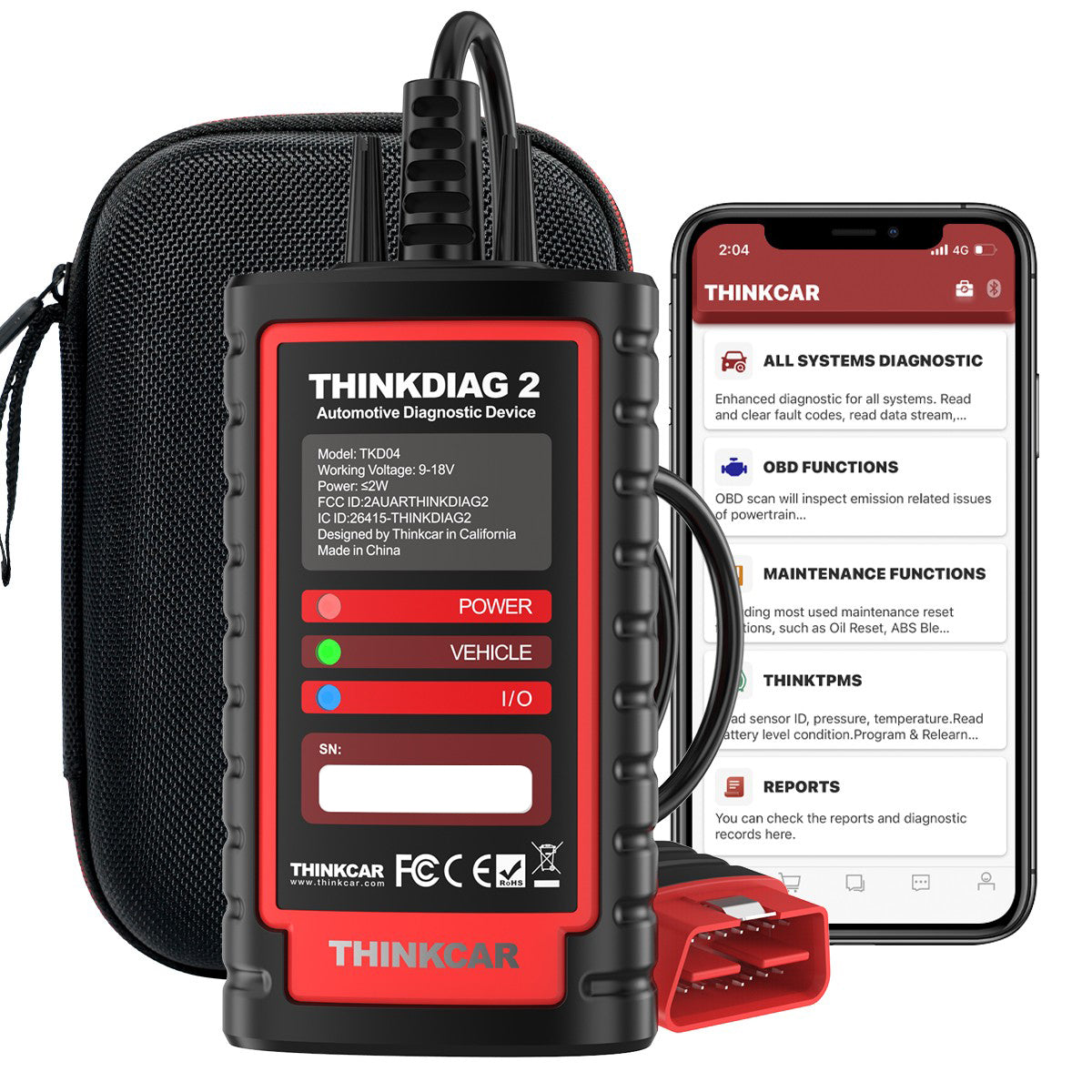
The THINKDIAG 2 is the best Bluetooth scanner in this group for app-first users. It is compact, phone-based, and built for people who want a wireless OBD2 scanner without carrying a tablet. That makes it easier to keep in a small kit, lend between family vehicles, or use during quick driveway checks.
ThinkCar lists CAN-FD support, ECU coding, bidirectional active tests, full-system diagnostics, 15 maintenance functions, adaptation, IMMO key matching, AutoVIN, report printing, and 15+ language support for THINKDIAG 2. The product page also describes OE-level access to systems such as ABS, SRS, engine, transmission, wiper, seat, EPB, TPMS, body system, AWD, battery, parking sensor, cruise control, and instruments.
Best fit:
- Phone-first DIYers who want deeper scans than a basic dongle.
- Drivers who want a compact Bluetooth diagnostic tool.
- Users who need active tests but do not need a dedicated tablet.
- Compact repair kits where storage space matters.
Best Budget AI-Assisted Pick: MUCAR BT200 MAX
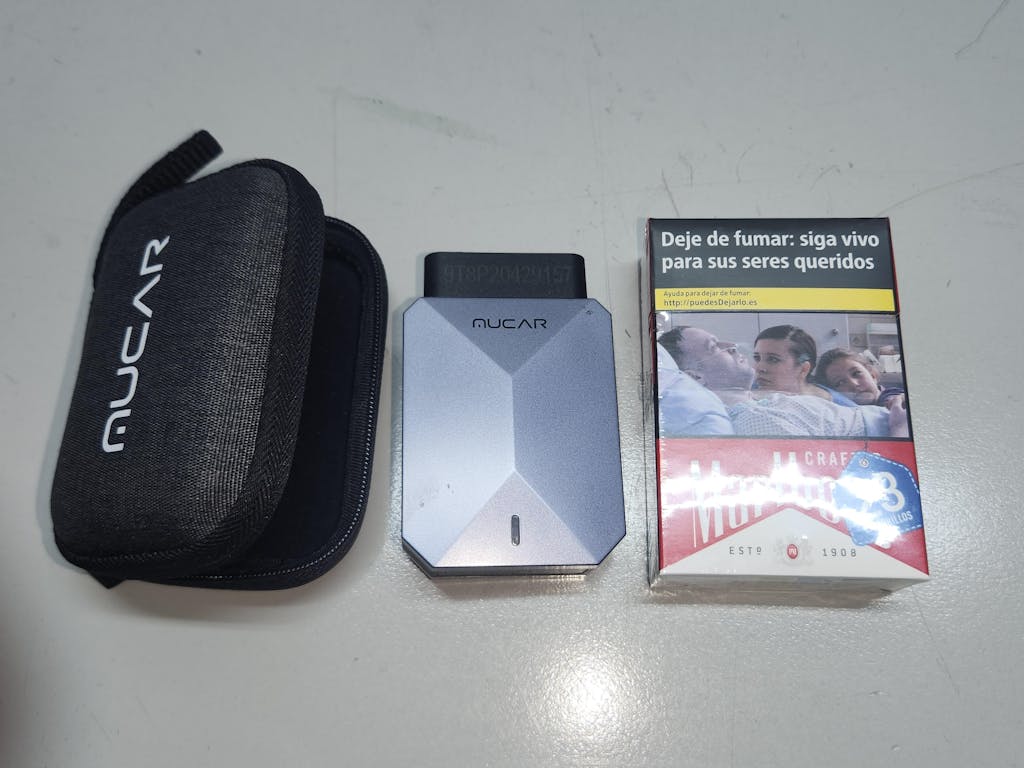
The MUCAR BT200 MAX is the easiest entry point if you want full-system diagnostics with guided interpretation. Its main advantage is not only scanning; it is helping you understand the report before you jump to a repair.
ThinkCar lists AI-guided diagnostics, lifetime free updates, bidirectional actuation tests, CAN-FD, ELM327 compatibility, 15+ resets, smart sleep mode, and true full-system diagnostics for engine, transmission, ABS, airbag, and more. The product page also describes AI report parsing, root-cause analysis, repair guidance, circuit diagnostics, component testing, and replacement decision support.
Best fit:
- Cost-conscious DIY users who want more than check-engine codes.
- First-time users who need help reading reports.
- Owners who want a compact scanner left available for routine checks.
- Users who value AI-assisted explanations alongside live scan data.
Shop: MUCAR BT200 MAX
Which Best Bluetooth Scanner Features Should Decide Your Choice?
Do not choose by wireless convenience alone. A Bluetooth OBD2 scanner can connect quickly and still miss the system you need. Instead, compare the scanner against your vehicle, your repair goal, and the level of control you need during diagnosis.
Vehicle Coverage and Protocol Support
Start with make, model, year, and region. Coverage can vary even when two vehicles share the same badge. A newer GM, Chrysler, Volvo, BMW, Jaguar, or Land Rover may require support for protocols such as CAN-FD or DoIP, depending on model and system.
Check these items before checkout:
- Your exact vehicle year, make, model, and engine.
- CAN-FD support for newer platforms where needed.
- DoIP support for supported Ethernet-based diagnostics.
- FCA SGW access if you service protected FCA/Stellantis vehicles.
- Whether the function works on your vehicle, not just on the tool’s feature list.
For secure-gateway vehicles, AutoAuth explains that its service lets technicians use aftermarket diagnostic tools to perform secured functions through the OBD port that would otherwise be locked by the vehicle OEM.
System Coverage Beyond Engine Codes
If your work stops at emissions checks, an engine-only reader may be enough. However, full-system car diagnostics matter when symptoms cross modules. A weak battery may set communication codes. A steering angle issue may affect traction control. An ABS fault may require wheel-speed live data rather than a generic engine code.
Use this simple rule:
| Repair need | Minimum scanner depth | Why it matters |
|---|---|---|
| Check-engine light only | Basic OBD2 | Reads emissions-related DTCs |
| ABS or airbag light | Multi-system | Needs brake or SRS module access |
| Transmission complaint | Full-system | Requires TCM codes and live data |
| EPB, BMS, SAS service | Service functions | Requires reset or calibration menu |
| Fan, pump, window, lock test | Bidirectional | Commands components directly |
Bidirectional Tests and Service Functions
Bidirectional control saves time because you can test a component without removing half the vehicle. For example, you can command a cooling fan on, activate an ABS pump, cycle an EVAP purge solenoid, operate windows, or test door locks when the vehicle supports that command.
Service functions are different. They complete maintenance or relearn procedures after repair work. Common examples include:
- Oil maintenance reset.
- EPB brake reset.
- Steering angle calibration.
- Battery matching or BMS reset.
- TPMS reset.
- ABS bleeding.
- Injector coding.
- DPF regeneration.
Use advanced functions carefully. If the scanner asks for temperature, battery, parking brake, or road-test conditions, meet those conditions before starting the procedure.
App, Tablet, and Workflow Experience
A phone app favors portability. A tablet favors a guided shop workflow. Neither format is automatically better; the better choice is the one that keeps your diagnostic steps clean.
Choose phone-first if you want:
- Small storage size.
- Fast setup on iPhone or Android.
- Occasional scans across personal vehicles.
- Simple report sharing.
Choose tablet-first if you want:
- Larger live-data graphs.
- Easier service-function navigation.
- Better visibility during active tests.
- A dedicated device that does not depend on your personal phone.
Compare ThinkCar With Other Bluetooth Scanner Brands Fairly
ThinkCar is not the only brand in the Bluetooth scanner space, and you should compare by job fit rather than brand hype. Innova is often strong for consumer-friendly workflows. BlueDriver is known for app-based code guidance. XTOOL offers many service-function and tablet options. ANCEL has budget-friendly and full-system diagnostic coverage across several models. (us.bluedriver.com)
Capability Matrix to Include
Use this matrix as a practical comparison lens, not a universal ranking:
| Brand path | Typical strength | What to verify |
|---|---|---|
| ThinkCar | Wireless app and tablet options with full-system depth | Vehicle coverage, resets, active tests |
| Innova | Consumer-friendly scan flow and repair guidance | Whether the model supports your needed systems |
| BlueDriver | App-focused code lookup and reports | Enhanced diagnostics by make and year |
| XTOOL | Tablet tools, service functions, active tests | Update terms and protocol support |
| ANCEL | Budget-to-midrange diagnostic coverage | Full-system access and bidirectional depth |
Comparison Criteria, Not Brand Hype
A fair comparison starts with your repair list. If you need ABS bleeding, do not buy based on app design alone. If you need report clarity for family vehicles, do not overbuy a workshop tablet only because it has more menus.
Compare these points in order:
- Full-system access by vehicle.
- Bidirectional controls by system.
- Reset functions by maintenance need.
- Update policy and future coverage.
- App stability and report clarity.
- Hardware durability and battery behavior.
- Support after purchase.
Recommended Positioning
ThinkCar is the lead recommendation here for users who want Bluetooth mobility plus full-system depth. THINKSCAN 689BT is the best fit when your workflow looks closer to a shop. THINKDIAG 2 is better when your phone is the center of the job. MUCAR BT200 MAX is the best match when budget and AI-assisted interpretation matter.
Competitors can still make sense. BlueDriver may suit users focused on app-based code guidance. Innova can work well for consumer-friendly diagnostics. XTOOL and ANCEL can be good alternatives for users comparing tablet functions or lower-cost coverage. The key is to verify the exact function on the exact vehicle before you buy.
Best Practices and Pitfalls
A scanner is only as useful as your process. The biggest mistake is clearing codes too early. Once you erase a code, you may lose freeze-frame context, readiness status, and clues that explain whether the fault was current, intermittent, or caused by another module.
Best Practices
Use this simple scan routine:
- Confirm vehicle voltage before scanning; low voltage can create misleading communication faults.
- Run a full-system scan before clearing any code.
- Save or export the report before repairs.
- Review freeze-frame data for the first code that was set.
- Compare live data between related sensors, not one value alone.
- Repair the root cause, then clear codes and rescan.
- Road test when the repair requires a drive cycle.
For bidirectional tests, keep the work area safe. If you command a fan, pump, window, mirror, lock, or throttle-related component, make sure hands, tools, and loose clothing are clear.
Common Pitfalls to Avoid
Avoid these buying and diagnostic mistakes:
- Buying by price alone and missing ABS, SRS, or transmission access.
- Assuming all listed resets work on every vehicle.
- Clearing codes before saving a report.
- Treating one DTC as a guaranteed failed part.
- Ignoring update terms and support policies.
- Forgetting secure-gateway access on supported FCA/Stellantis vehicles.
- Using coding or relearn functions without stable battery voltage.
If you are unsure, choose a scanner that gives you a clear report first. A clean report helps you decide whether you can handle the job, need more testing, or should hand it to a specialist.
Conclusion
The best Bluetooth scanner is the one that fits your diagnostic depth, not just your phone or budget. For the most complete wireless workshop-style setup, THINKSCAN 689BT is the strongest choice. For a compact car scanner with a phone app, THINKDIAG 2 gives you full-system diagnostics in a smaller workflow. For budget-focused users who want AI-assisted report help, MUCAR BT200 MAX is the most approachable option.
Match the tool to the systems you need: engine, ABS, SRS, transmission, body modules, battery, TPMS, steering, and service resets. Then confirm vehicle coverage before you buy. That step prevents wasted repair time and helps your scanner stay useful as your vehicles get more complex.
FAQ
Can a smartphone-based diagnostic tool replace a tablet scanner for most users?
Yes, a smartphone-based diagnostic tool can replace a tablet scanner for many DIY users and light repair jobs. It works well for full-system scans, live data checks, code clearing, and report sharing when the app supports your vehicle. A tablet scanner is still better when you need a larger display, longer sessions, frequent service functions, or a dedicated shop device. If you scan several vehicles every week, the tablet workflow usually feels faster and cleaner.
Which Bluetooth scanner is good for full-system scans, not just check engine lights?
A good full-system Bluetooth scanner should access engine, transmission, ABS, SRS, BCM, TPMS, battery, steering, and comfort modules when the vehicle supports them. It should also read and erase DTCs, show live data, save reports, and support useful maintenance resets. THINKSCAN 689BT is the strongest fit when full-system access, bidirectional tests, and tablet workflow matter most. THINKDIAG 2 is better if you want similar depth in a compact phone-based format.
What’s the best app-powered scan tool for an iPhone or Android user?
The best app-powered scan tool is one that combines stable Bluetooth connection, full-system scans, live data, service resets, and clear reports. THINKDIAG 2 is the best fit here for iPhone or Android users who want a compact Bluetooth diagnostic tool. MUCAR BT200 MAX is also useful if you want AI-assisted report interpretation and a lower entry point. Choose THINKSCAN 689BT instead if you prefer a dedicated tablet rather than using your phone.
Are there drawbacks to using Bluetooth diagnostic tools over wired ones?
Yes, Bluetooth diagnostic tools can depend on battery charge, app stability, wireless range, and connection quality. For normal scanning, live data, service resets, and many active tests, Bluetooth is usually practical and convenient. Wired tools may feel safer during long procedures where interruption could cause problems. Keep the scanner charged, maintain stable vehicle voltage, and avoid moving out of range during active tests or relearns.
How do I select the best Bluetooth scanner for my car’s needs?
Start by confirming your vehicle’s make, model, year, engine, and supported systems. Then decide whether you need basic code reading, full-system diagnostics, service resets, bidirectional control, ECU coding, or AI-guided reports. Check newer protocol needs such as CAN-FD or DoIP if your vehicle platform uses them. If you repair multiple vehicles, prioritize broad coverage, update policy, support, and report export over the lowest price.
What should I compare before buying a Bluetooth diagnostic scanner?
Compare vehicle coverage, system access, bidirectional functions, service resets, update terms, app quality, and report export options. Also check whether the scanner supports the exact maintenance tasks you plan to perform, such as EPB reset, SAS calibration, BMS reset, or ABS bleeding. For repair use, full-system scanning and active tests matter more than generic code lookup. For occasional DIY use, easy setup and clear explanations may matter more than advanced coding menus.
Table of Contents
- Why the Best Bluetooth Scanner Depends on Full-System Access
- Know the Diagnostic Levels Before Comparing Bluetooth Scanners
- How the 3 Best Bluetooth Scanners Fit Different Repair Jobs
- Which Best Bluetooth Scanner Features Should Decide Your Choice?
- Compare ThinkCar With Other Bluetooth Scanner Brands Fairly
- Best Practices and Pitfalls
- Conclusion
-
FAQ
- Can a smartphone-based diagnostic tool replace a tablet scanner for most users?
- Which Bluetooth scanner is good for full-system scans, not just check engine lights?
- What’s the best app-powered scan tool for an iPhone or Android user?
- Are there drawbacks to using Bluetooth diagnostic tools over wired ones?
- How do I select the best Bluetooth scanner for my car’s needs?
- What should I compare before buying a Bluetooth diagnostic scanner?

Share:
What's the Best OBD2 Scanner for Your Repair Shop? Three Tiers, Three Tools
How to Pick a Future-Proof Scan Tool for Modern Vehicles in 2026