
Start With the 2026 Vehicle Systems You Need to Diagnose
A check-engine light used to point you toward one narrow path: pull the code, check the sensor, clear the light, and see whether it returns. In 2026, that same light may sit on top of a much bigger problem. The fault may involve a gateway module, a battery management system, a brake controller, a body module, or a network message that never reached the right ECU. A cheap reader can still show a generic emissions code, but it may miss the system that caused the fault.
That is why a future-proof scan tool 2026 buying decision should start with your vehicle systems, not the scanner’s longest feature list. Basic readers, DIY scanners, prosumer tablets, and professional diagnostic tools differ sharply in module access, live data, bidirectional tests, service functions, and software updates. ThinkCar fits well for buyers who want a practical bridge between enthusiast budgets and professional-grade diagnostic coverage, especially through THINKSCAN 689BT, THINKSCAN 689, and MUCAR 682.
Know the Scanner Categories Before Comparing Features
The best automotive diagnostic tool is the one that matches the depth of the vehicle in front of you. A scanner can be “OBD2 compatible” and still fail to access ABS, SRS, TPMS, body, battery, hybrid, or EV-related modules. Use the category first, then judge features inside that category.
What Counts as Future-Proof in 2026?
A future-proof scan tool 2026 setup should cover three areas: vehicle protocols, system depth, and software support. Protocols decide whether the tool can communicate with newer vehicle networks. System depth decides whether it can read beyond the engine computer. Updates decide whether coverage keeps improving after you buy the tool.
Key signals to check:
- Modern protocol support: CAN FD and DoIP matter on many newer platforms.
- Full-system diagnostics: Look for ECM, TCM, ABS, SRS, BCM, TPMS, BMS, HVAC, and gateway access where supported.
- Service functions: Oil reset, EPB, SAS, ABS bleeding, DPF, battery matching, injector coding, and TPMS reset are common workflow needs.
- Secure gateway access: Some vehicles require authorized access before clearing codes or running service functions.
- Update policy: Compare included updates, renewal terms, and coverage expansion.
Core Terms to Define Clearly
OBD2 is the emissions-focused diagnostic standard used on modern light vehicles. The U.S. EPA states that 1996 and newer passenger vehicles are required to have onboard diagnostic systems, but that does not mean every OBD2 reader can access every vehicle module.
Enhanced diagnostics go deeper than generic engine codes. They may include ABS, SRS, transmission, body, immobilizer, TPMS, and manufacturer-specific data. A full-system scan tries to communicate with all supported control modules, while an engine-only scan focuses mostly on powertrain and emissions data.
CAN FD means Controller Area Network Flexible Data-rate. Bosch describes CAN FD as expanding payload size from up to 8 bytes to up to 64 bytes per frame, which helps newer vehicles move more data across networks. DoIP means Diagnostics over Internet Protocol, which allows diagnostic communication over Ethernet-based vehicle networks.
Scanner Taxonomy for Search Clarity
Use this scanner ladder to avoid overbuying or underbuying:
- Basic code readers: Good for generic check-engine codes and emissions readiness.
- DIY scanners: Add live data, freeze frame, and clearer code definitions.
- Prosumer scanners: Add ABS, SRS, transmission, body systems, and common resets.
- Professional tablets: Add full-system scans, bidirectional controls, coding, newer protocols, and broad coverage.
- Specialty tools: Focus on TPMS, battery testing, key programming, ADAS, or EV workflows.
A diagnostic scanner for newer vehicles should usually sit in the prosumer or professional tablet range. Otherwise, you may spend more time confirming what the scanner cannot see than fixing the vehicle.
Match the Tool to Your Vehicle, Workflow, and Budget
A smart OBD2 scanner buying guide starts with the vehicles you actually touch. A household with two gasoline vehicles needs a different tool than a mobile mechanic working across late-model trucks, hybrids, and European platforms.
Choose by Vehicle Age and Platform
Vehicle year matters because network architecture changes over time. A 2008 sedan may need strong live data and ABS access, while a 2024 truck may require CAN FD, secure gateway support, and deeper service functions. Hybrids and EVs add battery, thermal, braking, and communication systems that a basic code reader may never show.
Before you shortlist a tool, write down:
- Make, model, year, engine, and trim.
- Gasoline, diesel, hybrid, plug-in hybrid, or EV platform.
- Systems you expect to diagnose: ABS, SRS, TPMS, transmission, battery, body, HVAC, or ADAS-related modules.
- Service tasks you perform often, such as oil resets, EPB service, steering angle calibration, or battery registration.
Build a Practical Feature Checklist
Do not compare scanners only by screen size or reset-function count. Coverage by make, model, year, module, and software version matters more.
Use this checklist before buying:
- Vehicle coverage: Confirm exact VIN-level compatibility when possible.
- System depth: Look for ECM, TCM, ABS, SRS, BCM, TPMS, BMS, and gateway coverage.
- Live data: Prefer graphing, freeze frame, recording, and multiple data-stream views.
- Active tests: Confirm the bidirectional scan tool can command components you actually test.
- Maintenance functions: Oil, EPB, SAS, DPF, ABS bleeding, battery matching, injector coding, and TPMS reset are practical daily functions.
- Protocols: Prioritize a CAN FD scan tool and DoIP diagnostic scanner support for newer platforms.
- Updates: Compare update frequency, included years, and renewal terms.
- Support: Check warranty, return terms, coverage lookup, and remote help.
Recommended ThinkCar Product Fit

The THINKSCAN 689BT is the main ThinkCar fit for advanced users who want Bluetooth diagnostics, CAN FD, DoIP, ECU coding, bidirectional tests, AutoVIN, AutoScan, AutoAuth for FCA SGW, 35+ maintenance functions, an 8-inch touchscreen, 4 GB RAM, and 64 GB storage. It is useful when you want tablet-style workflow without staying tied to the OBD port by a short cable.
The THINKSCAN 689 suits users who prefer a wired tablet-style scan tool with 150+ brand coverage, full-system diagnostics, ECU coding, bidirectional tests, CAN FD, DoIP, AutoAuth, 35+ maintenance functions, an 8-inch touchscreen, and 2.4G/5G Wi-Fi updating.
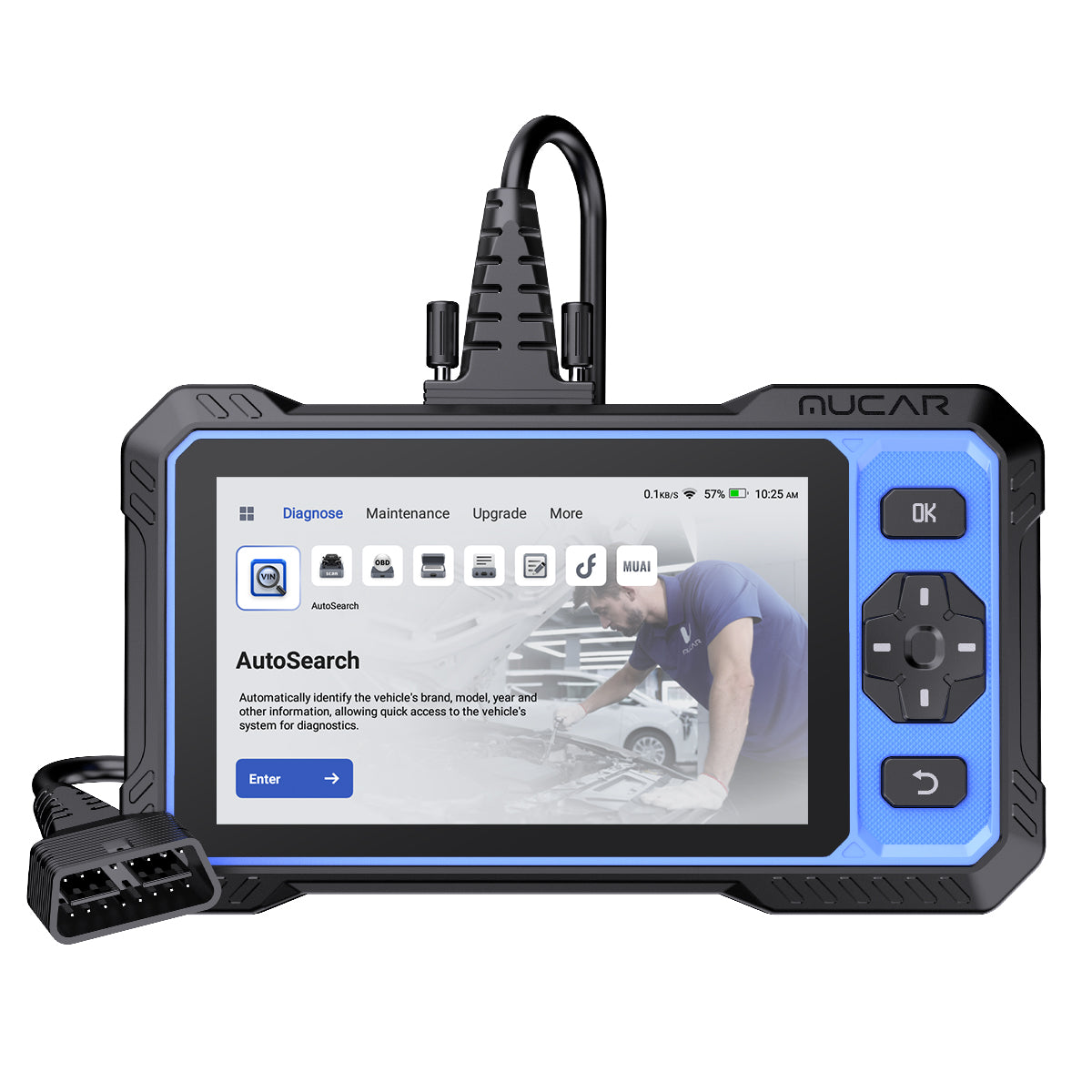
The MUCAR 682 is the affordable professional scan tool option for DIYers and light pros who want lifetime free updates, AI fault-code assistance, bidirectional testing, 20+ resets, CAN FD, FCA AutoAuth, full OBD2 functions, full-system diagnostics, and a 6.2-inch anti-glare touchscreen.
Shop: THINKSCAN 689BT
Shop: THINKSCAN 689
Shop: MUCAR 682
Which Features Actually Separate a Modern Scan Tool?
Feature lists can look similar until you ask what the tool can do on your exact vehicle. The real divider is not the number of icons on the home screen. It is whether the scanner can communicate, test, reset, and update in the systems you service.
Prioritize Protocols Before Extra Menus
Protocols are the language layer. If the scanner cannot speak the vehicle’s network language, the rest of the menu does not matter. CAN FD and DoIP are especially important when shopping for a diagnostic scanner for newer vehicles.
What to check:
- Choose a CAN FD scan tool if you work on many late-model GM, Chrysler, or other newer platforms.
- Choose a DoIP diagnostic scanner if you service vehicles that use Ethernet-based diagnostics.
- Confirm secure-gateway support when working on protected vehicles.
- Ask whether protocol support is built in or requires an adapter.
Secure gateways are not just a convenience issue. AutoAuth notes that its Standard account limit includes up to 5 tools, which matters for small shops managing multiple scan tools and technicians.
Treat Bidirectional Control as a Diagnostic Divider

A bidirectional scan tool does more than read information. It sends a command to a supported module and watches the result. For example, you can command a cooling fan, fuel pump, ABS pump, wiper, window, horn, mirror, or headlamp test where the vehicle supports it.
That changes your workflow:
- Reading a code tells you what the module reported.
- Live data shows what the module sees.
- Active tests show whether the commanded part responds.
- A failed response helps separate wiring, actuator, sensor, and control-side problems.
Use caution. Bidirectional tests can move parts, trigger actuators, pressurize systems, or run pumps. Keep hands clear, use wheel chocks when needed, and maintain stable battery voltage during tests and coding.
Shop: THINKSCAN 689
Evaluate Updates as Ownership Cost
Software updates are not a small detail. They affect new vehicle coverage, special functions, code definitions, module access, and supported protocols. A lower-cost scanner can become less useful if important functions require frequent paid renewals.
Compare ownership this way:
| Buyer Type | What Matters Most | Update Question to Ask |
|---|---|---|
| DIY owner | Codes, live data, common resets | Are updates needed for my vehicle year? |
| Serious enthusiast | Full systems and active tests | Do updates expand module coverage? |
| Mobile mechanic | Wireless workflow and broad coverage | How fast are new models added? |
| Small shop | Coding, service functions, protocols | What is the three-year ownership cost? |
| Fleet user | Repeatable scans and support | Can multiple vehicles be handled consistently? |
The MUCAR 682 stands out for users who place high value on lifetime free updates, while THINKSCAN 689BT and THINKSCAN 689 aim higher for coverage depth, coding, and professional workflow.
Shop: MUCAR 682
Compare ThinkCar With Common Alternatives
ThinkCar’s strongest angle is feature-to-value positioning across CAN FD, DoIP, bidirectional tests, full-system diagnostics, service functions, and update-focused ownership. Foxwell often appeals to users who want service-function-heavy diagnostic tablets. Innova is known for a friendly consumer diagnostics experience and guided repair information. BlueDriver is convenient for app-based code reading and enhanced diagnostics on supported vehicles. XTOOL offers competitive bidirectional tablet options with modern protocol support on several models.
The fair comparison rule is simple: do not buy from brand reputation alone. Verify exact vehicle coverage, active tests, update terms, and secure-gateway requirements before choosing any scanner.
Avoid the Mistakes That Make a Scanner Obsolete
Most bad scanner purchases happen when the buyer compares the wrong thing. A long reset list looks impressive, but it does not guarantee support for your vehicle. Likewise, “works with OBD2” does not mean full-system access.
Do's for Smarter Buying
Use a practical buying process:
- Confirm coverage using your VIN: Make, model, year, engine, and region can change supported functions.
- Choose protocol support over cosmetics: A bright screen is useful, but CAN FD, DoIP, and gateway access decide newer-vehicle readiness.
- Check update terms in writing: Know whether updates are lifetime, included for a set period, or renewal-based.
- Match features to workflow: DIY owners may need resets and live data; shops may need coding, active tests, and fast full-system scans.
- Plan for hybrids and EVs: A hybrid and EV scan tool should support relevant battery, brake, body, thermal, and communication modules where available.
Don'ts That Waste Money
Avoid these common buying errors:
- Do not buy by price alone: The lowest-cost tool may miss the system causing the fault.
- Do not ignore secure gateways: Some protected vehicles may block code clearing or service functions without authorization.
- Do not assume universal coverage: No aftermarket scanner covers every vehicle, module, and function perfectly.
- Do not compare reset counts blindly: Thirty-five reset icons are less useful than ten functions that work on your exact vehicle.
- Do not run active tests without context: A command test is powerful, but it can create risk if you do not understand the component.
Safety Reminder for Active Tests and Coding
Active tests and coding require a more careful setup than simple code reading. Keep the vehicle in park or neutral as required, apply the parking brake, block wheels when needed, and keep people clear of moving parts. During coding, battery voltage matters because a voltage drop can interrupt communication. The NHTSA explains that TPMS warns drivers when tire pressure is significantly low, but TPMS service work still depends on the exact vehicle procedure, sensor type, and relearn method.
Best Practices and Pitfalls
A future-proof scan tool 2026 purchase is not only about the tool. It is also about how you use it after the box is opened. Good habits protect your vehicle, your time, and the scanner’s long-term value.
Do's
- Confirm coverage before the first repair: Use the brand’s coverage checker or support channel with your VIN.
- Keep scanner software updated: Updates can improve vehicle coverage, code definitions, and service-function support.
- Save pre-scan and post-scan reports: This helps you prove what changed after repair.
- Use battery support during coding: Stable voltage reduces interruption risk.
- Record live data before clearing codes: Freeze frame and data streams may disappear after clearing.
- Use the right TPMS workflow: Reset, relearn, activation, and sensor programming are not the same task.
Don'ts
- Do not ignore hybrid and EV readiness: Battery, thermal, and regenerative braking systems may need deeper access than gasoline-only tools provide.
- Do not confuse ECU coding with ECU programming: Coding changes configurations supported by the module; programming or flashing rewrites deeper software and often needs OEM tools.
- Do not clear codes before documenting them: You may lose the clues that led to the root cause.
- Do not assume wireless is always better: Bluetooth workflow is convenient, but some procedures may still require stable wired communication.
- Do not treat AI fault help as the final answer: Use it as a guide, then verify with live data, service information, and testing.
Conclusion
A future-proof scan tool 2026 shortlist should balance coverage, protocols, bidirectional testing, service functions, updates, and real workflow fit. If you work on newer vehicles, prioritize CAN FD, DoIP, secure-gateway readiness, full-system diagnostics, and verified active tests before you compare extra menus.
For ThinkCar buyers, THINKSCAN 689BT is the strongest all-around fit for advanced wireless diagnostics, THINKSCAN 689 is a capable wired tablet-style option, and MUCAR 682 is the value-focused choice for DIYers and light pros who want lifetime updates and modern core functions. Start with your vehicle systems, confirm compatibility, then choose the tool that will still make sense three years from now.
FAQ
What is the best future-proof scan tool for modern vehicle systems?
The best future-proof scan tool is one that supports modern protocols, full-system diagnostics, bidirectional testing, service functions, and ongoing updates. THINKSCAN 689BT is a strong first choice when you need CAN FD, DoIP, AutoAuth, ECU coding, 35+ maintenance functions, Bluetooth diagnostics, and an 8-inch touchscreen. It fits advanced DIY users, mobile mechanics, and small shops that diagnose more than basic engine codes. Always confirm VIN-level compatibility before purchase because coverage can vary by make, model, year, and module.
What is the best diagnostic scanner for newer vehicles, hybrids, and EVs?
The best diagnostic scanner for newer vehicles, hybrids, and EVs is one that can access more than the engine control module. Look for CAN FD, DoIP, full-system scans, secure-gateway support, and battery, braking, thermal, body, and communication module coverage where supported. THINKSCAN 689BT and THINKSCAN 689 are better fits when you need deeper system access and professional workflow features. For hybrid and EV work, confirm exact system coverage before assuming the scanner can access high-voltage or battery-related modules.
Which affordable scanner can handle TPMS, newer protocols, and advanced vehicle functions?
MUCAR 682 is a strong affordable option for users who want newer-protocol readiness, TPMS reset capability, bidirectional testing, full-system diagnostics, and 20+ reset functions. It includes CAN FD, FCA AutoAuth, full OBD2 functions, AI-assisted fault help, and lifetime free updates. It is best for DIYers, enthusiasts, and light professional users who want more depth than a basic code reader. Before buying, check whether your TPMS task requires reset, relearn, activation, or sensor programming.
How much do software renewals matter when choosing a diagnostic tool?
Software renewals matter a lot because vehicle coverage and diagnostic functions continue changing after you buy the scanner. A tool with a low initial cost can become expensive if essential updates require frequent paid renewals. Compare the three-year ownership cost, not only the checkout price. If a tool promises lifetime updates, confirm whether that includes vehicle coverage, system functions, code definitions, and all supported brands.
Which features matter most before buying an automotive diagnostic tool?
The most important features are vehicle coverage, full-system access, live data quality, bidirectional controls, maintenance resets, protocol support, and update policy. For 2026 buying decisions, CAN FD, DoIP, secure-gateway access, and hybrid or EV readiness deserve extra attention. Also compare screen size, wireless connection, battery capacity, support, return terms, and accessory compatibility. The best scanner is the one that covers the systems you actually diagnose, not the one with the longest marketing list.
Should I choose a universal scanner or a vehicle-specific tool?
A universal scanner is usually better if you work across several makes, multiple household vehicles, customer cars, or fleet vehicles. A vehicle-specific tool can be useful when one brand requires deeper coding, guided tests, or special service workflows. Universal tools give broader coverage and more flexible update value, while vehicle-specific tools may go deeper on one platform. For either choice, the final step is checking exact compatibility for your vehicle’s year, trim, system, and required function.
Table of Contents
- Start With the 2026 Vehicle Systems You Need to Diagnose
- Know the Scanner Categories Before Comparing Features
- Match the Tool to Your Vehicle, Workflow, and Budget
- Which Features Actually Separate a Modern Scan Tool?
- Avoid the Mistakes That Make a Scanner Obsolete
- Best Practices and Pitfalls
- Conclusion
-
FAQ
- What is the best future-proof scan tool for modern vehicle systems?
- What is the best diagnostic scanner for newer vehicles, hybrids, and EVs?
- Which affordable scanner can handle TPMS, newer protocols, and advanced vehicle functions?
- How much do software renewals matter when choosing a diagnostic tool?
- Which features matter most before buying an automotive diagnostic tool?
- Should I choose a universal scanner or a vehicle-specific tool?

Share:
3 Best Bluetooth Scanners for Full-System Car Diagnostics
Diagnostic Tools for Remote Pre-Checks and Quick Troubleshooting: Which Bluetooth Scanner Fits Your Needs?