
Bluetooth Scanners for Full-System Scans Beyond Check Engine Lights
Why Full-System Bluetooth OBD2 Scanner Workflows Matter After the Check Engine Light

A check engine light is only one part of the story. You may clear an engine code, drive away, and still have an ABS warning, SRS airbag fault, transmission complaint, battery registration issue, or electronic parking brake problem waiting in another module. That is where a Bluetooth OBD2 scanner becomes more useful than a basic code reader: it gives your phone access to more vehicle systems without forcing you into a large tablet workflow.
The goal is not to buy the most complex tool possible. Instead, you want a full-system diagnostic scanner that matches your vehicle list, repair depth, and comfort level. This guide walks through what “full-system” really means, how to run a clean all-module scan, which features separate real diagnostic tools from generic dongles, and how ThinkCar Bluetooth Scanners such as THINKDIAG 2, MUCAR BT200 MAX, and MUCAR BT200 fit different DIY and light-repair scenarios.
What a Full-System Bluetooth OBD2 Scanner Actually Reads

A full-system scan means the tool can poll multiple electronic control units, not only the engine computer. In practice, that means you can scan ABS, SRS, transmission codes, check body and chassis faults, view live data, and save a report before you clear anything. MOTOR’s scan-tool framework separates simple code readers from enhanced tools that add manufacturer data, bidirectional controls, graphing, and deeper system access. MOTOR explains that factory-level tools can reach powertrain, body, chassis, ABS, transmission, air bag, suspension, and A/C systems, although actual depth depends on vehicle and tool capability. (motor.com)
Generic OBD2 vs. enhanced diagnostics
Generic OBD2 is mainly emissions-focused. It is useful for engine-related diagnostic trouble codes, freeze-frame data, readiness monitors, oxygen sensor tests, EVAP checks, and basic live engine data. The U.S. OBD inspection rule treats missing or inoperable connectors as a failure condition for 1996-and-newer vehicles, which is why 1996 is a practical starting point for most U.S. gasoline OBD2 coverage. eCFR states this model-year threshold in its onboard diagnostic test standards. (law.cornell.edu)
Enhanced diagnostics go further. They let an app-based automotive diagnostic tool access manufacturer-specific modules and service menus. That is the difference between seeing only a P0301 misfire and also checking ABS wheel-speed sensor faults, steering angle data, battery management status, or airbag module history.
Modules beyond engine codes
A Bluetooth scanner for all modules should help you inspect more than the engine ECU. Depending on vehicle support, common module groups include:
- Engine and transmission fault codes
- ABS, brake, EPB, and stability control systems
- SRS airbag and restraint system diagnostics
- TPMS, BMS, SAS, DPF, and oil reset workflows
- Body, chassis, HVAC, comfort, AWD, and parking modules
- Freeze-frame data, live data graphs, and shareable reports
This matters because symptoms often cross systems. A low battery event can trigger steering, airbag, ABS, and transmission history codes at once. A full-system scan tool for DIY repair helps you separate the first fault from the noise.
Bluetooth scanner categories
Not every OBD2 scanner with phone app support is full-system. Use this simple taxonomy before comparing models:
- Basic Bluetooth dongle: Reads generic engine codes and emissions data only.
- App scanner: Adds phone-based reports, live data, and deeper menus.
- Full-system scanner: Scans supported ECUs across powertrain, body, chassis, and safety systems.
- Bidirectional Bluetooth scan tool: Sends commands to actuators for testing.
- Tablet scanner: Offers faster navigation for daily shop use.
- Factory tool: Gives the deepest single-brand access, often with the highest setup burden.
How to Run a Clean Full-System Scan with a Bluetooth OBD2 Scanner
A good scan starts before you plug in the adapter. If you skip vehicle setup, you may misread old history codes as current faults or miss a module because the battery voltage dropped during scanning. Treat the first pass as evidence gathering, not repair confirmation.
Build the pre-scan vehicle profile
Write down the details before opening the app. A full-system diagnostic scanner depends on exact vehicle identification, especially when one model year has multiple engines, markets, or brake systems.
Check these items first:
- Year, make, model, engine, and trim
- Market region, such as U.S., EU, or Asia configuration
- Current warning lights and driver complaints
- Recent battery disconnects, jump starts, or repairs
- OBD2 port condition and connector fit
- Phone battery, app version, and scanner firmware
- Vehicle battery voltage before scanning
As a rule of thumb, do not run long scans on a weak battery. A charger or maintainer is useful when the vehicle has many modules or the ignition must stay on for several minutes.
Run the all-module pass
Pair the scanner first, then let the app identify the vehicle. THINKDIAG 2 supports Auto VIN, a health report workflow, and report history, which are useful when you want one before-and-after record instead of screenshots scattered across your phone. Shop: THINKDIAG 2
A clean first pass looks like this:
- Plug in the scanner with the ignition in the required position.
- Use Auto VIN when available.
- Confirm the exact vehicle configuration.
- Select full-system or health report scanning.
- Save the report before clearing any codes.
- Mark codes as current, pending, permanent, or history.
- Clear only after recording and diagnosing.
- Re-scan after the repair or road test.
Validate faults with live data
Codes tell you where to look; live data tells you whether the fault is happening now. If an ABS code points to a wheel-speed sensor, graph all four wheel speeds during a slow roll. If an EVAP code appears, compare purge command, fuel tank pressure, and freeze-frame conditions instead of replacing parts blindly.
ThinkCar’s THINKDIAG 2 supports four live-data streams in one graph and full OBD2 functions such as freeze frame, data stream graphing, O2 sensor test, EVAP test, on-board monitor test, code lookup, VIN information, and I/M readiness. That combination makes it easier to confirm a fault before you clear memory.
Which Features Separate Real Full-System Diagnostic Scanners from Code Readers?

The label on the box is not enough. A real car scanner beyond check-engine-light work needs protocol support, module coverage, service functions, and stable app behavior. If one of those pieces is weak, the tool may connect but still fail at the system you need.
Coverage depth and vehicle protocols
Protocol support controls whether the scanner can talk to the vehicle. Older OBD2 cars may use K-Line or early CAN variants, while newer platforms may require CAN-FD for higher data capacity. ISO defines ISO 15765-4:2021 as the requirements that enable CAN-based communication between in-vehicle systems and devices connected to the diagnostic link connector. (iso.org)
For shopping, check these points:
- 1996+ OBD2 compatibility for basic emissions functions
- CAN, K-Line, and legacy protocol support for mixed garages
- CAN-FD support for late-model vehicles
- Module coverage by make, model, year, and system
- Update policy and app support for future coverage
- Any security gateway limits for newer vehicles
THINKDIAG 2 lists CAN-FD support, full-system diagnostics, ECU coding, bidirectional active tests, 15 maintenance functions, Auto VIN, and broad vehicle coverage. That makes it a better fit than a generic dongle when newer vehicles are part of your garage.
Bidirectional controls and service functions
A bidirectional Bluetooth scan tool can command a component instead of only watching it. For example, it may cycle a radiator fan, command an EVAP purge solenoid, operate lights, trigger a window test, or run an ABS pump routine when supported.
Use active tests with care:
- Confirm the vehicle is secure and in park.
- Keep hands away from fans, belts, windows, and wipers.
- Do not run SRS or braking procedures casually.
- Read the app prompt before sending any command.
- Stop if the component moves unexpectedly.
MUCAR BT200 MAX is a more active-test-focused Bluetooth path. It lists AI-guided diagnostics, bidirectional control, CAN-FD, ELM327 compatibility, 15+ resets, Smart Sleep Mode, and full-system diagnostics for systems such as engine, transmission, ABS, and airbag. Shop: MUCAR BT200 MAX
App experience and workflow speed
A scanner is only as useful as the workflow you can repeat. Clear menus reduce mistakes, stable Bluetooth prevents interrupted scans, and report export helps you compare before-and-after results. Phone compatibility also matters because the app, operating system, Bluetooth permissions, and network access can affect activation and updates.
Look for these practical app features:
- Auto VIN and manual vehicle selection
- Full-system health reports
- Data graphing and freeze-frame access
- Report saving, sharing, or printing
- Update notices inside the app
- Clear reset menus by vehicle system
Bluetooth tools are compact and convenient, but tablet scanners can feel faster for high-volume shops. For a DIY owner or multi-car household, phone-based diagnostics usually provide a better balance of size, depth, and cost control.
Best-Fit Bluetooth Scanners by User Scenario
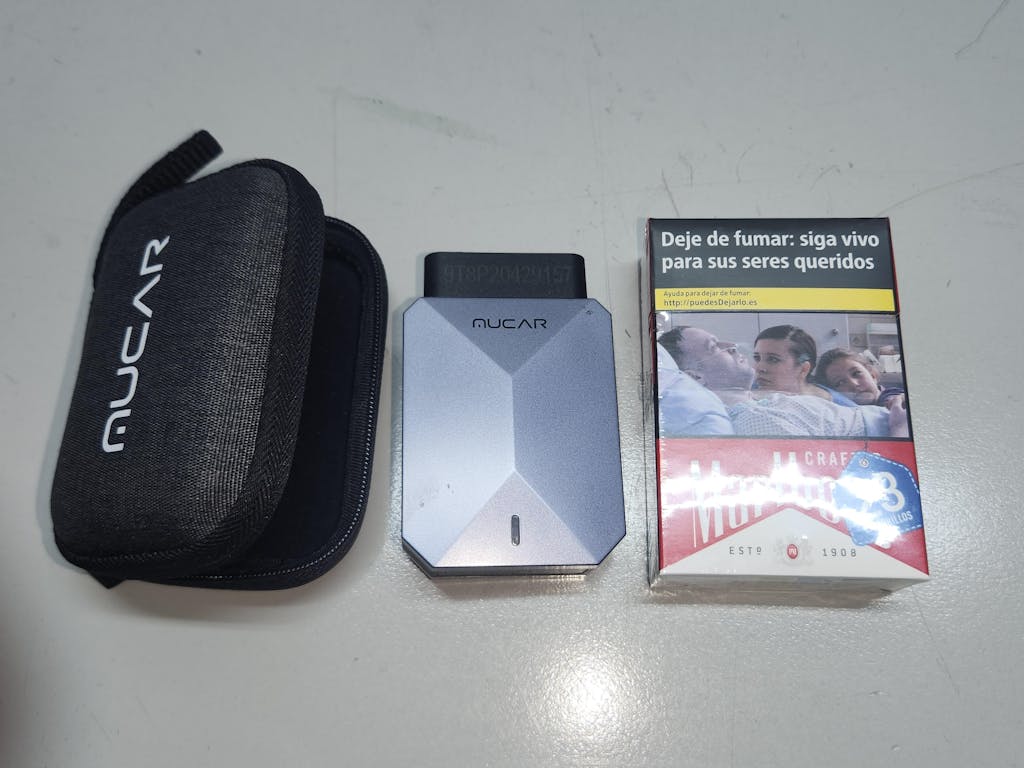
The best Bluetooth OBD2 scanner depends less on brand hype and more on your repair pattern. Match the tool to the hardest system you realistically need to diagnose, not the easiest engine code you already know how to clear.
DIY owner with one daily driver
If you own one daily driver, start with visibility. You want engine, ABS, SRS, transmission, and maintenance information without paying for shop-style speed you may not use every week.
Best fit:
- Recommended direction: Value app scanner
- Need: Engine, ABS, SRS, and transmission visibility
- ThinkCar fit: MUCAR BT200 or BT200 PRO
- Why it fits: Full-system diagnosis, full OBD2 functions, AutoVIN, and phone-based reports
- Caveat: Reset depth varies by version and vehicle
MUCAR BT200 lists full-system diagnosis, full OBD2 functions, AutoVIN, lifetime online updates, and access to modules such as engine, ABS, SRS, A/C, transmission, TPMS, SAS, BMS, steering, EPB, and chassis. The BT200 PRO path is better if you expect to need more reset functions. Shop: MUCAR BT200
Multi-car household or enthusiast garage
A multi-car garage usually needs newer protocol support and deeper menus. One vehicle may need a battery registration, another may need ABS data, and a newer model may require CAN-FD just to communicate correctly.
Best fit:
- Recommended direction: Broader full-system phone scanner
- Need: Newer protocols, active tests, reports, and maintenance resets
- ThinkCar fit: THINKDIAG 2
- Why it fits: CAN-FD, full-system scans, ECU coding, active tests, Auto VIN, and 15+ maintenance functions
- Caveat: Confirm subscription, activation, and function coverage before relying on it for a specific repair.
This is the point where a Bluetooth scanner for all modules becomes more than a code reader. It helps you build a repeatable diagnostic record across several vehicles instead of guessing which warning light matters most.
Shop: THINKDIAG 2
Light repair shop or advanced DIYer
A light repair shop needs repeatable workflows. You may not need a large tablet for every vehicle, but you do need active tests, common resets, and enough guidance to reduce dead-end diagnosis.
Best fit:
- Recommended direction: Bidirectional Bluetooth scanner
- Need: Active tests, service resets, full-system scans, and guided interpretation
- ThinkCar fit: MUCAR BT200 MAX
- Why it fits: AI-guided report parsing, bidirectional tests, CAN-FD, ELM327 compatibility, and 15+ resets
- Caveat: A dedicated tablet may still be faster for all-day shop use.
Use this tier when you regularly confirm components instead of only reading codes. For example, commanding a fan, checking ABS pump response, or comparing actuator behavior can save time before parts replacement.
Shop: MUCAR BT200 MAX
Best Practices and Common Pitfalls for Full-System Bluetooth Scanning
Full-system scanning gives you more information, which also means more ways to misread the vehicle. The best workflow is simple: document first, test second, repair third, and clear last.
Do’s
Use these habits every time:
- Save the full report before clearing codes.
- Confirm coverage by VIN, not only by model name.
- Update the app before difficult diagnostic work.
- Use live data to confirm a code-related symptom.
- Keep vehicle voltage stable during long scans.
- Match maintenance resets to the completed repair.
- Separate current faults from history faults.
- Re-scan after repairs and after a short road test.
This process helps you avoid the common mistake of clearing the only evidence you have. It also gives you a cleaner record if the same module fault returns later.
Common pitfalls to avoid
Most bad scan sessions fail for predictable reasons. Avoid these traps:
- Do not buy a generic-only dongle if you need ABS or SRS access.
- Do not assume every listed reset works on every vehicle.
- Do not run active tests while people are near moving parts.
- Do not ignore CAN-FD needs on newer vehicles.
- Do not confuse permanent emissions codes with current module faults.
- Do not rely on one code without checking live data.
- Do not forget phone battery, Bluetooth permission, and app login status.
A full-system diagnostic scanner should reduce guessing, not replace basic testing. If a code points to a sensor, still inspect wiring, connectors, voltage, grounds, and mechanical conditions before replacing parts.
How to Choose a Bluetooth OBD2 Scanner for Full-System Diagnostics
Use a decision framework instead of comparing feature lists line by line. The right OBD2 scanner with phone app support is the one that covers your vehicles, modules, protocols, and repair tasks with the least friction.
Decision checklist
| Decision factor | Choose a value scanner when | Choose a higher-tier scanner when |
|---|---|---|
| Vehicle count | One older daily driver | Multiple vehicles or newer models |
| System depth | Engine, ABS, SRS visibility | Full modules plus coding or resets |
| Protocol needs | Standard OBD2 coverage is enough | CAN-FD or broader protocol support matters |
| Testing style | Read, clear, and view data | Active tests and actuator commands matter |
| Workflow | Occasional DIY checks | Repeated diagnostics or light repair work |
Practical next step
Build a short vehicle list before you buy. Include year, make, model, engine, region, and the systems you care about: ABS, SRS, transmission, EPB, SAS, BMS, TPMS, DPF, or IMMO. Then choose the ThinkCar Bluetooth scanner tier that matches the deepest required function.
For basic full-system DIY diagnosis, MUCAR BT200 is a value path. For broader phone-based diagnostics, THINKDIAG 2 is the flagship choice. For guided diagnostics and bidirectional testing, MUCAR BT200 MAX fits advanced DIYers and light repair users.
FAQ
Which Bluetooth scanner is good for full-system scans, not just check engine lights?
A good Bluetooth scanner for full-system scans should read supported modules beyond the engine, including ABS, SRS, transmission, brake, steering, battery, TPMS, and body systems. ThinkCar’s THINKDIAG 2 is the strongest phone-first recommendation when you want CAN-FD support, full-system diagnostics, active tests, ECU coding, Auto VIN, and 15+ maintenance functions. MUCAR BT200 MAX is a strong direction if you also want AI-guided diagnostic support and bidirectional testing. Budget users can consider MUCAR BT200 or BT200 PRO for full-system scanning, but reset coverage must be checked by vehicle.
What is the best mobile diagnostic tool for checking more than just engine codes?
A smartphone-based scanner can replace a tablet for many DIY users who need full-system codes, live data, freeze frame, service resets, and saved reports. It is less ideal for high-volume shops because tablet scanners usually provide larger screens, faster navigation, dedicated batteries, and smoother repeated workflow. For a multi-car household, THINKDIAG 2 gives a compact app-based path with deeper capability than generic OBD2 dongles. If you scan vehicles every day, a tablet may still save time even when the Bluetooth tool can perform the same function.
What is the best Bluetooth OBD2 scanner with a phone app?
You should check vehicle coverage, module coverage, protocol support, reset availability, app compatibility, and update terms before buying. Write down your vehicle year, make, model, engine, region, and the exact systems you need, such as ABS, SRS, EPB, SAS, BMS, TPMS, or transmission. Newer vehicles may need CAN-FD support, while older vehicles may need legacy protocol support. Do not rely only on a feature label because one reset menu can work on one vehicle and be unavailable on another.
Are Bluetooth diagnostic tools less reliable than wired scan tools?
Bluetooth diagnostic tools can be slightly less predictable because they depend on wireless stability, phone battery, app permissions, and software activation. Wired tools often feel faster in repair shops because the cable, screen, operating system, and diagnostic software are built into one unit. Bluetooth scanners remain very practical for DIY and mobile use because they are compact, easy to update, and simple to carry between vehicles. Keep the phone near the vehicle and maintain stable vehicle voltage during long scans or active tests.
Which maintenance functions matter most in a full-system scan tool for DIY repair?
The most useful maintenance functions are the ones tied to repairs you actually perform, such as oil reset, EPB service mode, SAS calibration, battery matching, ABS bleeding, injector coding, throttle relearn, TPMS reset, and DPF regeneration. THINKDIAG 2 lists 15+ maintenance functions, including ABS bleeding, battery matching, gearbox relearn, brake reset, injector coding, oil reset, steering angle reset, and TPMS reset. MUCAR BT200 MAX also targets reset-heavy workflows with 15+ essential resets and bidirectional testing. Always confirm the function by vehicle because supported resets vary by make, year, and control module.
Table of Contents
- Why Full-System Bluetooth OBD2 Scanner Workflows Matter After the Check Engine Light
- What a Full-System Bluetooth OBD2 Scanner Actually Reads
- How to Run a Clean Full-System Scan with a Bluetooth OBD2 Scanner
- Which Features Separate Real Full-System Diagnostic Scanners from Code Readers?
- Best-Fit Bluetooth Scanners by User Scenario
- Best Practices and Common Pitfalls for Full-System Bluetooth Scanning
- How to Choose a Bluetooth OBD2 Scanner for Full-System Diagnostics
-
FAQ
- Which Bluetooth scanner is good for full-system scans, not just check engine lights?
- What is the best mobile diagnostic tool for checking more than just engine codes?
- What is the best Bluetooth OBD2 scanner with a phone app?
- Are Bluetooth diagnostic tools less reliable than wired scan tools?
- Which maintenance functions matter most in a full-system scan tool for DIY repair?

Share:
Finding Reliable Diagnostic Tools with AI Assistance for Auto Repairs
Wireless OBD2 Scanners: Easy Setup and Fast Reports for DIYers