
Why entry-level scan tools can make or break shop intake diagnostics
A car rolls in with a check engine light, an ABS warning, and a customer who says the problem "comes and goes." If your first scan only pulls a generic engine code, the intake process slows down fast. Now your team is guessing which system deserves bay time, whether the problem is safe to delay, and whether the job will turn into a comeback. That kind of bottleneck costs more than a few extra minutes because it ties up a technician, delays approvals, and raises the chance of swapping parts before the fault is confirmed.
For small shops, the right entry-level scan tools solve that early decision problem better than a long feature list ever will. The three picks below are organized by workflow fit: one for broad daily shop intake diagnostics, one for mobile bidirectional checks, and one for simple handoff-friendly triage. Along the way, you will see where a bidirectional scan tool matters, when a full-system OBD2 scanner is worth the step up, and which tradeoffs are acceptable for a growing team.
The 3 best entry-level scan tools for faster shop intake and diagnosis
1. THINKSCAN 689BT

If your shop needs one entry-level scanner that can handle mixed daily intake without feeling like a stripped-down code reader, this is the most complete fit in the group. The THINKSCAN 689BT is better suited to shops that want one shared device for service writers and technicians, especially when the first scan needs to decide whether a vehicle goes to quick service, electrical diagnosis, or a deeper drivability bay.
Why it stands out
- It supports full-system diagnostics instead of stopping at engine and emissions data.
- It includes bidirectional control, so you can trigger components and confirm behavior instead of reading stored faults only.
- ThinkCar positions it with CAN-FD and DoIP support, which matters when newer GM, Chrysler, Volvo, Jaguar, Land Rover, and some BMW-platform vehicles show up in the queue.
- The tablet-style format and Wi-Fi updating are easier to share across a small team than a tiny handheld or phone-only tool.
Key specs to check
- 8-inch touchscreen
- 2.4G and 5G Wi-Fi updates
- 35+ maintenance functions
- CAN-FD support
- DoIP support
- FCA AutoAuth support
- Lifetime free software updates
- Broad vehicle coverage across major makes
Best for
- Small repair shops doing mixed domestic and import work
- One- or two-bay teams that need faster intake direction
- Shops that want a full-system OBD2 scanner before moving into a much higher tool class
- Teams that need a bidirectional scan tool for actuator checks and repair confirmation
What to watch
- It is still a more capable device than a basic intake-only reader, so there is a learning curve if your team is used to simple code pullers.
- For very light-duty pre-checks, the tablet format may feel like more tool than you need.
A 2025 Shopmonkey buying guide stresses that the best scanner for a repair shop should do more than read and clear DTCs. It specifically highlights live data, actuator tests, newer protocol support, and a durable interface as the features that reduce wasted troubleshooting time in real shop use. (shopmonkey.io) In that context, the THINKSCAN 689BT leads this shortlist because it covers the most intake decisions without forcing an immediate jump into premium-platform pricing.
Shop: THINKSCAN 689BT
2. MUCAR BT200 MAX

Some shops do not need a shared tablet first. They need a compact scanner that moves quickly between cars, works well for mobile checks, and still gives enough control to verify a simple repair before the vehicle leaves. That is where the MUCAR BT200 MAX makes sense. It is the lighter, lower-friction option in this list, but it stays useful because it is built around app-based operation rather than a code-only reader.
Why it stands out
- Bluetooth operation keeps the tool compact and easy to carry around the lot or bay.
- ThinkCar positions it as a bidirectional Bluetooth scanner rather than a basic dongle, which is an important distinction for real confirmation work.
- It is framed around AI-assisted diagnostics, quick health checks, and portable use, making it a practical step up from entry readers that only clear lights.
- Lifetime-update positioning reduces the ownership friction that often makes low-cost scanners obsolete too early.
Key specs to check
- Bluetooth 5.2 connectivity
- App-based operation
- Full-system diagnostics
- 15+ reset functions
- 3000+ bidirectional commands claimed in ThinkCar's recent product guidance
- CAN-FD support
- Lifetime software updates
Best for
- Mobile service setups
- Quick pre-checks before scheduling deeper work
- Shops that want a compact backup to a larger shared scanner
- Service writers or techs who prefer phone-based workflows
What to watch
- A phone-based interface is portable, but it is less visible for shared use around the bay than a dedicated tablet.
- It fits quick scans and targeted checks better than repeated all-day shop-floor use on a busy multi-tech workflow.
This is a strong fit when speed and portability matter more than screen size. If your intake pattern involves parking-lot checks, used-car inspections, or fast pre-authorization scans, the BT200 MAX gives you much more diagnostic reach than a simple code reader while keeping the workflow lightweight.
Shop: MUCAR BT200 MAX
3. MUCAR DriverScan
Not every intake job starts with deep diagnosis. Sometimes you need a simple first-pass tool that helps confirm whether the issue is basic, urgent, or worth escalating to a larger scanner. MUCAR DriverScan fits that role better than it fits repeated heavy bay work. It is the most accessible tool here, which makes it useful for owner communication, quick handoff scans, and lightweight shop intake diagnostics.
Why it stands out
- It offers OE-level full-system diagnostic access across many modules on paper, including ABS, SRS, engine, A/C, transmission, body systems, and more.
- It includes 15+ maintenance functions and bidirectional active tests, which is more capability than many low-cost entry tools provide.
- AutoVIN, printed health reports, and remote-diagnosis features make it easier to communicate findings during intake.
- The compact Bluetooth format lowers the barrier for new users or shops that want a simple first scanner.
Key specs to check
- Bluetooth app-based operation
- Full OBD2 functions
- 15+ maintenance functions
- Bidirectional active test support
- Full-system diagnostics
- AutoVIN and health report support
- Claimed support for 98% of cars and 134 brands
- Lifetime free updates for OBD2 functions
Best for
- First-pass intake screening
- Driver-facing vehicle health checks
- Small shops that need a low-cost communication tool before buying a larger scanner
- Light service confirmation work
What to watch
- It is more limited as a dedicated all-day bay tool than the THINKSCAN 689BT.
- The phone-led workflow is easy to start with, but less ideal when multiple technicians need a larger shared screen.
DriverScan works best when you treat it as an intake gatekeeper, not as your final answer for every diagnostic path. For simple triage, health reporting, and owner communication, it covers more ground than a generic OBD plug-in while staying approachable for smaller teams.
Shop: MUCAR DriverScan
Why THINKSCAN 689BT leads this shortlist of entry-level scan tools
Faster intake without jumping tool classes
The biggest reason the THINKSCAN 689BT leads is balance. It is not just a full-system OBD2 scanner, and it is not only a portable app dongle either. It sits in the middle ground that many small shops actually need: enough system access to scan broadly, enough active-test capability to confirm likely faults, and enough newer-vehicle readiness to stay relevant as the car mix changes. ThinkCar's current product and blog content consistently positions this model around CAN-FD, DoIP, bidirectional control, Wi-Fi updates, and lifetime software coverage.
Where the other two fit better
That does not mean the other tools are weak choices. The MUCAR BT200 MAX fits better when mobility matters most, such as quick lot scans, off-car review, or technician-owned backup use. DriverScan fits better when your first goal is simple screening, customer communication, or a low-barrier entry into shop intake diagnostics. So the ranking here is about workflow depth, not just raw feature count: THINKSCAN 689BT for broader daily intake, BT200 MAX for portable bidirectional use, and DriverScan for basic triage and handoff speed.
How to choose entry-level scan tools for your actual intake workflow
Match the scanner to the intake job
If your team mainly sorts vehicles into quick-service, monitor, or deeper-diagnosis buckets, prioritize full-system visibility, live data, and clear vehicle identification first. Shopmonkey's February 3, 2025 scanner guide says live data, actuator tests, software quality, compatibility, and support for newer protocols should drive scanner selection more than marketing claims alone. (shopmonkey.io) In practice, that means a small repair shop scanner should tell you what system to chase next, not just confirm that a warning light exists.
Decide whether bidirectional control matters now
A bidirectional scan tool becomes valuable the moment your shop wants to test a fan, solenoid, throttle, or actuator without jumping straight into manual circuit testing. That can save real intake time because you are confirming behavior earlier in the process. If most of your work stops at emissions-code triage, you may not need it yet. However, if you already handle ABS, body, HVAC, or intermittent electrical complaints, skipping bidirectional capability usually creates a second tool purchase later.
Check protocol readiness before buying
Newer-vehicle compatibility is not a premium-only concern anymore. Shopmonkey specifically recommends support for communication standards such as CAN BUS, CAN FD, and DoIP when shops service current-model vehicles. (shopmonkey.io) That matters because an entry-level scanner that works fine on older cars can become unreliable when late-model domestic and import vehicles start filling your schedule.
Think about update friction and shared use
A scanner only helps intake speed when people actually reach for it. Dedicated tablet tools are often easier to share because the interface is visible, menus are simpler to follow around the car, and updates happen directly over Wi-Fi. Bluetooth tools still make sense when mobility is the main need. For accuracy over time, update discipline matters because newer vehicles, module changes, and protocol support move fast across the market.
Scenario fit by team stage
New shop: prioritize broad coverage first
If you are opening a small general repair shop, buy the scanner that keeps working as job complexity rises. A tool with full-system access, active tests, and newer protocol support will stay useful longer than a code-only unit.
One-tech bay: choose speed over extras
A solo technician often benefits more from clean menus and fast scans than from long lists of advanced functions. In that case, the BT200 MAX or DriverScan may feel more practical if workflow simplicity is the top priority.
Mixed car count: newer protocol support matters
Once your schedule includes late-model domestic, European, and Asian vehicles, protocol support becomes a daily issue. This is where the THINKSCAN 689BT has the clearest edge in this shortlist.
Mobile service: favor Bluetooth portability
When the scanner needs to move fast between roadside calls, used-car checks, or off-bay inspections, a compact Bluetooth tool is easier to live with. That makes the MUCAR BT200 MAX the more natural fit.
Common intake bottlenecks and how the right scanner fixes them
Scanner reads codes but stalls diagnosis
- Cause: The tool only pulls generic faults with little system context.
- Fix: Use a scanner with full-system access and live data so you can compare engine, ABS, transmission, and body-module clues in one pass.
- Best fit here: THINKSCAN 689BT
Tool works on some cars only
- Cause: Protocol support is too limited for newer vehicles.
- Fix: Check for CAN-FD and DoIP support before buying if you see recent-model imports or domestic trucks.
- Best fit here: THINKSCAN 689BT, then BT200 MAX for lighter portable work
Techs avoid the scanner
- Cause: Menus are slow, the interface is awkward, or updates are a hassle.
- Fix: Choose a format that matches how your team works every day, whether that is a shared tablet or a phone-led Bluetooth tool.
- Best fit here: 689BT for shared visibility, BT200 MAX for mobility
Intake creates safety shortcuts
- Cause: Fast check-ins tempt teams to connect tools around active electrical work or unstable battery conditions.
- Fix: Build a repeatable check-in routine before scanning, including battery condition awareness and basic PPE when electrical hazards are present. OSHA warns that electrical contact hazards can burn unprotected skin, and its battery-handling guidance calls for protective equipment such as goggles, gloves, and face protection in higher-risk battery service situations. (osha.gov)
What should a small shop do next?
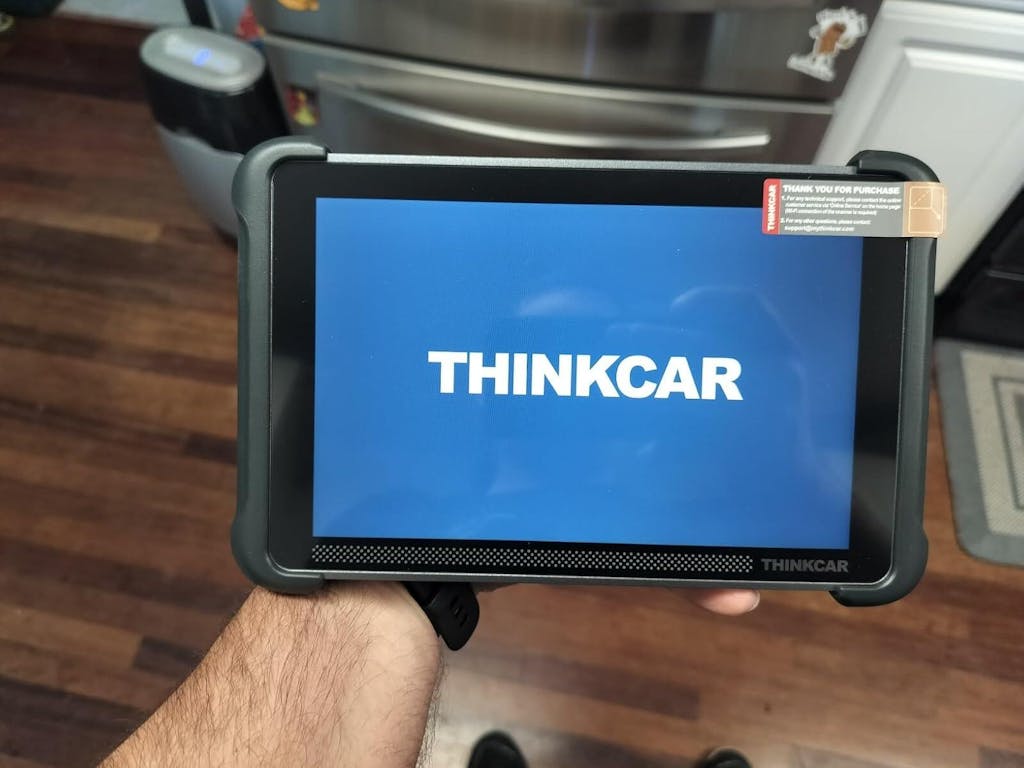
If you want one recommendation that reduces repeat checking and supports real shop intake diagnostics, choose the THINKSCAN 689BT first. It is the most balanced option here for a small repair shop scanner because it combines full-system access, bidirectional testing, broader newer-vehicle protocol support, and a shared tablet workflow. The MUCAR BT200 MAX is the better second path when portability matters more than screen size, while MUCAR DriverScan works as an accessible first-pass screener. For a shortlist focused on real entry-level scan tools rather than bare-minimum code readers, that ranking gives the cleanest fit-to-workflow decision.
FAQ
What are the differences between entry-level and professional scan tools?
Entry-level scan tools usually focus on fast code reads, live data, full-system access, and a limited but useful set of service functions. Professional platforms go further with deeper module coverage, broader active tests, programming, coding, guided diagnostics, and more shop-wide workflow tools. For most small shops, the sweet spot is an entry-level unit that already includes bidirectional control and newer protocol support. In this shortlist, THINKSCAN 689BT is the closest to that middle ground without forcing you into a much larger platform.
Which scanner under $1,000 is best for mechanics who need special functions every day?
For daily mixed-vehicle intake, THINKSCAN 689BT is the best fit in this group because it gives a small shop more room to grow. It combines full-system diagnostics, bidirectional testing, CAN-FD and DoIP support, and a dedicated touchscreen workflow that is easier to share during the day. If your jobs regularly include resets, actuator checks, and newer-vehicle communication needs, it is the strongest first purchase here. The lighter Bluetooth options make more sense when portability matters more than broad daily coverage.
What is the best bidirectional scan tool under $1,000?
A Bluetooth scan tool is the better choice when you value mobility, quick pre-checks, and compact carry over a larger shared screen. That setup works well for mobile service, parking-lot inspections, used-car evaluations, or a technician-owned backup path. ThinkCar's MUCAR BT200 MAX fits that role best because it keeps bidirectional capability and full-system access in a lighter format. A tablet tool is still easier to use when several people need to view data around the vehicle during intake and confirmation.
How should a shop maintain scanner accuracy over time?
Keep the software updated, confirm vehicle identification carefully, and rescan after repairs before closing the job. Accuracy drops fast when a scanner is behind on protocol coverage or when the technician clears faults before reviewing freeze-frame and module context. It also helps to standardize intake steps, such as always checking battery condition and recording the first all-system scan before repairs begin. ThinkCar's current lineup makes update model a major buying factor, which is one reason lifetime-update tools are attractive for growing shops.
Do small shops really need a bidirectional scan tool at intake?
Yes, if the shop regularly handles complaints beyond simple emissions faults. A bidirectional scan tool lets you command parts like fans, relays, mirrors, throttles, or actuators so you can confirm whether the component responds before spending more labor time. That shortens diagnosis on many electrical, HVAC, and body-control complaints. If your work stays limited to check-engine-light triage only, you can start lighter, but most growing shops outgrow code-only tools quickly.
Can DriverScan work as a true shop scanner or only as a basic code reader?
DriverScan can do more than a basic code reader because it includes full-system diagnostics, active tests, and maintenance functions. Still, its best role is first-pass screening, owner communication, and simple intake checks rather than acting as the only shared bay scanner in a busy shop. It is most useful when you want a low-barrier starting point that still offers practical diagnostic depth. For repeated all-day intake across mixed newer vehicles, THINKSCAN 689BT is the stronger primary tool.
Table of Contents
- Why entry-level scan tools can make or break shop intake diagnostics
- The 3 best entry-level scan tools for faster shop intake and diagnosis
- Why THINKSCAN 689BT leads this shortlist of entry-level scan tools
- How to choose entry-level scan tools for your actual intake workflow
- Scenario fit by team stage
- Common intake bottlenecks and how the right scanner fixes them
- What should a small shop do next?
-
FAQ
- What are the differences between entry-level and professional scan tools?
- Which scanner under $1,000 is best for mechanics who need special functions every day?
- What is the best bidirectional scan tool under $1,000?
- How should a shop maintain scanner accuracy over time?
- Do small shops really need a bidirectional scan tool at intake?
- Can DriverScan work as a true shop scanner or only as a basic code reader?

Share:
Interpreting Diagnostic Trouble Codes: A Guide for Accurate DIY Repairs
Scan Tool Update Policies: How to Avoid Subscription Confusion