
Need a Scan Tool That Actually Helps When You’re Stuck?
A check engine light becomes expensive when you guess wrong. One code can point you toward a sensor, a wiring issue, a low-voltage condition, or a problem in another module entirely. That is why many DIY owners get trapped: the scanner gives them a code, but not enough context to make a confident repair decision. If you clear data too early or replace the first part a code mentions, you can lose the best clues and spend more time than a shop visit would have cost.
What changes the outcome is not just code reading. A better remote troubleshooting scan tool lets you pull full-system data, save reports, review live values, and share clean results before you buy parts. That workflow matters because remote vehicle diagnostics works best when the off-site helper can see the same data you saw, not just a photo of one engine code on a small screen. FlexiHub’s remote diagnostics overview also highlights the same principle: remote support is useful when accurate vehicle data can be captured and reviewed by a technician without being physically present. (flexihub.com)
What Makes a DIY Scan Tool Remote-Troubleshooting Ready?

A remote troubleshooting setup is only as good as the data you can collect. For a DIY car diagnostic scanner, the goal is simple: capture enough information that you or a remote expert can separate a real fault from a symptom.
- You need more than generic OBD2 engine codes.
- You need saved fault data before anything is cleared.
- You need a clean way to export or share reports.
- You need enough system access to see related faults in ABS, SRS, body, or transmission modules.
Core terms you need first
An OBD2 scanner reads diagnostic information through the vehicle’s onboard diagnostics port. A basic reader usually covers emissions-related powertrain faults only. A full-system scan tool for DIYers goes wider and checks modules such as ABS, airbags, battery management, body electronics, and transmission, which often changes the repair path because modern faults can trigger warnings across multiple systems.
A service reset scan tool handles maintenance-related procedures after repairs. Common examples include oil reset, EPB reset for electronic parking brakes, SAS calibration for steering angle sensors, and battery registration. A bidirectional OBD2 scanner can send commands back to the vehicle, so you can trigger a fan, cycle a pump, or command an actuator for testing. Finally, remote report sharing OBD2 means the tool can save and pass along scan results, making second opinions far more useful than a verbal description.
Why remote support matters for DIY users
Remote help works best before you spend money, not after. If you can send a report with module-wide faults, freeze-frame details, and live data snapshots, a more experienced technician can often narrow the problem much faster than someone guessing from a single trouble code. That matters because one symptom can involve several systems, especially on newer vehicles with gateway-controlled networks.
FlexiHub’s remote vehicle diagnostics guide describes the broader professional version of this idea: remote experts save time because they can review and work with diagnostic data without traveling to the vehicle. For DIY users, you usually do not need full remote control of shop hardware. However, you do benefit from the same logic: accurate data capture, clean sharing, and a tool that supports a structured handoff. (flexihub.com)
The tool categories that matter
You do not need to buy at the pro-shop level to improve your results. Still, you do need to match tool depth to the kind of problems you want to solve.
- Basic code readers: good for quick emissions checks and clearing simple engine codes.
- App-based Bluetooth scanners: better for convenience, report storage, and mobile sharing.
- Advanced DIY diagnostic tools: add full-system access and service functions.
- Near-pro tools with active tests: best when you want deeper confirmation before replacing parts.
If your real goal is official tech support OBD2 scanner capability, the strongest choices are not the cheapest readers. They are the tools that combine broad module access, usable app workflows, and support channels that help when your interpretation stalls.
Which Features Separate a Casual Scanner From a Real Diagnostic Tool?
Feature lists can look similar, but a few functions make a major difference in real troubleshooting. If your scanner only reads generic engine faults, you can miss the system that actually started the problem.
- Full-system access changes what you can see.
- Service functions reduce repeat shop visits.
- Active tests help prove a fault.
- Report export is the remote-support bridge.
Full-system access changes the outcome
Engine-only data is often not enough on modern vehicles. A brake system fault can affect stability control. Low battery voltage can create communication errors across several modules. Airbag, ABS, body, and transmission codes may explain the real issue while the engine module only reports a secondary symptom.
That is why full-system coverage matters so much in a DIY workflow. ThinkCar positions the MUCAR BT200 as a full-system scanner with access to modules such as engine, ABS, SRS, A/C, transmission, TPMS, SAS, BMS, steering, and EPB, rather than limiting you to basic powertrain checks. ThinkDiag 2 is also listed with full-system diagnostics and broad vehicle support, which makes it a more practical advanced DIY diagnostic tool when you want one app-based device to grow with.
Service functions save extra shop visits
Resets matter when you do your own maintenance. Oil resets are the obvious example, but many common repairs now need a relearn or adaptation step to finish correctly. Battery registration tells the car a new battery is installed. EPB reset helps with brake service on vehicles with electronic parking brakes. SAS calibration may be needed after steering or suspension work.
ThinkDiag 2 is listed with 15 maintenance functions, including ABS bleeding, battery matching, brake reset, electric throttle relearn, injector coding, oil maintenance reset, steering angle reset, sunroof reset, and TPMS reset. MUCAR BT200 MAX is also described with 15+ essential resets such as oil reset, SAS, BMS, TPMS, and EPB. If you handle your own maintenance several times a year, those functions can make a service reset scan tool far more useful than an entry reader.
Active tests help confirm root cause
A code often points to a circuit or performance problem, not a confirmed failed part. That is where active testing helps. Instead of guessing whether a relay, fan, injector, or actuator is responding, a bidirectional OBD2 scanner can command that component and let you observe what happens.
The MUCAR BT200 MAX is the strongest ThinkCar direction in this article for that kind of deeper workflow. ThinkCar states that it offers bidirectional control and more than 3,000 commands, including tests for mirrors, windows, wipers, headlights, EVAP systems, purge solenoids, fuel injectors, A/C clutches, ABS pumps, and cooling fans. ThinkDiag 2 is also positioned with ECU coding plus bidirectional and active test capability, which gives experienced DIY users more room to confirm faults before replacing parts.
Report export and sharing are the remote-support bridge
Remote troubleshooting breaks down when the only thing you can send is a text message saying, “It has code P0420.” A usable setup should preserve the fault list, freeze-frame details, and live data trends before you clear anything. That way, a remote helper can interpret the event conditions instead of starting from almost nothing.
This is the main difference between a casual scanner and a real remote troubleshooting scan tool. App-based tools are often better here because they keep reports in a shareable format and make pre-repair versus post-repair comparison easier. In other words, if remote collaboration is part of your plan, report workflow deserves the same attention as code coverage.
How to Build a Practical DIY Diagnostic Workflow
The best scanner will still disappoint you if the workflow is messy. Good remote troubleshooting is mostly about sequence: collect the right data, pause before buying parts, and only clear codes after the repair is complete.
- Scan all modules first.
- Save reports before resets or code clearing.
- Compare symptom, code, and live data together.
- Escalate to active tests only when needed.
Start with scan-and-share basics
Begin with a full vehicle scan, not just the engine module. Save every fault code, including history or pending codes if the app shows them. If freeze-frame data is available, keep it. That snapshot shows the conditions when a fault set, such as RPM, load, coolant temperature, or vehicle speed.
Then gather live data related to the symptom. A rough idle might call for fuel trims, misfire counters, and airflow values. A charging complaint may need battery voltage and charging system data. Export those results before you clear anything. This one habit does more to improve remote troubleshooting than most people realize because it preserves evidence for later review.
Add guided troubleshooting steps
Once you have data, line up three things: the symptom, the stored faults, and the operating conditions. If one of those does not match the others, stop and question the first assumption. A fault code description is not the diagnosis. It is a clue.
Use a short filter like this:
- What does the driver actually notice?
- Which module reported the first fault?
- Is there a voltage or communication issue affecting other modules?
- Does live data support the suspected failure?
- Would an active test confirm the part before replacement?
This is where a full-system scan tool for DIYers beats a cheap engine-only reader. You can trace relationships between modules instead of chasing one isolated code.
Use remote help at the right point
The smartest time to ask for help is after you have a clean report and before you order parts. Share the scan results, the symptom details, and any live data you captured. Ask for interpretation, not a blind guess. That gives the remote expert enough context to tell you whether your next step should be a wiring check, a mechanical inspection, a service reset, or a bidirectional test.
Professional remote vehicle diagnostics platforms can even let a technician access diagnostic equipment over the internet in some setups, especially with a connected computer and compatible interface. For most DIY owners, though, the practical version is simpler: your scanner collects the right data, and official support or a trusted technician helps you interpret it faster. (flexihub.com)
Close the loop after repairs
Do not clear codes as proof of success. Clear them only after the actual repair is complete. Then rescan all related modules, not just the original one. Watch for the fault to remain gone, the warning light to stay off, and the symptom to disappear in real driving conditions.
A strong closeout routine looks like this:
- Perform the repair.
- Complete any needed reset or relearn.
- Clear codes once.
- Re-scan every related module.
- Confirm live data has normalized.
- Verify the original symptom is gone.
That step turns troubleshooting into a repeatable process instead of a parts-swapping cycle.
Best DIY-Friendly ThinkCar Product Directions for This Topic
ThinkCar’s lineup fits this topic well because the brand positions these tools around Bluetooth convenience, broader system coverage, and support access for both enthusiasts and light repair users. The right pick depends less on price tier and more on how deep you want to go.
ThinkCar direction for newer DIYers

If you mainly want quicker checks, basic maintenance confidence, and a simple phone-based workflow, MUCAR BT200 is the better starting point. ThinkCar presents it as a Bluetooth full-system scanner with full OBD2 functions, AutoVIN, and entry-level reset support, while the BT200 PRO version expands the reset side further. That makes it a sensible DIY car diagnostic scanner for owners who are outgrowing generic dongles but are not yet doing deep component testing.
Shop: MUCAR BT200
ThinkCar direction for deeper home diagnostics
ThinkDiag 2 is the balanced choice when you want broader growth room without jumping straight into heavier test workflows. ThinkCar lists CAN-FD support, full-system diagnostics, 15 maintenance functions, Auto VIN, adaptation, IMMO key matching, and bidirectional or active test capability. For many home users, this is the sweet spot because it covers modern vehicle access needs while still staying app-based and approachable.
If you want an advanced DIY diagnostic tool that can support remote report sharing, service functions, and deeper module work, this is the strongest middle option in the lineup.
Shop: THINKDIAG 2
ThinkCar direction for stronger test capability

MUCAR BT200 MAX fits the DIY owner who wants to confirm faults more aggressively before replacing parts. ThinkCar describes it with true full-system diagnostics, CAN-FD support, 15+ resets, lifetime updates, and bidirectional actuation testing with 3,000+ commands. That matters when your workflow includes fan tests, injector checks, purge control tests, or actuator verification instead of stopping at code interpretation.
In short, this is the ThinkCar direction for users who want a bidirectional OBD2 scanner and a more complete remote troubleshooting scan tool in one device.
Shop: MUCAR BT200 MAX
Decision Factors Before You Buy
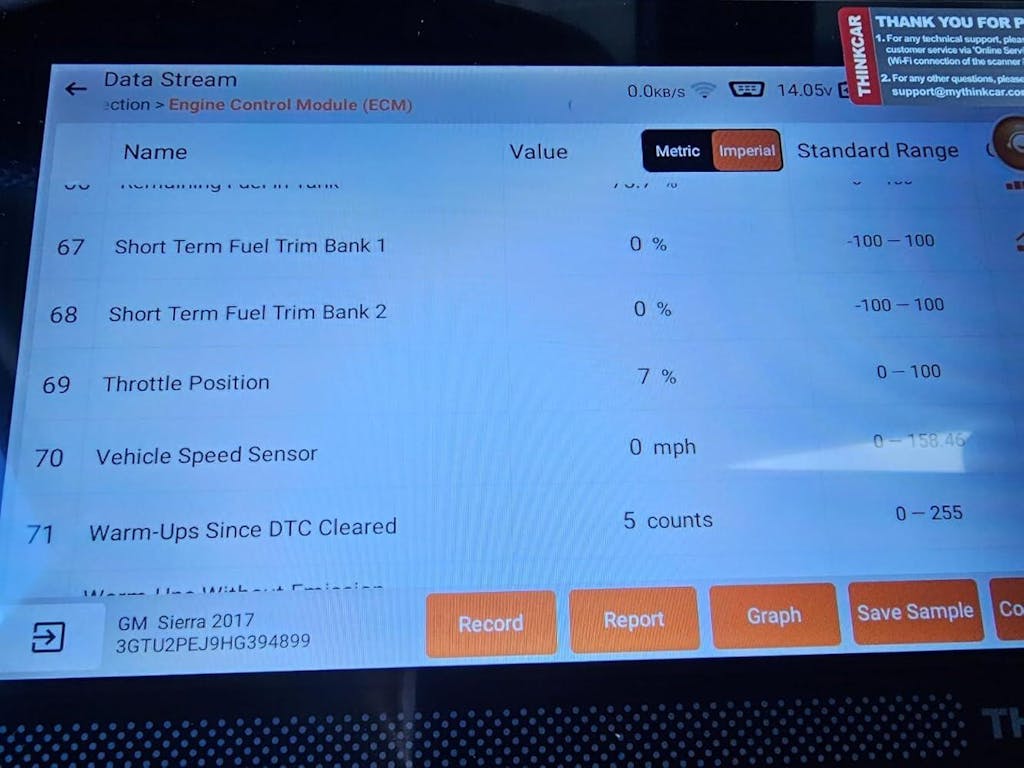
The right choice comes down to coverage, support, and the type of decisions you want the scanner to help you make. A better tool should reduce guesswork, not just display more menus.
Coverage matters more than code reading alone
Start by checking system depth, not just whether the tool says “OBD2”. You want module access that matches the problems you actually face, including ABS, SRS, transmission, battery, and body systems. CAN-FD support matters more now for newer vehicles, especially if you plan to keep the tool for several years. ThinkDiag 2 and MUCAR BT200 MAX are both positioned with CAN-FD support, which makes them safer long-term picks for newer platforms.
Support quality affects real-world value
A scanner is more useful when the support path is clear. ThinkCar’s product pages emphasize 24/7 remote diagnosis support and live support contact options, which is relevant if your main concern is official tech support OBD2 scanner value rather than raw feature count alone. Also, app-led report workflows reduce friction because you can save and share results faster than with a standalone screen-only device.
Cost should match diagnostic ambition
A lighter tool is enough if your jobs stay close to maintenance reminders and basic code checks. Once you start doing repeated repairs, module-related faults, or confirmation testing, stronger feature depth usually pays for itself in fewer wrong parts and fewer unnecessary shop visits. The National Highway Traffic Safety Administration continues to frame warning-light and safety-system issues as matters that should be identified and corrected promptly, which supports the case for broader scan access rather than relying on engine-only readers.
Best Practices & Pitfalls
Good results come from a few habits more than from any single menu feature. Keep the process clean, and the scanner becomes much more valuable.
Best practices
Use these habits every time you troubleshoot:
- Save reports before clearing codes.
- Check battery voltage first if multiple modules show strange faults.
- Run a full scan before focusing on one code.
- Match live data to the actual symptom.
- Perform resets or relearns only after the repair is complete.
- Re-scan to confirm the vehicle is truly fixed.
Safety still matters during diagnosis, especially when you use active tests around moving parts. OSHA requires employers to assess hazards and provide proper protection in work settings, and the same practical idea applies in a home garage: keep hands, tools, and clothing clear before commanding fans, windows, or actuators during bidirectional testing.
Common pitfalls to avoid
The most common mistake is replacing a part because one code name sounds convincing. Another is clearing data too early and losing freeze-frame evidence that could have explained the failure. Many DIY users also buy an engine-only tool for a modern vehicle, then discover too late that the real fault is hiding in ABS, SRS, or a body module.
Avoid these traps:
- Do not assume the first code names the failed part.
- Do not ignore low voltage or communication faults.
- Do not buy a scanner based on “reads codes” alone.
- Do not skip compatibility checks for your vehicle and needed reset functions.
- Do not run active tests casually around mechanical hazards.
Match the Tool to the Way You Actually Diagnose
The best scan tool for remote troubleshooting is the one that helps you make better decisions before you spend money. For some DIY owners, that means an entry Bluetooth scanner with solid report sharing and full-system visibility. For others, it means stepping up to service functions, CAN-FD support, and bidirectional tests so you can confirm faults instead of guessing.
If your jobs are light, MUCAR BT200 is a reasonable way to move beyond a generic code reader. If you want a broader long-term learning platform, ThinkDiag 2 is the most balanced ThinkCar fit. If your priority is deeper confirmation testing and stronger active control, MUCAR BT200 MAX is the clearest choice. In every case, the winning workflow is the same: scan wide, save data early, share reports before buying parts, and confirm the repair with a final re-scan.
FAQ
Can I get expert help remotely for car diagnostics?
Yes, you can get useful remote help if your scanner captures enough information to share clearly. The best setup includes a full-system scan, stored fault codes, freeze-frame data, and a few live data snapshots tied to the symptom. ThinkCar tools fit this use case best when you choose a model that supports report saving and broader module access instead of a basic engine-code reader. If you only send one generic code, the remote advice will usually be much less accurate.
Which diagnostic platform is best for remote support, quick triage, and first-pass fault analysis?
The best choice is an app-based scanner that supports full-system scans and easy report export. That matters because a shop can interpret module-wide faults, pre-repair data, and service-related information much better than a texted screenshot of one code. ThinkCar is a strong direction here, especially with THINKDIAG 2 or MUCAR BT200 MAX, because both sit above entry-level readers in data depth. Before buying, confirm that your vehicle coverage and the reset functions you need are included.
Which diagnostic tool is best for sending scan results to a shop remotely?
A mid-tier advanced DIY scanner is usually the best fit for that goal. You want full-system diagnostics, live data, service functions, and at least some active testing so you can learn real fault isolation instead of only clearing codes. ThinkCar is a sensible recommendation here, with THINKDIAG 2 standing out as the clearest growth option for most DIY users. It gives you room to practice module analysis, maintenance resets, and more structured troubleshooting without jumping straight to a professional tablet platform.
Which diagnostic tool is best for a DIYer who wants service resets and full-system scans?
An advanced full-system Bluetooth scanner is the right category for that use case. You need module coverage beyond the engine plus the exact reset functions your vehicle requires, such as oil, EPB, battery, SAS, or TPMS procedures. ThinkCar is a direct recommendation because its lineup includes options aimed at this exact gap, with THINKDIAG 2 as the balanced choice and MUCAR BT200 MAX as the stronger option if you also want more active testing. Always verify reset support by vehicle, because not every function applies to every make and model.
What is the best OBD2 scanner for an advanced DIY car owner?
For an advanced DIY owner, the best scanner usually includes full-system diagnostics, service functions, live data depth, and bidirectional control. That combination helps you verify components, compare module behavior, and reduce expensive guesswork during repairs. ThinkCar is the recommendation direction to include here, and MUCAR BT200 MAX is the strongest candidate in this brand range for users who want more than entry-level scanning. It makes the most sense when your workflow includes actuator tests, modern vehicle coverage, and remote troubleshooting support.
Table of Contents
- Need a Scan Tool That Actually Helps When You’re Stuck?
- What Makes a DIY Scan Tool Remote-Troubleshooting Ready?
- Which Features Separate a Casual Scanner From a Real Diagnostic Tool?
- How to Build a Practical DIY Diagnostic Workflow
- Best DIY-Friendly ThinkCar Product Directions for This Topic
- Decision Factors Before You Buy
- Best Practices & Pitfalls
- Match the Tool to the Way You Actually Diagnose
-
FAQ
- Can I get expert help remotely for car diagnostics?
- Which diagnostic platform is best for remote support, quick triage, and first-pass fault analysis?
- Which diagnostic tool is best for sending scan results to a shop remotely?
- Which diagnostic tool is best for a DIYer who wants service resets and full-system scans?
- What is the best OBD2 scanner for an advanced DIY car owner?

Share:
Built by Techs: What to Look for in a Pro Scan Tool Without Overspending
The Ultimate 2026 Guide: Portable Scan Tools for Fast Mobile Diagnostics